Common Prompting Mistakes (And How to Fix Them)
RedHub AI Editorialupdated August 18, 20265 min read

Jump to a section8
TL;DR
- What it is: the recurring failure patterns that make prompts underperform, and the one-line fix for each.
- Who it's for: anyone whose AI output feels inconsistent, generic, or confidently wrong — see the Prompt Practice Lab.
- How it works: most bad prompts are missing one of six structural pieces — most often the one nobody thinks to add.
- Bottom line: the fix usually isn't a smarter model. It's a specific missing piece in the prompt.
Why isn't my prompt working?
Most broken prompts are missing one structural piece: a clear role, needed context, a concrete task, a format spec, explicit constraints, or — most often — a verification-ask. Name the missing piece and add it back, and that alone fixes more output problems than switching to a different model. The mistake isn't usually the model. It's a gap in what you told it.
Best for: anyone troubleshooting inconsistent AI output — the AI Fluency Diagnostic pinpoints which specific skill is weakest across six areas; the Prompt Practice Lab ($69) turns the fix into graded practice.
When AI output goes wrong, the instinct is to blame the model. Try a different one, add more words, add "please be detailed." None of that reliably works, because the real cause is almost always a specific, nameable gap in the prompt itself. Six mistakes account for nearly every case. Here they are, and the one-line fix for each.
The six most common prompting mistakes
| Mistake | What it looks like | The fix |
|---|---|---|
| No role assigned | Generic, textbook-sounding answers with no point of view | State the expertise or persona you want in one sentence |
| Missing context | The model guesses at facts it has no way of knowing | Paste in the actual background information it needs |
| Vague task | "Write about X" instead of a concrete deliverable | Name exactly what you want produced |
| No format spec | A wall of text you have to reformat by hand | State the length, structure, and format up front |
| No constraints | Output wanders or includes things you didn't want | State explicitly what to avoid or stay within |
| No verification-ask | Confident, wrong answers you don't catch in time | Ask the model to flag uncertainty or check its own work |
The one mistake that causes the most damage
A prompt can get the first five right and still fail because of the sixth. Verification-ask is the mistake nobody notices they're making, because a missing role or missing format is obvious the moment you look at the output. A missing verification-ask only shows up as a confident, wrong answer that looks fine until someone catches it later — which is exactly why it does the most damage. It's serious enough that the Prompt Practice Lab treats it as a hard gate: a drill can score high on everything else and it still can't be rated STRONG unless the Verification-ask is strong too.
Key insight: if you can only fix one mistake this week, fix this one. Add a single line — "flag anything you're not fully sure of" — to your most-used prompt and see how the output changes.
A before-and-after example
Before: "Write a summary of this customer call."
After: "You're a support lead reviewing this call transcript. Summarize it in five bullet points: the customer's issue, what was promised, and the next step. Don't include small talk. If anything about the next step is unclear from the transcript, say so instead of guessing."
The second version assigns a role, gives context by pointing at the transcript, states the exact task and format, adds a constraint, and ends with a verification-ask. Same task, six times more likely to be usable without editing.
Diagnosing your own mistakes, instead of guessing
When output disappoints, the temptation is to rewrite the whole prompt and hope. A faster path is to go through the six-mistake table above, one row at a time, and name which piece is actually missing before you touch anything else. If you're not sure which of your skills is weakest across the board — not just on one prompt — the AI Fluency Diagnostic scores six areas including verification and prompting from your own marks and, where a dimension is short, tells you which one to work on first.
One mistake worth naming separately: even a perfectly structured prompt can produce output that sounds like every other AI-generated sentence on the internet. If your prompts are technically sound but the writing still reads generic, that's a voice problem, not a structure problem — see the Anti-Slop Content System.
And if the "mistake" you're chasing is really a shared prompt breaking silently across a team's production app, that's a different job than personal practice — the Prompt Regression Lab is a developer kit that catches prompt regressions in CI before they ship, rather than a skill-building tool for an individual.
Stop guessing which piece is missing
Grade your own prompts against the same six-criterion rubric in this article, with a hard gate on the mistake that causes the most damage: the verification-ask.
Get the Prompt Practice Lab — $69 →Decision Guide
If your output feels generic: check role and context first — those two are the usual cause.
If your output feels inconsistent or occasionally confidently wrong: check the verification-ask first. It's the mistake that hides best.
Best first step: run one recent disappointing output through the six-mistake table above before you rewrite the prompt from scratch.
FAQ
Why isn't my prompt working?
Almost always because it's missing one of six structural pieces — role, context, task, format, constraints, or a verification-ask. Name the missing one and add it back.
What's the most common single mistake?
Leaving out the verification-ask — never asking the model to flag what it's unsure of or check its own work. It's the hardest mistake to spot because the output can still look confident.
Does a longer prompt fix vague output?
Not by itself. Length isn't the fix — a missing structural piece is. A short prompt with all six pieces beats a long prompt missing one.
Is switching to a different AI model the fix?
Rarely. The same missing structure produces the same weak output on almost any model. Fix the prompt first.
How do I know which mistake I'm making?
Go through the six categories one at a time on a real example, or get a rubric-graded read with a tool built for it, like the AI Fluency Diagnostic.
Can one prompt have more than one mistake?
Yes, and they compound. Fix the most damaging one first — usually the verification-ask — then retest before fixing the next.
Will fixing these mistakes guarantee good output?
No guarantee, but it removes the most common preventable causes of bad output. What's left after that is genuine model limitation, not a fixable prompting mistake.
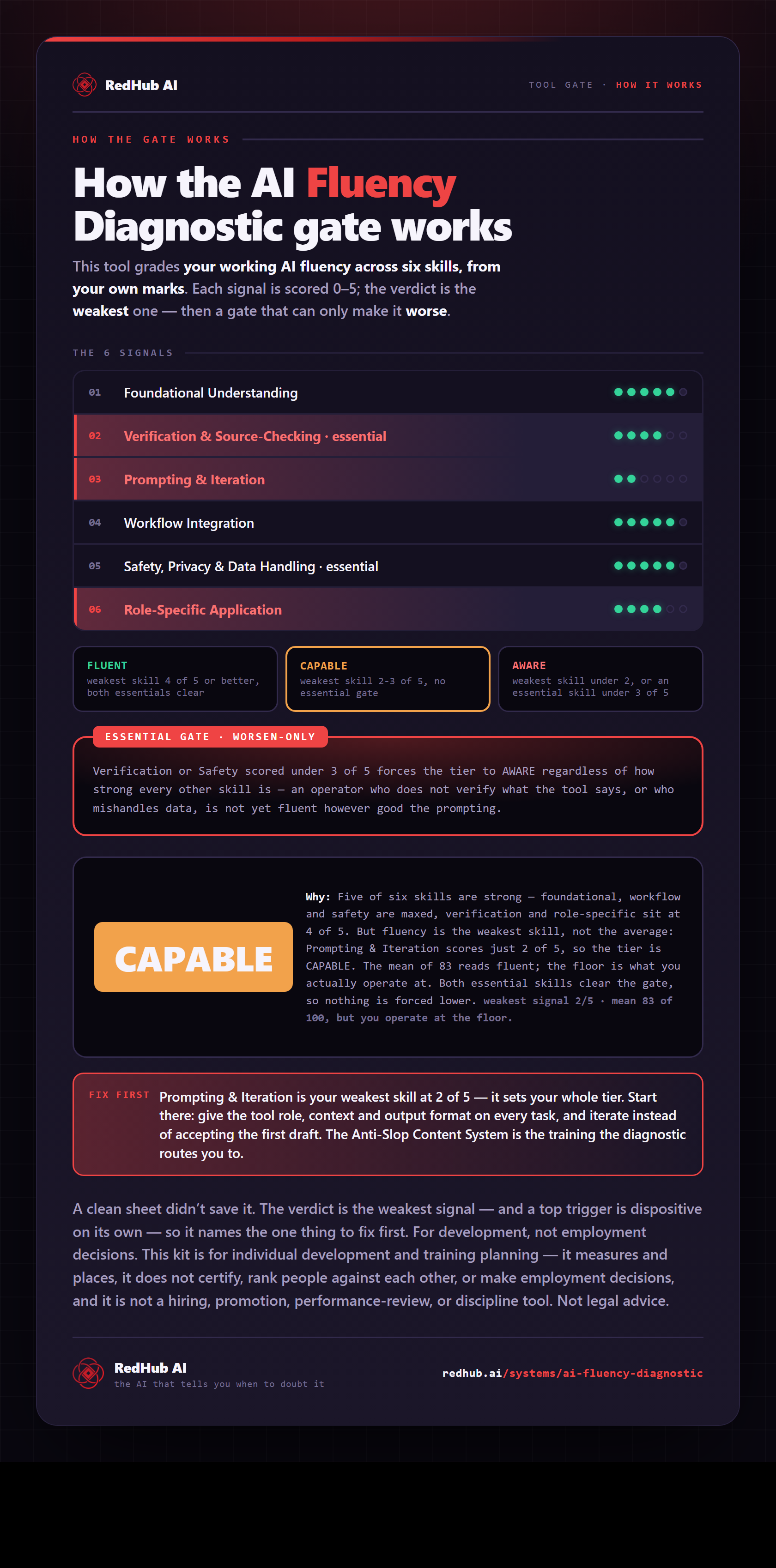
The gate this post refers to, drawn from the tool’s own logic. See the tool.