How to Set Up Jev AI With Claude Code, Cursor & Codex
RedHub AI Editorial7 min read

In short
Setting up Jev means installing TypeSafe's official agent skill, putting the API key in an environment variable, and telling your coding agent to use the skill while it builds. Claude Code takes two commands; Cursor, Codex and other supported agents take one. TypeSafe publishes no official MCP server, so the ones in circulation are community projects and should be treated as third-party code you are handing an API key to.
Jump to a section12
- How do you set up Jev AI?
- What you need first
- Step 1 — Try the primitives before you wire anything
- Step 2 — Install the official skill
- Step 3 — Put the key in the environment
- Step 4 — Tell the agent to use the skill
- Step 5 — Build one Noul, then add to it
- Step 6 — Choose a threshold, and know what you are choosing
- The advanced pattern: routing before the expensive model
- About the MCP servers you will find
- Troubleshooting
- More in this guide
How do you set up Jev AI?
Install TypeSafe's official agent skill in your coding agent, put your API key in an environment variable, then ask the agent to use the skill while it builds. In Claude Code that is two commands. In Cursor, Codex and other supported agents it is one. You can also call the API directly at api.typesafe.ai/v1/systemone.
Best for: developers wiring Jev into a project for the first time who want the shortest correct path, not a tour.
Last verified September 20, 2026. Commands are quoted from TypeSafe's official skills repository. Re-check them if you are reading this much later.
What you need first
- A TypeSafe account and an API key, or access through a provider that carries Jev.
- Claude Code, Cursor, Codex or another supported coding agent.
- A project folder and a terminal.
Step 1 — Try the primitives before you wire anything
Jev has three question types and they are the whole interface. Spend ten minutes in TypeSafe's playground getting a feel for them before you integrate, because the integration is easy and the question design is the part that takes judgment.
- Noul — the probability a yes/no statement is true. "Is this customer asking for a refund?"
- Choice — one option from a list you define, up to 255. "Which queue: billing, technical, sales, other?"
- Score — a position on an ordered scale, up to 10 levels. "How urgent, 1 to 5?"
Step 2 — Install the official skill
TypeSafe publishes an agent skill so your coding agent knows how to build with Jev correctly. For Claude Code:
claude plugin marketplace add typesafe-ai/skills
claude plugin install typesafe@typesafe-ai
For Cursor, Codex and other supported agents:
npx skills add typesafe-ai/skills --skill typesafe-aiOnce installed you can invoke it explicitly with /typesafe:typesafe-ai. This is the step that makes the rest easy — without it, an agent writing Jev code is guessing at an API it has probably never seen.
Step 3 — Put the key in the environment
The SDKs read TYPESAFE_API_KEY from the environment. Set it there and nowhere else. Do not paste it into a source file, a config file you commit, or a prompt.
Step 4 — Tell the agent to use the skill
The skill only helps if the agent knows to reach for it. A starter prompt that works:
"Use the TypeSafe skill. Build a function that takes a support email and returns which queue it belongs in — billing, technical, sales or other — along with an urgency score from 1 to 5 and whether the customer is asking for a refund. Return the raw probabilities, not just the top answer."
That last sentence matters. The top answer alone throws away the most useful thing in the response.
Step 5 — Build one Noul, then add to it
Start with a single yes/no question against one piece of state and confirm you get a probability back. Then add a Choice. Then a Score. Then put all three in one request against the same state and watch the latency barely move — that is the parallel evaluation doing its work, and it is the moment the economics make sense.
The direct API, if you are skipping the SDK:
POST https://api.typesafe.ai/v1/systemone
{
  "model": "jev-latest",
  "state": "...",
  "questions": [ ... ]
}
jev-latest is an alias. Responses currently echo back the concrete version it resolves to. For anything you plan to keep, pin the version rather than the alias, so a model update does not silently change your results.
Step 6 — Choose a threshold, and know what you are choosing
Every automated decision needs a rule for when the probability is high enough to act. TypeSafe's published guidance on this is thin — a comment in their examples noting that 0.5 is a starting point and the right number depends on your use case.
No calibration curve appears in TypeSafe's public documentation as of September 20, 2026, which means a stated 0.9 has no public evidence attached about how often it is right. The practical consequence: pick a conservative threshold, run it against a set of examples you have labeled yourself, and move it only when you have measured what moving it costs.
The advanced pattern: routing before the expensive model
The integration worth building once you are comfortable is a router. Claude Code exposes a UserPromptSubmit hook that fires when a prompt is submitted, before the model processes it. That gives you a place to intercept.
The shape: a prompt arrives, Jev classifies what kind of request it is, and cheap requests get handled by a tool or a lookup while everything else continues to the full model. You pay frontier prices only for the work that needs frontier reasoning.
About the MCP servers you will find
Search for a Jev MCP server and you will find several — jev-mcp, typesafe-mcp and a number of forks. They are worth knowing one thing about: none of them is TypeSafe's. As of this writing there is no official MCP server under the TypeSafe organization. The official integration is the agent skill in Step 2.
That does not make the community servers bad. It does mean you are installing a third party's code, with your API key, into an agent that can act on your machine — and the usual questions apply. Who publishes it, what does the change history look like, what scope does it ask for, how does it handle credentials, and does it require approval before acting.
Grade the server before you install it
The MCP Server & Skill Trust Gate ($79, one-time) scores a third-party MCP server or agent skill across six supply-chain signals — provenance, change history, scope, credential handling, approval behavior and containment — and returns TRUSTED, REVIEW or DO NOT INSTALL. A supply-chain gate forces the worst verdict when credential handling and approval behavior are both short, because that combination is how a clean install becomes a poisoned one later.
Get the Trust Gate — $79 →Troubleshooting
| Symptom | Usual cause |
|---|---|
| The agent ignores the skill | It was installed but not invoked. Name it in the prompt, or call /typesafe:typesafe-ai explicitly. |
| Authentication errors | TYPESAFE_API_KEY is not in the environment the process actually sees — a common mismatch between your shell and your editor's terminal. |
| Answers feel arbitrary | The question is too broad. Split it into narrower ones and combine the results in code. |
| Everything comes back near the threshold | Your categories overlap. If a human would hesitate between two options, the model will too. |
| Request rejected for size | You have exceeded 32K for state plus the longest question, or 64K for the whole request. |
| 429 or 529 responses | Rate limited or temporarily overloaded. Back off exponentially and retry. |
The two that actually matter are in the middle of that table. TypeSafe's own guidance is that reviewing your questions and thresholds closely is among the most important parts of an implementation, and that matches experience: setup takes minutes, and question design is where the quality lives.
More in this guide
FAQ
Does Jev work with Claude Code?
Yes. TypeSafe publishes an official skill: claude plugin marketplace add typesafe-ai/skills then claude plugin install typesafe@typesafe-ai. Once installed, ask the agent to use it while building.
Can Jev work with Cursor or Codex?
Yes. Both use the same skills mechanism: npx skills add typesafe-ai/skills --skill typesafe-ai. The skill is agent-agnostic. What differs is only how each agent installs it.
Is there an official TypeSafe MCP server?
No. Several community MCP servers exist and some are widely linked, but none is published by TypeSafe. The official integration path is the agent skill. Treat any MCP server you find as third-party code you are handing an API key to.
Is there a Python SDK?
Yes, pip install typesafe-sdk, and an official JavaScript SDK as well. Both read TYPESAFE_API_KEY from the environment.
Can Jev answer questions about my database or codebase?
Not by itself. Jev classifies and decides. It does not retrieve. An agent that answers questions about your data is using Jev to route or classify the request and then doing the retrieval with other tooling. Tutorials that blur this are describing the wrapper, not the model.
What threshold should I automate at?
There is no published default and no calibration curve to derive one from. Start conservative, measure against examples you have labeled yourself, and move the threshold only when you have measured what moving it costs. A model days old is not a model whose confidence you have any track record with.
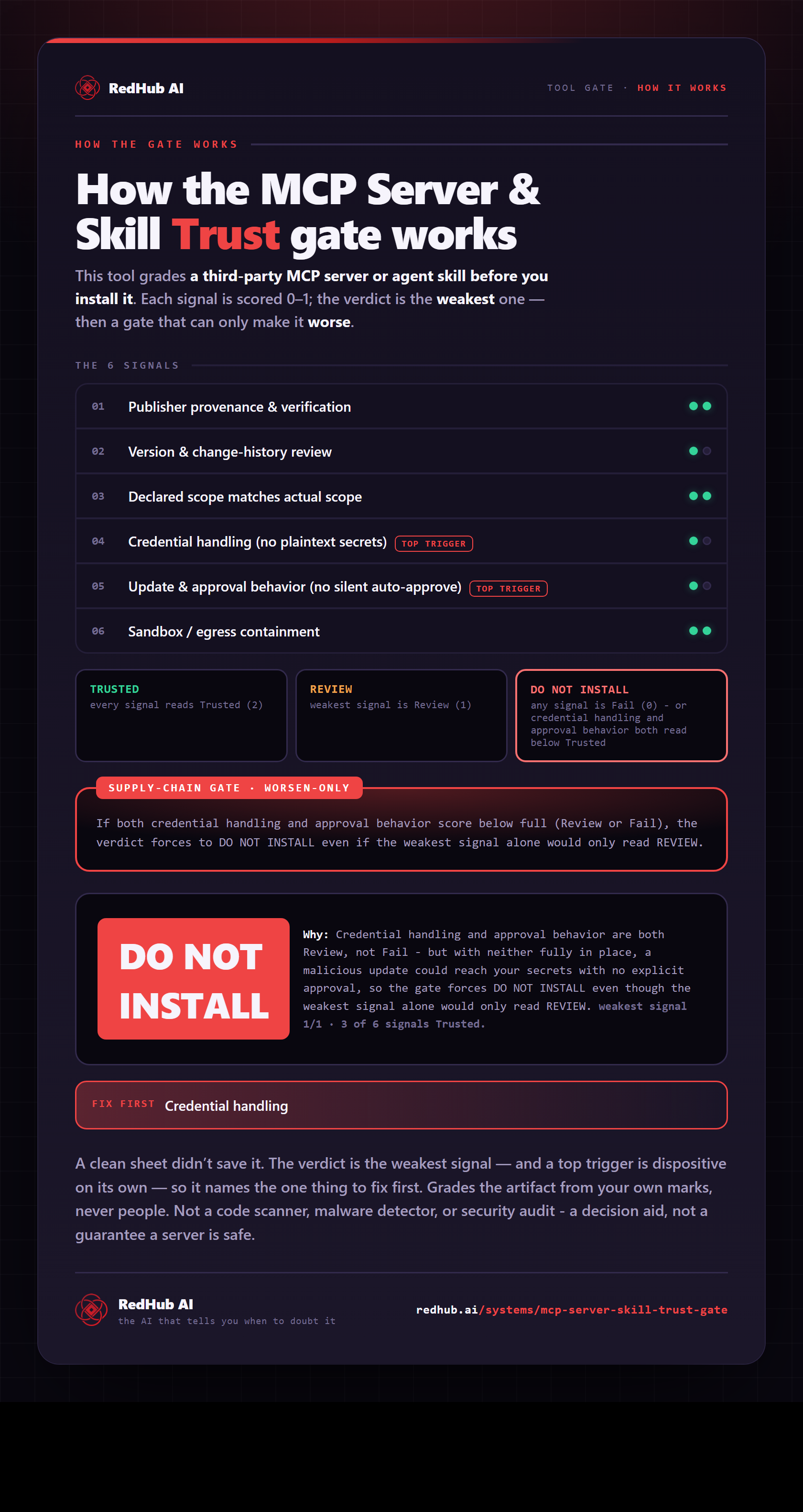
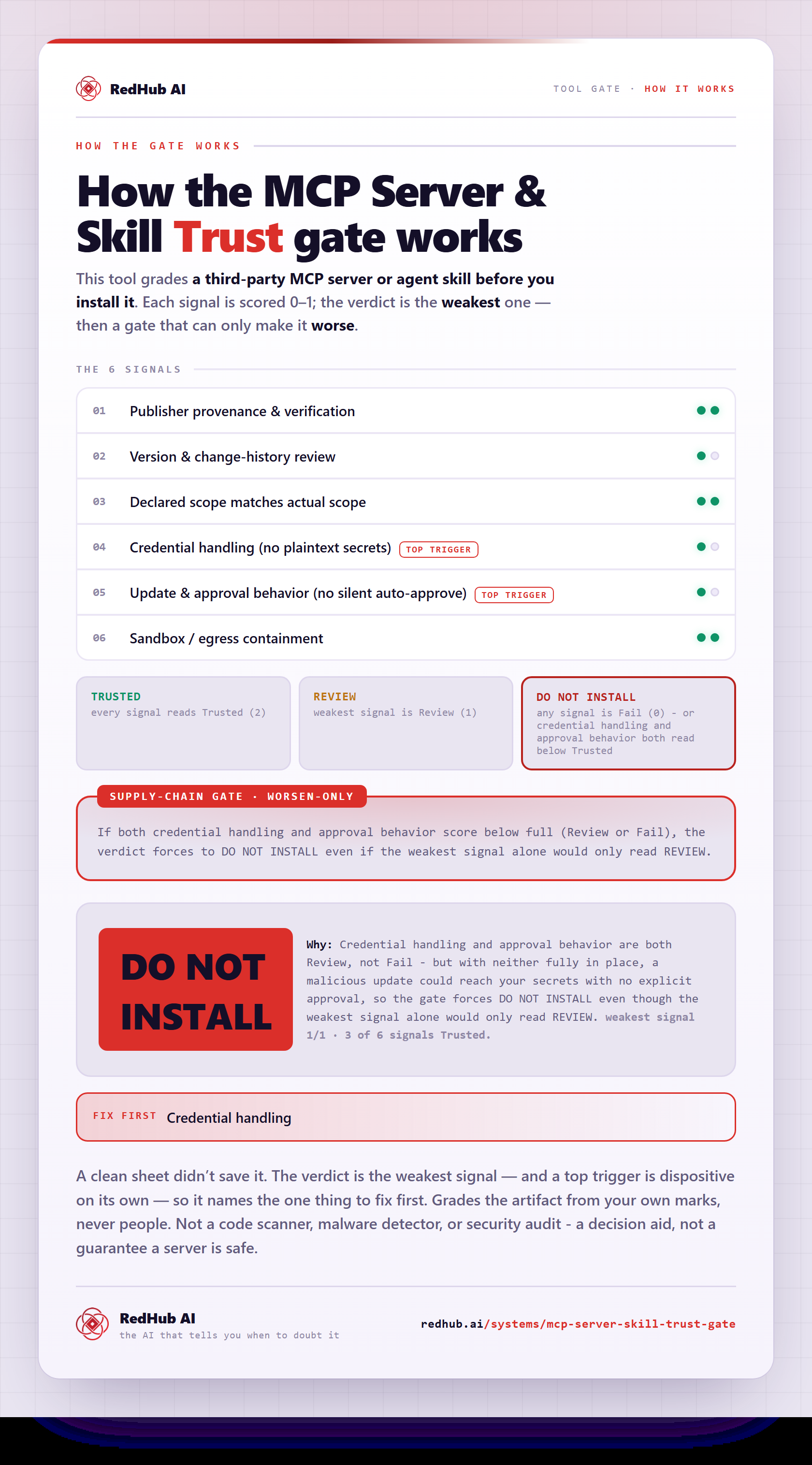
The gate this post refers to, drawn from the tool’s own logic. See the tool.