Storing Money Loosely Is a Decision You'll Meet Again
RedHub AI Editorialupdated November 5, 20267 min read

Jump to a section8
Storing a price in a general-purpose number type built for approximate values, or as text, works fine right up until those values are compared, added together, or split — and then rounding and precision differences that were invisible for months stop being invisible. Money stored loosely rarely breaks with an error message. It breaks by drifting, quietly, until a total doesn't reconcile and nobody can point to the exact day it started.
TL;DR: Money isn't just a number with a dollar sign on it — it has rules about rounding and comparison that a generic number type doesn't know to enforce. How you store it is a decision worth making once, deliberately, because it's a decision that comes back every time you touch money again: a discount, a refund, a split payment, a second currency.
A crash tells you something's wrong. This doesn't.
Most bugs a new app hits are loud. Something throws an error, a page breaks, a request fails, and you find out immediately. A loosely stored price isn't like that. It sits there working correctly for every single transaction you look at individually, because a $19.99 charge stored as an approximate number is still $19.99 when you look at it. The problem only shows up in aggregate — when a hundred of those numbers get summed, or when two numbers that should be exactly equal turn out not to be, off by a fraction of a cent that neither number's own display ever revealed.
That's the honest way to describe this failure mode: a slow, quiet drift, not a crash. Nobody gets paged. A support ticket doesn't come in tagged "money bug." What happens is a total that's supposed to reconcile doesn't, by some tiny amount, and figuring out why can take longer than fixing whatever's found, because the individual numbers all look fine on their own.
Why a generic number isn't the same as money
The core issue is that a plain number type is built to represent quantities in general, and money has narrower rules than "a quantity" — it has a fixed number of decimal places, and two amounts that should be equal need to compare as exactly equal, not "equal to several decimal places." Certain ways of storing a fractional number are built for approximation, which is fine for scientific measurements and wrong for currency, where "approximately nineteen dollars and ninety-nine cents" isn't a concept that should exist.
Text has a different problem: the database can't do arithmetic on it at all, and can't stop you from storing "19.9" one time and "19.90" another, or even something that isn't a number at all. Every calculation has to happen in your application code, which means every place that touches that column has to independently get rounding and comparison right, with nothing checking that it did.
Two honest approaches, and why neither is universally correct
Two common ways developers store money deliberately: keep the amount in whole cents as an integer (nineteen ninety-nine becomes 1999), or use a fixed-precision decimal or money type built for exact currency math instead of approximation. Both solve the core problem — exact comparison, no silent rounding — and neither is the one universally right answer. Whole cents is simple and exact but needs the same conversion at every display point. A fixed-precision type reads more naturally, but what's on offer differs by database, so check what yours supports before assuming it. Pick one on purpose, instead of defaulting into whichever generic type your AI builder happened to choose when it saw a "price" field in your feature description.
Notice where the rule lives in each case, though. With a type built for money, the column itself knows the amount has two decimal places. With whole cents in an integer, the column holds a plain number, and only your code knows that 1999 means $19.99 instead of $1,999. That's a sound choice that many teams make on purpose. It's also a convention your code enforces, and every new piece of code that reads the column has to know it.
Dates have the same problem
Dates stored as text fail the same quiet way. The database can't tell "03/04/2026" in one row from "2026-04-03" in another, can't sort them reliably, and can't refuse "next Tuesday." A column declared as a date or timestamp can do all three. If your dates live in a text column, every query that sorts, filters, or compares them is trusting that every write used the same format.
Why this decision keeps coming back
Here's the part that makes this different from most schema issues: fixing it once doesn't retire the topic. Every new feature that touches money reopens the same question, usually with more room for the looseness to show up. A discount means subtracting one loosely-stored number from another. A refund means comparing an amount against what was originally charged and needing them to match exactly, not approximately. A partial payment means splitting a total across multiple rows and needing the pieces to sum back to the whole, exactly, not almost. A second currency means the same comparison problem plus a conversion rate on top of it.
None of these are exotic. They're the ordinary next features of a growing app, and each one is a fresh chance for a loosely stored number to produce a total that's off by a fraction of a cent. That's the real cost of storing money loosely early on — not that it fails on day one, but that every feature after day one inherits the same unresolved decision, usually without anyone deciding to make it again.
Checking your own tables
- Find every column that holds a monetary amount. Prices, totals, balances, fees — anywhere a dollar figure lives. Test: list them table by table, including ones buried in less obvious places like a refund log or a usage record.
- Check what type each one is. A plain number, text, or a type built specifically for exact currency math. Test: open your table editor's schema view and read the declared type directly, don't infer it from what a sample value looks like.
- Do the same for dates. Created, due, renewed, expired. Test: any date held in a text column is a format your code has to keep consistent on every write.
- Pick one approach for money and apply it consistently. Whole cents as an integer, or a fixed-precision decimal type — either is defensible. Test: confirm every money column in your schema uses the same approach, not a different one per table.
A literal sentence for your AI builder: "Store this price column as [whole cents in an integer / a fixed-precision decimal type], not a floating-point number or text, and use the same approach for every monetary column in the schema."
The Data Model Sanity Bench ($69) asks about money and dates together, as one of its four questions per table: stored as their proper types, stored as text or a plain number, the table holds neither, or can't find. Text or a plain number reads YOU ENFORCE IT. That includes whole cents in an integer column. That doesn't make the choice wrong. The row records that your code, not the column, holds the convention. In its worked example, an orders table (T-02) is right in every other respect and lands there for this one reason. The bench takes your answer as given. It doesn't read your column types or check whether any total is already off.
More in this guide
Frequently asked questions
What's the best way to store money in a database?
Two common, defensible approaches: whole cents as an integer, or a fixed-precision decimal type meant for exact currency math. Neither is universally correct — what matters is picking one deliberately and applying it consistently across every money column, instead of defaulting into a generic number or text field.
What's wrong with storing a price as a plain decimal number?
Some number representations are built for approximation instead of exact values, which means two amounts that should be exactly equal can fail to compare as equal, and sums can drift by tiny amounts that accumulate over time. It looks fine on any individual value and only shows up once totals stop reconciling.
What about handling multiple currencies?
It adds a conversion rate on top of the same underlying problem — you still need exact, consistent storage for each currency's amount before conversion math enters the picture. Getting single-currency storage right first makes the multi-currency version much less error-prone.
Does the same advice apply to dates?
Yes. A date stored as text can't be reliably sorted, compared, or validated by the database, and two writes can use two different formats without anything refusing either. A column declared as a date or timestamp lets the database do that checking instead of your code.
Can I fix this after money is already stored the wrong way?
Usually yes, but it means migrating existing values to the new type and re-checking anything that read the old column directly, like reports or exports. It's more work after the fact than deciding up front, which is the case for most schema decisions.
Is this accounting or tax advice?
No. This is about how a database column is modeled, not how you book revenue or file taxes. Talk to an accountant for those questions.

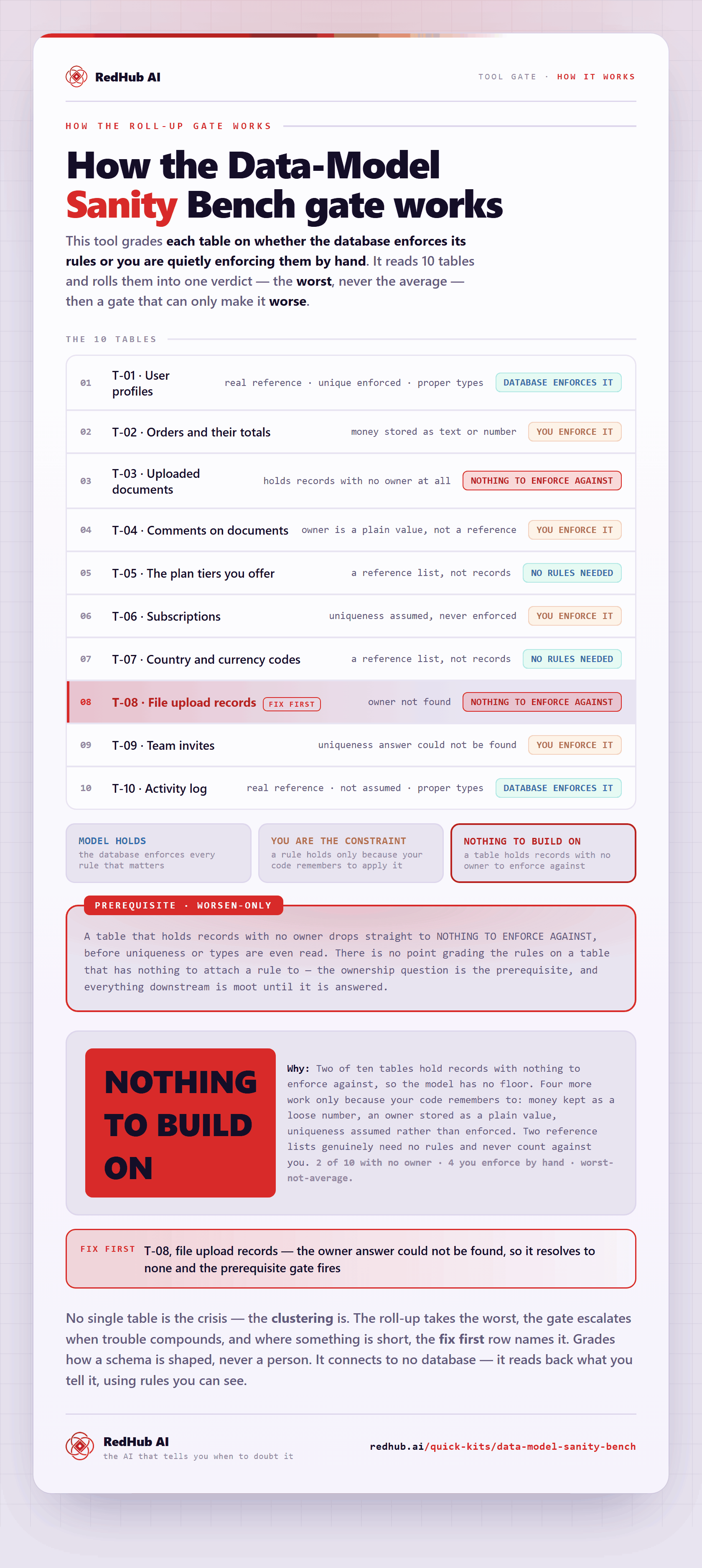
The gate this post refers to, drawn from the tool’s own logic. See the tool.