How AI Speeds Up Invoice Matching (and Where a Human Must Still Sign Off)
RedHub AI Editorialupdated October 5, 20265 min read

Jump to a section6
AI invoice matching is two jobs, and they are easy to blur. The first is reading: pulling the vendor, PO number, quantities and prices off a PDF or a scan, and pairing an invoice line that says "3/4 SS hex bolt" with a PO line that says "Stainless hex bolt, 0.75 in." AI is useful there. The second is comparing those fields against the purchase order and the receipt, which is arithmetic, and a fixed rule does it better because it gives the same answer every time. Neither job should approve a payment. A person signs off on every exception and on the payment run.
TL;DR: Use AI to read invoices and pair lines whose descriptions differ. Use fixed rules to compare quantities and prices. Keep a person on every exception and on the payment itself. The costly AI error is a misread in a field the match never compares, such as the invoice number. The Invoice-PO-Receipt 3-Way Match ($79) is the rules half: deterministic checks, no model. General information, not accounting advice. Part of the guide on 3-way matching.
Where AI earns its place
Invoices arrive as PDFs, phone photos, scans of faxes and email bodies, each vendor with its own layout. Getting structured fields out of that pile is the slow part of accounts payable, and it is where a model helps most. It also helps with pairing. Vendors describe items in their own words, so "Crate, pine, 48x40" on the invoice and "Packing crates" on the PO need someone, or something, to decide they are the same line. A model makes that call quickly. It should also say how sure it is, so that a low-confidence pairing goes to a person instead of straight into the match. Our guide to invoice data extraction covers per-field confidence in detail.
Where it fails quietly
- Misreads in the wrong field. A smudged 8 reads as a 3, a PO number transposes, a decimal shifts. A misread quantity or price usually fails the match, which costs a person a few minutes. The costly misreads land where the match does not look. Misread an invoice number, and a duplicate check sees two different bills. Transpose a PO number into another open PO, and the invoice is compared against the wrong order.
- Judgment on exceptions. Software can flag that an invoice price is 12% above the PO. It cannot know the buyer agreed to the increase on a phone call, or that a short delivery is a legitimate backorder.
- Fraud or error. A duplicate sent by a confused vendor and one sent on purpose look the same to a matcher. Deciding which one you are looking at is a human call.
Why the comparison should be a rule
Whether $18.45 is within 2% of $18.00 has one correct answer. It is 2.5% over, so it is not. A rule computes that the same way on every run, and an auditor can rerun it next year and get the same result. Asking a model to make that comparison adds variation to a step that has none to begin with, and makes the result harder to explain. So the sensible split is AI for reading, rules for comparing, and a person for deciding.
The division of labor
- AI extracts and pairs. It reads the documents, pulls the fields and pairs invoice lines to PO lines, flagging anything it is unsure of.
- Rules compare. Fixed checks test quantity against the receipt, price against the PO and line totals against quantity times price, within your tolerances.
- A person spot-checks the clean ones. Not every invoice, but enough to catch a systematic extraction error before it clears a whole batch.
- A person works every exception. Approve with a note, hold, update the PO or escalate, and record the decision.
- A person authorizes payment. The final "pay" is a person's call on a queue the software prepared.
Step three has no standard answer. How many clean invoices to sample depends on your volume, how many vendors send scans and how often extraction has been wrong before. A practical start is to sample more heavily from vendors whose documents have caused errors, and to widen the sample after any miss. When the misses stop, you can narrow it again, though nobody can tell you in advance exactly when that is safe. For the controls that stop the most expensive mistakes, see our post on how to prevent duplicate payments.
The rules half, with no model in it
The Invoice-PO-Receipt 3-Way Match takes fields you have already extracted and checked, runs seven fixed checks on every invoice line and returns APPROVE, HOLD or BLOCK PAYMENT. The same input always gives the same verdict. It moves no money, and the payment decision stays with you.
Get the Invoice-PO-Receipt 3-Way Match — $79Pairs well with
Reading comes first. The AI Document Extraction Kit ($99) turns invoices into structured data and flags low-confidence fields for review instead of guessing, with no accuracy guarantee. Its output goes next to the Document Field Validator ($79), which rejects a record with a missing total or a math error before it gets near a match. And AI for the Bookkeeper ($39) teaches the habit this post depends on: AI drafts, you confirm against the source.
More in this guide
Can AI do invoice matching automatically?
AI can read invoices and pair their lines with PO lines automatically. The comparison of quantities and prices is better done by fixed rules. Neither should approve payment: a person signs off on exceptions and on the payment run.
Is AI invoice matching accurate?
Comparing is reliable when the inputs are right. Reading is the weak point: extraction can misread amounts, PO numbers and decimals, and a misread invoice number or PO number can slip past the match entirely. Extraction needs its own verification, and clean matches deserve spot-checks.
Where does a human still need to sign off?
On every exception, deciding whether a mismatch is an agreed change, a backorder or a problem, and on the payment itself. Software cannot know about a price change agreed on a phone call.
Why not fully automate invoice payment?
Because the value of the control is the judgment at the exceptions. Full automation turns one misread field into a wrong payment repeated across a batch. Let software remove the reading and comparing work, not the accountability for paying.
What's the difference between extraction and matching?
Extraction pulls the data fields off the document. Matching compares those fields across the PO, receipt and invoice. Errors in extraction flow straight into matching, so each step gets its own check.
How much time does AI matching save?
We will not quote a figure, because it depends on your invoice volume, your document formats and your exception rate. The saving comes from reviewing flagged invoices instead of cross-checking every clean one, and it grows with volume.
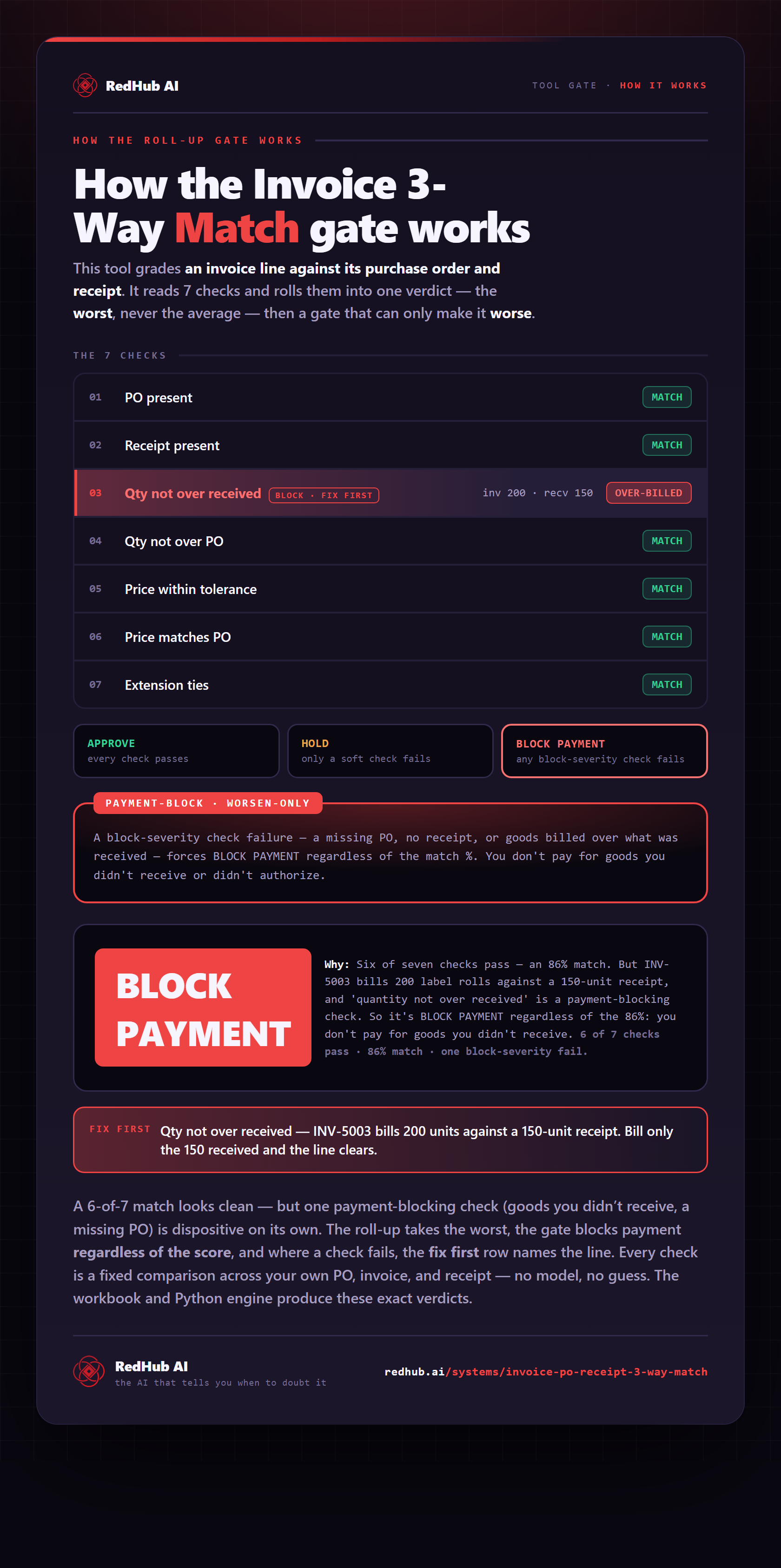
The gate this post refers to, drawn from the tool’s own logic. See the tool.