Invoice Data Extraction: Automate AP Without Bad Data
RedHub AI Editorialupdated August 17, 20265 min read

Jump to a section8
TL;DR
- What it is: Invoice data extraction reads each invoice and returns the fields AP needs — number, date, vendor, total — as structured data.
- Who it's for: AP and finance teams keying invoices by hand — see the AI Document Extraction Kit.
- How it works: A six-field schema, per-field confidence ratings, validation checks, and an exception queue for anything flagged.
- Bottom line: The one field you cannot afford to guess is the total. Build the workflow so a shaky total gets a human, every time.
What is invoice data extraction?
Invoice data extraction is the automated reading of invoices — PDFs, scans, email attachments — to pull out the fields accounts payable needs: invoice number, date, vendor name, total, currency, and line items. Done well, it replaces manual keying with a validate-and-flag workflow: the model extracts every field with a confidence rating, automatic checks confirm dates parse and totals are numeric, and anything shaky lands in an exception queue for a person instead of flowing into the ledger.
Best for: AP teams processing recurring vendor invoices — part of our AI document extraction guide.
Invoice data extraction is where most teams meet document AI for the first time, and for good reason. Invoices are high-volume, the same fields repeat on every one, and the manual alternative — someone keying totals into the accounting system — is slow and mistake-prone in both directions. The machine mistypes; so do humans.
But AP is also the most dangerous place to automate carelessly. An invoice isn't a form you can fix later. Once a total lands in the ledger, it turns into a payment, a reconciliation entry, and a vendor balance. Get it wrong quietly and the error compounds. So the question isn't "can AI read invoices?" — it can. The question is: what happens when it reads one wrong?
The six fields of an invoice schema
Every extraction workflow starts with a schema — the list of fields you want, their types, and which are required. For invoices, six fields cover most AP workflows:
| Field | Type | Required? | Risk if wrong |
|---|---|---|---|
| Invoice number | Text | Yes | Duplicate payments, broken matching |
| Invoice date | Date | Yes | Wrong period, missed terms |
| Vendor name | Text | Yes | Paid to the wrong account |
| Total amount | Number | Yes | Wrong payment — the expensive one |
| Currency | Text | Optional | Cross-border amount errors |
| Line items | List | Optional | Coding and approval mistakes |
Keep required fields to the four that block payment. Marking everything required just inflates your exception queue with flags nobody acts on.
What a flagged invoice actually looks like
Here's an extraction result from the AI Document Extraction Kit's built-in sample invoice — the kit's own demo, shown as-is:
| Field | Value | Confidence | Status |
|---|---|---|---|
| invoice_number | INV-2043 | high | ok |
| invoice_date | 2026-03-07 | high | ok |
| vendor_name | Acme Supplies Inc. | high | ok |
| total_amount | 1284.0 | low | REVIEW — low confidence |
| currency | — | low | ok — absent (optional) |
| line_items | — | low | ok — absent (optional) |
Read the verdict carefully. Five fields pass. One doesn't — and it's the total. A blind extractor would hand you all six values with the same straight face and the invoice would sail through. This one stops, marks the total REVIEW, and exits with a non-zero code so nothing downstream auto-accepts it. Thirty seconds of human attention on one field, instead of a wrong payment.
Key insight: the total is both the field AP cares about most and one of the fields models misread most — cramped layouts, subtotal-vs-total confusion, faded scans. Your workflow should treat every shaky total as guilty until a human proves it innocent.
The AP extraction workflow, step by step
- Standardize intake. One inbox or folder where invoices land. If invoices arrive mixed with other paperwork, sort them first — that's a classification problem, not an extraction problem.
- Run extraction against the invoice schema. Every field comes back with a value and a confidence rating.
- Validate automatically. Date parses? Total numeric? Required fields present? Failures are flagged without any human effort spent.
- Split the stream. Invoices where everything validated and came back confident are staged for entry. Anything flagged goes to the exception queue.
- Work the exception queue like a queue. A person confirms or corrects only the flagged fields — not the whole invoice, and not the whole batch.
- Sample-audit the clean ones. Pull a share of auto-accepted invoices each week and check them against the source. This is how you know your real accuracy instead of assuming it. More on the metrics in document extraction accuracy: what to expect and verify.
What to do with the flags
An exception queue only works if it stays short and honest. Three rules keep it that way:
- Fix the field, then look for the pattern. If one vendor's invoices flag every week, the problem is that vendor's layout — tune the schema or ask for a cleaner format, don't keep paying the review tax.
- Never edit downstream. Corrections happen in the queue, before entry. Fixing errors after they hit the ledger is how quiet discrepancies are born.
- Track your flag rate. If it creeps up, your inputs got worse or your schema drifted. If it drops to near zero, be suspicious — check that validation is actually running. Deeper field-level validation rules are the lane of the Document Field Validator ($79).
Who staffs the queue, and how much review is enough? That's a design question of its own — we cover it in human-in-the-loop document processing, done right.
Decision Guide
Use invoice extraction if: AP keys more than a few dozen invoices a month and the fields repeat across vendors.
Skip it if: you receive a handful of invoices monthly from the same two vendors — manual entry is honestly fine at that volume.
Best first step: run last month's invoices through a validate-and-flag extractor and count the flags. That number tells you how much review your real documents need before you automate anything.
FAQ
How does invoice data extraction work?
A language model reads each invoice against a schema — invoice number, date, vendor, total, currency, line items — and returns a value plus a confidence rating per field. Validation checks then confirm types and required fields, and anything shaky is flagged for review.
Can AI misread an invoice total?
Yes, and it's one of the most common failure points — cramped tables, subtotal confusion, poor scans. That's why a safe workflow flags low-confidence totals for a human instead of accepting them silently.
What invoice fields should be required?
The four that block payment: invoice number, date, vendor, and total. Leave currency and line items optional unless your workflow depends on them — over-requiring inflates the exception queue.
What is an exception queue?
The list of invoices where at least one field was flagged — low confidence, missing, or failed validation. A person confirms or corrects only those fields before entry. Everything else auto-accepts.
Do I still need to check the invoices that weren't flagged?
Sample-audit them. Pull a share each week and verify against the source document. Flags catch what the model knows it's unsure of; sampling catches what it doesn't.
What if my invoices arrive mixed with other documents?
Sort first, extract second. Classification is its own stage — the Document Classify & Route Kit ($69) handles routing documents to the right handling before extraction runs.
What does the AI Document Extraction Kit include for AP?
A ready-to-edit invoice schema, a runnable extractor that rates, validates, and flags (zero dependencies, demo mode needs no API key), an Extraction Playbook, and a QA tracker for flag rate and sampled accuracy. One-time $99.
Automate AP entry — with a safety net on the total
The AI Document Extraction Kit ships an invoice schema, a runnable validate-and-flag extractor, a playbook, and a QA tracker — so shaky fields get a human and clean ones get speed. One-time $99. 30-day guarantee. No accuracy guarantee — the flags are the honesty.
Get the AI Document Extraction Kit — $99 →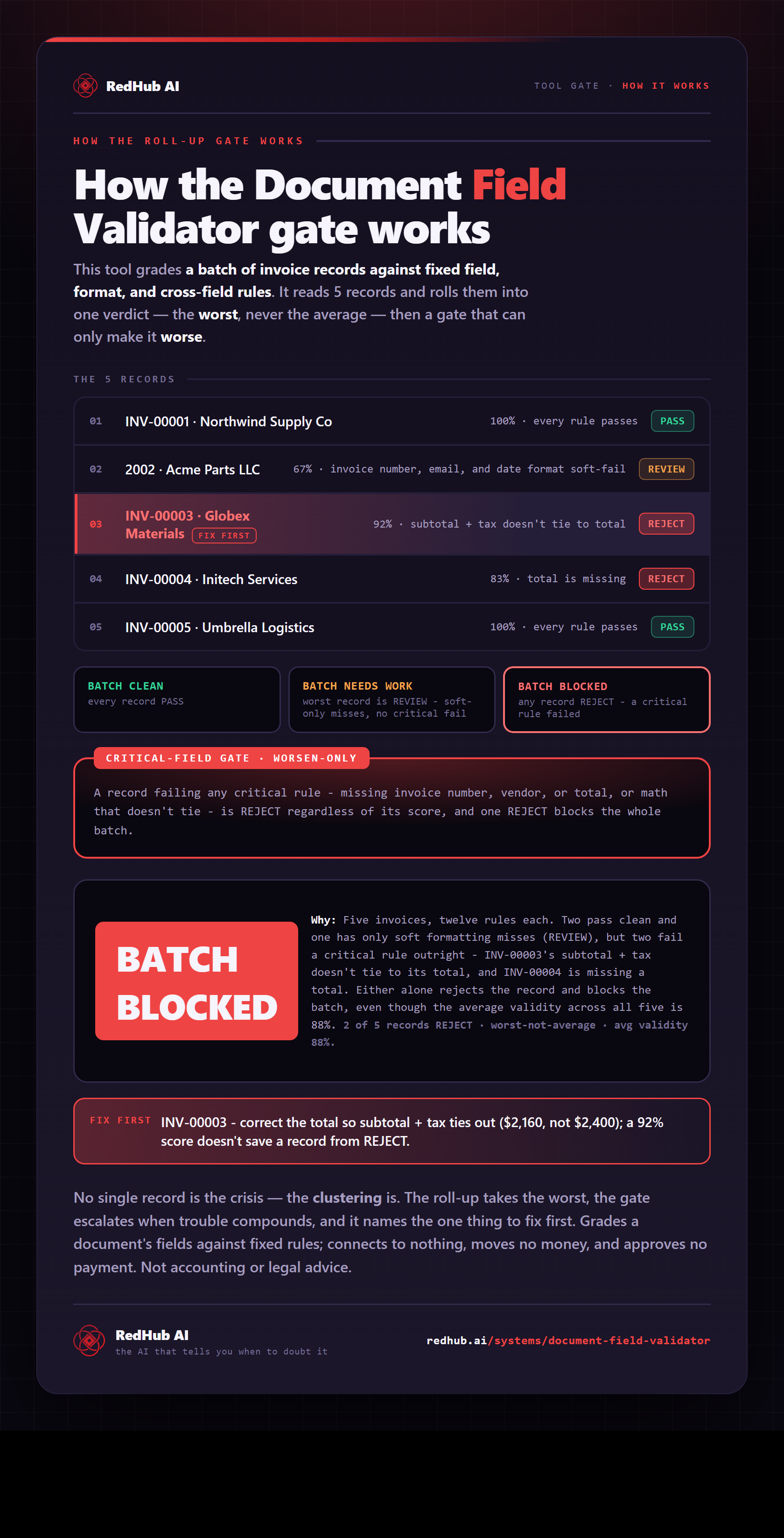
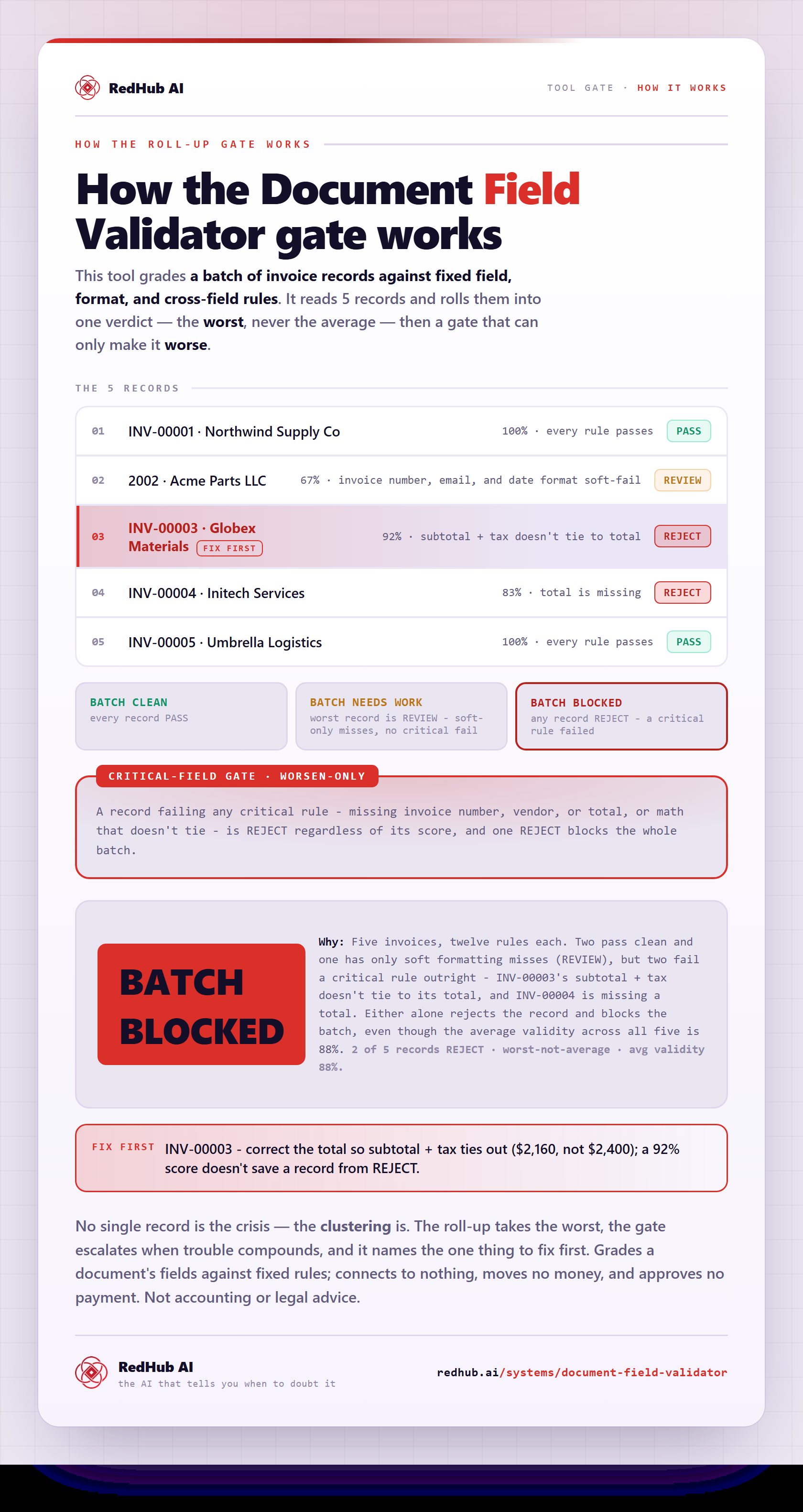
The gate this post refers to, drawn from the tool’s own logic. See the tool.