The Anon Key Is Public. The Service Role Key Ends the Argument.
RedHub AI Editorialupdated October 4, 20266 min read

Jump to a section8
The anon key vs service role key question now goes by new names. Supabase issues a publishable key, starting sb_publishable_, in place of the anon key, and a secret key, starting sb_secret_, in place of service_role. Its API keys guide says the legacy pair is being deprecated by the end of 2026. The split itself has not moved. The public key is meant to ship to every browser and is bound by your row level security policies. The secret key skips those policies entirely, so if it can be reached from anywhere a browser can load it, every policy on every table stops mattering.
TL;DR: Two keys, two jobs, two sets of names. The publishable key (legacy: anon) is public by design and runs as the anon or authenticated role, so your policies decide what it reaches. The secret key (legacy: service_role) runs as the service_role role, which has BYPASSRLS. Both key systems can be active on one project at once. Check where the secret key, and any legacy service_role key, can be reached before you polish a single policy. The Supabase RLS Read-Off ($69) puts that question at the top of the sheet.
Old names, new names, same split
| Key | Looks like | Runs as | Policies apply? | Belongs in |
|---|---|---|---|---|
| Publishable | sb_publishable_... | anon, or authenticated with a user session | Yes | Browser, mobile app, anything you ship |
| Anon (legacy) | Long JWT starting eyJ | Same as publishable | Yes | Same as publishable |
| Secret | sb_secret_... | service_role | No | Servers, Edge Functions, cron jobs |
| Service_role (legacy) | Long JWT starting eyJ | service_role | No | Same as secret |
Supabase's guide says creating the new keys doesn't revoke the legacy ones. Both systems work at the same time until you disable the legacy keys under Settings > API Keys in the dashboard. So a project that added a secret key last month may still have a working service_role key in an old .env file. The guide also has a useful tell: if a tutorial or an AI assistant tells you to copy a long key beginning eyJ, it was written for the legacy keys.
Why the public key isn't the vulnerability
A Supabase key in your front-end bundle, your build output or the browser's network tab is not a leak. Supabase's guide lists web pages, mobile apps and source code as places the publishable key is safe to expose. It identifies your app, not your user. A request carrying it with no session runs as anon, and the same key with a user's session runs as authenticated, which is what your policies match on.
The trouble starts when someone reads "the key is public" and assumes something else must be filtering requests too, a server in the middle or a check upstream. There isn't one unless you built it. The policies are the whole filter, and RLS Is Enabled and Your Data Is Still Readable covers what happens when one of them admits everyone.
What the secret key does when it leaks
The secret key maps to the service_role Postgres role, which has the BYPASSRLS attribute. Supabase's guide is blunt about the result: a leaked secret key exposes all of your project's data. Not some tables.
The new secret keys add a guard the legacy key lacks. Supabase matches on the User-Agent header and returns 401 Unauthorized when a secret key is used from a browser. Don't read that as a safety net. The same guide says an attacker can still use the key from other tools, so a secret key that ships in your bundle is exposed the moment someone copies it into a script.
How a secret key ends up where a browser can load it is usually mundane. Supabase's own .env example shows the trap: the public variables carry a framework prefix such as NEXT_PUBLIC_, and the guide warns never to prefix the secret one, "or your bundler will ship the key." One prefix copied onto the wrong line puts the secret key in every page.
A secret key doesn't always skip RLS
This one cuts both ways. Supabase's RLS guide says a secret key bypasses row level security only when the request carries no user access token. If a server route forwards the signed-in user's token, the request runs under that user's policies, even though the client was created with a secret key.
That can work for you: a route that passes the user's token gets the database's ownership check for free. It can also mislead. A route that uses the secret key without a user token gets no policy check at all, so it has to decide for itself whether the caller may touch the record. That is the server-side check in our post on IDOR, and it is easy to leave out precisely because the policies look like they cover it.
Where to look
- Search what ships. Open your deployed site, view the built JavaScript, and search for
sb_secret_. If the project still has legacy keys, search for the last 20 or so characters of the service_role string from Settings > API Keys too. Both legacy keys are JWTs that open with the same characters, so the start of the string can't tell them apart. Searching your working files isn't enough: the built output is what visitors get. - Read your variable names. Any variable holding the secret or service_role key must not carry the prefix your framework uses for browser-visible values. A name proves nothing on its own, though, so match each value against the dashboard.
- Search your repository's history. A key removed in a later commit still sits in the old one. Our post on exposed API keys and secrets covers moving keys out of code.
- If you find one, rotate it. Supabase's procedure is to fix the cause of the leak first, create a new secret key, replace the old one everywhere, confirm every component uses the new key, then delete the old one. For a legacy key, the guide says to deactivate the legacy keys in the same dashboard section, which can be reversed if you find a client you missed. Move any front end still on the anon key to the publishable key before you do.
None of this means you have been breached, and a key in the wrong place is an easy mistake to make. If the secret key checks out clean, the work moves to the per-table, per-operation read in How to Check What a Stranger Can Actually Reach in Your Tables.
Answer the key question before the table questions
The Supabase RLS Read-Off asks one project-level question first: is the secret key reachable from the browser? A browser-reachable service-role key rewrites the whole matrix to PROJECT OPEN, and the fix becomes the key. Then it reads every table, one row per operation. One .xlsx, offline, and it never sees your keys.
Get the Supabase RLS Read-Off — $69Pairs well with
The Keys & Secrets Sorting Drill ($49) sorts every key in your project SAFE WHERE IT IS / MEANT TO BE PUBLIC / MOVE IT / ROTATE NOW, and a once-reachable secret reads ROTATE NOW wherever it now sits, because moving it isn't fixing it. The Browser Line Read-Off ($59) reads which of your app's checks the browser can override, ENFORCED / TRUSTS THE BROWSER / FINE IN THE BROWSER. The Vibe-Coded App Hardening Kit ($79) is the wider production-readiness audit, with a 10-antipattern catalog, a 6-layer checklist and a monitoring template.
More in this guide
Frequently asked questions
Are the anon and service_role keys going away?
Supabase's API keys guide says it is deprecating them by the end of 2026, in favor of publishable keys (sb_publishable_) and secret keys (sb_secret_). Creating the new keys doesn't revoke the old ones. They keep working until you disable them in Settings > API Keys.
Is it a problem that my publishable or anon key is visible in my app's code?
No. Supabase designs both to be public. Requests with them run as the anon or authenticated role, so your row level security policies decide what they can reach.
What makes the secret key different?
It runs as the service_role role, which has the BYPASSRLS attribute, so your policies don't apply to it. That is why it belongs on servers, Edge Functions and scheduled jobs, never in anything you ship to a user.
Doesn't Supabase block secret keys in the browser?
New secret keys return 401 when Supabase detects a browser from the User-Agent header. Supabase's own guide says an attacker can still use the key from other tools, so a secret key in your bundle is exposed regardless.
Should I rewrite my policies before checking for this?
Check the keys first. If the secret or service_role key is reachable from the browser, no policy work changes what a request carrying it can do. Rotate the key, then read the policies.
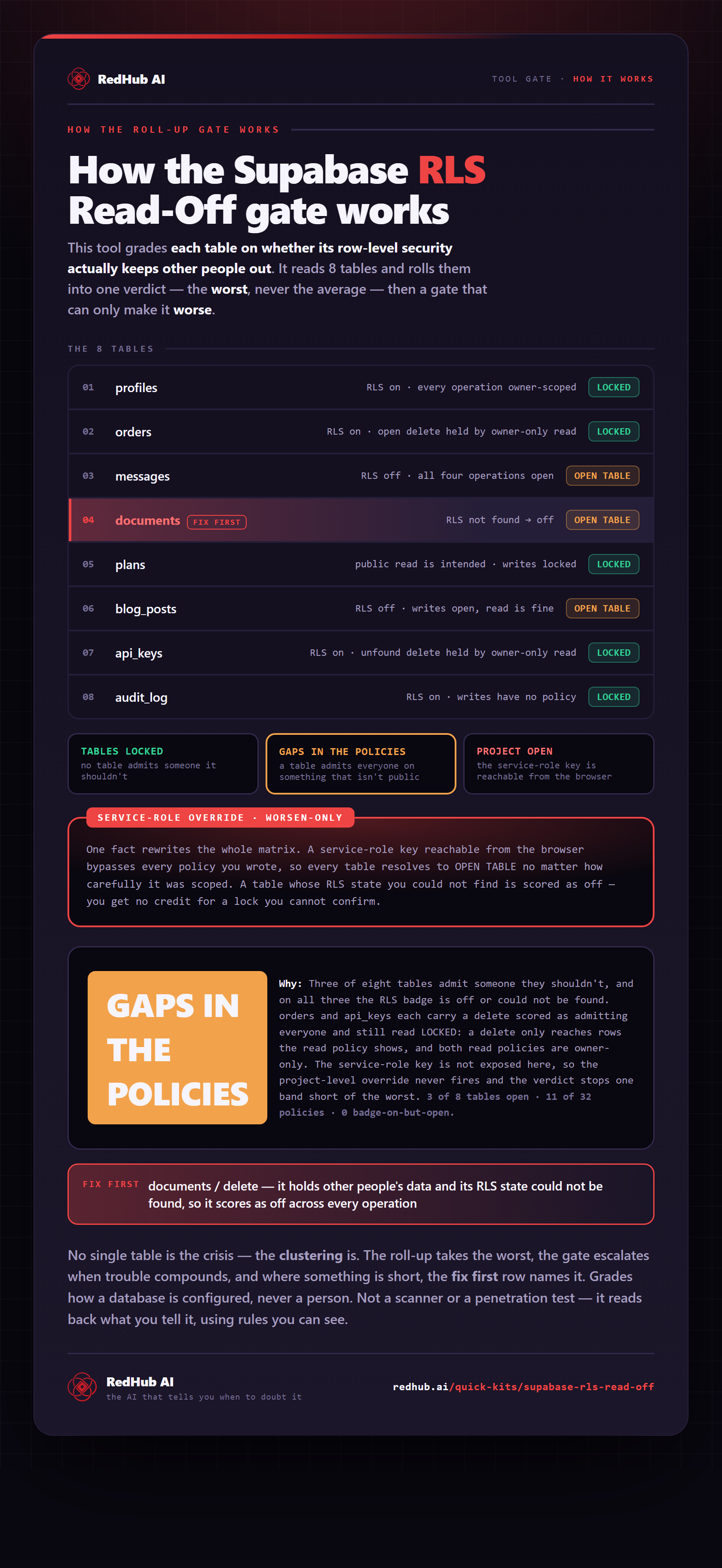
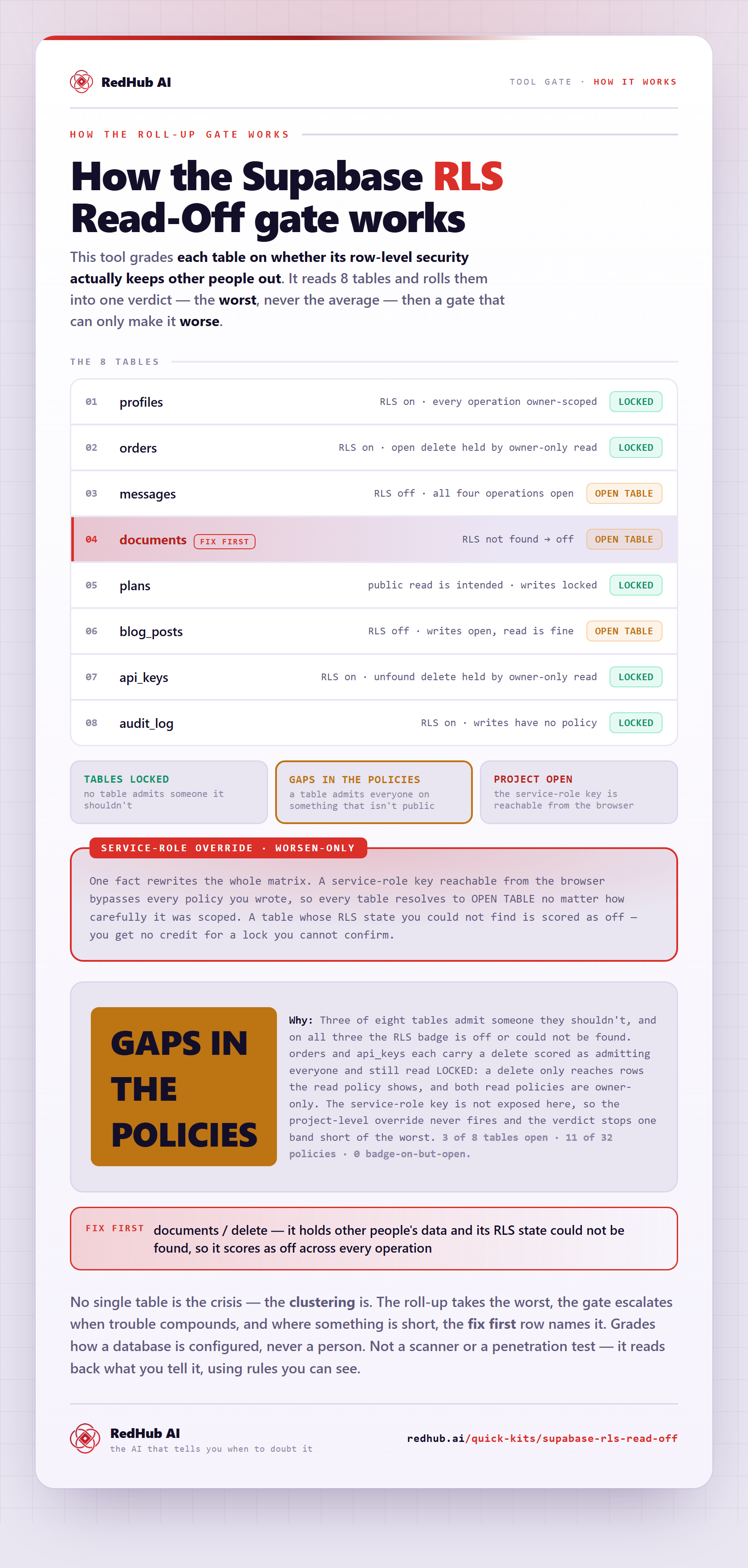
The gate this post refers to, drawn from the tool’s own logic. See the tool.