How to Check What a Stranger Can Actually Reach in Your Tables
RedHub AI Editorialupdated October 4, 20267 min read
Jump to a section9
Knowing how to test Supabase RLS comes down to one habit: run every check as the person you are worried about, never as yourself. That means a signed-out visitor holding your publishable key, and a signed-in user who owns none of the rows. Your own dashboard session is the wrong tester, because the SQL editor's default connection is not subject to your policies at all. Rule out the secret key first, run Supabase's Security Advisor, then try each table's four operations as both strangers.
TL;DR: Step one is the secret key, because it ignores every policy. Step two is the Security Advisor, which flags tables with RLS off and policies that are always true. Step three is the per-table pass: select, insert, update and delete, each tried as a signed-out visitor and as a signed-in non-owner. A denied update or delete usually returns zero rows rather than an error, so check that the target row is still intact. Step four is a pgTAP test file, so the next table gets the same checks. The Supabase RLS Read-Off ($69) is the same pass as a worksheet, one row per table and operation.
Why the SQL editor proves nothing by default
Write a careful owner-only policy, run select * from notes in the SQL editor, and every row comes back. Nothing is broken. Supabase's tables guide explains that the table's owner and roles with the BYPASSRLS attribute aren't subject to policies, which is why the same query still returns rows in the SQL editor. A query run that way tells you what the data is, not who can reach it.
Supabase gives you two ways around this. The SQL editor has a role selector, and its user impersonation feature, listed as a public beta, lets you pick the authenticated role and a specific user and see the table as that user would. Supabase also announced an RLS Tester as a feature preview on April 24, 2026. It shows which policies a query evaluates, but its changelog says it supports select queries only for now. Insert, update and delete still need testing another way.
Step 1: rule out the secret key
Search your deployed site's built JavaScript for sb_secret_, and for your legacy service_role key if the project still has one. If either turns up, stop and rotate it. Every other result in this post assumes requests are being checked against policies, and that key skips them. The Anon Key Is Public. The Service Role Key Ends the Argument. covers where to look and Supabase's rotation steps.
Step 2: run the Security Advisor
Supabase's Security Advisor runs deterministic checks against your project. You can open it in the dashboard, or run supabase db advisors from the CLI. A few of its checks map straight onto this post: "RLS disabled in public," which it rates an error, "permissive RLS policy" for conditions such as using ( true ), "RLS references user metadata," and "security definer view" for views that skip the policies of the tables beneath them.
Treat the Advisor as the floor, not the finish. It catches conditions that are always true. It can't tell whether a condition that changes per request, such as (select auth.uid()) is not null, ties each row to its owner. Supabase also notes that some findings are intentional, such as a public price list that anyone may read.
Step 3: four operations, two strangers
List every table the Data API can reach. Start with the ones holding rows that belong to a specific person, such as orders, messages, documents or profiles, then the public ones. Try each operation as both testers.
- Try a select. As a signed-out visitor and as a non-owner, read the table. Expect: an empty result, or a permission error if the role holds no grant. On a table meant to be private, any of someone else's rows is a failure.
- Try an insert. As the non-owner, insert a row whose
user_idis someone else's id. Expect: a 42501 error from theWITH CHECKclause. A successful insert means anyone can create rows in another user's name. - Try an update. As the non-owner, update one of the owner's rows. Expect: zero rows changed, then read the row as its owner and confirm it is untouched. As the owner, try setting
user_idto another id, and try changing any column that should be off-limits, such as a plan or role. - Try a delete. As the non-owner, delete one of the owner's rows. Expect: zero rows deleted, and the row still there when the owner reads it. On a table everyone can read, the select policy puts no limit on which rows a delete can reach, so this step carries the most risk there.
The "zero rows" results are the trap. Supabase's guide spells out that a USING clause filtering a row out raises nothing and matches zero rows, while a missing grant or a WITH CHECK violation raises a 42501 error. A denied delete and a delete that found nothing to delete look the same from the client. Only re-reading the target row tells them apart.
Step 4: make it a test file
Supabase recommends a pgTAP test file per table under supabase/tests/, run with supabase test db. A short version for a notes table with id, user_id and body columns, and the owner policies from Supabase RLS Policies, One Operation at a Time, looks like this:
begin;
select plan(3);

insert into auth.users (id, email) values
  ('11111111-1111-1111-1111-111111111111', 'owner@example.com'),
  ('22222222-2222-2222-2222-222222222222', 'other@example.com');
insert into public.notes (id, user_id, body) values
  ('33333333-3333-3333-3333-333333333333',
   '11111111-1111-1111-1111-111111111111', 'private');

set local role authenticated;
set local request.jwt.claim.sub = '22222222-2222-2222-2222-222222222222';

select is_empty(
  $$select * from public.notes$$,
  'a non-owner reads no notes'
);
select is_empty(
  $$delete from public.notes returning id$$,
  'a non-owner deletes no notes'
);

set local request.jwt.claim.sub = '11111111-1111-1111-1111-111111111111';
select results_eq(
  $$select body from public.notes
    where id = '33333333-3333-3333-3333-333333333333'$$,
  array['private'],
  'the owner note survived the denied delete'
);

select * from finish();
rollback;
The inserts run as the test's owner connection, before the role switch, so they bypass the policies on purpose. The returning id on the delete matters, and so does the read after it. Supabase's guide pairs every denied write with a returning clause and a read proving the target row is intact, because a statement that matched nothing doesn't fail. The rollback at the end leaves the database as it was. A full file adds the insert and update cases and a signed-out pass with set local role anon.
What to fix first
A browser-reachable secret key comes first, every time. After that, tables holding a specific person's data, and within those, open writes before open reads. Treat any answer you couldn't confirm as unsafe until you can. One result needs a second look, not a fix: an operation that denies everyone may mean a feature is quietly broken for your real users too.
After each fix, run the same test again. A policy edit is easy to get half right, and the test file is what tells you. If your app also checks ownership in its own routes, the record ownership check is the matching test for that layer.
The same pass, as a worksheet you keep
The Supabase RLS Read-Off lays out this pass as one .xlsx: the project-level key question first, then a row per table and per operation, rolled up to TABLES LOCKED / GAPS IN THE POLICIES / PROJECT OPEN. You fill it in from your own dashboard. It connects to nothing, and it is not a scanner or a penetration test.
Get the Supabase RLS Read-Off — $69Pairs well with
The Vibe-Coded App Pre-Launch Security Gate ($79) is the launch-moment go/no-go across six controls, one of them whether access control was tested, banded LAUNCH-READY AS DESCRIBED / HARDEN FIRST / DO NOT SHIP. Logged-In Is Not Allowed ($59) runs the non-owner test across your app's routes and rolls up to PERMISSIONS HOLD / SIGNED IN IS DOING TOO MUCH / ANYONE CAN WALK IN. The Test Mode vs Live Mode Line-Up ($49) checks that your test work points at a sandbox, since a test run that deletes real rows can't be undone.
More in this guide
Frequently asked questions
Why does my query return every row in the SQL editor when RLS is on?
Supabase's documentation says the table owner and roles with BYPASSRLS aren't subject to policies, which is why the same query returns rows in the SQL editor. Switch the editor's role, or impersonate a user, to see what a real request would get.
What's the first thing to check when testing Supabase RLS?
Whether the secret key, or a legacy service_role key, is reachable from your browser or client code. Both bypass row level security, so they override the result of every other test.
Does Supabase have a built-in RLS test tool?
Several pieces. The Security Advisor flags common misconfigurations, the SQL editor can run queries as a chosen role or user, and an RLS Tester has been in feature preview since April 2026 for select queries. For writes, Supabase recommends pgTAP tests run with supabase test db.
How do I tell a blocked delete from an empty one?
Read the target row again afterward. A USING clause that filters a row out returns zero rows without an error, so a blocked delete and a delete that found nothing look the same. In a test, add returning to the statement and check the row is intact.
Do I need to do this once or every time I add a table?
Every time. Each new table gets its own policies, and a test file per table means the same checks run again whenever you change one. Supabase's own procedure says that until the suite passes, you don't know whether the policies do what you intended.
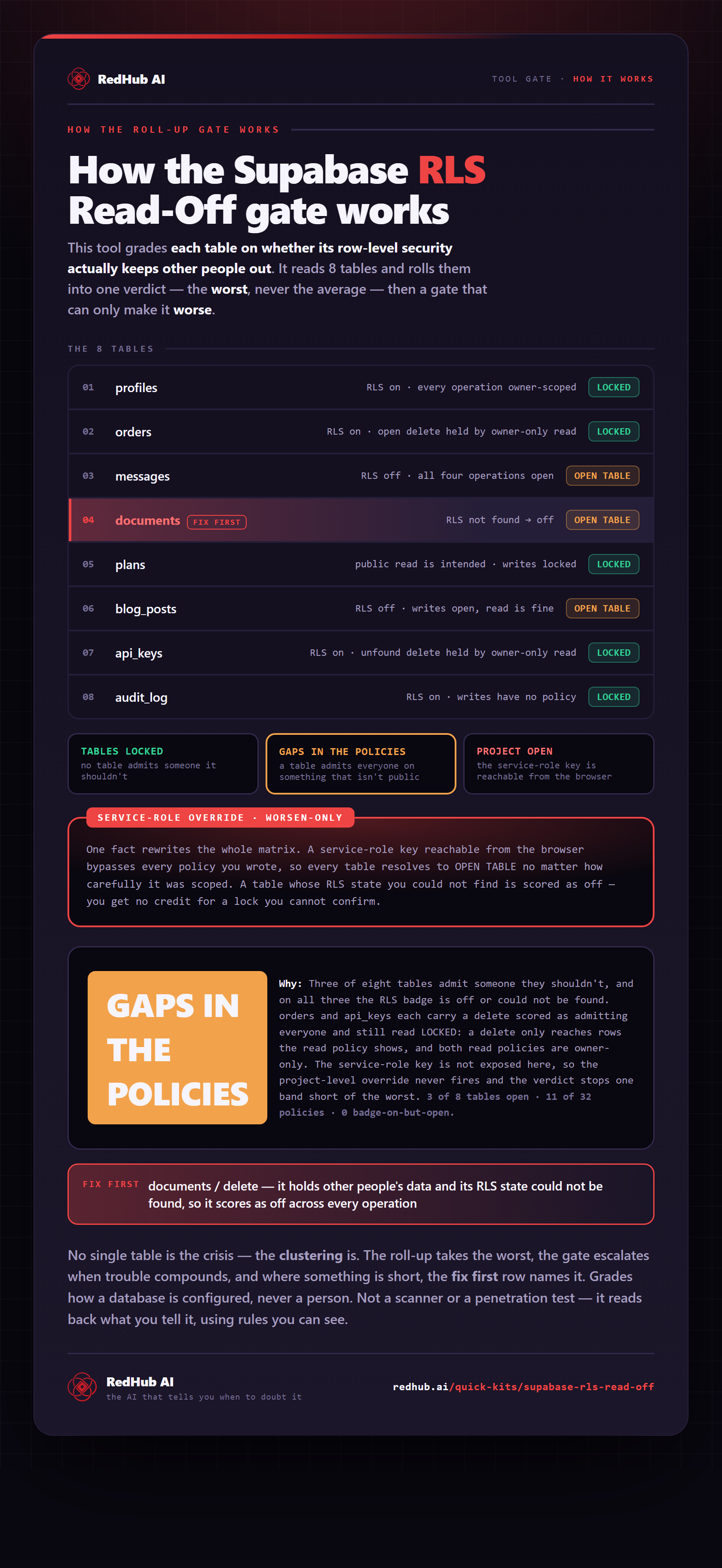
The gate this post refers to, drawn from the tool’s own logic. See the tool.