Supabase Row Level Security: What "RLS Enabled" Does and Doesn't Do
RedHub AI Editorialupdated October 4, 20268 min read

Jump to a section9
- The switch and the rules are two different things
- What the dashboard can and can't tell you
- The publishable key is not the problem
- Four operations, and how they lean on each other
- Above the policies: grants, views and the secret key
- Reading your own project
- Pairs well with
- More in this guide
- Frequently asked questions
Seeing "RLS enabled" on a table answers one question about Supabase row level security, and it is the smaller one. Row level security has two parts: a switch on each table, and the policies that decide, operation by operation, which rows a request may touch. Turning the switch on tells Postgres to look for a policy before it reads or changes a row. It says nothing about what those policies allow. A table can show RLS enabled and still hand every row to a stranger, because a policy that admits everyone satisfies the switch as fully as one that checks who is asking.
TL;DR: "RLS enabled" means Postgres will run policy checks on a table. With no policy at all, it denies everything. The exposure comes from a policy that exists and checks nothing useful, such as using ( true ), or one that admits any signed-in user. Read each table per operation: select, insert, update and delete. Then check two things that sit above the policies: whether the table is reachable through the API at all, and whether the secret key (formerly the service_role key) can be reached from the browser, because that key skips row level security. The Supabase RLS Read-Off ($69) reads off the key question and every table's policies, one row per table and per operation.
The switch and the rules are two different things
Every Postgres table has row level security on or off. That part is binary. What happens after you switch it on is not. Postgres now checks for a policy every time something tries to read, insert, update or delete a row, and it allows the operation only where a policy says yes.
With the switch on and no policy written, the answer is no. Postgres's documentation calls this a "default deny" policy, and Supabase's says that once RLS is enabled, no data is reachable through the API with a publishable key until you create policies. So forgetting a policy fails safe. Among tables with the switch on, the one that leaks has a policy that was written on purpose and compares nothing. using ( true ) is a complete, valid policy. It satisfies the switch, and it lets everyone through.
One more thing the switch doesn't cover: the table's owner. Supabase's docs point out that the owner and any role with the BYPASSRLS attribute are not subject to policies, which is why a query in the SQL editor still returns every row after you lock a table down. The editor's default connection is not a stranger.
What the dashboard can and can't tell you
Supabase's Security Advisor reads more than the badge. Its check named "RLS disabled in public" is rated an error and warns that anyone with your project URL can read, edit and delete the table. Another check, "permissive RLS policy," flags always-true conditions such as using ( true ), with check ( true ) and 1=1. If your project has never been through the Advisor, that is the cheapest first step available.
The Advisor can spot a condition that is always true. It can't tell whether a condition that varies still ties the row to the person asking. using ( (select auth.uid()) is not null ) is not a tautology. It also lets every signed-in user read every row, and anyone who can create an account counts as signed in. That is the gap our post on signed in versus authorization describes at the route level, showing up one layer down. Supabase also notes that some Advisor findings are intentional. A table of published prices that anyone may read will trip the permissive-policy check and be exactly right.
The publishable key is not the problem
Open your front end's network tab and you will find a Supabase key in every request. Supabase now calls it the publishable key, a short string starting sb_publishable_. Older projects ship the legacy anon key, a long JWT, which Supabase's API keys guide says it is deprecating by the end of 2026. Either way, the key is meant to be public. Supabase's guide says it is safe to expose in a web page, a mobile app or source code.
A request with the publishable key and no signed-in user runs as the anon role. The same key with a user's session runs as authenticated. There is no server in the middle filtering what comes back. The policies are the only wall, and the key was always going to be on the visitor's side of it. Our post on authentication vs authorization covers why knowing who someone is doesn't settle what they may touch.
Four operations, and how they lean on each other
A table isn't protected or unprotected as one fact. Select, insert, update and delete each get their own policy, and a table can be tight on three and loose on the fourth with nothing on the dashboard looking wrong.
They are not fully independent, though, and that changes which gap matters most. Postgres's documentation says that an update or delete that filters on a column, which is how a client names the row it wants, must also pass the table's select policy. So a delete policy that says true reaches every row the select policy already shows that person. On a table where select is limited to the owner, that is their own rows. On a table anyone can read, it is every row. Insert has no such ceiling: a with check ( true ) lets any caller write a row stamped with someone else's user id.
The clause-by-clause version, with the SQL for each operation, is in Supabase RLS Policies, One Operation at a Time.
Above the policies: grants, views and the secret key
Postgres checks grants before it looks at a policy. A grant decides whether a role may run an operation on a table at all, and a missing one returns a 42501 permission error. On existing Supabase projects, a new table in public has been granted select, insert, update and delete for anon, authenticated and service_role automatically. Supabase's changelog for April 28, 2026 says that stopped being the default for new projects in a rollout starting May 30, 2026, and that the change is scheduled for all existing projects on October 30, 2026. Tables that already exist keep their grants. Supabase's tables guide adds that the Table Editor turns RLS on when you create a table there, and a table created in SQL needs you to turn it on yourself.
Views are a second way around. Supabase's RLS guide warns that views bypass RLS by default, because they are usually created by the postgres user. A view over a locked table can hand out every row the table's policies withhold, unless it is created with security_invoker = true on Postgres 15 or later.
Then there is the one fact that overrides the rest. Supabase's secret key, and the legacy service_role key it replaces, map to the service_role role, which has the BYPASSRLS attribute. If that key is reachable from anywhere a browser can load it, every policy stops mattering. The Anon Key Is Public. The Service Role Key Ends the Argument. covers where it hides and how to look.
Reading your own project
None of this needs new software. Run the Security Advisor. Search your built front end for a string starting sb_secret_, and for your legacy service_role key if the project still has one. Then open each table's policies and read the conditions, not the names. Supabase's SQL editor can run a query as a chosen role, which closes the owner loophole above, and Supabase recommends asserting every policy in a pgTAP test file run with supabase test db.
The step-by-step version is How to Check What a Stranger Can Actually Reach in Your Tables. If your app also checks ownership in its own routes, the record ownership check is the same comparison written in application code instead of in a policy. For the parts of an AI-built app outside the database, start with our guide to vibe-coding security.
Read off what anyone can reach, table by table
The Supabase RLS Read-Off is one .xlsx with a row per table and per operation, filled in from your own dashboard. A policy that admits everyone reads OPEN TABLE, and a browser-reachable service-role key rewrites the whole matrix to PROJECT OPEN. It connects to nothing, grades the config and never a person, and it is not a scanner.
Get the Supabase RLS Read-Off — $69Pairs well with
The Data Model Sanity Bench ($69) reads the shape of the tables those policies sit on. A records table with no owner column reads NOTHING TO ENFORCE AGAINST, because a policy can't compare a row to its owner when the row doesn't name one. Logged-In Is Not Allowed ($59) runs the same question through your app's routes, AUTHORIZED / MEMBERSHIP IS ENOUGH / LOGGED-IN ONLY / NOBODY IS CHECKING, for the checks that live in code rather than in the database. What You Now Hold ($59) inventories what those tables hold about people, field by field, and whether you could delete it.
More in this guide
Frequently asked questions
What does "RLS enabled" mean in Supabase?
It means Postgres checks for a matching policy every time something tries to read, insert, update or delete a row in that table. It does not mean a policy exists for every operation, or that the policies that do exist restrict who gets through.
If I turn on row level security and add no policies, is the table open or closed?
Closed. Postgres applies a default-deny policy when RLS is on and no policy applies, so API requests with the publishable key get no rows. The exposure to look for is a policy that exists and admits everyone, not a missing one.
Is the Supabase key in my front-end code a security problem?
Not if it is the publishable key (sb_publishable_) or the legacy anon key. Supabase designs those to be public. The question is whether the policies behind the key restrict what it can reach, and whether the secret key has stayed on your server.
Does row level security apply to the secret or service_role key?
No. Both map to the service_role Postgres role, which has the BYPASSRLS attribute. Supabase notes one exception: a request that carries a signed-in user's access token runs under that user's policies even when the client was created with a secret key.
Does Supabase's Security Advisor catch a policy that admits everyone?
It flags always-true conditions such as using (true) in its "permissive RLS policy" check, and tables in the public schema with RLS off. It can't judge whether a condition that varies, such as "any signed-in user," ties each row to the person asking. That still takes a read.
Do I need to check every table, or only the ones with personal data?
Every table the API can reach is worth a look, but tables tied to one user, such as orders, messages, documents and profiles, are where a gap matters most. A table of public prices being readable by anyone is a choice. Anyone being able to write to it is not.
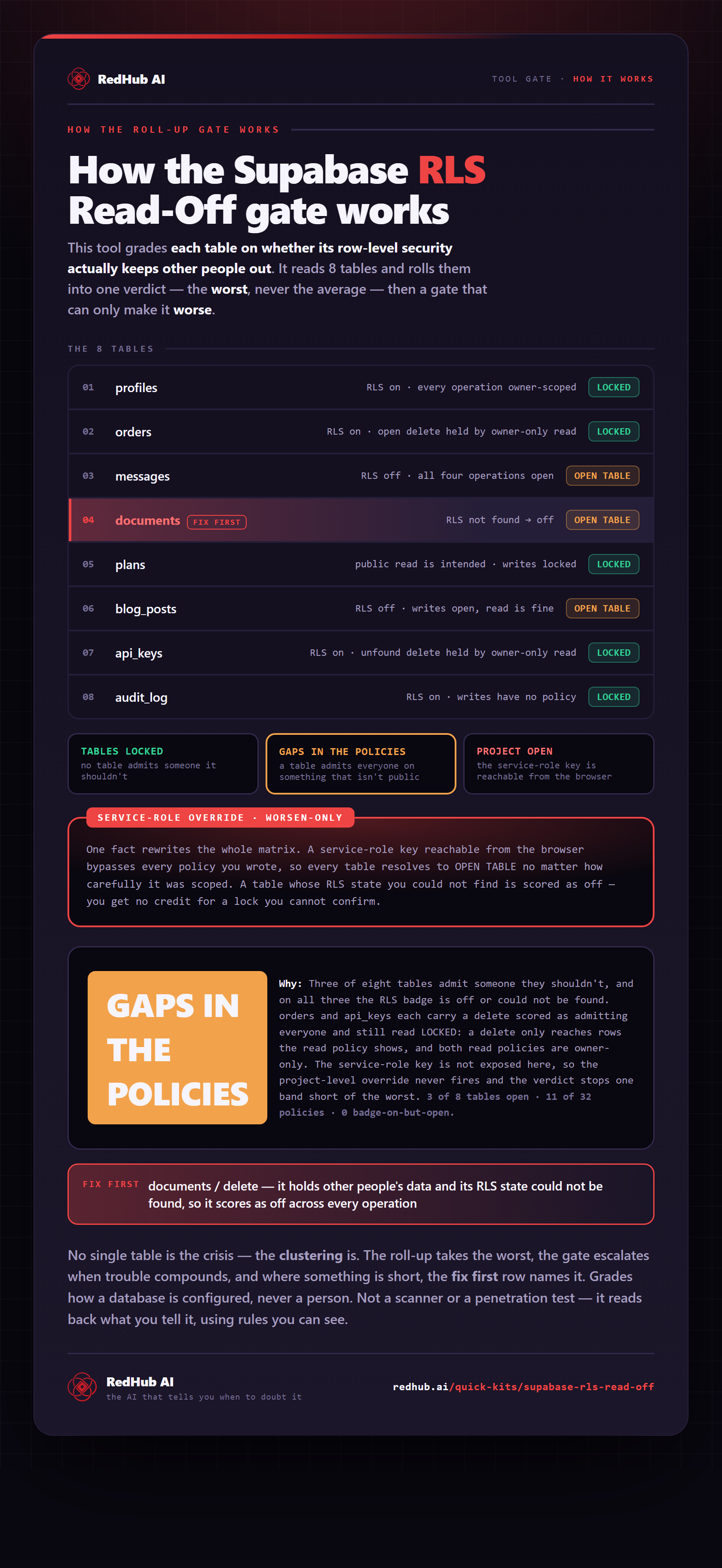
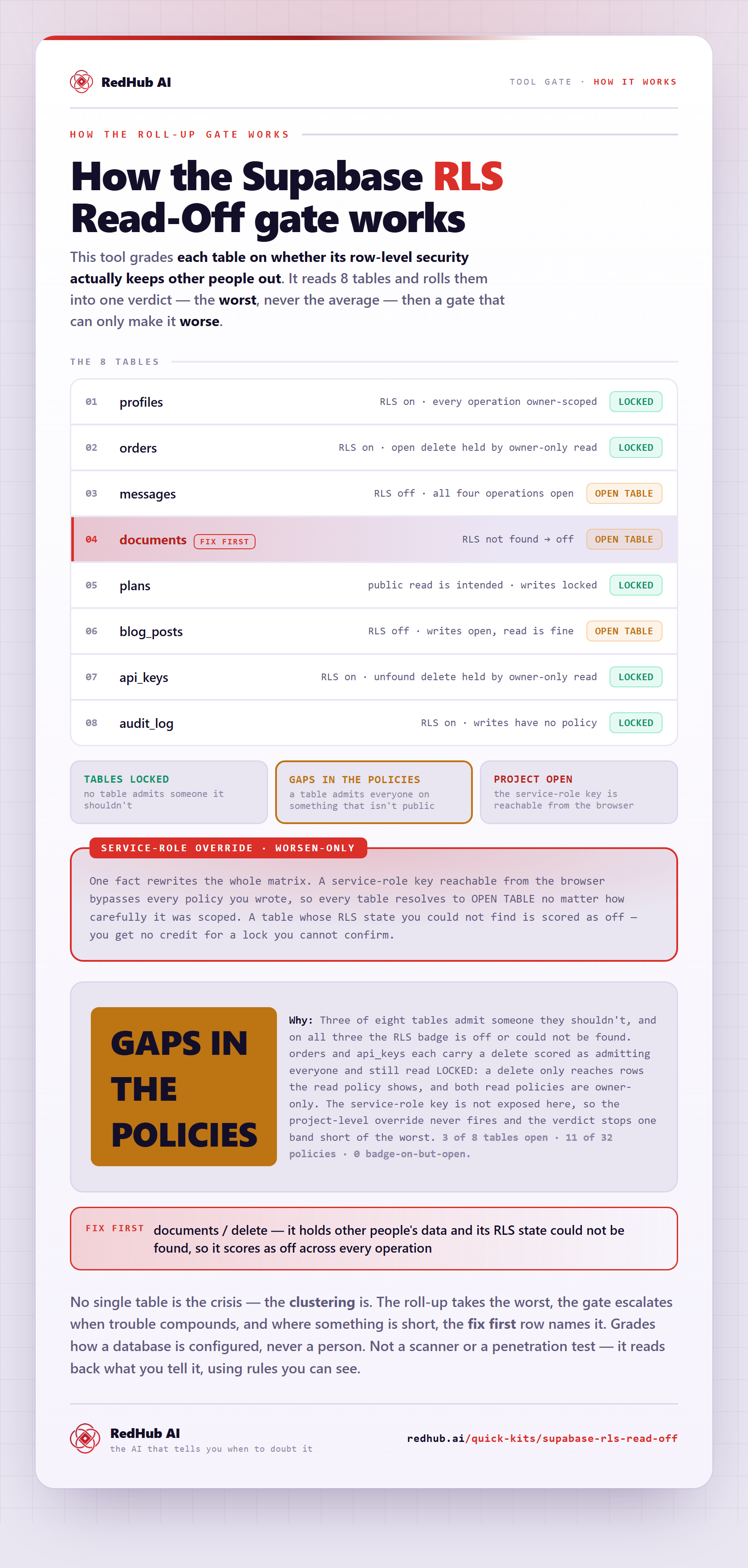
The gate this post refers to, drawn from the tool’s own logic. See the tool.