Authentication vs Authorization: Logging In Isn't Permission
RedHub AI Editorialupdated October 4, 20268 min read

Jump to a section9
Authentication vs authorization comes down to two different questions. Authentication asks who is this person, and a login answers it. Authorization asks whether this person may read, change or delete this specific record, and only your own code can answer that. An app can get the first question right, with a real signup form, real passwords and real sessions, and never ask the second at all. It will still demo well, because the person demoing it only ever opens their own data.
TL;DR: Authentication is who you are. Authorization is whether this record is yours to touch. Quick builds tend to nail the first and skip the second, because the first is what makes the app work at all. Watch the URL: if a record's id runs 1, 2, 3 and the route only checks that someone is signed in, the login protects nothing, because signing up is free. OWASP files the two failures separately in its Top 10:2025, with Broken Access Control at A01 and Authentication Failures at A07.
A lock on the front door, none on the rooms
Think of your app as an office building. The login is the lock on the front door, and it works. You tried to get in without an account and you couldn't.
Inside, every office door is unlocked. Yours has your name on it. So does the one next to it, which belongs to a customer you've never met, and nothing on either door tells the building who may go in, because the building checked people once, at the street, and never again. The front door got built, tested and demoed. Locking each room is a separate job, and nobody assigned it.
Why a working login feels like the whole answer
A login is the one piece of security work you can watch working. You built it, you clicked through it, and you saw it reject a wrong password. So when someone asks whether the app is secure, "yes, you need an account" comes to mind. It's an honest answer to a smaller question than the one asked.
The second question needs a second account to test. OWASP's IDOR prevention cheat sheet (opens in a new tab) describes the test plainly: create User A and User B, give each some records, then try to reach B's as A. Almost nobody does that during a solo build. There is only ever one person in the app, you, looking at your own stuff. Everything you see is yours, so nothing looks broken.
Two questions, answered at different times
Authentication can be answered once, at sign-in, and it stays answered for the session. Authorization has to be answered on every route that touches a record, because the right answer changes with the record being asked for. The invoice you may open is not the invoice the next customer may open.
From the outside, a route that asks one question looks identical to a route that asks both. Same login screen. Same session cookie. Same redirect when you're logged out. The difference shows up only when two people's data sits in the same table and one of them asks for the other's row.
OWASP keeps the two apart as well. In the OWASP Top 10:2025 (opens in a new tab), Broken Access Control is A01 and Authentication Failures is A07, and OWASP's note on A07 says standardized authentication frameworks appear to be cutting authentication failures. A hosted login service can take the first question off your hands. The second stays with you, because only your app knows who owns a row.
There is one partial exception. If your database enforces ownership itself, through row-level security, a route that forgets the check can still be stopped one layer down. That holds only if the policies were written for it, and whether yours were is a separate question that the read-off below does not answer.
A login is a turnstile
Most explanations skip this part. A login is not a wall. It's a turnstile. Anyone can walk up and go through, because signing up costs nothing. All the login does to a stranger is hand them a session.
So the question that decides whether a route is protected is this one: once someone is signed in, including a person who joined ten seconds ago to look around, what stops them from reaching a record that isn't theirs? If the answer is "nothing, they only need the address," and the address looks like yourapp.com/documents/482, the app asked for a number where it needed a permission. Whoever holds 482 can count to 483.
OWASP's A01:2025 page (opens in a new tab) lists this among the common access control failures: letting someone view or edit another account by supplying its unique identifier. The IDOR post in this guide walks through how that works, and why switching to random ids only half helps.
Four questions you can answer by looking
You don't need to become a security engineer to tell which routes ask the second question. Ask four things about each route. Each one is something you go and look at, not something you guess:
- What can this route reach? Does it only touch your own data or something the whole account is meant to see, or can it reach a record that belongs to someone else? Test: picture opening the route as a second, unrelated user and ask what it would show them.
- Is there a signed-in check at all? Test: log all the way out, try the route on your own app, and see whether anything stops you.
- Is there an ownership check? Not "is somebody signed in," but "does the code compare the record's owner to the person asking for it." Test: ask your AI builder to show you the line that makes this comparison. If it can't point to one, there isn't one.
- Where does the record's id come from? From the signed-in session, where the user never chooses it, or from the request, where they can type anything. Test: look at the URL or the request body. A small number that goes 1, 2, 3 is countable. A long random string usually isn't.
The answers put a route in one of four places. It checks nothing. It checks that you're signed in and stops there, on a record that could be someone else's. It checks that the record belongs to the person asking. Or it never needed an ownership check, because it only touches your own data or data the whole account shares. Two of the four are sound. The second place is the one to worry about, because it looks finished. Add a countable id from question four and it drops to the first place, where anyone can walk through it.
What authorized means in code
Authorized is a checkable fact. Somewhere on the server, before the record is returned or changed, the code compares who is asking with who owns the record. A session existing is not that comparison. The gap between an app that only authenticates and one that also authorizes is usually one missing line, not a missing feature, and the ownership check post shows that line in real code. It's cheap to write once you know it's the one you were supposed to write.
Read off every route, not only the ones you remember
Logged-In Is Not Allowed asks those four questions about each route, one row per route, in a spreadsheet you fill in from your own project. Each route lands on AUTHORIZED, MEMBERSHIP IS ENOUGH, LOGGED-IN ONLY or NOBODY IS CHECKING, and the app rolls up to PERMISSIONS HOLD, SIGNED IN IS DOING TOO MUCH or ANYONE CAN WALK IN, set by the worst route rather than the average. It isn't a scanner, and it never touches your code. It also comes in The Front Door bundle ($139), with The Browser Line Read-Off and Can You Explain Your Own App?
Get Logged-In Is Not Allowed — $59Pairs well with
The Browser Line Read-Off ($59) asks the question before this one: whether each check runs on your server at all, or is taken on trust from the browser. It routes each check ENFORCED, TRUSTS THE BROWSER or FINE IN THE BROWSER. The Supabase RLS Read-Off ($69) reads what your database will hand over regardless of your app code, one row per table and operation, which is the row-level security exception above. The Vibe-Coded App Pre-Launch Security Gate ($79) is the launch-day go or no-go across six controls, one of them server-side auth on every sensitive route. If your app is built around an AI agent instead of a login form, our post on AI agent permissions covers what the agent itself can reach, and our vibe-coding security guide covers the rest of the pre-launch list.
More in this guide
Frequently asked questions
Is authorization just a stricter kind of authentication?
No. They answer different questions, and one doesn't imply the other. Authentication confirms an identity once, at sign-in. Authorization has to be checked again on every route that touches a specific record, because the right answer depends on which record it is. An app can authenticate perfectly and authorize nothing.
If my app has a login, doesn't that mean strangers can't get in?
It means strangers can't get in without an account, and an account is free. A login screens out people who won't bother signing up. It does nothing about a signed-in person reaching a record that isn't theirs, which is a separate check your code either makes or doesn't.
Why would a record id being "countable" matter that much?
Because it turns a permission problem into an arithmetic problem. If a route checks that you're signed in and then trusts whatever id arrives in the request, and that id is a small number, a signed-in stranger can try 1, then 2, then 3. No guessing, no cleverness, only counting. The signed-in check adds nothing on that route, because getting signed in cost nothing.
Does this mean every route needs an ownership check?
No. Plenty of routes only touch your own data or something the whole account is meant to see, such as your own dashboard, a shared directory or a feedback form. Those have no other person's record to protect, so being signed in is the whole permission. Demanding an ownership check on those would be inventing work.
Is this something my AI builder should already have handled?
It builds what it's told to build. "Add a login" is a common instruction, while "check that each record belongs to the person asking" rarely gets typed, because it isn't the obvious next step after "users can sign in." The gap is a missing instruction, not a mistake in the tool.
Does "Logged-In Is Not Allowed" test my live app?
No. It's a spreadsheet you fill in yourself, offline, from your own project. It connects to nothing, uploads nothing and holds no credentials. It grades how a route is built, not whether an attack against it would succeed, and it isn't a penetration test or a certification.
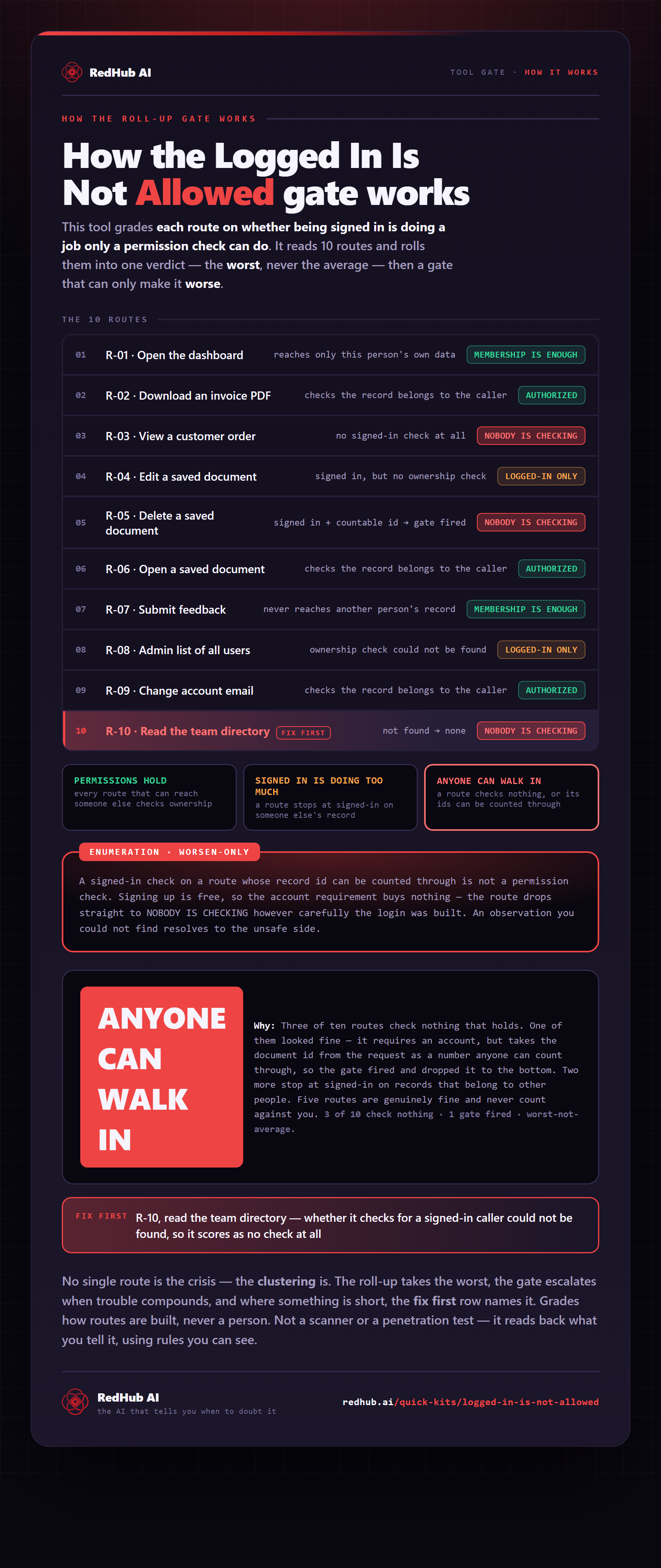
The gate this post refers to, drawn from the tool’s own logic. See the tool.