Broken Access Control, Explained Without the Jargon
RedHub AI Editorialupdated October 4, 20266 min read

Jump to a section8
Broken access control is OWASP's name for any failure that lets someone act outside their intended permissions: reading, changing or deleting something that isn't theirs. It sits at A01, first place, in the OWASP Top 10:2025 (opens in a new tab), the same spot it held in the 2021 edition. In a quickly built app it usually looks like one thing. A route checked that you were signed in and stopped there, without checking whether the record was yours.
TL;DR: Access control decides who gets to reach what. "Broken" means the app decided on the wrong basis, usually "are you signed in" instead of "is this yours." OWASP ranks Broken Access Control A01 in its Top 10:2025, and the category is broad: 40 weakness types, including server-side request forgery. A working login can sit in front of every broken route, because the login was never the broken part.
A decision made on every route
Every time your app is about to return a record, change one or delete one, it makes a decision: should this request, from this person, be allowed to do this to this record? Access control is the name for that decision. You can't switch it on once in a settings panel. It gets made on every route, correctly or not.
Broken doesn't mean the decision crashed. It means the app decided on the wrong basis. In apps built quickly, the usual wrong basis is "is somebody signed in," because it's easy to check and it's true for nearly every request a working app receives. Most traffic is legitimate. The check passes, the page loads, and the wrong question got answered without anyone noticing.
What a login proves, and what it doesn't
A login is real, and it proves something. It doesn't prove the thing people assume it proves.
| A login proves | A login does not prove |
|---|---|
| Somebody has valid credentials for an account | Which record that account is allowed to touch |
| A session belongs to a real, existing user | That the user isn't currently trying every id in the address bar |
| The person isn't a total stranger with zero account | The person isn't a stranger who made an account a minute ago |
| The app can identify who is asking | The app checked whether this person should get what they asked for |
None of the right column is exotic. A login answers identity, and identity is half of what access control needs. The other half, whether this identity may touch this thing, is a separate line of code. Broken access control is what you call an app where that line was never written.
The shapes it takes in a quick build
You don't need a taxonomy to spot this in your own app, but four shapes come up again and again:
- A route that reaches someone else's record and has no signed-in check at all. It's the plainest version and the easiest to notice by accident.
- A route that checks you're signed in and stops, on a record that belongs to someone else. This one passes every test a solo builder runs against their own account.
- A route whose record id can be counted through, 1, 2, 3. That turns the signed-in check above from weak into worthless, since anyone can sign up for free and then count.
- A route where you looked for the check and couldn't find it. Score it on the unsafe side. A check you can't find is not one you can rely on.
The second and third shapes have a working login in front of them. That is the point of the word: broken describes what's missing, not what's present.
Where OWASP ranks it, and what the rank covers
OWASP's A01:2025 page says the category kept its #1 position and has the highest number of occurrences in the data contributed for the 2025 edition. It also held first place in the OWASP Top 10:2021 (opens in a new tab), after moving up from fifth. OWASP's description of the category names the exact failure this guide is about: letting someone view or edit another person's account by supplying its identifier.
Read the rank carefully, though. A01:2025 maps 40 separate weakness types, and the 2025 edition folded server-side request forgery into it. So first place measures a wide category, not the single signed-in-but-not-the-owner route. OWASP doesn't publish how much of the ranking that one shape accounts for, and this post won't guess. The rank does settle one thing: OWASP treats access control as its own problem, apart from logins, which sit at A07 as Authentication Failures.
A question to hand your AI builder
For a fast, concrete check, pick one route that loads a record by id and ask your AI builder: "Does this route compare the record's owner to the signed-in user before returning it, or does it only check that someone is signed in?" The answer tells you which column of the table above you're in.
Then ask it to show you the line. A builder can describe a check that the code doesn't make, so if it explains the comparison but can't point to where it happens, treat that as no. Our vibe-coding security guide covers the rest of the pre-launch list, from secrets to rate limits.
One question per route, one verdict for the app
Logged-In Is Not Allowed is a read-off, not a scanner: four fixed questions per route, answered by you, in a spreadsheet with 80 rows. It doesn't connect to your app, and it grades the build, never you. A single route that reads NOBODY IS CHECKING sets the whole app to ANYONE CAN WALK IN, however many other routes are fine.
Get Logged-In Is Not Allowed — $59Pairs well with
A check that runs in the browser fails before ownership even comes up, and The Browser Line Read-Off ($59) finds those, routing each check ENFORCED, TRUSTS THE BROWSER or FINE IN THE BROWSER. When you're about to launch, the Vibe-Coded App Pre-Launch Security Gate ($79) marks six controls, including whether access control was actually tested, and bands the app LAUNCH-READY AS DESCRIBED, HARDEN FIRST or DO NOT SHIP. For the whole hardening pass, the Vibe-Coded App Hardening Kit ($79) brings a production-readiness audit, a 10-antipattern catalog, a 6-layer checklist and a monitoring template.
More in this guide
Frequently asked questions
Is "broken access control" the same thing as a bug?
Not quite. A bug usually breaks a feature and gets noticed. Broken access control is a missing check that breaks nothing visible, so the app keeps working normally for the account testing it. It's more like a missing wall than a crack in one.
Where does broken access control rank in the OWASP Top 10?
It is A01, first place, in the OWASP Top 10:2025, which OWASP lists as its current edition, and it was also A01 in the 2021 edition. The category is broad, covering 40 weakness types, so the rank describes the whole category rather than one kind of mistake. This is general information, not legal advice.
Can an app with no login have broken access control?
Yes. The term is about whether the right decision gets made before a record is reached or changed, and a login is only one piece of that decision. An internal tool with no login and a public app with a working one can land in the same broken category if neither checks ownership.
How is this different from IDOR?
Broken access control is the umbrella. IDOR, changing a record's id in a request to reach one that isn't yours, is one specific and common shape of it. Every IDOR is broken access control. Not every case of broken access control involves changing an id.
Does fixing my login fix this?
No. The login answers who's asking. This category is about what happens after that answer: whether the app then checks what they're allowed to reach. Those are two different pieces of code, and only one of them tends to get built by default.
What's the fastest way to see if I have this problem?
Pick one route in your own app that loads a record by an id in the URL and ask whether anything compares that record's owner to the signed-in user. If nothing does, and the id is a number you could count through, you've found an instance of it, and you'll likely find more once you know what to look for.
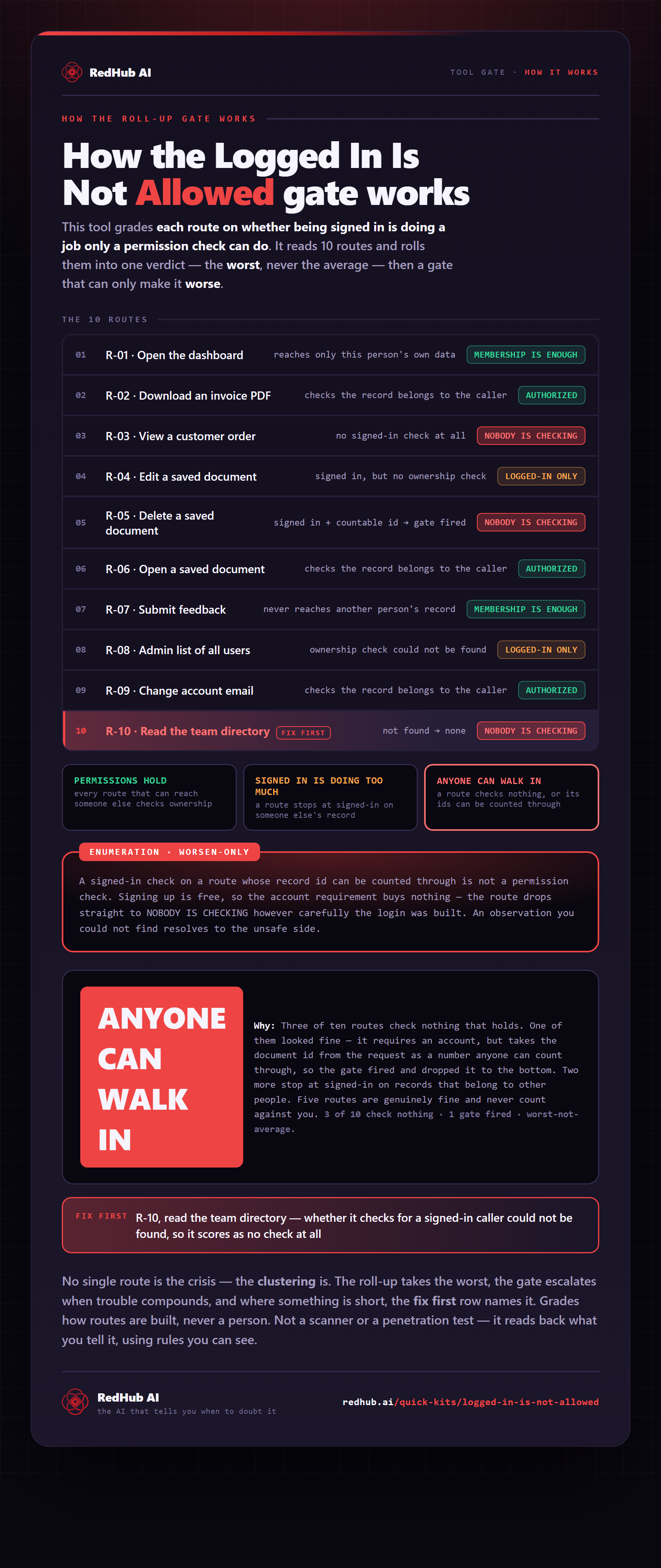
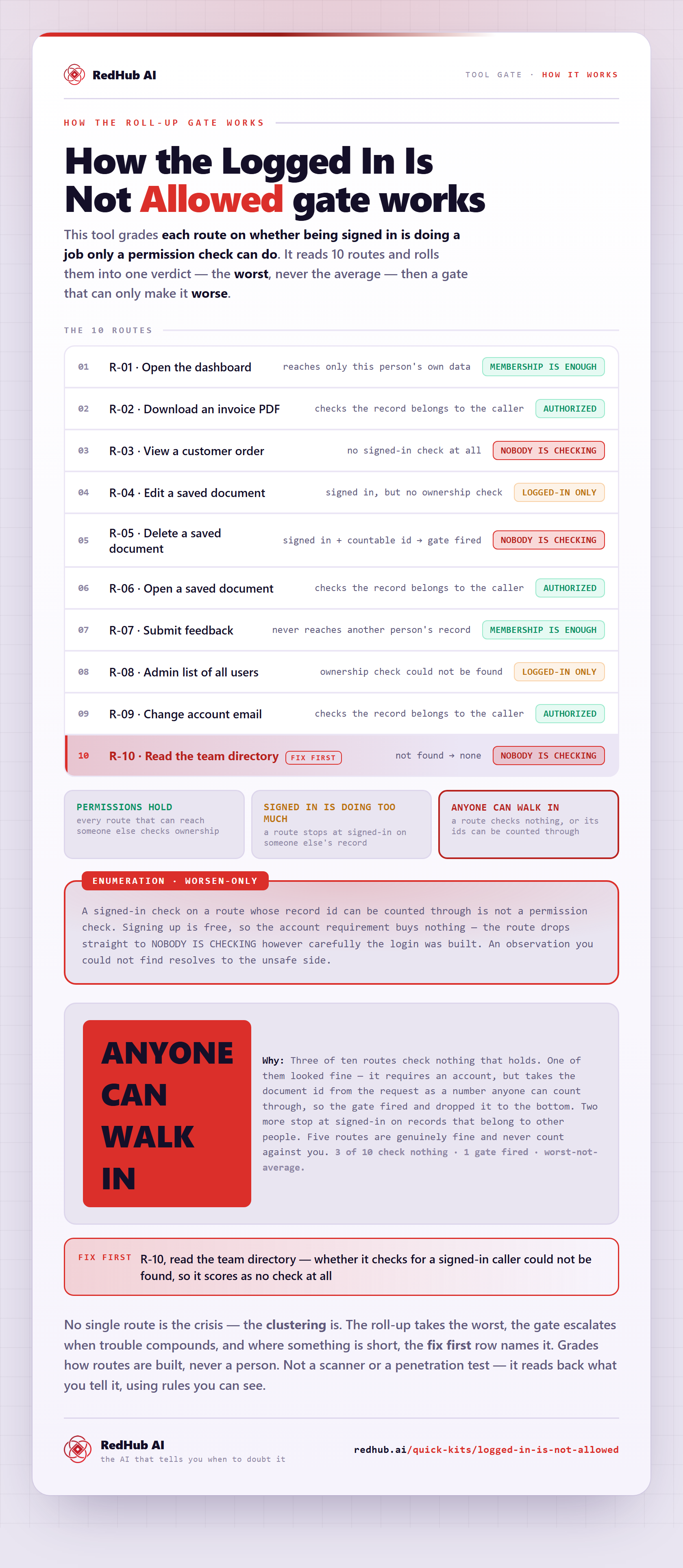
The gate this post refers to, drawn from the tool’s own logic. See the tool.