Whose Record Is This? The Check Most Apps Skip
RedHub AI Editorialupdated October 4, 20267 min read

Jump to a section9
To check record ownership, compare the record's owner column with the signed-in user's id on the server, before the record is returned or changed, and refuse the request when they don't match. The neatest way is to put both in the database query, so a record that isn't yours never comes back at all. Without that comparison, a route can require a real session from a real user and still hand over somebody else's record.
TL;DR: An ownership check ties a record to the person asking. It's one condition, usually one line, and the user id in it must come from the session, never from the request. OWASP's A01:2025 guidance says access controls should enforce record ownership instead of letting any user create, read, update or delete any record. Only routes that can reach someone else's record need it. Routes that touch only your own data don't.
What the check looks like in code
Strip away the vocabulary and it's ordinary logic. The route below is written in Node.js with Express 5 and a pg connection pool called pool, and it's shaped like a lot of first apps. Assume requireLogin is your login middleware and sets req.user from the session. This route is signed-in only:
// Signed in, but any document id works
app.get("/documents/:id", requireLogin, async (req, res) => {
  const { rows } = await pool.query(
    "SELECT * FROM documents WHERE id = $1",
    [req.params.id]
  );
  if (rows.length === 0) return res.sendStatus(404);
  res.json(rows[0]);
});
The fix adds the owner to the query. The user id comes from the session that requireLogin verified, never from the URL or the request body:
// Only the owner's document can come back
app.get("/documents/:id", requireLogin, async (req, res) => {
  const { rows } = await pool.query(
    "SELECT * FROM documents WHERE id = $1 AND owner_id = $2",
    [req.params.id, req.user.id]
  );
  if (rows.length === 0) return res.sendStatus(404);
  res.json(rows[0]);
});
Edit and delete routes take the same condition: put AND owner_id = $2 in the UPDATE or DELETE, then treat a rowCount of 0 as a refusal, not a success. Answering 404 instead of 403 for someone else's document is a choice, not a requirement. It avoids confirming that document 482 exists. Either way, the record never leaves the server.
Why the login gets built and this doesn't
A login is usually one generic layer, like the requireLogin above, applied in front of many routes at once. It asks one question, whether there's a valid session right now, and it gets written once and reused everywhere. That's why it tends to work.
The ownership check is a different kind of logic. Each route touches a different kind of record with its own owner column, so in a quick build the comparison gets written route by route, by hand. The demo never catches its absence, because the only user in the demo is you, and every record you open is yours.
OWASP's advice pulls the other way. Its A01:2025 guidance (opens in a new tab) says to implement access control once and reuse it throughout the app, and you can get close. A helper that always scopes by owner, like the Rails example in OWASP's IDOR cheat sheet (opens in a new tab), @current_user.projects.find(params[:id]), makes the comparison automatic for every route that uses it. So does a row-level security policy in the database. The catch is in "every route that uses it." The export job, the admin page and the route written in a hurry are the ones that query the table directly, and a shared helper can't protect a route that skips it. Centralizing the check shrinks the problem. It doesn't tell you which routes went around.
What it looks like when the check is missing
In the worked example that ships with Logged-In Is Not Allowed, route R-04 edits a saved document. It requires a signed-in user and stops there: nothing compares the document's owner to whoever is asking. It reads LOGGED-IN ONLY. A real session is required, and the document still isn't protected from anyone else who has an account.
Three sibling routes in the same sample make the comparison: downloading an invoice, opening a saved document and changing the account email. Each reads AUTHORIZED. Same app, same kind of route, one line of difference.
Not every route needs this check
Once you see the gap, it's tempting to put an ownership comparison everywhere. A route that opens the current user's own dashboard, accepts a piece of feedback or shows something the whole account is meant to see never reaches another person's record. There's no other owner in the picture, so there's nothing to compare. The kit reads those routes MEMBERSHIP IS ENOUGH and never counts them against you, because flagging them anyway teaches you to skim past every flag, including the ones that matter.
So the question to ask, route by route, is narrower than "does this have an ownership check." Ask whether this route can reach a record belonging to somebody else. Only those routes need the comparison.
Admin routes need a role check instead
Some routes don't map onto one record and one owner. An admin page that lists every user has no single owner to compare against. The question is the same, phrased differently: is this person allowed to see this? For an admin route, that's usually a role check, confirming the current user is an admin. In the kit's worked example, the admin list (R-08) has a login check, but nobody could find anything confirming the caller's right to see every user, so it's scored as unchecked and reads LOGGED-IN ONLY. A plain signed-in check doesn't answer the admin question either.
How to find the missing check in your own code
- Find the fetch. Test: locate the query or call that pulls the row from the database for this route.
- Find the login guard. Test: confirm there's a guard verifying a real session, separate from the fetch itself.
- Find the comparison. Test: is there a condition tying the record's owner column to the session's user id, either in the query or right after it, before the record is returned or changed? If you can't find it after a real look, the route doesn't have it.
Run the three-line check on every route
Doing this for one or two routes is an afternoon's work. Logged-In Is Not Allowed turns it into four fixed questions with dropdowns, one row per route and 80 rows in all, so the answer doesn't depend on which routes came to mind that day. A route that compares the record to the person asking reads AUTHORIZED. A route that stops at signed in reads LOGGED-IN ONLY, however carefully the login was built.
Get Logged-In Is Not Allowed — $59Pairs well with
The query above only works if documents has an owner_id column, and The Data Model Sanity Bench ($69) checks that for every table: a records table with no owner column reads NOTHING TO ENFORCE AGAINST, however good the rest. If you'd rather the database enforce ownership too, The Supabase RLS Read-Off ($69) reads whether your row-level security policies do that, and a policy that admits everyone reads OPEN TABLE. Before launch, the Vibe-Coded App Pre-Launch Security Gate ($79) asks whether access control was actually tested, as one of its six controls.
More in this guide
Frequently asked questions
What is an ownership check, exactly?
A comparison, usually one line of code, between a record's owner column and the id of the person currently signed in. It runs on the server, either inside the database query or right after the fetch, before the record is returned or changed. It's separate from any check that only confirms someone is logged in.
Does every route need an ownership check?
No. Only routes that can reach a record belonging to somebody else. A route that only touches the current user's own data, or something the whole account is meant to see, has no other person's record to protect and doesn't need this check.
Why do AI-built apps skip this so often?
Because a login guard gets written once and reused across the whole app, while the ownership comparison tends to get written route by route. Nothing in normal testing forces the question, since the person testing is usually looking only at their own data. A shared helper or a database policy helps, but only on the routes that use it.
Is this the same thing as role-based access, like admin versus regular user?
It's the same underlying question, whether this person may see this thing, applied differently. An ownership check compares a record to its owner. A role check confirms the person has a specific right, like being an admin, when there's no single owner to compare against. Both are separate from a plain signed-in check.
How do I add this check without a security background?
Find where the route fetches the record, and add the owner to that lookup: fetch the record only where its owner column matches the signed-in user's id, taken from the session. If nothing comes back, refuse the request. It's ordinary application logic, not a security library or a framework change.
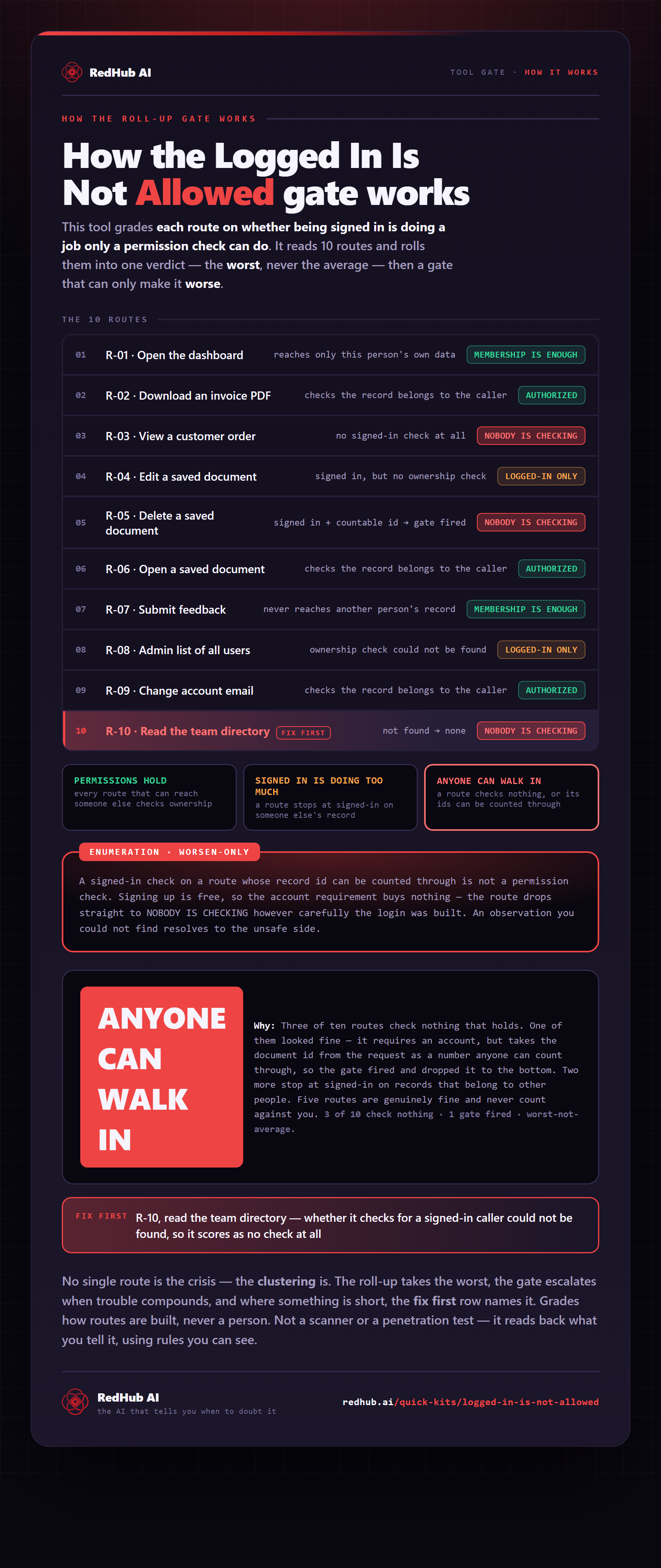
The gate this post refers to, drawn from the tool’s own logic. See the tool.