Common CSV Errors That Break Imports
RedHub AI Editorialupdated October 7, 20266 min read

Jump to a section9
Common CSV errors share one cause: the program that wrote the file and the program reading it disagree about a rule. They disagree about which character separates fields, what the columns are called, which encoding the bytes are in, how a comma inside a value is protected, or what counts as a number. That gives five errors, and they are not equally dangerous. Some stop the import cold. The others let it finish.
TL;DR: Five errors, from loudest to quietest: wrong delimiter, header drift, wrong encoding, an unquoted comma or line break, and type drift. The loud ones fail on the first row and get fixed. The quiet ones load, and the damage turns up later in someone's report. All five can be checked on the raw file before import. The CSV / Data-Export Schema & Quality Gate ($69) checks them against a schema you write. The pillar, CSV data quality, explains why structure is checked before values.
1. The wrong delimiter
CSV stands for comma-separated values, but not every "CSV" uses commas. Microsoft's own instructions for exporting text files from Excel (opens in a new tab) note that setting the decimal separator to a comma forces Excel to use a semicolon as the list separator. A reader that expects commas then sees a file with one column, named order_id;email;amount.
This is the loudest error on the list. Nothing matches, the import fails on row one, and somebody fixes the export setting. Loud errors are the cheap ones.
2. Header drift
A column gets renamed, dropped, duplicated or left blank between one export and the next. An import that maps by name fails on a required field, which is loud. It may leave an optional field empty, which is not. An import that maps by position has a worse problem: if two columns swap places, both still load, each into the other's field.
3. The wrong encoding
Encoding is the rule for turning bytes into characters. Write a file under one rule and read it under another, and any character outside plain English letters breaks. Read as the wrong encoding, café becomes café. Rows without accents, currency signs or curly quotes look fine, so a skim of the first screen proves nothing.
There is an invisible version of this too. Some programs start a UTF-8 file with a byte order mark. The Unicode Consortium's FAQ on the mark (opens in a new tab) lists its UTF-8 form as three bytes, EF BB BF. A reader that does not strip them sees the first header with three unseen bytes in front of it. On screen it says order_id. To the import, it is a different name.
4. An unquoted comma, quote or line break
When a value contains a comma, the whole value has to be wrapped in double quotes. RFC 4180 (opens in a new tab), the 2005 memo that documents the usual CSV format, says fields containing line breaks, double quotes and commas should be enclosed in double quotes, and a quote inside a quoted field is written twice.
Skip that and Acme, Inc. becomes two fields. The row is now one field too wide. A strict reader stops. A forgiving one keeps going and puts every value after the break one column to the right. This is the ragged row, and it is where the list turns from loud to silent.
5. Type drift
The quietest error leaves the file perfectly aligned. A ZIP code loses its leading zero. A date column carries 2026-05-04 in one row and 05/04/2026 in the next. An amount arrives as "1,200.50" in one row and 1200.5 in another. One cell in a numeric column says N/A.
Nothing is ragged, so nothing stops. The destination stores what it can read and blanks or mangles the rest.
There is no single rulebook
It would be tidy to call all five "invalid CSV." They are not, because there is no one definition to be invalid against. RFC 4180 is labeled Informational. It writes down common practice, and it notes along the way that some programs, Microsoft Excel among them, do not use double quotes at all.
So a semicolon file is correct for the program that wrote it. A Windows-encoded file is correct on the machine it came from. The error only exists relative to a reader. The useful question is "is this file what my import expects?" and answering it means writing the expectation down. That is what a schema is.
It also means some conflicts have no fix at the file level. If two systems read the same export and want different delimiters, one of them gets a file it calls broken.
What a gate does with each one
The CSV / Data-Export Schema & Quality Gate treats four of these as structural and one as graded. A ragged row, a duplicate or blank header, a missing required column, or a file that is not clean UTF-8 each force BLOCK. The engine reads commas unless you pass it another delimiter, so a semicolon export run without that option shows up as missing required columns and is blocked too. Type drift is graded: the column reads DIRTY and the file reads FIX.
It names the check that failed. It does not point to the row, and it does not repair anything. Finding and fixing the row is still a job for you or for whatever produced the export.
Check all five on the raw file
The CSV / Data-Export Schema & Quality Gate runs seven structural checks and a per-column quality score against a schema you define, and returns READY, FIX or BLOCK. The worked sample shows the ragged-row case: six CLEAN columns, a quality score of 100, and a BLOCK. Runnable Python engine, matching workbook, editable JSON schema, two playbooks. Offline, and it never changes your file.
Get the CSV / Data-Export Schema & Quality Gate — $69Pairs well with
When the structure holds, the Document Field Validator ($79) checks each record against fixed rules, including cross-field math, and returns PASS, REVIEW or REJECT. When the numbers live in a workbook, the Spreadsheet Formula & Model Integrity Auditor ($69) grades the formula layer; our post on spreadsheet errors covers that side. And when the export holds names, emails or account numbers, PII Detection for Structured Data ($79) checks each column and returns HANDLED, MASK FIRST or EXPOSED.
More in this guide
What are the common CSV errors that break imports?
Five: the wrong delimiter, header drift, the wrong encoding, an unquoted comma, quote or line break inside a value, and type drift. Each is a mismatch between what the writing program produced and what the reading program expects.
Which CSV error is the hardest to notice?
Type drift, because the file stays aligned. A stripped leading zero or a second date format raises no error on its own. The destination stores what it can read and leaves the rest blank or wrong.
What causes a row to have too many columns?
A comma, double quote or line break inside a value that was not wrapped in double quotes. The reader treats the comma as a field boundary, so the row gains a field and everything after it shifts.
Why do accented characters turn into symbols?
The file was written in one character encoding and read in another. Plain English letters survive, which is why the problem hides until a row with an accent, a currency sign or a curly quote appears.
Why does my CSV open as a single column?
The delimiter is not the one the reader expects. Excel, for example, can save with semicolons depending on the decimal separator setting. A reader looking for commas finds none and treats each line as one field.
Does a schema check tell me which row is wrong?
The CSV / Data-Export Schema & Quality Gate names the check that failed and the column that is dirty. It does not point to a row and it does not repair the file. That step comes after.
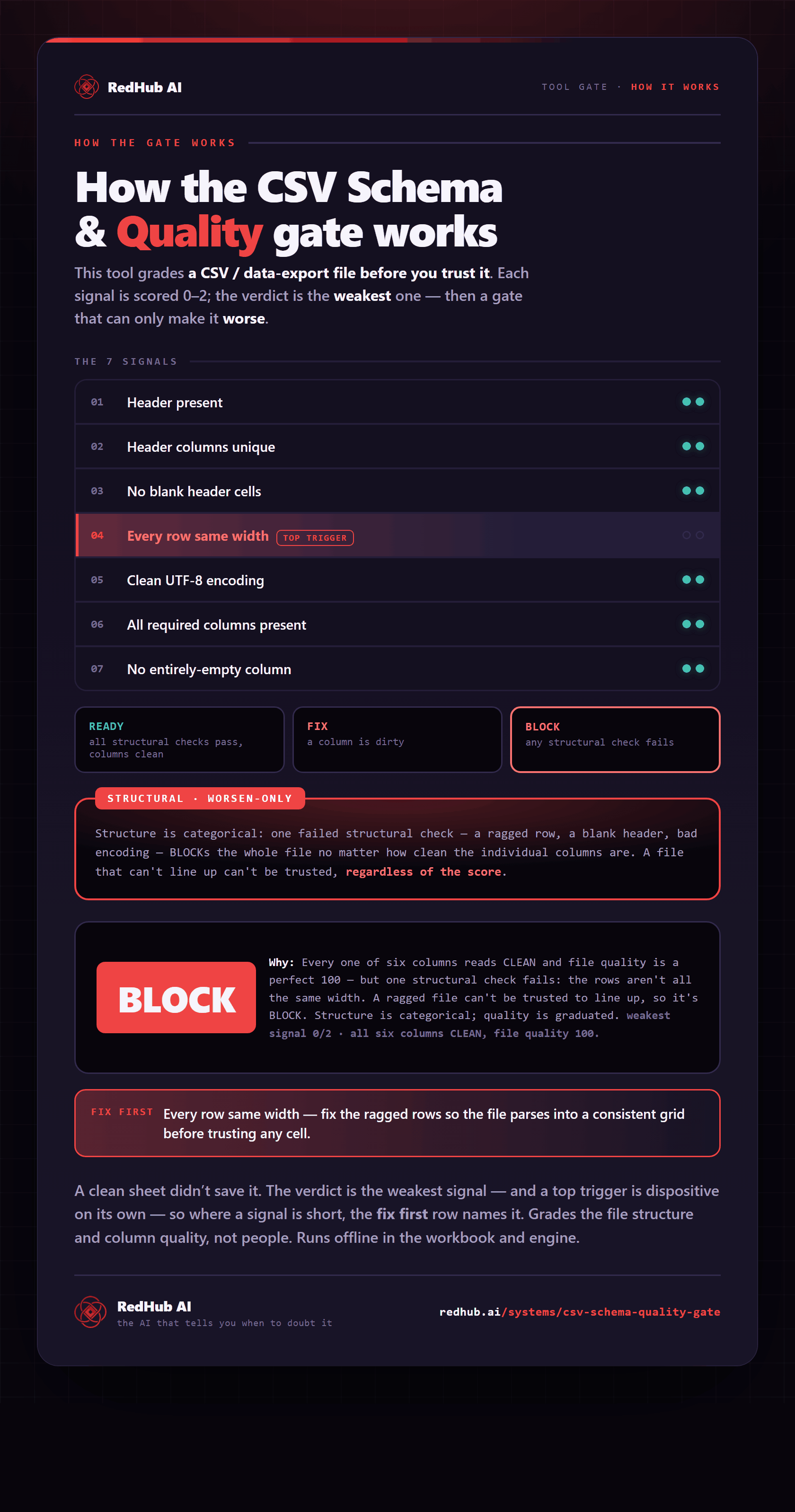
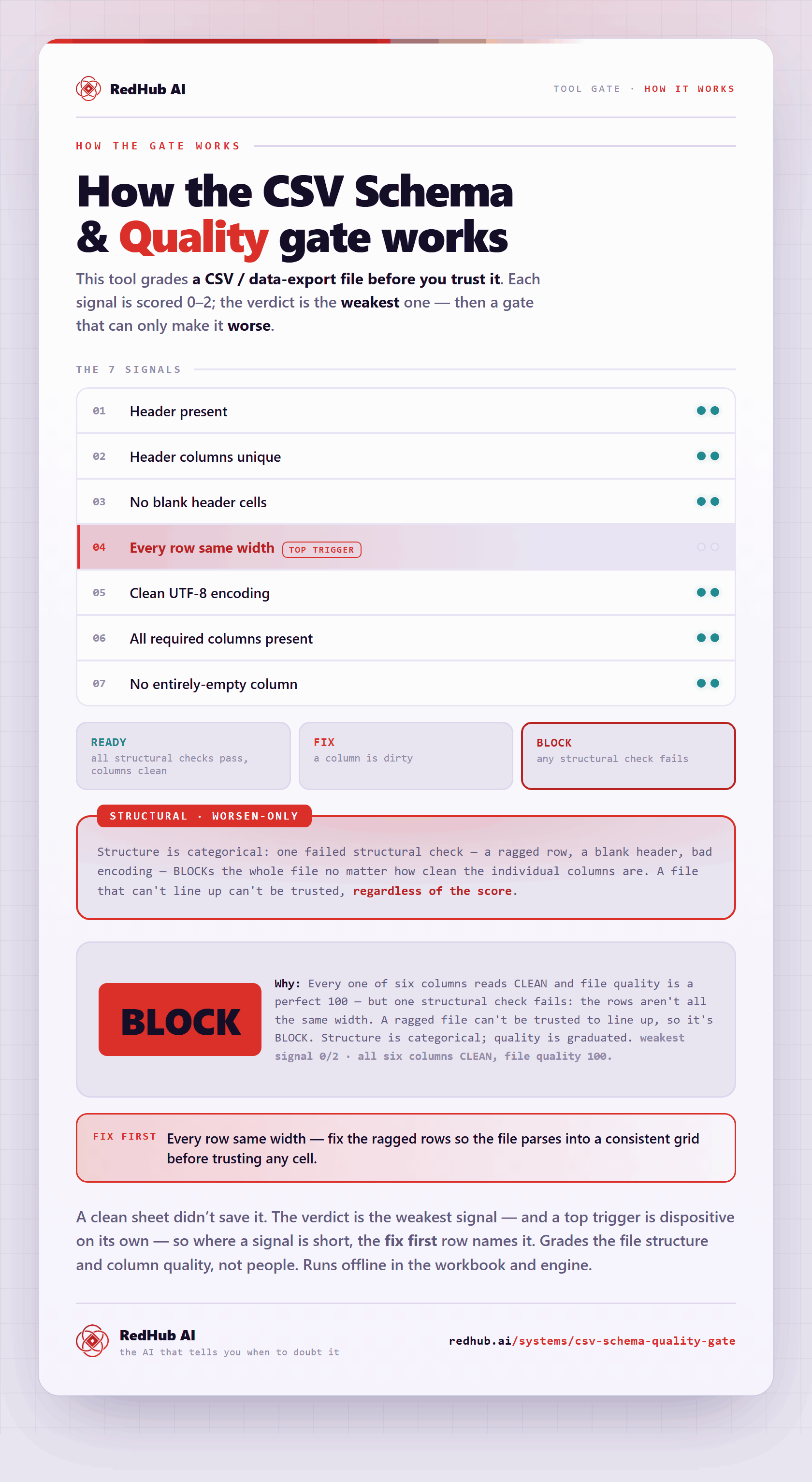
The gate this post refers to, drawn from the tool’s own logic. See the tool.