Spreadsheet Errors: How to Find Them Before They Cost You
RedHub AI Editorialupdated October 4, 20266 min read

Jump to a section6
Spreadsheet errors come in two kinds: the ones Excel shows you, like #REF!, and the ones it never will, like a tax rate typed into the middle of a formula. You find both the same way. Read the formulas instead of the totals: look for hardcoded numbers inside formulas, error values, formulas that break from the rest of their row or column, and links to other workbooks. A total that looks right tells you almost nothing about the cells that built it.
TL;DR: Spreadsheet errors hide in the formula layer, not the output. Check for hardcoded numbers, error values, inconsistent formulas and external links before you trust a model's numbers, and check for numbers pasted over formulas too, because a formula audit cannot see those. The Spreadsheet Formula & Model Integrity Auditor ($69) reads a real .xlsx and grades every formula cell. The four guides in this series go deeper: how to audit a spreadsheet you didn't build, Excel formula errors, financial model review and spreadsheet best practices.
A clean total can sit on a broken cell
A spreadsheet looks finished the moment it opens. The grid renders, the totals sum, the formatting is tidy. None of that says whether row 47 uses a different formula from every row around it.
The auditor ships with a sample that makes the point. It is a four-line budget with a neat grand total. Seven of its ten formula cells grade SOUND and the model's integrity score is 89. The auditor still returns MODEL VERDICT: BROKEN, because one cell, Budget!E7, holds =SUM(#REF!). A score of 89 sounds like a passing grade. The broken cell outranks it.
Spreadsheets also get inherited more often than they get built fresh. An analyst leaves, a consultant hands off a workbook, a founder's first draft gets extended by three more people. Each handoff can add a small change nobody flags, because nobody has time to compare every cell with its neighbors.
Four checks that need no business knowledge
- Hardcoded numbers inside formulas. The sample's
=D3*(1+0.085)bakes an 8.5% rate into the calculation. It still calculates, but the day the rate changes, that cell keeps using the old one and nothing on screen says so. - Error values.
#REF!means a formula points at a cell, row or sheet that no longer exists, usually because something upstream was deleted.#VALUE!,#DIV/0!and#N/Aeach mean a different kind of failure. Search for them on purpose. An error cell three tabs away from the summary is easy to miss, and a total that depends on it is already wrong. - A formula that breaks pattern. If 40 rows share one formula and row 22 uses a slightly different one, that is either an intended exception or a mistake. You want to know which before you rely on the total.
- Links to other workbooks. A formula that pulls from another file works until that file moves, gets renamed or sits on a drive that is offline. Then the cell can keep showing the last value Excel stored, which looks exactly like a live one.
What a formula check cannot see
Take a column where every cell multiplies quantity by price, and someone types 318 over the formula in row 4. That cell no longer holds a formula at all. It holds a number. We ran the auditor on exactly that file, and its report was identical to the clean version. Its own documentation says plain values are inputs and are not scored. It reads formulas, and a pasted number is not one.
Excel only partly covers the gap. Its error-checking rule "Inconsistent calculated column formula in tables" flags a value typed into a formula column, but only inside an Excel Table. In an ordinary range, Microsoft's list of error-checking rules has nothing for it. The manual check is Go To Special: select Constants and then Formulas, and see which cells in a block of calculations are not formulas.
The same limit applies to the model as a whole. A formula check tells you the model is built the way it appears to be built. It does not tell you whether the growth rate is realistic or whether the inputs are true. Those questions still belong to whoever owns the business logic.
Where to start, based on your situation
If you have inherited a file, start with how to audit a spreadsheet you didn't build, which sets the order of operations. For what each error code means and how to search a whole workbook for it, read Excel formula errors and how to catch them. If the model is going to a board or an investor, how to review a financial model before it goes to the board splits the review into two passes. And if you want fewer of these to find, spreadsheet best practices that prevent silent mistakes covers the habits, including one that is easy to take too far.
Grade every formula cell in a real .xlsx
The Spreadsheet Formula & Model Integrity Auditor reads your actual workbook and grades each formula cell SOUND, REVIEW or BROKEN. An error value or a broken external link forces the whole model BROKEN, whatever the integrity score says. It points to the exact cell and never edits your file. A runnable Python auditor, a workbook that reproduces the gate, a worked sample and two playbooks.
Get the Spreadsheet Formula & Model Integrity Auditor — $69Pairs well with
A formula audit checks one workbook's internal mechanics. If the trouble starts in the file being imported into it, the CSV / Data-Export Schema & Quality Gate ($69) grades that export READY, FIX or BLOCK before a formula touches it. If two or more systems' numbers should agree and don't, the Multi-Source Data Reconciliation Engine ($89) classifies every key AGREED, DISPUTED or INCOMPLETE. And if the model takes fields keyed from invoices or forms, the Document Field Validator ($79) checks each record against rules like subtotal plus tax equals total before it lands in a cell.
More in this guide
Which spreadsheet errors are hardest to spot?
The ones that return a plausible number instead of an error code: a constant typed inside a formula, a formula that differs from the rest of its row, or a plain number pasted over a formula. Each looks like every other cell until you read the formula itself.
Can I visually scan a spreadsheet for errors?
You can, and it catches obvious problems. It misses a formula that is slightly different from the rest of its row or column, because that only shows up when you compare each cell's formula with its neighbors.
What does #REF! mean in Excel?
It means a formula points at a cell, row, column or sheet that no longer exists, usually because something it depended on was deleted. The formula cannot resolve, so it returns the error instead of a value.
Will a formula audit catch a number pasted over a formula?
Not a formula-layer audit. A pasted number is a value, not a formula, so there is nothing for it to grade. Excel flags it inside an Excel Table's calculated column. In an ordinary range, use Go To Special to compare Constants with Formulas.
Does an audit check whether my numbers are correct?
No. A formula-layer audit checks that the model is built correctly: no stray hardcodes, no error values, consistent formulas. Whether your assumptions or the resulting numbers are right is a separate question it does not answer.
Will the auditor edit my file for me?
No. It flags issues and points you to the exact cell, but it never edits or writes back to your workbook. You make every change yourself.

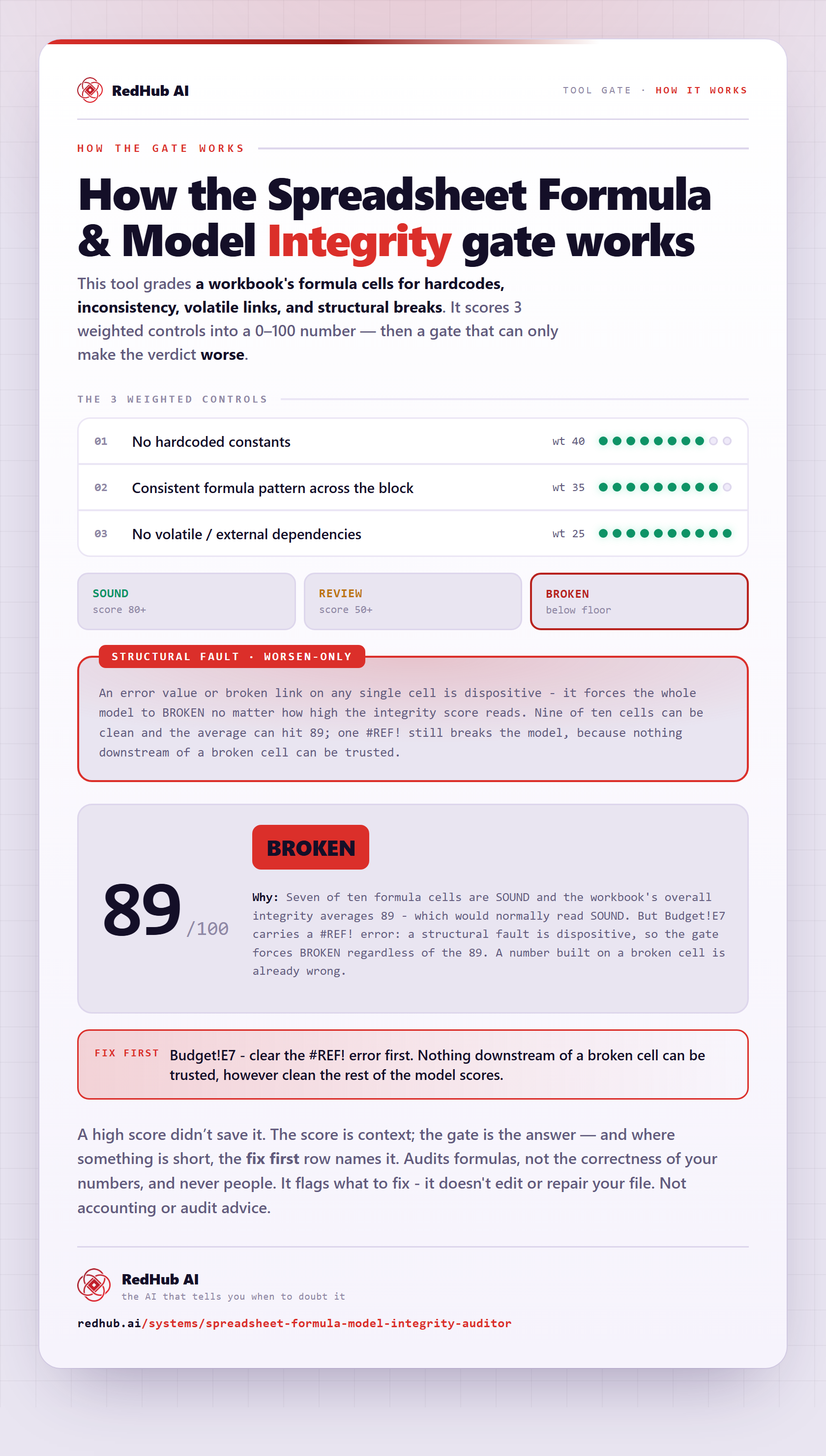
The gate this post refers to, drawn from the tool’s own logic. See the tool.