How to Validate a CSV File Before You Import It
RedHub AI Editorialupdated October 7, 20266 min read

Jump to a section8
To validate a CSV file before an import, run five checks in this order: the header row, the width of every row, the encoding, the blanks in each column, and the type of each column. The order is the method. Each check assumes the one before it passed, so a result from step five means nothing if step two failed.
TL;DR: Header, row width, encoding, blanks, types. Do the first three with a real CSV parser, not by eye and not by counting commas, because a quoted field may legally contain a comma or a line break. Do not open the file in Excel and save it: Excel can change the values while you look. The CSV / Data-Export Schema & Quality Gate ($69) runs these checks against a schema you write and returns READY, FIX or BLOCK. This post is part of the CSV data quality guide.
Before you start: looking can change the file
The natural first move is to double-click the file and scan it in Excel. That is the one check that can damage the thing it checks. Microsoft's support page on keeping leading zeros and large numbers (opens in a new tab) says it plainly: Excel automatically removes leading zeros and converts large numbers to scientific notation, like 1.23E+15. A ZIP code of 02134 shows as 2134. A sixteen-digit account number is cut to 15 digits of precision and shown in scientific notation.
If you then save, the changed values are the file. So look in a plain text editor, or open a copy, and never save over the export you are about to import.
The five checks
- The header row. Confirm it exists, that no two columns share a name, and that no header cell is blank. Then confirm every column your import needs is there under the name it expects. A renamed column is a missing column as far as the import can tell.
- The width of every row. Every row should have as many fields as the header. Check this with a parser. Counting commas per line gives wrong answers, because
"Acme, Inc."is one field with a comma inside it, and a quoted note can run across two lines and still be one row. - The encoding. Confirm the file reads as UTF-8 with no damaged characters. A name like café that shows up as café was written in one encoding and read in another.
- The blanks in each column. Decide how many blanks each column may have before you look. An order ID column should have none. A notes column can be half empty and be fine. A column that is blank from top to bottom is a different matter: the export dropped it, and that is a structural fault.
- The type of each column. Whole numbers in the ID column, decimals in the amount column, one date format in the date column, only the allowed words in the status column.
Why the order holds
Headers go first because every later check is "does column X look right," and that question needs a column X. Row width goes second because a row with one field too many has shifted everything after the break. Checking types on a shifted row grades the wrong cells against the wrong rule.
Encoding goes third because it changes what the characters are. Blanks and types go last. They are the finest checks, and they describe the data only once the coarser three have passed.
Steps one to three are yes or no. Steps four and five are a score.
This split is how the gate turns five checks into one verdict. A header, width or encoding failure is BLOCK, with no partial credit. So is a required column that is absent, or any column that is empty from top to bottom. Blanks and types are graded per column from 0 to 100, with type match worth 55 points and the blank allowance worth 25.
order_date column declared as a date in YYYY-MM-DD form. Four rows comply. One reads 05/03/2026. Four of five is 0.8, and 0.8 of the 55 type points is 44. The other parts score in full: 10 + 25 + 10 = 45. The column scores 44 + 45 = 89. It reads DIRTY anyway, because any type mismatch makes a typed column DIRTY, and the file verdict is FIX. We ran this file through the engine to confirm the result.A person reads 05/03/2026 as a date without blinking. A strict import does not, and it cannot tell whether that is March 5 or May 3. FIX is the right call at 89.
What passing does and does not tell you
READY means the file lines up and each column matches the schema you wrote. It is a statement about shape. A phone number can be well formed and belong to someone else. A date can parse and be a typo. Those are record-level questions, and they come after this one.
The verdict is also only as good as the schema. Type every column as text and nothing can mismatch. The tool cannot write the strict schema for you, and how strict is strict enough depends on what the destination does with a bad value: reject it, or quietly store it.
By hand, or with a gate
For one file, by hand is fine. A text editor and some care cover it. It stops working when exports arrive on a schedule from more than one system, because nobody reads the forty-first weekly file as closely as the first.
The CSV / Data-Export Schema & Quality Gate is a script you point at the file and a small JSON schema. It gives the same answer for the same file every time, and when a structural check fails, the output names that check as the thing to fix first. It does not repair the file. That part is still yours.
Run the same five checks on every export
The CSV / Data-Export Schema & Quality Gate grades a file against a schema you define and returns READY, FIX or BLOCK, with CLEAN, DIRTY or MISSING for each column. Runnable Python engine with no dependencies, a workbook that reproduces the scoring, an editable JSON schema and two playbooks. Offline, and it never changes your file.
Get the CSV / Data-Export Schema & Quality Gate — $69Pairs well with
Once a file is READY, the Document Field Validator ($79) checks each record against a rule pack and returns PASS, REVIEW or REJECT. If the export is one of several that must agree, the Multi-Source Data Reconciliation Engine ($89) reconciles three or more sources on one match key. And if the file carries customer details, PII Detection for Structured Data ($79) classifies each column by the personal data it holds and returns HANDLED, MASK FIRST or EXPOSED per column. It flags what to handle and does not mask anything itself.
More in this guide
What is the first thing to check when validating a CSV file?
The header row. Confirm it exists, has no duplicate or blank names, and contains every column your import needs under the name it expects. Every later check depends on finding the right column.
Can I check row width by counting commas?
Not reliably. A quoted field may contain a comma or a line break and still be one field. Use a CSV parser to count fields per row, then compare each row with the header.
Is it safe to check a CSV in Excel?
Looking is fine. Saving is the risk. Microsoft's support pages state that Excel removes leading zeros and converts large numbers to scientific notation, so a save can write changed values back into the file. Open a copy.
Does validating a CSV file fix the problems it finds?
No. Validation reports what is wrong. Fixing it means changing the export setting, re-exporting, or cleaning the file in a separate step.
Is checking types the same as checking the values are correct?
No. A type check confirms a date column holds dates in the expected format. It cannot confirm the date is the right one. That is record-level validation, and it runs after the file passes.
Why would one bad date make a column DIRTY when it scores 89?
In the CSV / Data-Export Schema & Quality Gate, any type mismatch in a typed column makes it DIRTY, whatever the score. One unreadable date is enough to break a strict import, so the file gets FIX, not READY.
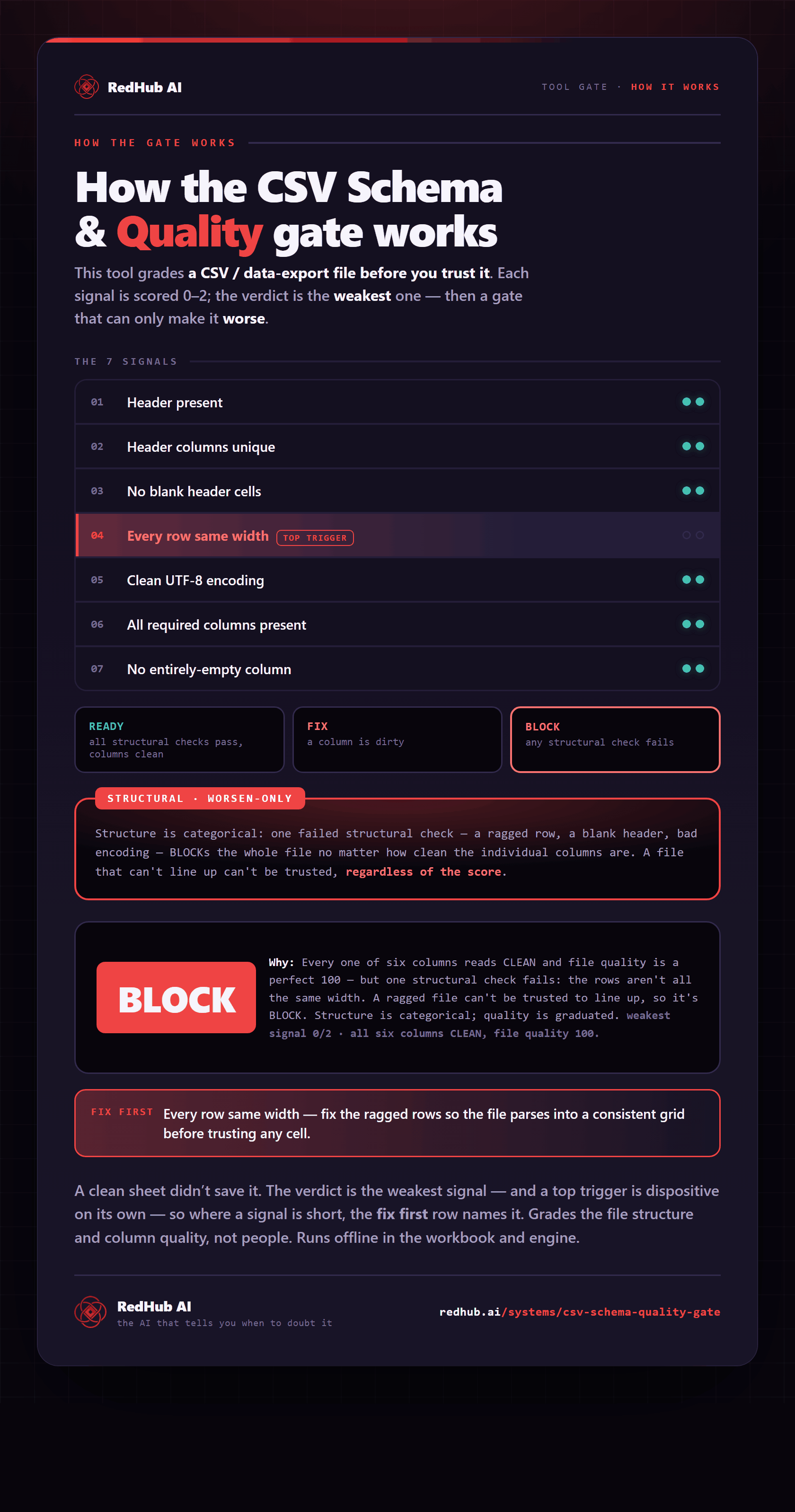
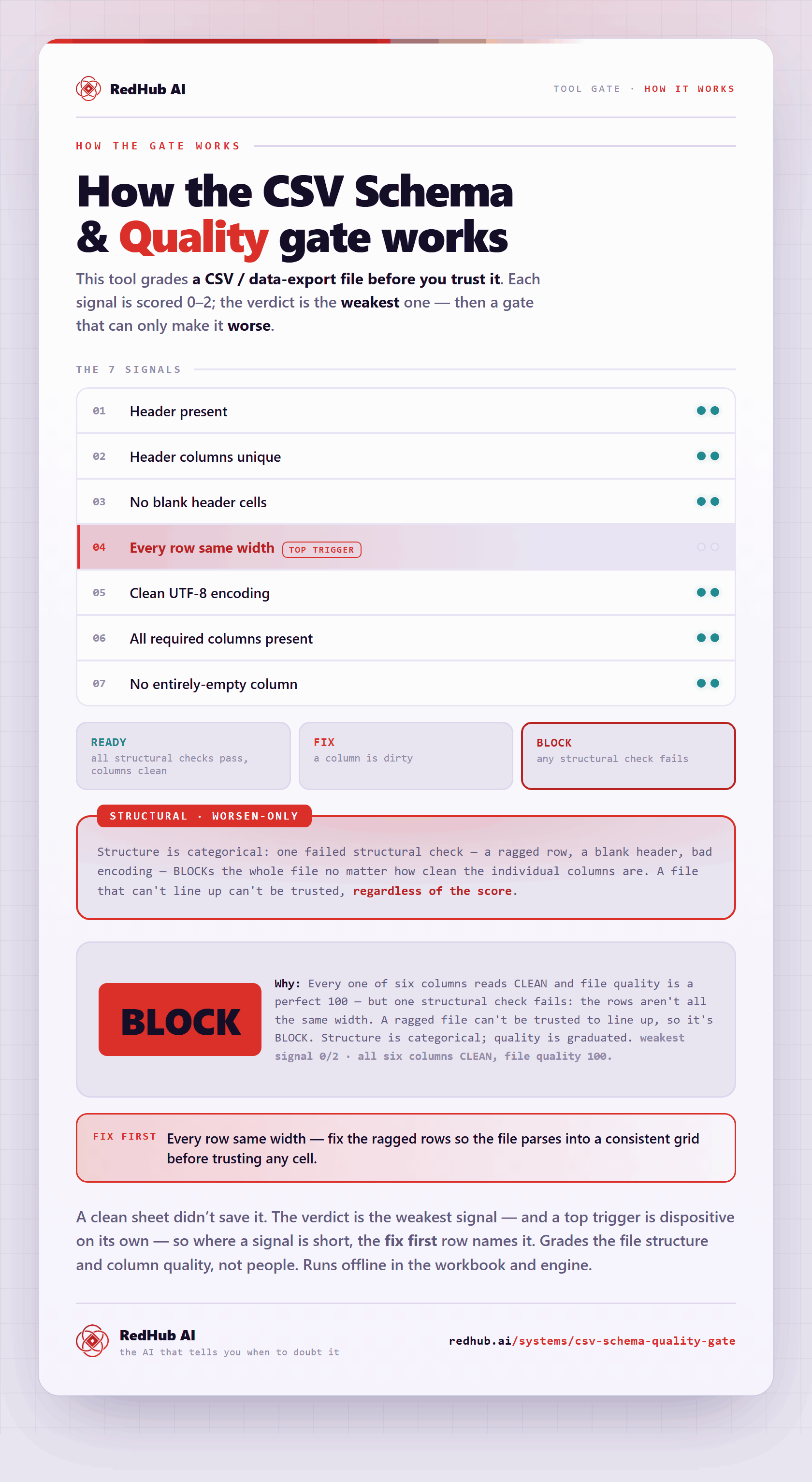
The gate this post refers to, drawn from the tool’s own logic. See the tool.