Account Reconciliation: How to Make It Self-Checking
RedHub AI Editorialupdated September 7, 20265 min read

Jump to a section8
TL;DR
- What it is: account reconciliation is confirming that two numbers that should agree — a sub-ledger and the general ledger, cash and the bank statement — actually do.
- Who it's for: anyone who signs off on monthly figures before they become a report — see RedHub Systems.
- How it works: instead of eyeballing whether two numbers "look close," a self-checking reconciliation runs a formula and labels the result Ties out, Review, or Does not reconcile.
- Bottom line: reconciliation only works if it catches the small drift, not just the obvious mismatch — a self-checking process does both, consistently.
What Is Account Reconciliation?
Account reconciliation is the process of comparing two records of the same balance — like a sub-ledger against the general ledger, or cash on the books against the bank statement — to confirm they agree, or to identify and explain the difference if they don't. It's the step that turns "the numbers probably look right" into "the numbers are confirmed right, or we know exactly why they're not."
Best for: anyone closing the books who wants reconciliation to be a repeatable check, not a judgment call made under deadline pressure. See the Finance & Reporting Automation Kit.
Account reconciliation sounds simple: check that two numbers match. In practice, most reconciliation problems aren't about big obvious mismatches — those get caught. They're about small differences that get waved through because someone eyeballed two numbers under time pressure and decided they were "close enough."
The Three Reconciliation States
A reconciliation that only has two outcomes — match or don't match — throws away useful information. A small $3 rounding difference and a $30,000 missing entry shouldn't get treated the same way. That's why a self-checking reconciliation uses three labels instead of two:
| State | What it means | What to do |
|---|---|---|
| Ties out | The difference is within the tolerance you've defined as acceptable — rounding, timing, immaterial | No action needed; move on |
| Review | The difference is bigger than "ties out" but not clearly a real error | Look at it before sign-off — it may be fine, but confirm |
| Does not reconcile | The difference is beyond any reasonable tolerance | Find and fix the cause before the report goes anywhere |
The tolerances that define each label aren't universal — they're set by your own materiality. A $50 difference might be a non-issue for one business and worth a Review for another. What matters is that the tolerance is defined in advance, in writing, so the label doesn't quietly shift depending on who's closing the books that month.
How to Make Reconciliation Actually Self-Checking
- Pick the pairs of numbers that need to agree — balance sheet totals, sub-ledger vs. GL, cash vs. bank, income statement consistency, budget vs. actual.
- Set a tie-out threshold (small, rounding-level) and a review threshold (bigger, but not yet a confirmed error) for each pair.
- Run the comparison with a formula, not a glance — the same formula every month, on every pair.
- Label the result automatically: Ties out, Review, or Does not reconcile.
- Roll every individual result into one overall status, so a reviewer can tell at a glance whether the period is clean.
Key insight: the point of a self-checking reconciliation isn't to remove the human — it's to make sure the human's attention goes to the two or three lines that actually need it, instead of being spread thin across everything.
What Gets Reconciled in a Typical Monthly Close
Most closes should run these checks, each against its own defined tolerance:
- Balance sheet balances — Assets equal Liabilities plus Equity.
- AR and AP sub-ledgers vs. the general ledger — the aging detail should match the GL control account.
- Cash vs. the bank statement — the book balance should tie to the bank, adjusted for outstanding items.
- Income statement consistency — Revenue minus Expenses should equal the Net income line.
- Budget vs. actual variance — flagged when a line moves outside the percentage you've set as normal.
Stop eyeballing the tie-out
The Finance & Reporting Automation Kit's self-checking workbook runs these exact reconciliations automatically and labels each one Ties out, Review, or Does not reconcile — with one overall close status.
Get the Finance & Reporting Automation Kit — $129 →When You Have More Than Two Sources
A standard close reconciles pairs — the sub-ledger against the GL, cash against the bank. Some businesses need more: three, four, or more systems that all need to agree on the same key, like a payment processor, a CRM, and an ERP all reporting on the same transaction. That's a different, deeper problem than a standard tie-out, and it's what the Multi-Source Data Reconciliation Engine is built for — it classifies every key across three or more sources as AGREED, DISPUTED, or INCOMPLETE, with a hard rule that a single disputed key blocks the reconciled verdict.
For the full close process this reconciliation sits inside, see how to run a faster, repeatable month-end close. And once reconciliation is trustworthy, turning the result into a report worth reading is covered in management reporting.
Decision Guide
Use a self-checking reconciliation if: you're currently eyeballing whether two numbers "look close," or reconciliation quality depends on who's rushed and who isn't.
Skip it if: you need cross-system reconciliation across three or more sources on one key — that's a deeper problem than a standard tie-out.
Best first step: pick your single most error-prone reconciliation, set a written tolerance for it, and automate that one check first.
FAQ
What is account reconciliation?
Comparing two records of the same balance — like a sub-ledger and the general ledger — to confirm they agree, or to identify why they don't.
How do I reconcile accounts without doing it by hand every time?
Set a defined tolerance for each reconciliation, then run the comparison with a formula that labels the result automatically instead of eyeballing it each month.
What does "Ties out" mean?
The difference between two numbers is inside the tolerance you've defined as acceptable — typically rounding or timing — so no action is needed.
What's the difference between "Review" and "Does not reconcile"?
Review means the difference is bigger than a rounding gap but not clearly an error — worth a look before sign-off. Does not reconcile means the difference is beyond any reasonable tolerance and the cause needs to be found and fixed before reporting.
Who sets the reconciliation tolerance?
You do, based on your own materiality. There's no universal dollar threshold — what counts as "close enough" for one business may not for another.
Should I ever adjust a number just to make a reconciliation tie out?
No. If a check flags Does not reconcile, find and fix the actual cause. Changing a figure to force a check to pass hides the problem instead of solving it.
Does account reconciliation replace an accountant's review?
No. It's a working aid for bookkeeping, not accounting, tax, or financial advice. A qualified accountant should still review anything flagged and any figures used for filings.
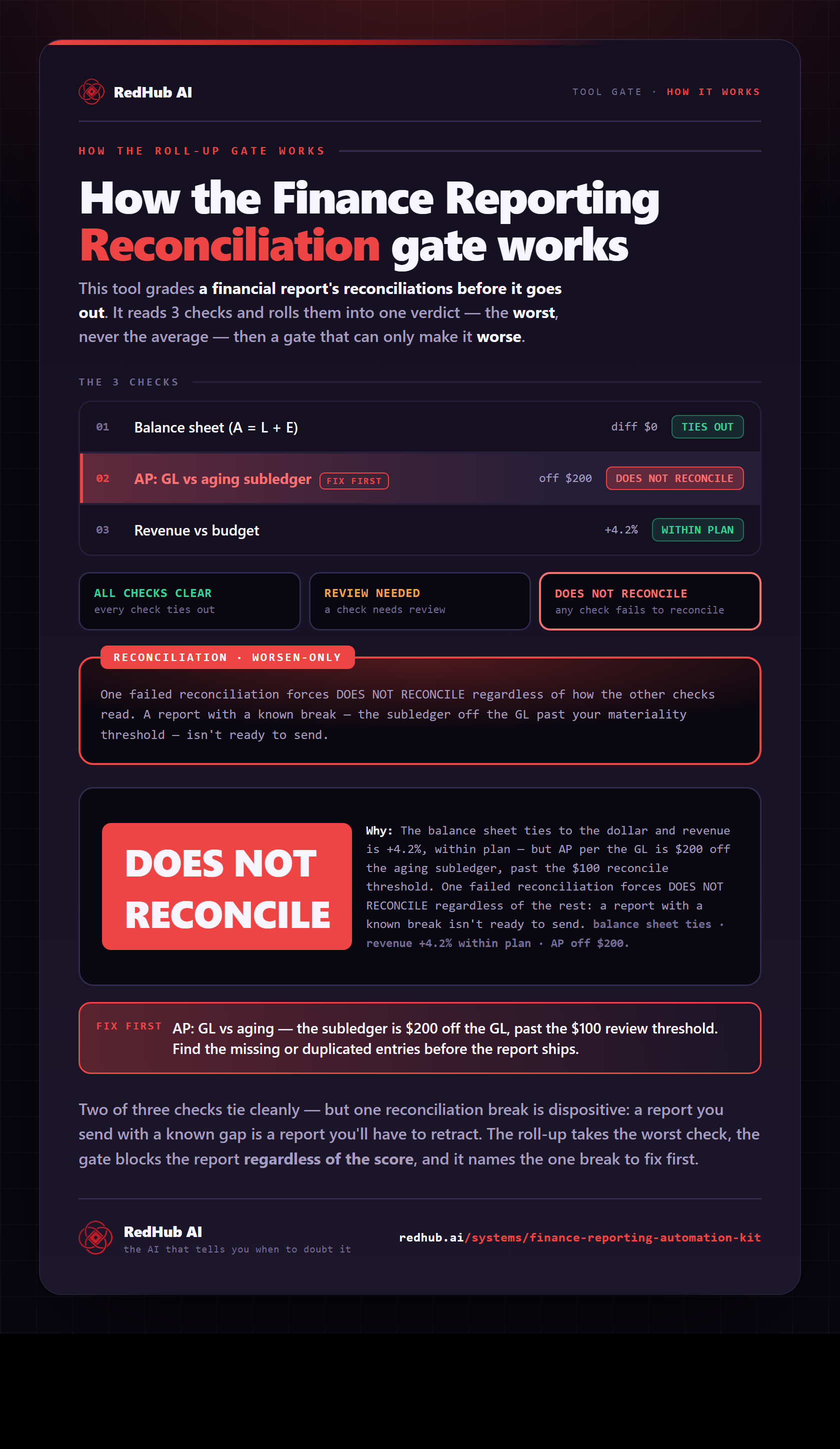
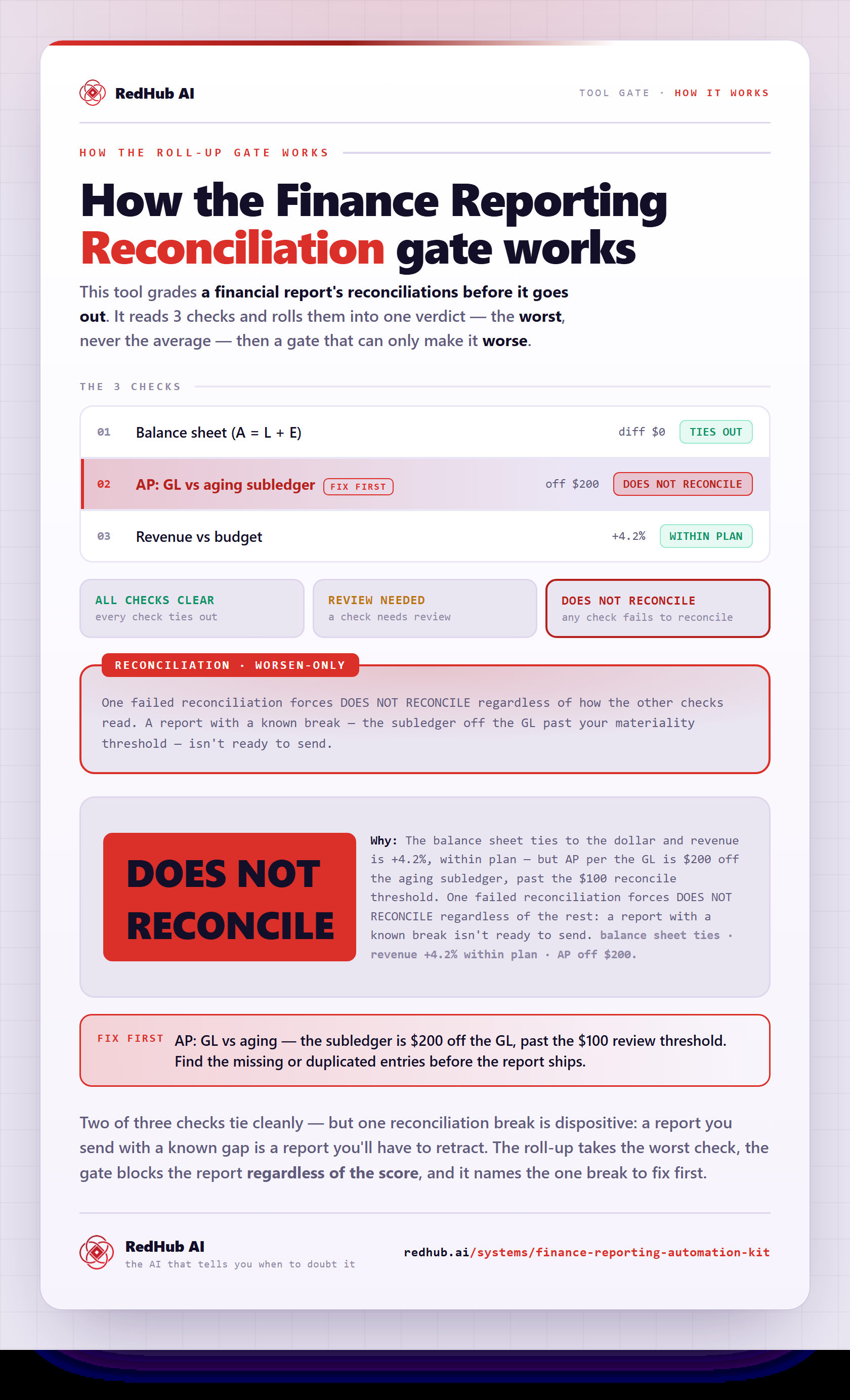
The gate this post refers to, drawn from the tool’s own logic. See the tool.