How to Close the Books Faster (Without Cutting Corners)
RedHub AI Editorialupdated September 7, 20265 min read

Jump to a section7
TL;DR
- What it is: closing the books faster means removing the specific manual time-wasters in a close — not skipping checks to save time.
- Who it's for: anyone whose close drags on longer than it should — see RedHub Systems.
- How it works: name each time-waster (re-keying data, chasing files, manual double-checks, late variance surprises) and fix the cause, not the symptom.
- Bottom line: speed and accuracy aren't in tension — most of the time a manual close loses is spent on repetitive work that automation removes without touching the actual checking.
What Does It Take to Close the Books Faster?
Closing the books faster means identifying the specific repetitive, manual steps that stretch out your close — re-typing figures, chasing down files, eyeballing reconciliations, waiting on late explanations — and removing each one at its source, usually with a template, an SOP, or a self-checking workbook. It does not mean cutting the checks that catch errors; the goal is removing wasted motion, not removing the safety net.
Best for: any close that consistently runs longer than the business can afford, without a clear reason why. See the Finance & Reporting Automation Kit.
Ask most people why their close is slow and you'll get a vague answer: "it's just a lot of work." It usually isn't the amount of work — it's a handful of specific time-wasters, repeated every single month, that nobody has ever sat down and fixed.
The Real Time-Wasters in a Manual Close
Here are the ones that show up again and again, and the fix for each:
| Time-waster | Why it's slow | The fix |
|---|---|---|
| Re-keying the same figures into multiple sheets | Every re-type is a chance to fat-finger a number, and it takes real time even when it's correct | One input point that feeds every downstream tab or report |
| Chasing down the "latest" version of a file | Time spent finding the right spreadsheet is time not spent closing | One shared, versioned workbook instead of emailed copies |
| Eyeballing whether two numbers match | Slow, and error-prone exactly when you're rushed to finish | A formula-driven check with a clear Ties out / Review / Does not reconcile label |
| Re-deciding the order of steps each month | Time lost to figuring out what to do next instead of doing it | A written close SOP that's the same every month |
| Waiting on a late explanation for a variance | The report stalls on one missing answer | Catch variances early with automatic checks, not at the finish line |
| Rebuilding the report format from scratch | Formatting time that adds nothing to accuracy | A standing template that only the numbers change in |
Why "Just Skip Some Checks" Isn't the Answer
The tempting shortcut when a close is running late is to skip a reconciliation "just this once" and catch up next month. That's how a small drift becomes a real problem — the check that gets skipped under pressure is usually the one that would have caught something.
The better fix is making the checks themselves fast, not making them optional. A self-checking reconciliation that runs in seconds removes the incentive to skip it, because it was never the slow part to begin with.
Key insight: almost every time-waster above has nothing to do with judgment — it's repetitive, rules-based work. That's exactly the kind of work automation is good at, and exactly the kind of work that's safe to automate without losing any real checking.
Where to Start
- Time your current close, roughly, and note which step actually eats the most hours — it's rarely the one that feels the most annoying.
- Pick the single biggest time-waster from the table above and fix just that one first.
- Write the fix into your close SOP so it's the new standard, not a one-time trick.
- Repeat with the next-biggest time-waster next month.
Fixing one time-waster at a time beats trying to overhaul the whole close at once — a close that's rebuilt gradually is a close people actually stick to.
Cut the manual reconciliation time-waster
The Finance & Reporting Automation Kit's self-checking workbook removes the slowest, most error-prone step — manual reconciliation — and pairs it with a documented close SOP so the rest of the process stays consistent too.
Get the Finance & Reporting Automation Kit — $129 →For the full checklist this fits inside, see how to run a faster, repeatable month-end close, and for the reconciliation logic specifically, see how to make account reconciliation self-checking. Once the close is fast and the books are trustworthy, the next natural step for many businesses is looking forward instead of back — see Cash-Flow Sentinel for runway and burn-trajectory tracking once the period is closed.
Decision Guide
Fix the time-wasters if: your close reliably takes longer than it should, and you can name the step that eats the most time.
Don't cut checks if: the close is late — a skipped reconciliation to save time is how errors get through, not a real fix.
Best first step: time your next close honestly, step by step, and automate whichever single step ate the most hours.
FAQ
How can I close the books faster without skipping checks?
Automate the repetitive, rules-based steps — re-keying figures, reconciling accounts, formatting the report — and keep every check in place. Speed comes from removing wasted motion, not from removing the safety net.
What's the biggest time-waster in a manual close?
It varies by business, but eyeballing whether two numbers reconcile and re-keying the same figures into multiple sheets are the two most common — both are rules-based work automation handles well.
Is it safe to skip a reconciliation to catch up when the close is late?
No. Skipping a check under time pressure is exactly when an error is most likely to slip through unnoticed. Make the check faster instead of skipping it.
Should I fix every time-waster at once?
No — fix the single biggest one first, write it into your close SOP, and move to the next one the following month. Gradual fixes stick better than a full overhaul.
Does automating the close mean I lose control of my numbers?
Not if the automation is a checking layer you control, like a workbook you enter figures into — it doesn't need to connect to or take over your accounting system.
How do I know if my close is actually slow, or just feels slow?
Time it, step by step, for one full cycle. Most people are surprised by which step actually eats the most hours — it's rarely the one that feels the most annoying in the moment.
Is speeding up the close accounting advice?
No. This is process guidance for running a faster close, not accounting, tax, or financial advice. The figures and any filings remain your and your accountant's responsibility.
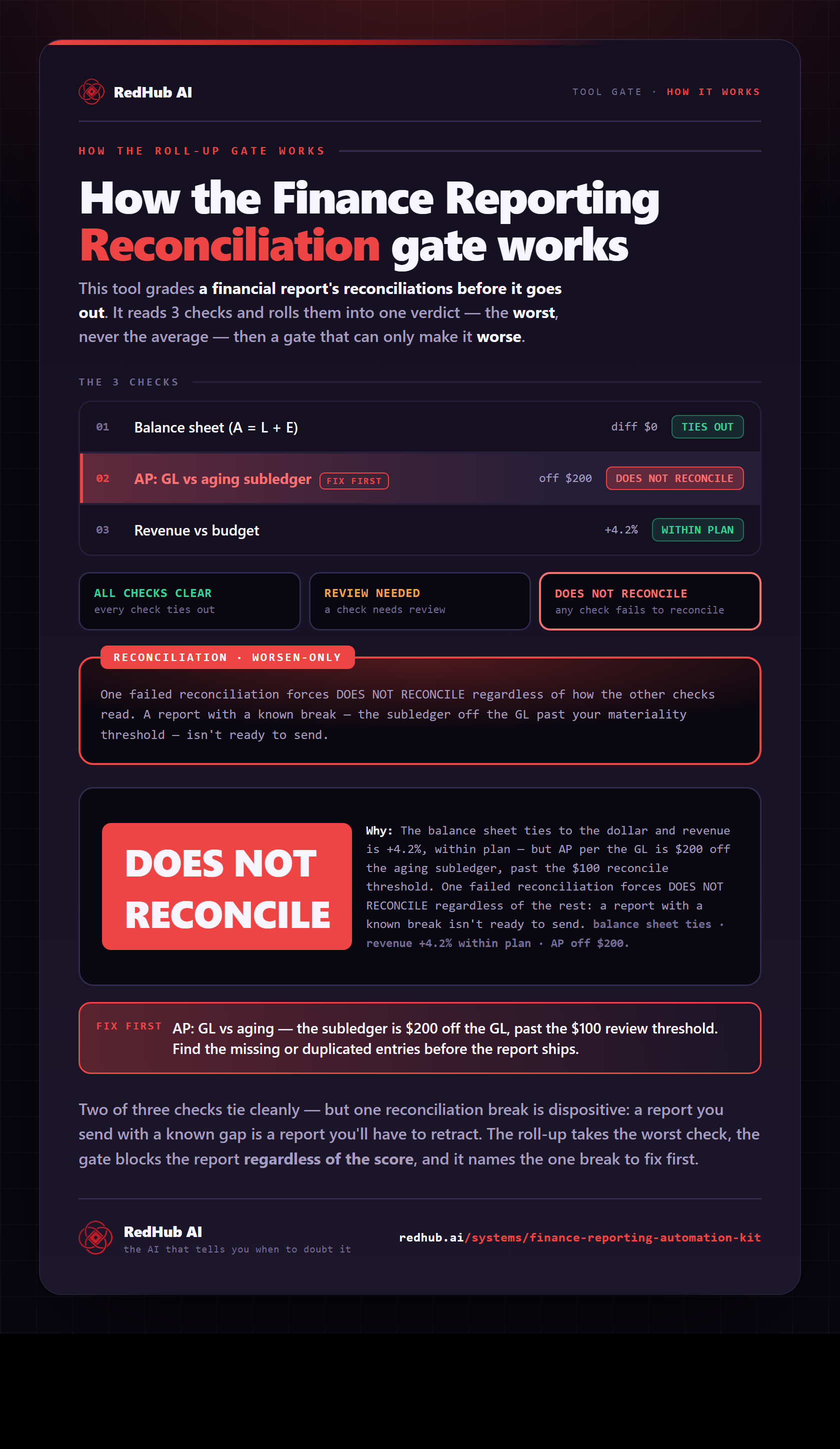
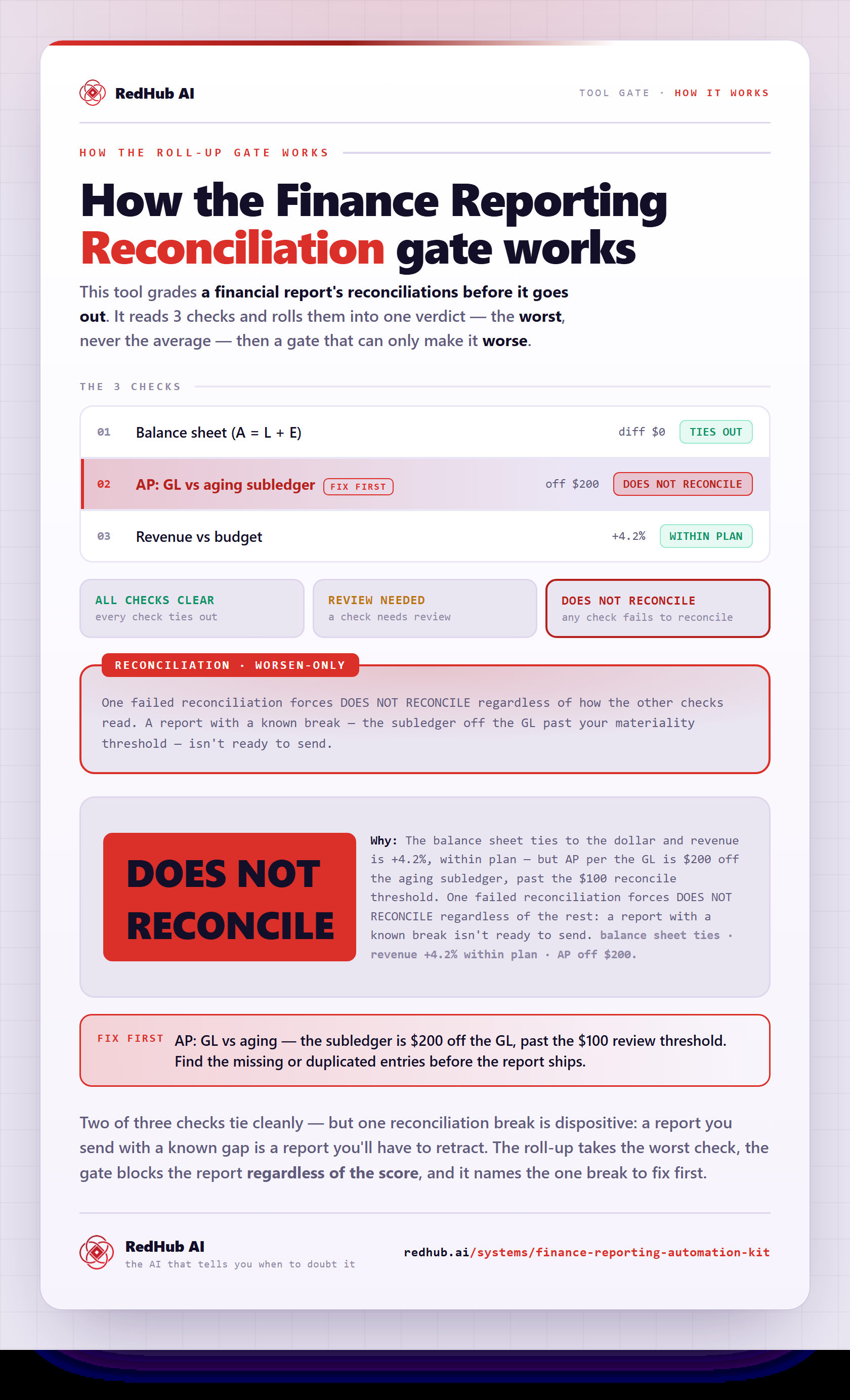
The gate this post refers to, drawn from the tool’s own logic. See the tool.