Financial Reporting Automation: Close Faster, Trust It
RedHub AI Editorialupdated September 7, 20266 min read

Jump to a section11
- TL;DR
- What Is Financial Reporting Automation?
- The Problem Isn't Effort. It's Repetition Without a Check.
- What Financial Reporting Automation Actually Automates
- Try a Mini Self-Check
- Month-End Close, Account Reconciliation, and Management Reporting Aren't the Same Thing
- Why "Faster" Isn't the Only Goal
- What This Doesn't Replace
- Decision Guide
- More in this guide
- FAQ
TL;DR
- What it is: financial reporting automation means letting software run the repeatable steps of your monthly close — and, done right, making the workbook check its own reconciliation before you sign off.
- Who it's for: bookkeepers, controllers, fractional CFOs, and founders who own the numbers — see the full RedHub Systems lineup.
- How it works: you enter the period's figures, the workbook runs every tie-out, and each one is labeled Ties out, Review, or Does not reconcile.
- Bottom line: automation should speed up the close, not just skip a step — the real win is a report that's already been checked before anyone reads it.
What Is Financial Reporting Automation?
Financial reporting automation is the use of templates, formulas, and software to run the repeatable parts of monthly reporting — pulling figures together, running reconciliations, and formatting the report — instead of doing each step by hand every month. The strongest version doesn't just save typing. It checks its own math: every reconciliation gets a clear label (Ties out, Review, or Does not reconcile) before the report goes anywhere.
Best for: any business that closes its books monthly and wants that close to be faster and more trustworthy — not a replacement for an accountant, a way to catch what a tired, rushed close would miss. See the Finance & Reporting Automation Kit.
Most monthly closes aren't slow because the math is hard. They're slow because the same steps get redone by hand every month, and nobody has time to double-check the numbers twice before the report goes out. Financial reporting automation fixes both problems at once: it removes the repeat work, and — if it's built right — it forces every reconciliation to prove itself before you sign off.
The Problem Isn't Effort. It's Repetition Without a Check.
A typical close looks like this: pull the trial balance, chase down a few sub-ledgers, eyeball whether cash matches the bank, glance at the budget variance, and write it up. Every step is manual. Every step is also exactly the same step from last month — just with new numbers.
That repetition is where errors hide. A sub-ledger drifts a little from the general ledger. A cash entry is off by a small amount. Nobody notices, because nobody re-checks the same tie-out they checked last month with fresh eyes. The report ships. The error surfaces later — sometimes a lot later.
What Financial Reporting Automation Actually Automates
Not judgment. Not the decisions a controller or CFO makes about what a number means. What it automates is the repeatable, rules-based work sitting in front of those decisions:
- Pulling the period's figures into one place instead of re-typing them from five different sources.
- Running the reconciliations — balance sheet, sub-ledger vs. general ledger, cash vs. bank, budget variance — with formulas instead of a manual eyeball check.
- Labeling the result so a small difference doesn't get treated the same as a real problem.
- Rolling everything into one close status so a reviewer can see at a glance whether the period is ready to report.
A human still reads the output, decides what to do about anything flagged, and signs off. Automation removes the busywork in front of that decision — it doesn't remove the decision.
Try a Mini Self-Check
Here's the core idea in miniature. Enter two figures that are supposed to match — say a sub-ledger total and a general-ledger total — plus the thresholds you'd consider acceptable. This mirrors the logic a self-checking workbook runs on every tie-out; it's illustrative, not the full workbook, and it isn't accounting advice.
Mini reconciliation self-check
Key insight: the point isn't the exact numbers you type in — it's that a self-checking workbook applies this same logic to every reconciliation, every month, automatically, so a small drift gets flagged instead of quietly passed through.
Month-End Close, Account Reconciliation, and Management Reporting Aren't the Same Thing
These three terms get used loosely, but they're different jobs inside the same process:
| Term | What it means | Where automation helps most |
|---|---|---|
| Month-end close | The whole checklist of steps to finish a period — reconcile, review, finalize, sign off | A repeatable, documented order every month |
| Account reconciliation | Confirming two numbers that should match actually do (GL vs. sub-ledger, GL vs. bank) | Automatic tie-out checks with a clear verdict |
| Management reporting | Turning reconciled numbers into a report people outside finance can read and act on | Only trustworthy once the reconciliation is done |
Read the deep dive on each: how to run a faster month-end close, how to make account reconciliation self-checking, and how to build a management report people actually read.
Why "Faster" Isn't the Only Goal
It's tempting to automate a close purely for speed. Speed matters — a close that drags into the third week of the month delays every decision that depends on it. But a fast close that skips the double-check is a worse outcome than a slower one that catches the error. The goal is a close that's both faster and more likely to be right, not one traded for the other.
That's the difference between automation that just moves numbers around and automation that checks its own math. The second kind tells you, before the report ships, exactly which lines Ties out, which need a Review, and which Do not reconcile — so nothing quietly slips through because the close was rushed.
See it on your own numbers
The Finance & Reporting Automation Kit is a self-checking reconciliation workbook, a documented close SOP, and a finance prompt pack — built to catch what a manual close would miss, before the report goes out.
Get the Finance & Reporting Automation Kit — $129 →What This Doesn't Replace
Financial reporting automation is not accounting, tax, or financial advice, and it doesn't replace a qualified accountant. A workbook that flags "Does not reconcile" is telling you where to look — a human still decides what caused it and what to do next. If your business has cross-system data beyond a standard close (multiple platforms, vendors, or feeds that all need to agree on one key), a deeper tool like the Multi-Source Data Reconciliation Engine handles reconciling three or more sources at once. And once the books are closed and trustworthy, forecasting forward — runway, burn, trajectory — is a separate job handled by Cash-Flow Sentinel.
Decision Guide
Use financial reporting automation if: you close the books monthly, you're redoing the same manual steps every period, or you've ever caught a reconciliation error after the report already went out.
Skip it if: you need software that connects directly to your accounting system and files things automatically — a self-checking workbook is a checking layer you control, not an integration.
Best first step: document your current close checklist, then add one self-checking reconciliation step at a time — starting with the tie-out that's bitten you before.
More in this guide
FAQ
What is financial reporting automation?
Using templates, formulas, and software to run the repeatable parts of monthly reporting — gathering figures, running reconciliations, and formatting the report — instead of redoing each step by hand every month.
Does automation replace an accountant?
No. It removes repetitive work and flags what needs a human look. A person still interprets the numbers, decides what to do about anything flagged, and signs off. This isn't accounting, tax, or financial advice.
What does "checks its own math" mean?
It means every reconciliation — balance sheet, sub-ledger vs. GL, cash vs. bank, budget variance — runs automatically and gets a clear label: Ties out, Review, or Does not reconcile, instead of a manual eyeball check.
Do I need to connect my accounting software?
Not necessarily. A self-checking workbook can sit on top of whatever system you use — you enter or paste in the period's figures, and it stays a checking layer, not an integration that touches your books.
How much faster does automation make the close?
It varies by business and by how manual your current process is — there's no universal number, and we won't invent one. The realistic win is removing repeat manual steps and catching errors earlier, which tends to shorten the close and reduce late surprises.
What's the difference between this and a cash flow forecast?
Reporting automation is about closing and checking the period that already happened. A cash flow forecast, like Cash-Flow Sentinel, looks forward from a closed, trustworthy set of numbers — different job, same starting point.
Where should I start?
Start with the reconciliation that has caused problems before — a sub-ledger that's drifted, a cash tie-out that's been off. Automate that check first, then expand to the rest of the close.
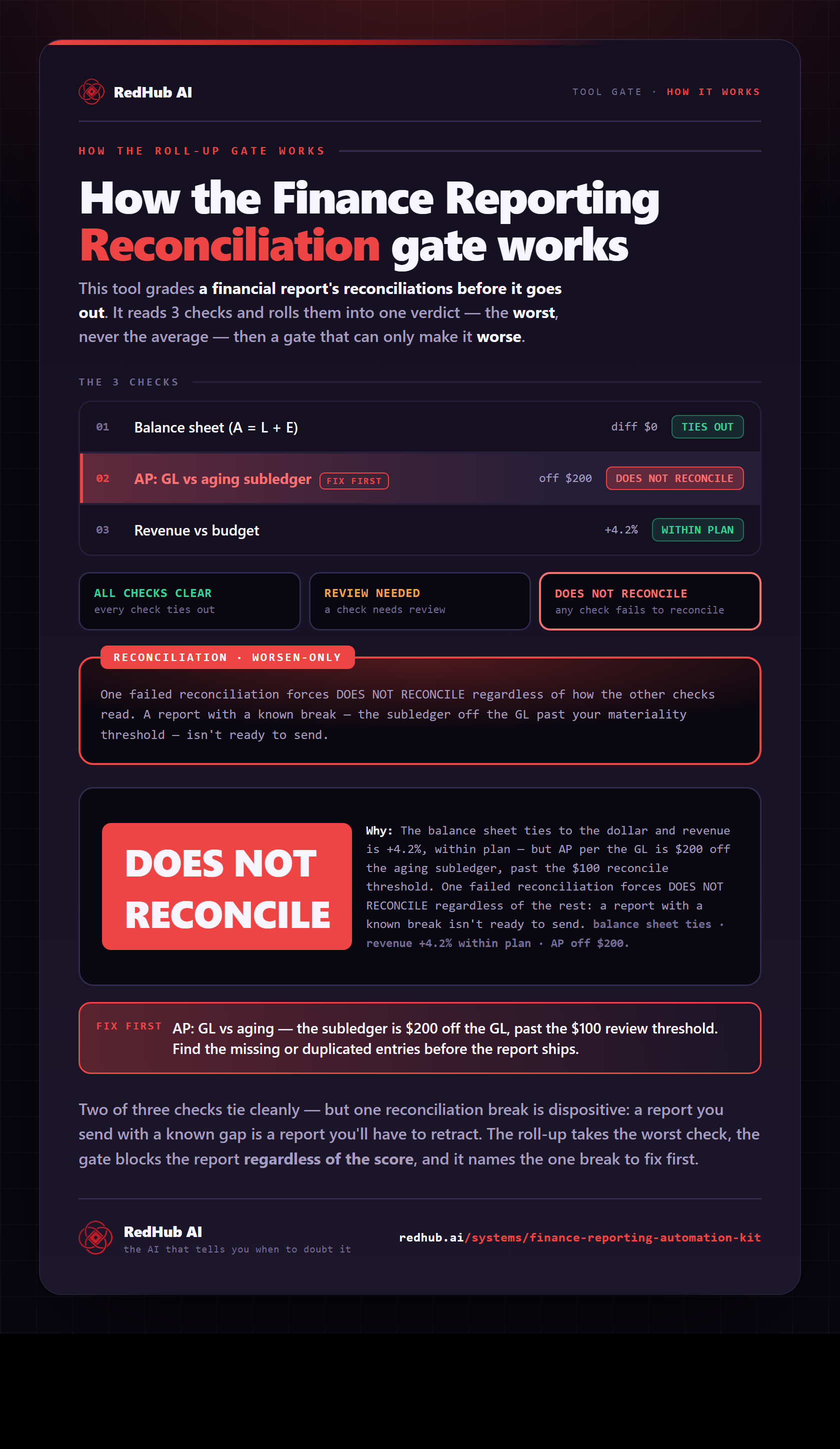
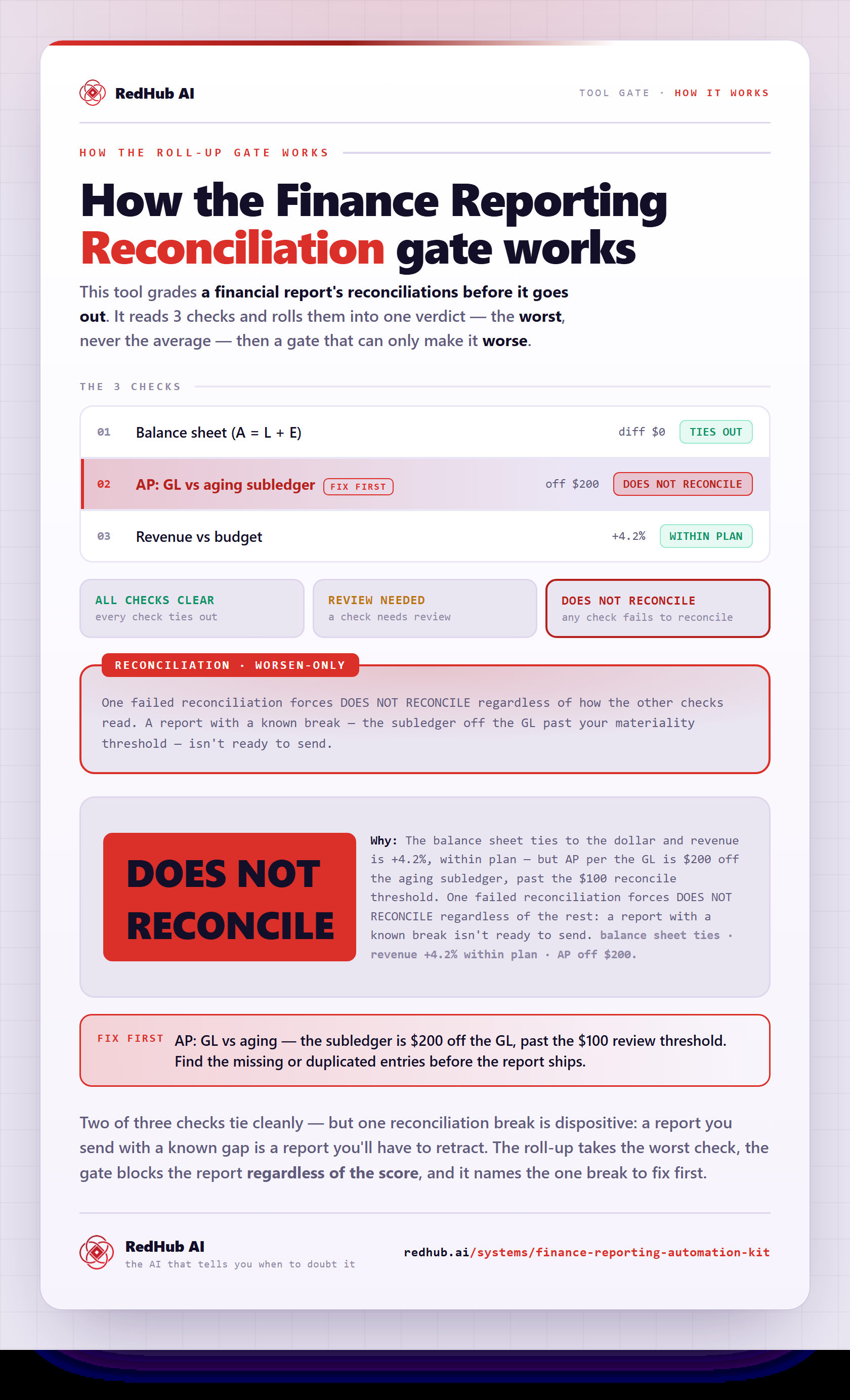
The gate this post refers to, drawn from the tool’s own logic. See the tool.