AI for Teachers: How to Use It to Save Time Without Cutting Corners
RedHub AI Editorialupdated November 5, 20268 min read

Jump to a section8
AI for teachers is most useful as a fast first-draft tool: a lesson outline, a rubric, a page of feedback comments, a note home. The time it saves is real, and it comes from the typing. The judgment does not get faster. Every fact, quote and worked example in an AI draft still needs your check before a student sees it, so the honest plan is to spend some of the saved time on checking.
TL;DR: Use AI to draft the parts of teaching that are mostly structure and wording. Read every draft before it goes out, because AI states invented dates, quotes and citations in the same confident tone as true ones. Keep identifiable student details out of your prompts. What a given tool may see is a question for your school or district, not for a blog post. If you want to score your own habits across five common jobs, AI for the Teacher ($39) is a workbook that grades each skill and won't let a good average hide a zero.
Where the time actually goes
Much of a teacher's writing week is not teaching. It is reformatting a worksheet, drafting rubric rows, writing the twentieth version of "strong evidence, thin analysis," and composing a calm message to a worried parent. Those jobs share a shape. The structure is predictable and the wording takes time. That is the shape AI drafts well.
The trade is easy to misread. A draft that took ten seconds to generate can take ten minutes to check, and the check is the part that protects students. If the check gets skipped, the time saved turns into an error in front of a class. A useful way to think about it: AI moves your time from writing to reviewing. It rarely removes it.
| Weekly job | What AI drafts well | What you still check |
|---|---|---|
| Lesson outlines and objectives | Sequence, pacing for your period length, objective wording | That it matches what you teach and your real standards documents |
| Rubrics and quiz items | Criteria rows, level descriptors, a first set of questions | That every item has one defensible answer and the rubric grades what you assigned |
| Student feedback | Turning your short note into a full, kind comment | That it describes what this student actually did |
| Parent and guardian messages | A calm, clear first draft in plain language | That it says exactly what you mean and promises nothing you can't do |
| Anything stated as fact | Nothing. This one is yours | Every date, quote, citation and worked example |
The check that protects students
AI models produce invented facts in the same tone as true ones. A quiz drafted about a class novel can quote a line that is not in the book. A history handout can give a date that is off by a decade. A worked math example can reach the right answer through a wrong step, which is worse than a wrong answer because students copy the method.
None of this shows up on a skim. The draft looks finished, and that polish is exactly what tempts you to skip the read. Three habits catch most of it:
- Trace every quote to the source text before it goes on a handout or a quiz.
- Look up every date, number and name in a source you already trust, not in a second AI answer.
- Work every example yourself, step by step, before students see it.
Citations deserve their own warning. AI will produce a reference list with real-sounding journals, authors and page numbers that do not exist. If a handout cites something, open it.
Student data is a separate question
Some uses never need a student's identity. A lesson outline doesn't. A generic rubric doesn't. Feedback and differentiation are where names, grades and accommodation details tend to slip into a prompt, often without anyone deciding to put them there.
The practical habit is to leave identifying details out of the prompt and add them back by hand afterward. Ask for "a simplified version of this reading for a student who reads two grade levels below," then apply it to the student yourself. Whether a particular tool is allowed to see student work at all is a legal and school-policy question for your district. This post can't answer it for you. The person who owns AI and data policy where you teach can.
Score the habit, not the hours
It is tempting to judge AI by how much time it saves. A better question is whether your checking keeps up with your drafting, job by job. A teacher can be excellent at AI-drafted feedback and careless about verifying a quiz key, and an average across both hides the gap.
That is the idea behind scoring each skill separately and letting the weakest one set the result. Here is how it works in the AI for the Teacher workbook, using its shipped example. Each of five modules gets a score from how many of three questions you answered correctly: 3 of 3 is 100, 2 of 3 is 67, 1 of 3 is 33, 0 is 0. A module at 67 or above is CLEARED, 33 is REVISIT, 0 is REPEAT.
- A teacher scoring 3, 3, 2, 3 and 0 across the five modules averages 73. The brief verdict is still REPEAT REQUIRED, because one module is at zero.
- A teacher scoring 2 on every module averages 67, lower than the first, and gets BRIEF CLEARED, because nothing is below the line.
- A teacher scoring 3, 3, 3, 1 and 3 averages 87 and gets REVISIT FLAGGED for the one weak module.
The higher average loses to the steadier one. That is the point of a weakest-link rule.
Where this kind of scoring falls short
Three questions per skill is thin evidence. Two right answers out of three clears a module, so a lucky guess can be the difference between REVISIT and CLEARED. Treat the result as a prompt for where to look next, not a certificate.
There is a second limit worth knowing if you use it with a grade team. The workbook fits five people on one sheet, and when anyone falls short, its Dashboard names the module that the most people fell short on. In the shipped example two modules are tied at one person each, and the tie goes to the lower-numbered module. So the Dashboard names the parent-communication module, while the verify module, where one teacher scored zero, is what sets the team result to REPEAT REQUIRED. Read the per-person rows, not only the summary line. And keep it a self-check the team agrees to run together. It grades skills. It isn't a staff evaluation and shouldn't feed one.
Getting started this week
Pick one recurring job, such as feedback comments or a weekly parent update. Draft it with AI for a week, and keep a short note of every correction you make before it goes out. By Friday that list is your personal checklist, and it tells you where AI saves you time and where it costs you some. Add a second job only once the first habit holds.
Score your own AI habits, one skill at a time
AI for the Teacher is an Excel workbook with three tabs and a Word brief. It names five skills: lesson outlines and objectives, rubric and assessment drafting, feedback and comment drafting, parent and guardian communication, and verify-before-you-teach. You enter how many of three questions you answered correctly per module, for yourself or up to five people. Your weakest module sets the verdict: BRIEF CLEARED, REVISIT FLAGGED or REPEAT REQUIRED. When someone falls below BRIEF CLEARED, the Dashboard names a focus module. When everyone clears, it names none. The workbook holds the scoring and a one-line description of each module. The brief holds a short lesson for each module, its three multiple-choice questions and an answer key. No AI runs inside it and no student records go in.
Get AI for the Teacher — $39Pairs well with
The AI Over-Reliance & Critical-Thinking Check ($69) tests the verify habit directly: you review AI text seeded with planted errors, including a fabricated statistic, mark which you caught, and get INDEPENDENT, ASSISTED or RELIANT. Missing the fake statistic caps you at ASSISTED. It is for individual development, not employment decisions. The Prompt Practice Lab ($69) is graded prompt-writing practice. A prompt can't score STRONG unless it asks the model to check its own work. For a whole staff, the AI Literacy & Workforce Training Kit ($199) is an editable slide deck, participant workbook, knowledge check, safe-use handout and facilitator guide.
More in this guide
Is it okay for teachers to use AI to write lesson plans?
As a first draft you review and adapt, yes. AI is quick at structure, pacing and objective wording. Accuracy, fit with your standards documents and fit with your students remain your job, so read the plan before it reaches a class.
Will AI make up facts in teaching materials?
It can. AI models state invented dates, quotes, citations and worked steps in the same confident tone as true ones. Trace quotes to the source, look up dates and numbers somewhere you trust, and work every example yourself.
Can I put student names or grades into an AI tool?
The safer habit is to leave identifying details out of the prompt and add them back by hand. Whether a specific tool may receive student information is a legal and school-policy question for your district, so ask whoever owns that policy before pasting anything identifiable. This is general guidance, not legal advice.
How much time can AI save a teacher?
It depends on the job and the person, and RedHub doesn't promise a number. Drafting gets faster. Checking does not. A week of noting every correction you make to AI drafts shows where your own savings are.
What is in AI for the Teacher?
A $39 Excel workbook with Start Here, Brief Scorecard and Dashboard tabs. You enter how many of three questions you answered correctly in each of five modules, and the weakest module sets the verdict: BRIEF CLEARED, REVISIT FLAGGED or REPEAT REQUIRED. A Word brief in the same download holds the lesson and three quiz questions for each module, plus an answer key.
Can a school use AI for the Teacher to evaluate staff?
It isn't built for that. It scores self-reported quiz results for up to five people as a skills check a team agrees to run. It is not a staff evaluation, and its results shouldn't be used as one.
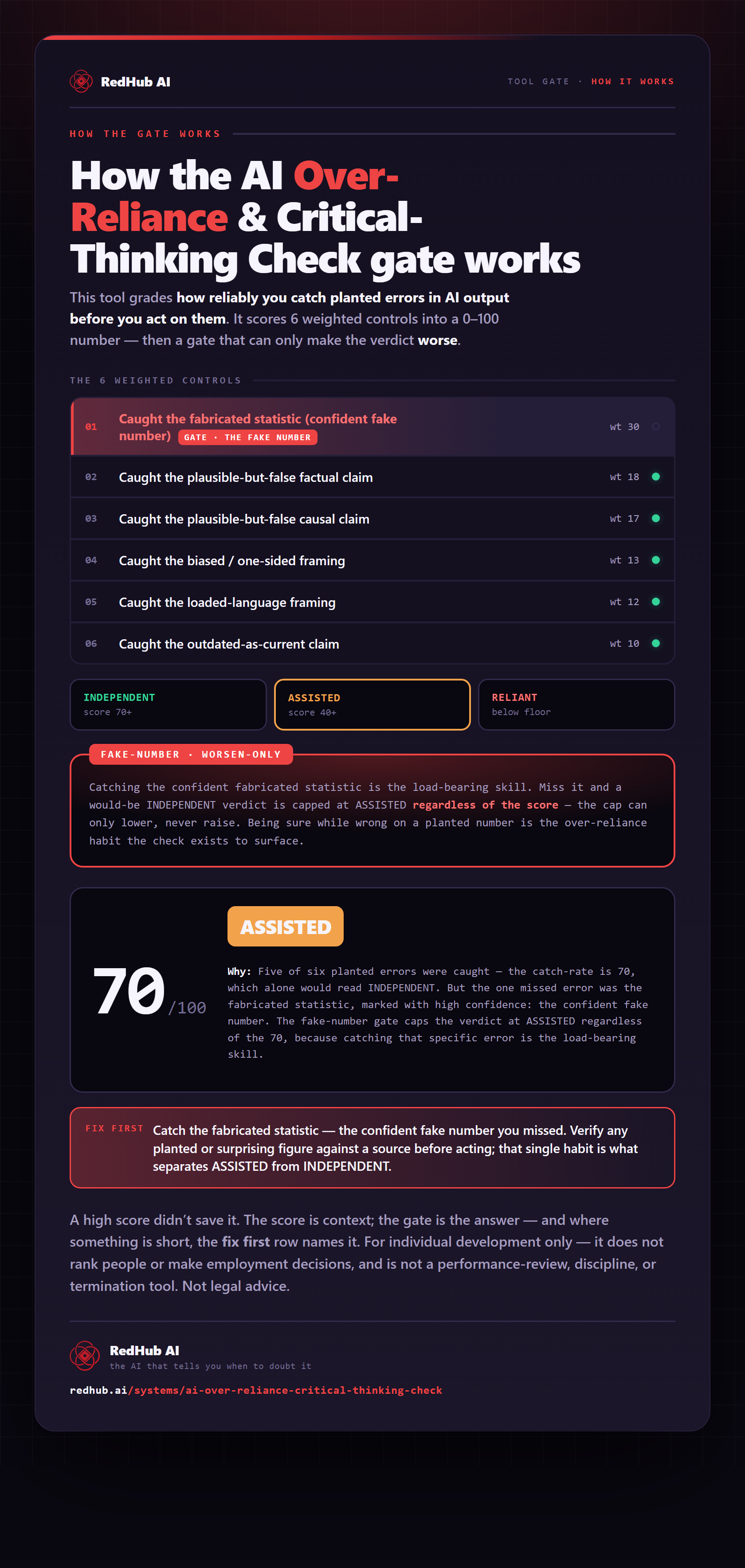
The gate this post refers to, drawn from the tool’s own logic. See the tool.