AI for Lesson Planning: How to Do It Well (and What to Always Check)
RedHub AI Editorialupdated November 5, 20266 min read

Jump to a section8
AI lesson planning works best for the skeleton of a lesson: the objective, the sequence, the pacing and a first set of activities. A model can draft that in under a minute. What it can't do is know whether its facts are right, whether the standard it cites is the one your district uses, or whether the plan fits your students. That review is the other half of the job, and it is the half that protects students.
TL;DR: Ask AI for structure: an outline, objectives as "I can" statements, timed activities, an exit ticket. Then check four things before class: every fact and quote, the standards against your own documents, whether the minutes add up, and whether it fits your students. Ask for differentiated versions in general terms and apply them to individual students yourself. For a lesson you have taught many times, writing it yourself may still be faster.
What AI drafts well
The parts of a lesson plan that are mostly format are where AI is quickest. Lesson templates follow familiar patterns, so a model produces the shape without effort.
- A lesson outline from a topic, grade and period length
- Objectives rewritten as "I can" statements
- Warm-up and exit-ticket ideas
- A simplified or extended version of an assignment you already wrote
- A summary of a long reading, so you can decide whether it belongs in the unit
A prompt that gets a usable first draft names the grade, the period length, the topic, what students already know, and the output format. For example: "Draft a 50-minute lesson for seventh graders on how the water cycle works. They already know the three states of matter. Give one objective as an 'I can' statement, a 5-minute warm-up, two activities with minutes for each, and a 3-question exit ticket." Nothing in that prompt identifies a student, and nothing needs to.
The four checks before class
- Every factual claim. Dates, figures, scientific details and quotes come out of a model in the same confident tone whether they are right or invented. Look each one up in a source you already trust. If the plan quotes a text, find the line in the text.
- The standards. A model may cite a standard code that is out of date, belongs to a different state, or does not exist. Check the objective against your own curriculum documents, not against the code the draft printed.
- The minutes. AI plans often run long. A draft with a 10-minute warm-up, a 15-minute mini-lesson, a 20-minute activity and a 10-minute exit ticket adds up to 55 minutes in a 50-minute period. Add the column before you trust the pacing.
- Fit for your students. A generic draft doesn't know your class's reading levels, what you covered last week, or which accommodations apply. That adjustment stays with you.
A workflow that keeps the check short
| Step | What you do | Why it matters |
|---|---|---|
| 1. Draft | Prompt with grade, period length, topic, prior knowledge and format | A specific prompt gives a draft that needs fewer fixes |
| 2. Fact-check | Look up every date, number, name and quote | Invented details read exactly like real ones |
| 3. Align | Compare the objective with your own standards documents | Printed standard codes can be wrong or outdated |
| 4. Time it | Add up the minutes and cut to fit the period | Overstuffed plans are a common AI habit |
| 5. Adapt and own it | Adjust for your students and edit until it sounds like you | You are accountable for what reaches the room |
Differentiate without naming anyone
Lesson planning rarely needs any student's identity, which makes it the easiest category to keep clean. Differentiation is where details slip in. Instead of describing a named student and their plan, ask for "a version of this reading for a student reading two grade levels below" or "an extension task for students who finish early." Then apply the version to the student yourself. You get the same draft, and nothing identifying ever leaves your hands.
When AI is the slower option
AI lesson planning is not always faster. For a lesson you have taught ten times, the plan is already in your head, and reading and correcting a generated version can take longer than writing your own notes. AI earns its keep on the lesson you have never taught: a new unit, a new grade, a topic outside your usual range. Those are also the lessons where you are least able to spot a wrong fact on sight, so the check matters most exactly where AI helps most. There is no clean way out of that. Budget the extra checking time for new material and don't expect the same savings across every lesson.
Build your checklist once
Keep the four checks on a sticky note or the top of your planning document: facts, standards, minutes, fit. After a few weeks you will notice which one catches the most errors in your subject. For a history teacher it is usually dates and quotes. For a math teacher it is worked steps. Put your most common catch first.
Score your lesson-planning habit alongside four others
AI for the Teacher is a $39 Excel workbook. Lesson outlines and objectives is one of its five modules, next to rubric drafting, feedback drafting, parent communication, and verify-before-you-teach. You enter how many of three questions you answered correctly in each module, and your weakest module sets the verdict: BRIEF CLEARED, REVISIT FLAGGED or REPEAT REQUIRED. When a module falls short, the Dashboard names a focus module. At full marks it names none. The workbook holds the scoring and a one-line description of each module. The lesson for each module, its three multiple-choice questions and an answer key come in a separate Word brief in the same download.
Get AI for the Teacher — $39Pairs well with
Better prompts give better first drafts. The Prompt Practice Lab ($69) grades the prompts you write against a six-part rubric and returns STRONG, WORKABLE or WEAK. A prompt that never asks the model to check its own work can't reach STRONG. The AI Over-Reliance & Critical-Thinking Check ($69) practices the fact-check step: you review AI text with planted errors, including a fabricated statistic, and score how many you caught. It is for individual development only.
More in this guide
Can AI write a full lesson plan for me?
It can draft one quickly. Treat it as a starting point: check every fact, compare the objective with your own standards documents, add up the minutes, and adapt it to your students before you teach it.
What does AI get wrong most often in lesson plans?
Facts and quotes, because a model states invented details as confidently as true ones. Pacing is a close second: AI-drafted activities often add up to more minutes than the period has.
Does AI know my state's curriculum standards?
Not reliably. A draft can print a standard code that is outdated, from another state, or invented. Check AI-drafted objectives against your own curriculum documents, not the code in the draft.
How do I use AI to differentiate a lesson without sharing student information?
Describe the need in general terms, such as a version for a student reading two grade levels below, and apply it to the individual student yourself. Whether a tool may receive student information at all is a question for your district's policy owner.
Is AI lesson planning always faster?
No. For a lesson you have taught many times, correcting a generated plan can take longer than writing your own. It saves the most on new material, which is also where careful fact-checking matters most.
Does AI for the Teacher include lesson plans or templates?
No. It is a $39 scoring workbook covering five modules, one of them lesson outlines and objectives. You enter quiz results and it returns a verdict per module and overall. It contains no lesson plans or templates. A Word brief in the same download holds a short lesson and three multiple-choice questions for each module, plus an answer key.
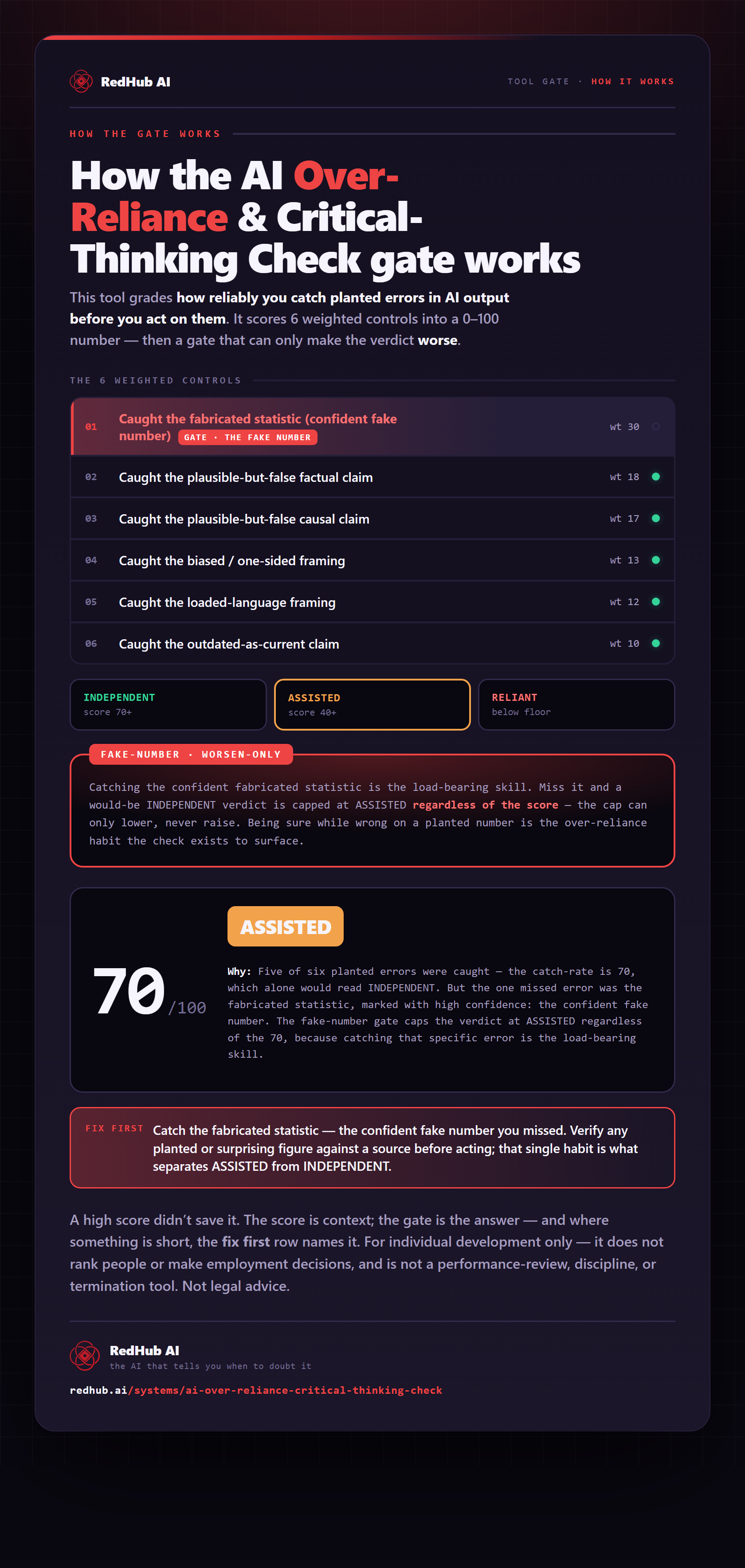
The gate this post refers to, drawn from the tool’s own logic. See the tool.