AI Tools for Teachers: What's Actually Worth Your Time
RedHub AI Editorialupdated November 5, 20265 min read

Jump to a section7
Most lists of AI tools for teachers are long because length is easy. For most classroom writing, one general-purpose AI assistant you know well covers lesson drafts, rubric rows, feedback wording and parent messages. What makes it useful is knowing how to ask and how to check, and that skill carries from one tool to the next. A new tool earns a place only when it passes a short test.
TL;DR: Get good at one general assistant before collecting more. Test any new tool with three questions: does it save time after you count the learning and the checking, how much of its output must you verify, and does it touch student data. The third question isn't yours alone to answer. Whether a tool may see student information is a legal and school-policy question for your district. Sometimes that answer makes a school-approved tool the right choice over the one you know best.
The three-question test
- Does it save time once you count everything? Count the hours to learn it and the minutes to check its output, not only the minutes it saves. A tool that takes three hours to learn and saves ten minutes a week pays back after eighteen weeks, which is half a school year. That can still be worth it. Do the arithmetic before you decide.
- How much of its output must you verify? Almost everything an AI tool states as fact needs a check. A tool that drafts parent emails needs a read for tone. A tool that generates quiz items needs every answer key worked. Budget that time honestly.
- Does it touch student data? If the tool needs names, grades or student work to function, stop and ask your school or district before using it. Which tools may receive student information is a legal and policy question for them, and some keep an approved list.
Where a general assistant is enough
| Job | Worth using AI for? | Watch for |
|---|---|---|
| Lesson outline drafts | Yes | Dates, quotes, standard codes and whether the minutes add up |
| Rubric rows and quiz items | Yes | Levels you can observe, points that total correctly, answer keys you've worked |
| Feedback wording | Yes, after you read the work | Generic comments and grades the tool suggests |
| Parent and guardian messages | Yes | Tone, and promises you can't keep |
| Feedback on pasted student essays | Only where your district allows it | Student data. Strip identifying details either way |
| AI detectors to catch cheating | No, not as proof | False positives on honest writing and missed AI text |
Parent messages: a worked example
Parent and guardian messages are a good first job because the stakes of a draft are visible. Give the assistant the facts without identifying anyone: "Draft a short, calm note to a parent. Their child has missed three homework assignments in two weeks. I want to set up a 15-minute call and suggest one change at home. Keep it under 120 words." Then read it as the parent would. Check that it says exactly what you mean, that it doesn't promise anything you can't do, and that the tone matches how you speak to families. Add the names yourself before sending.
When a specialized tool is the better choice
The one-tool rule has a real exception, and it cuts against the advice above. A tool built for schools may come with an agreement your district has already reviewed, which the general assistant you know best may not have. For anything involving student work, the approved tool can be the right choice even if it is clumsier. In that case you end up with two tools: the one you know for planning and wording, and the approved one for student work. That is more to learn. It is also a sensible split.
Outside that case, add a specialized tool only when it does something your general assistant clearly can't. Being marketed to teachers is not, on its own, a reason.
Build a routine before a collection
The teachers who keep using AI past the first month usually have one routine, not many apps: draft fast, check what matters, keep identifying details out of the prompt, and own everything that reaches a student or family. Try that routine on one job for a week. Then add a second job, and only then think about a second tool.
Score the routine, not the tool
AI for the Teacher is a $39 Excel workbook that works with whatever assistant you use. Its five modules are lesson outlines and objectives, rubric and assessment drafting, feedback and comment drafting, parent and guardian communication, and verify-before-you-teach. You enter how many of three questions you answered correctly per module, and your weakest module sets the verdict: BRIEF CLEARED, REVISIT FLAGGED or REPEAT REQUIRED. When a module falls short, the Dashboard names a focus module. At full marks it names none. It recommends no tools. The workbook holds the scoring and a one-line description of each module. The lesson for each module, its three multiple-choice questions and an answer key come in a separate Word brief in the same download.
Get AI for the Teacher — $39Pairs well with
Asking well is the skill that carries across tools. The Prompt Practice Lab ($69) grades the prompts you write against a six-part rubric and returns STRONG, WORKABLE or WEAK. A prompt that never asks the model to check its own work can't score STRONG. Checking well is the other half. The AI Over-Reliance & Critical-Thinking Check ($69) has you review AI text seeded with planted errors and scores how many you caught. It is for individual development, not employment decisions.
More in this guide
Do teachers need several AI tools?
Usually not at first. One general assistant you know well covers most classroom drafting. The common exception is student work, where your district may have approved a specific tool you should use instead.
How do I decide if a new AI tool is worth adopting?
Ask three questions: does it save time after counting the hours to learn it and the minutes to check it, how much of its output must you verify, and does it touch student data. If it does, ask your school or district before using it.
Is it safe to use free AI tools with student work?
That is a legal and school-policy question for your district, not one a general article can settle. Ask whoever owns AI and data policy there. Either way, strip names and identifying details before pasting anything.
What is a good first job to try with an AI assistant?
Parent and guardian messages or lesson outlines. Both need no student identity in the prompt, and both are easy to check by reading the draft carefully before it goes out.
Should I avoid AI tools marketed to teachers?
Not automatically. Apply the same three questions to education tools as to general ones. Being marketed to teachers isn't a reason by itself, though a district-approved tool can be the better choice for student work.
Does AI for the Teacher recommend specific AI tools?
No. It is a $39 workbook that scores a teacher's own skills across five modules with any assistant. You enter quiz results and it returns BRIEF CLEARED, REVISIT FLAGGED or REPEAT REQUIRED. It includes no tool list.
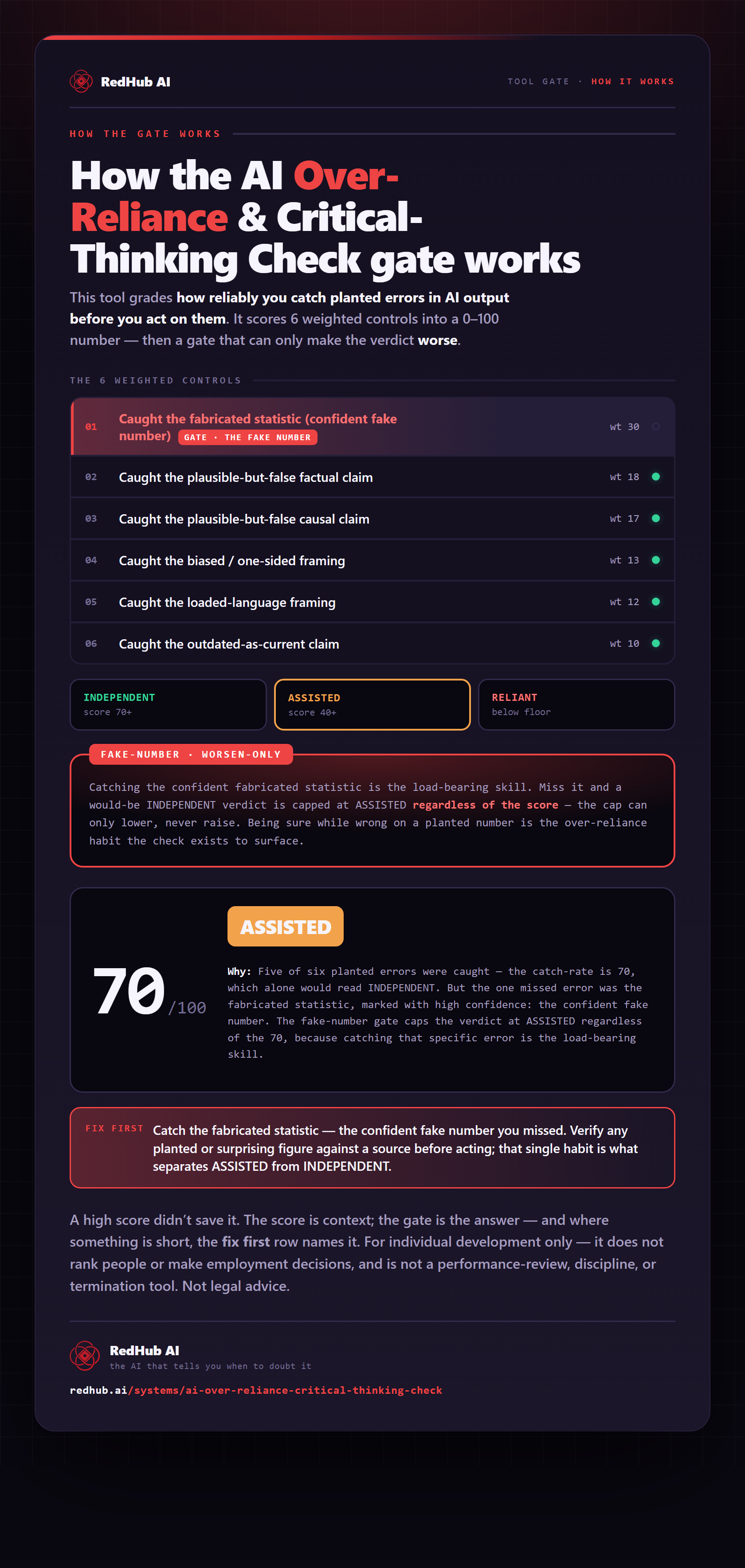
The gate this post refers to, drawn from the tool’s own logic. See the tool.