How to Take an Honest Inventory of Your AI Tools
RedHub AI Editorialupdated September 7, 20265 min read

Jump to a section7
You take an honest inventory of your AI tools by asking every person on your team, directly and without punishment attached, what AI tools they actually use for work — then logging every answer, even the embarrassing ones, in one place before you judge any of them.
TL;DR: A real AI tool inventory isn't a checklist you fill out from memory — it's a set of honest declarations collected under amnesty, because most unsanctioned tool use is invisible to any audit that doesn't involve just asking people. This is one leg of the discovery motion covered in the Shadow AI pillar guide; once you have the list, triage it with the Shadow AI Discovery & Risk-Triage Kit — $69.
Why "I Think I Know What My Team Uses" Is Almost Always Wrong
Most leaders can name the AI tools their company officially pays for. Almost none can name what's actually running on their team's laptops. The gap between those two lists is shadow AI, and it exists because approved tools go through procurement while unapproved ones go through a five-second signup with a personal email. No app-store audit, spend report, or SSO log catches a free-tier chatbot account or a browser extension someone installed on a whim.
An inventory built from assumption — "marketing probably just uses the one we bought them" — isn't an inventory. It's a guess wearing a spreadsheet. The only way to close the gap is to ask, and ask in a way that gets an honest answer back.
What to Actually Ask
The ask matters more than the tool you use to collect it. A vague "do you use any AI tools?" question gets a vague "not really" answer, because most people don't think of the tool they use daily as "AI" anymore — it's just the thing that drafts their emails. Be specific about the moments, not the technology.
- What do you use to draft or edit writing — emails, proposals, social posts?
- What do you use to summarize meetings, calls, or long documents?
- What do you use to write, review, or debug code?
- What do you use to analyze spreadsheets, reports, or customer data?
- Is there a browser extension, plugin, or "assistant" feature you've turned on inside another tool you already use?
That last question catches more shadow AI than any of the others — a lot of unsanctioned use isn't a standalone tool at all, it's an AI feature quietly enabled inside software your team already had permission to use.
Collect It the Same Way Every Time
Whatever format you use, keep three fields on every declared tool: who's using it, what kind of data they feed it, and how often. Those three fields are exactly what turn a list into something you can triage instead of just a pile of names.
- Name the tool and who declared it. Don't anonymize at this stage — you need to know who to follow up with.
- Name the data it touches. Customer PII, financial figures, source code, internal strategy, or "nothing sensitive" — be specific, not reassuring.
- Name how often and how many people. A tool one person tried once is a very different risk than one half the sales team uses daily.
Getting people to answer honestly in the first place is its own skill — see how to run an AI tool amnesty for the exact framing that gets a full list instead of a partial one.
What an Honest Inventory Looks Like When It's Done
A finished first-pass inventory is usually longer and messier than leadership expects — a dozen tools nobody had heard of, several of them touching customer or financial data, a few used by exactly one person and a few used by nearly everyone. That messiness is the point; a short, tidy inventory almost always means people didn't feel safe answering fully, not that shadow AI isn't happening.
Once the list exists, the next job is deciding what it means — which tools are genuinely risky, and which one you deal with first. That's a scoring exercise, not a gut-check; read what ungoverned AI tools actually expose before you start ranking anything by feel.
An inventory is the first of three things the free AI Governance Gap Assessment (opens in a new tab) tests, and the one it will not let you waive: mark it not applicable and the verdict still reads UNGOVERNED, because the rest of a governance score sits on top of it. 22 questions, self-declared, not an audit.
From List to Live Dashboard
A spreadsheet of names is a start; a live exposure rate that updates as you add each declared tool is what actually tells you where to focus. The Shadow AI Discovery & Risk-Triage Kit takes the inventory you've just collected and turns it into verdicts — a Start Here tab, a Dashboard that shows your exposure rate at a glance, and a Shadow AI Triage tab that scores each tool and, where a tool needs governing, tells you the single one to govern first. It grades the tools, never the people, and it doesn't scan your network for you — you supply the inventory, by amnesty, exactly as described above.
This is general operational guidance, not legal advice — if your inventory turns up tools touching regulated data, confirm your obligations with qualified counsel.
Pairs well with
Once you know what's out there, the AI Governance & Acceptable Use Starter Kit ($39) writes the policy for what's allowed going forward, and the Vendor & Sub-Processor Data-Flow Register ($89) tracks exactly where each kept tool's data goes next. See the full sequence in the Shadow AI pillar guide.
More in this guide
How do I start an AI tool inventory if I have no idea where to begin?
Send one direct message to every team asking what they use to draft writing, summarize meetings, write code, and analyze data — those four categories catch the vast majority of AI tool use in a typical business.
Should the inventory be anonymous?
No — you need to know who's using what so you can follow up and eventually route each tool. Anonymity protects the person from punishment via amnesty, not from being identified on the list.
What if people don't respond the first time I ask?
Ask again, and ask differently — the second round, phrased around specific tasks instead of "AI tools" broadly, routinely surfaces tools the first round missed entirely.
Do browser extensions count as shadow AI?
Yes, and they're one of the most commonly missed categories — an AI feature quietly enabled inside an already-approved tool is still a place data can leave your control.
How detailed does each inventory entry need to be?
At minimum: the tool name, who declared it, what kind of data it touches, and roughly how often it's used. That's enough to triage; you can go deeper later for the tools you decide to keep.
What do I do with the inventory once it's collected?
Triage it — score each tool by exposure and usage so you can see which one to bring into governance first, rather than guessing. The Shadow AI Discovery & Risk-Triage Kit is built to take your raw inventory straight into that scoring step.
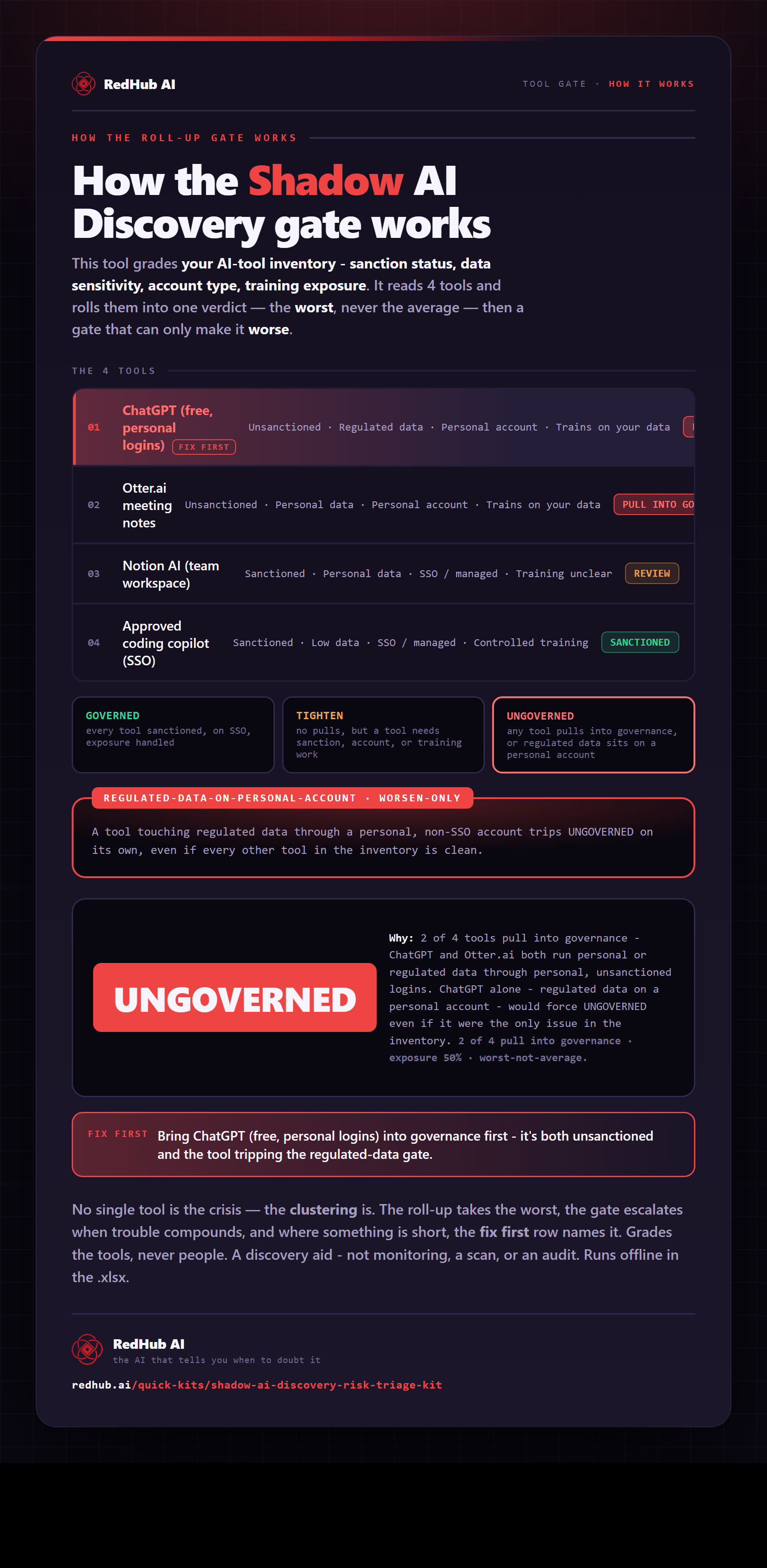
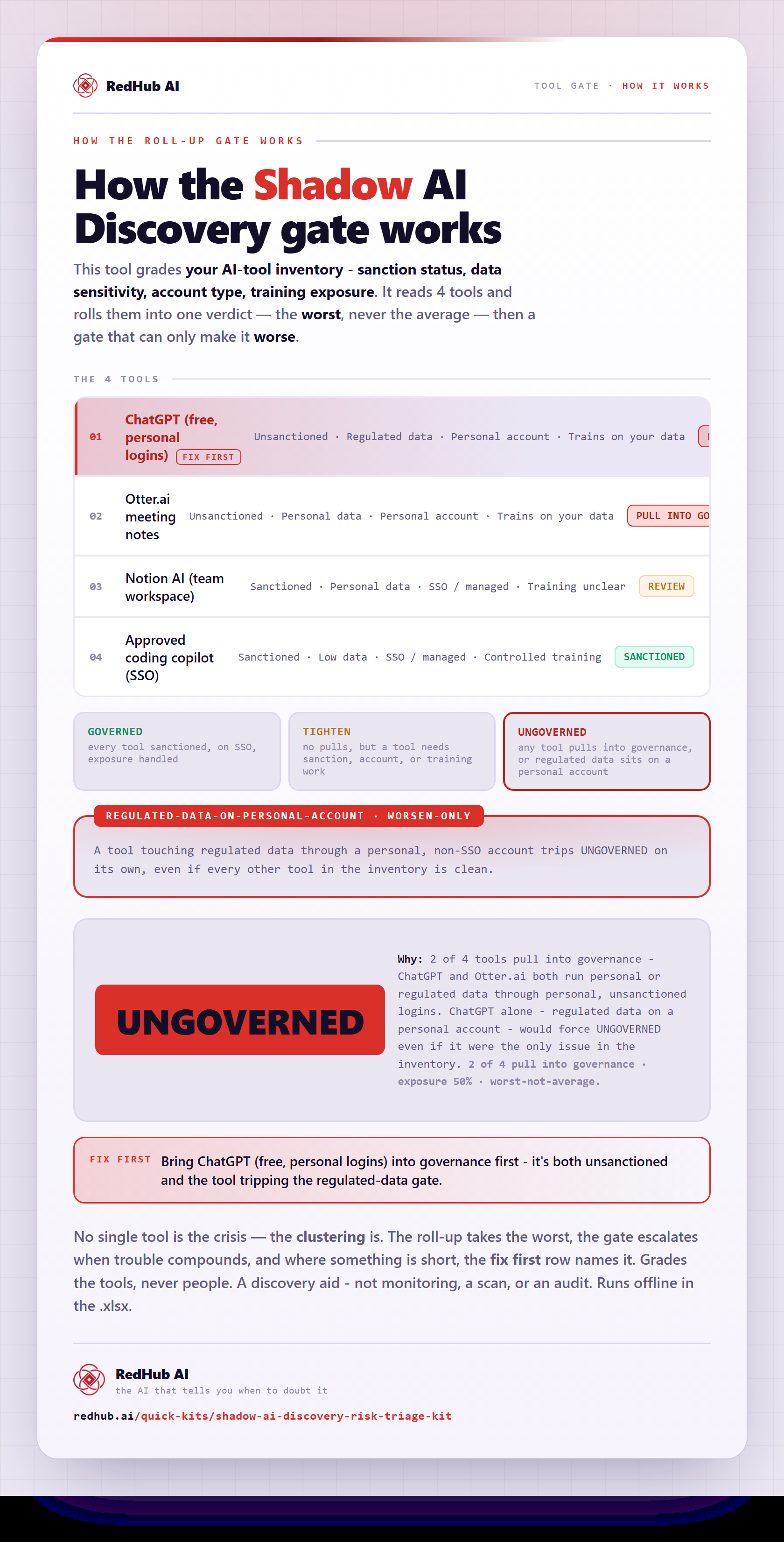
The gate this post refers to, drawn from the tool’s own logic. See the tool.