Shadow AI: How to Find the Unsanctioned Tools Your Team Uses
RedHub AI Editorialupdated September 7, 20266 min read

Jump to a section7
Shadow AI is any AI tool your people are actually using — to draft emails, summarize calls, write code, analyze customer data — that IT, security, or leadership never approved and doesn't know is running. You find it the same way you find any blind spot in a business: you go look, on purpose, instead of assuming your policy document describes reality.
TL;DR: Shadow AI isn't a hypothetical — it's the free ChatGPT tab, the browser extension, the "just to see if it helps" tool someone installed last quarter. You can't govern what you can't see, so discovery comes first. Start with an honest, amnesty-based AI tool inventory, then triage what you find with the Shadow AI Discovery & Risk-Triage Kit — $69.
What "Shadow AI" Actually Means
The term borrows from "shadow IT" — the decades-old pattern of employees adopting software the official channel never sanctioned because it was faster, cheaper, or just already on their laptop. Shadow AI is the same pattern, moving faster, because the tools are free, browser-based, and require no procurement conversation at all. Someone pastes a customer email into a chatbot to draft a reply. Someone runs a spreadsheet of leads through an AI summarizer. Someone installs a meeting-notes extension that quietly listens to every call on their calendar. None of it is malicious. Almost none of it went through a review.
What makes shadow AI distinct from shadow IT is what it touches. A rogue project-management app is annoying. A rogue AI tool that a salesperson feeds prospect data into, or a support rep feeds customer PII into, or an engineer feeds a codebase snippet into — that's data leaving your perimeter into a vendor's training pipeline, retention policy, and terms of service that nobody on your team has read.
Why It's So Hard to See What's Already in Use
Shadow AI is common precisely because it's invisible by design: no purchase order, no IT ticket, no login through your SSO. It shows up as a browser tab, a personal account, a free-tier signup. Traditional software audits — checking your Stripe invoices, your app-store MDM, your SaaS spend dashboard — miss all of it, because nobody paid for anything. The only reliable way to find it is to ask the people using it, in a way that makes them comfortable telling the truth. That's the whole premise behind running an AI tool amnesty: you can't audit your way to an honest inventory, but you can ask your way to one.
The Three-Step Discovery Motion
Every shadow AI program, no matter how big the company, collapses down to the same three moves in the same order. Skipping ahead — triaging before you've inventoried, or writing policy before you've triaged — is the most common way these efforts stall out.
- Inventory. Ask every team, by name, what AI tools they use for work — under amnesty, with no punishment for the answer. See how to take an honest inventory for the exact ask and the follow-up questions that surface tools people forget to mention.
- Triage. Score each declared tool by what data it touches and how exposed that data is — not by how it makes you feel. This is where most teams either freeze (too much to look at) or guess (no consistent method). Understand the actual risks ungoverned tools expose before you rank anything.
- Route. Every tool on your list gets a next step: bring it into governance, replace it, or shut it down. The tool with the highest exposure and the widest use is the one you govern first — not the scariest-sounding one.
What Happens After You Find It
Discovery and triage tell you what exists and what to do about it first. They don't write the policy that governs it going forward, they don't map where a kept tool's data actually flows, and they don't evaluate whether a vendor is worth what you're paying it. Those are separate, deliberate steps — and trying to do all of it in one spreadsheet is how these efforts collapse under their own weight.
Once you've routed a tool into "keep and govern," the AI Governance & Acceptable Use Starter Kit ($39) is where the actual usage policy gets written. If the tool touches vendor or customer data, the Vendor & Sub-Processor Data-Flow Register ($89) tracks exactly where that data goes next. And when it's time to decide whether a kept tool is earning its spend, the AI Vendor Reliability & Spend Justification Scorecard ($79) makes that case with numbers instead of a gut feeling.
This is general operational guidance, not legal advice — confirm your specific regulatory obligations with qualified counsel, especially if your team handles regulated customer data.
Discovery answers one of the three questions the free AI Governance Gap Assessment (opens in a new tab) asks. The other two — is there a rule people follow, and is there a named human on each decision — are where most inventories stall, and any one of the three reading zero holds the whole verdict at UNGOVERNED. 22 questions, about ten minutes, self-declared and not an audit.
Where to Start This Week
You don't need a security team or a six-month project plan to start. You need one message asking your team what they're actually using, one honest place to log the answers, and one consistent way to score what comes back. That's the entire job of the kit: one workbook — Start Here, Dashboard, and a Shadow AI Triage tab — that turns a pile of declared tools into a live exposure rate and a single answer to "which one do we govern first?"
If you're also staring down a customer security questionnaire that asks what AI tools touch their data, read how to answer the AI section of a security questionnaire honestly, from whatever inventory you already have — even an incomplete one beats a guess.
Pairs well with
Once tools are discovered and triaged, route the ones you keep into the AI Governance & Acceptable Use Starter Kit ($39) for policy, the Vendor & Sub-Processor Data-Flow Register ($89) to track their data flows, and the AI Vendor Reliability & Spend Justification Scorecard ($79) to decide whether they're worth keeping.
More in this guide
Is shadow AI the same thing as shadow IT?
It's the same pattern applied to AI tools specifically — unsanctioned software adopted without IT or security review — but shadow AI usually involves live data being fed into a third-party model, which raises the stakes on what leaves your perimeter.
Do I need network monitoring software to find shadow AI?
No. Network and browser monitoring can help, but the fastest and most honest starting point is simply asking your team what they use, under amnesty, and logging the answers — that's the approach this kit is built around.
What's the difference between discovery and governance?
Discovery finds and triages the tools already in use; governance is the ongoing policy, training, and approval process that decides what's allowed going forward. This kit does the first; the AI Governance & Acceptable Use Starter Kit does the second.
Will employees actually admit they're using unapproved tools?
Most will, if you ask under a clear amnesty — no punishment for declaring past use — and explain why you're asking. Punitive framing is the single biggest reason inventories come back empty.
How do I know which discovered tool to deal with first?
Rank by exposure, not by how unfamiliar or scary a tool sounds — a widely-used free tool touching customer data is usually a bigger priority than an obscure one nobody relies on. The kit's triage tab produces that ranking for you.
Is this a legal or compliance product?
No — it's operational IT/security discovery, not legal advice. Confirm any regulatory obligations tied to your industry or customer data with qualified counsel.
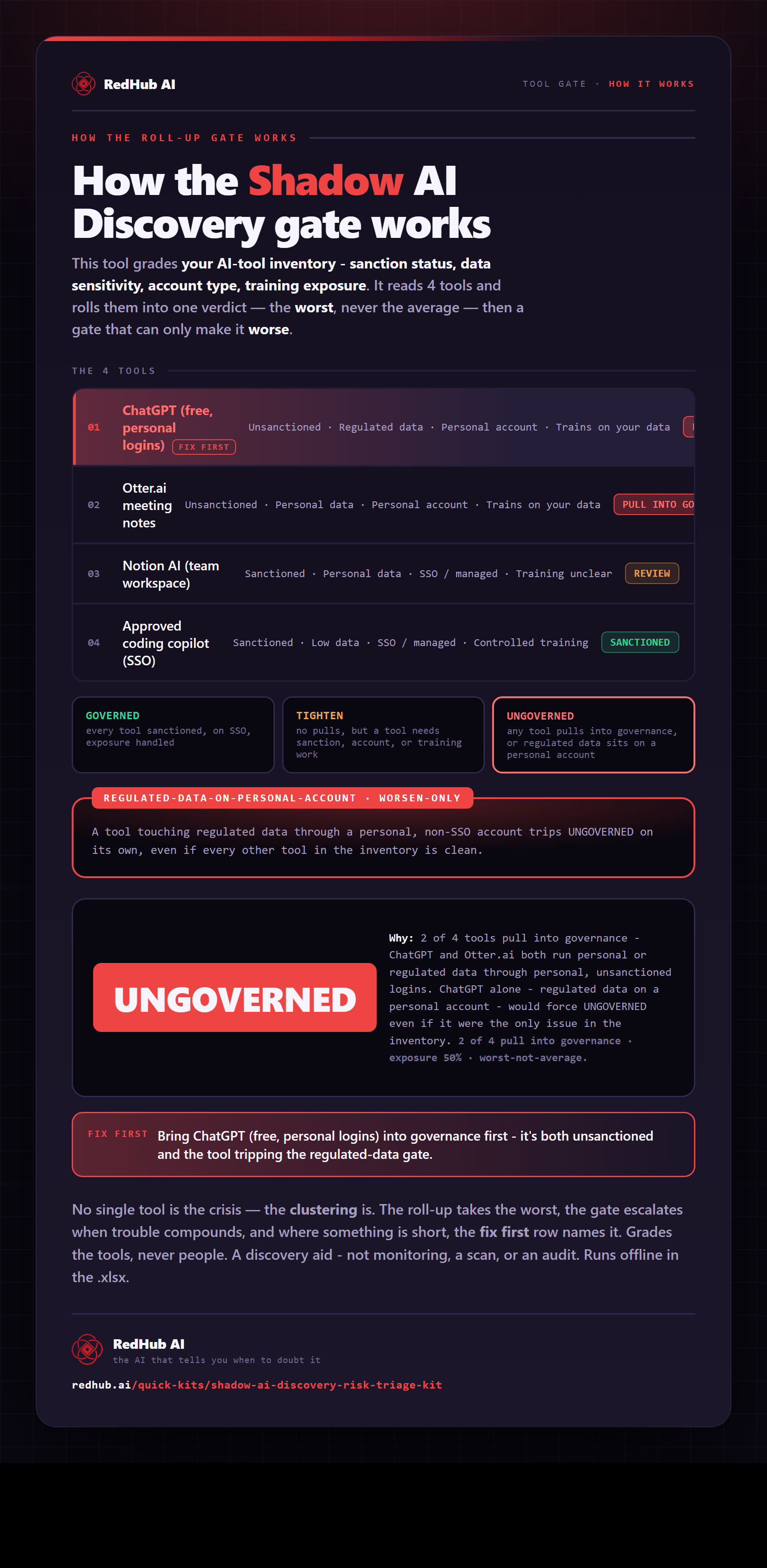
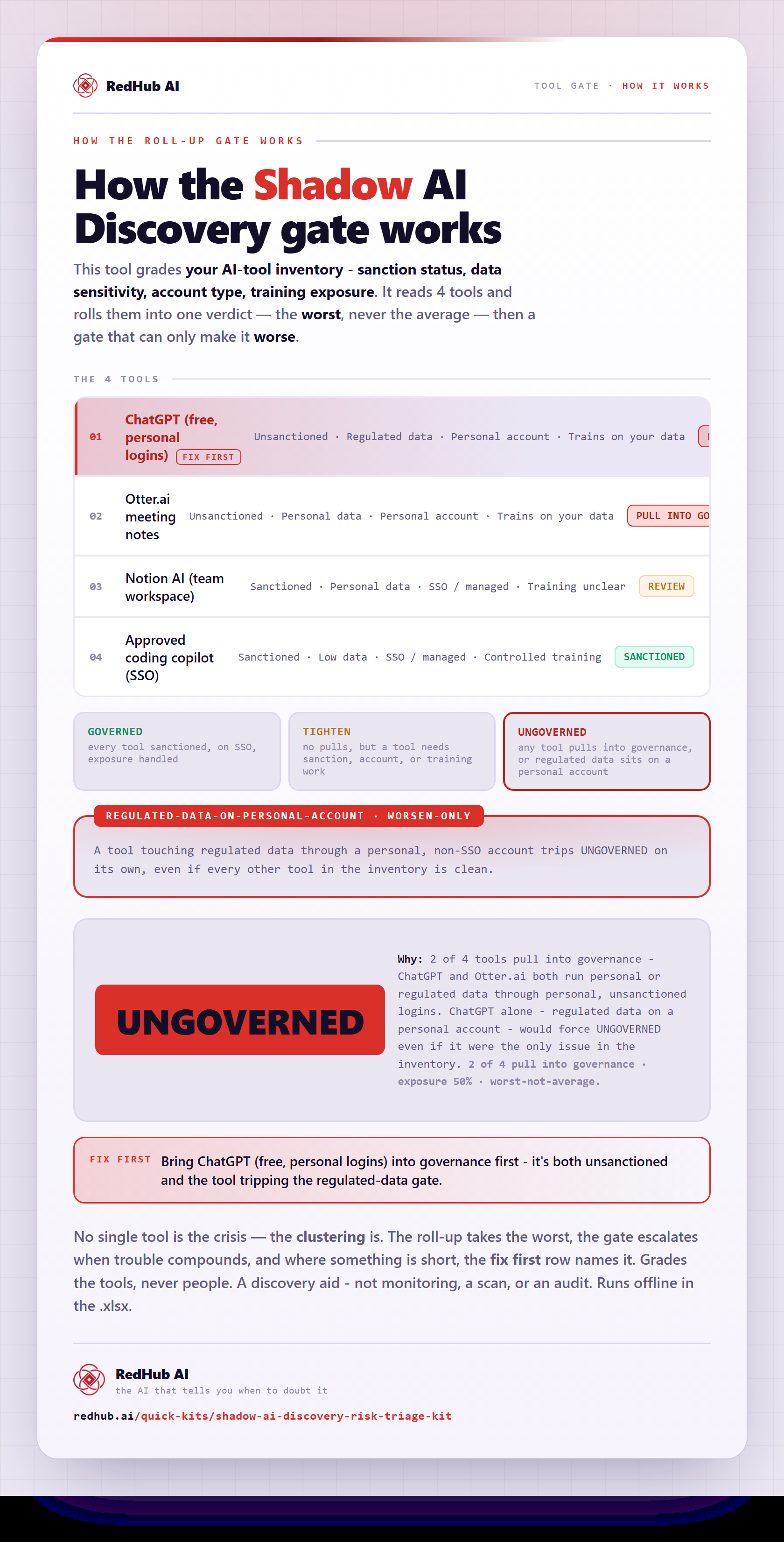
The gate this post refers to, drawn from the tool’s own logic. See the tool.