AI Agent Permissions: Enough Access to Help, Not to Harm
RedHub AI Editorialupdated October 2, 20266 min read

Jump to a section9
AI agent permissions should be sized to one task, not to a job title. Every permission decision has three parts: what the agent can access, what it can do there, and how long that authority lasts. Keep all three as narrow as the task allows, and widen them only when the agent has earned it with evidence. Giving an agent access is not the mistake. The mistake is broad, permanent access granted before anyone understands the task, the risk and the ways it can fail.
TL;DR: Size each grant on three axes (access, action and duration), place each task on an authority ladder from read-only to high-impact, use short-lived credentials for risky steps, and limit writes to the fields a task needs. Where your software cannot go that narrow, check each proposed action yourself. The Agent Action Admissibility Engine ($99) checks an agent's proposed actions against your own rules before any of them execute. Start with the pillar: Zero Trust for AI Agents: Why One Check at the Door Fails.
Access, action and duration
Permission design means matching authority to a specific job. It is how you give an agent enough access to help without enough to cause outsized harm. Every grant can be described on three axes.
- Access: which data and systems the agent can reach.
- Action: what it can do there, from read, create and update to delete, send, execute or purchase.
- Duration: whether the authority lasts for one task or carries on across many.
A grant that is wide on all three, such as admin rights to the CRM with a key that never expires, is the one that turns a small mistake into a large one. Narrow any single axis and the worst case shrinks.
Climb an authority ladder
An authority ladder puts every agent task on a rung. New tasks start low and move up when the record supports it, not because the agent seems capable. A newer, smarter model is no reason to skip a rung. Our post on the AI capability-control gap traces what happens when an agent gains access its controls never caught up to.
| Level | Agent capability | Example |
|---|---|---|
| 0: Observe | Read only | Search approved policy documents |
| 1: Recommend | Draft or propose | Prepare a customer response for review |
| 2: Assist | Create internal noncritical work | Open a ticket or update a draft field |
| 3: Act with guardrails | Execute bounded, reversible actions | Update a status field using approved rules |
| 4: Act with approval | Perform sensitive action after review | Send an external message or export a report |
| 5: High-impact action | Production, financial, or irreversible change | Deploy code, modify access, move funds |
Two things about the ladder are easy to miss. The rung belongs to the task, so one agent can hold two rungs: level 3 for status updates, level 1 for customer replies. And the jump from 3 to 4 is the line between reversible and not. Below it, a mistake can be undone. Above it, a person signs off first.
Scope the task, not the job title
Avoid broad roles like "sales agent" with blanket access. Define each task instead. Take a lead-research agent whose task is to find public information about new leads and fill in a draft CRM record. It needs read access to public sources and the right to create a draft. It does not need to delete records, export the customer list or send email.
Written as a task, the grant is short enough to review in a minute. Written as a role, it tends to grow, because every new request gets added to "sales agent" until the role can do almost anything. Task-scoped grants also make widening a deliberate act: adding "send a first-touch email" becomes a new task with its own rung, reviewed on its own.
Use just-in-time authority
Long-lived credentials are convenient and dangerous. For higher-risk actions, issue a short-lived credential only after policy confirms the action is allowed, and bind it to the task, the tool, the resource and a time limit. Just-in-time means the authority exists only when it is needed, then disappears.
This limits the damage if an agent is hijacked, misconfigured or handed an unsafe instruction, because a stolen credential expires before it is useful. It also leaves a clear record of why the authority existed. The standing keys, tokens and service accounts these credentials replace are the subject of non-human identity security.
Limit fields and destinations
System-level access is often too broad. The lead-research agent may need to edit a CRM record, but only four fields on it: industry, company size, website and LinkedIn page. It should never touch the account owner, the deal amount or the lead's status (illustrative field list). A messaging agent may be limited to approved templates and recipients, and an exporting agent to one summary report sent to approved domains.
Granular limits keep a valid tool from turning dangerous. "Can update CRM records" and "can update four enrichment fields on draft records" are different grants, and only the second says what you meant.
When your software will not go that narrow
Your application may not offer permissions this fine. Check whether its API lets you scope a key to one action, or to a named set of fields. If the only choices are broad ones, such as read all records or write all records, there is no way to grant four fields on draft records. Then you face a bad choice: give the agent the wide grant, or give up on the task.
The way out is to enforce the narrow rule in a layer you own. The agent proposes an action, a check you control compares it with your rules, and only an action that passes reaches the application. The CRM still sees a wide key. Your rules decide what that key is used for.
This works, but it has a cost. The check becomes something you build, test and keep in sync with the application, and a stale rule will block good work or wave through bad. There is a quieter pressure too. A narrow agent fails more tasks at first, and every failure argues for admin. Hold the line by widening one rung at a time, with the record from the current rung as the reason.
The precise question
The weak question is "can this agent use the CRM?" The strong one is longer: can this identified agent, on this approved task, change this field, for this reason, within this time limit? Proving afterward which answer was given is a job for agent forensics.
Check every proposed action against your own rules first
The Agent Action Admissibility Engine checks the actions your agent proposes against your own domain rules before any of them run, and returns ADMISSIBLE, REVIEW or INADMISSIBLE per action, plus a verdict for the batch. There is no admissibility score, because a contradiction cannot be scored. It is a deterministic, offline Python engine with a workbook that reproduces it, and it grades proposed actions, never people.
Get the Agent Action Admissibility Engine — $99Pairs well with
The Non-Human Identity & Credential Sprawl Gate ($79) grades whether the keys and tokens your agents run on are inventoried, owned, scoped, rotated, vaulted and revocable, and returns GOVERNED, SPRAWLING or UNMANAGED. The AI Agent & Connector Access Auditor ($99) scores what each connector can touch on scope, data sensitivity, write capability and staleness, and returns LEAST-PRIVILEGE AS DESCRIBED, OVER-SCOPED or UNGOVERNED. The Agent Side-Effect & Blast-Radius Checkpoint ($89) grades whether an action is safe to run unattended, and returns RUN UNATTENDED, RUN WITH APPROVAL or DO NOT AUTOMATE.
More in this guide
What are AI agent permissions?
They are the access an agent holds: which data and systems it can reach, what it can do there, and how long that authority lasts. Good permission design keeps all three as narrow as the task allows.
What is an authority ladder?
It is a set of levels running from read-only up to high-impact changes. Each task starts low and moves up only when its record supports it.
Should permissions follow the agent's role?
No. Scope them to each task. A role like "sales agent" collects access over time, while a task grant stays short enough to review.
What is just-in-time access for agents?
It means issuing a short-lived credential only when policy confirms a specific action is allowed, bound to that task, tool, resource and time limit. The credential expires on its own afterward.
What if my software only offers broad API permissions?
Enforce the narrow rule in a layer you control: the agent proposes, your check compares the action with your rules, and only passing actions reach the application.
When should an agent get more access?
When its record at the current level supports the next one, and one level at a time. A task failing because its access is narrow is a reason to review that one grant, not to hand over admin rights.
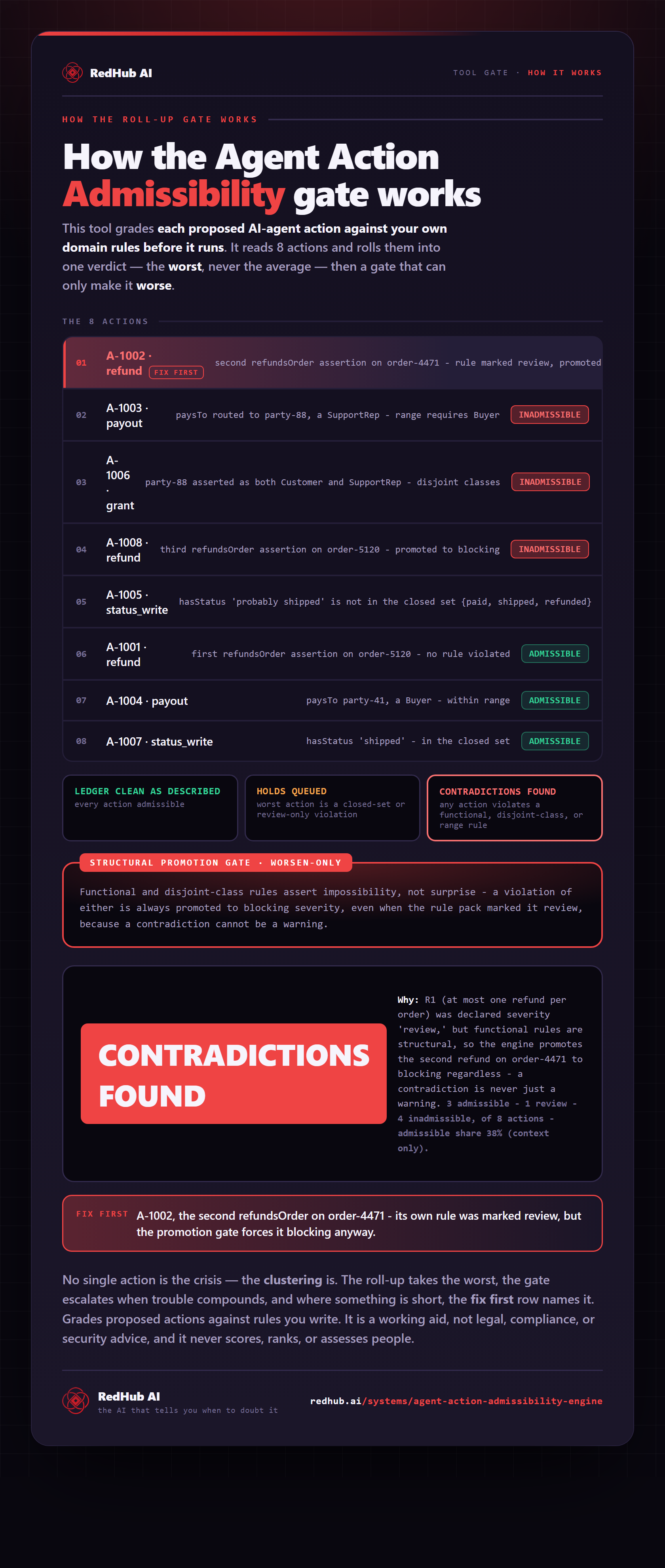
The gate this post refers to, drawn from the tool’s own logic. See the tool.