How to Build a Ransomware Recovery Plan You've Actually Tested
RedHub AI Editorialupdated October 5, 20266 min read
Jump to a section7
The short answer to how to build a ransomware recovery plan: write down four things, then prove them. The four are what you restore first, where each restore comes from, who does each step, and how you reach customers when your main systems are dark. The proof is a real restore of your most critical system from backup, timed from start to finish. Most plans stop after the writing. The restore is the step that tells you your true recovery time. Until you run it, the plan is an estimate nobody has checked.
TL;DR: Write down what to restore and in what order, where each restore comes from, who owns each step, and how you'll communicate. Then test it with a real, timed restore of your most critical system. The test shows your true recovery time and the gaps: a corrupt backup, a missing password, a forgotten dependency. Update the plan from what it finds. The Ransomware & AI-Outage Recovery Readiness Drill ($79) reads WOULD NOT RECOVER on any system that has never had a timed restore. Part of the guide on recovery readiness.
The four parts of the plan
- What to restore, in priority order. List your systems and rank them by how fast the business needs each one back. You can't restore everything at once, so decide the order now, calmly, instead of arguing about it mid-crisis.
- Where each restore comes from. For each critical system: the specific backup, how recent it is, and the actual steps to restore it. Include where the credentials and encryption keys live, and make sure that place is not the machine that got locked.
- Who does what. Named people for the first hour: who declares the incident, who runs restores, who calls the vendor and the insurer, who talks to customers and staff. Name a backup for each. The primary might be on vacation.
- How you communicate. A short, honest message for customers and your team, and a channel that still works if email and your main systems are down.
Rank systems by how long you can live without them
Not every system deserves the same urgency, and treating them equally wastes recovery time. NIST SP 800-34, the federal contingency-planning guide, names the number you need for each one: the recovery time objective, how long a system can stay in recovery before the business starts to suffer. For payments, that might be hours. For the marketing site, it might be a week.
Sorting by that number puts the business back on its feet fastest. It also forces an admission most owners avoid: which one or two systems are load-bearing. Those are the ones you protect hardest and test first.
The step that makes it real: test the restore
Take your most critical system and restore it from backup into a separate environment. Time it. Write down what breaks. Expect something uncomfortable: a backup missing a database, a restore that took four hours when the plan said one, a dependency nobody backed up, a sequence nobody remembered. Finding that on a quiet Tuesday costs an afternoon. Finding it during an attack costs days.
The Readiness Drill weights this control more heavily than any other, 22 points of 100, and makes it a trigger: in the drill's shipped sample, a system that scores 78 still reads WOULD NOT RECOVER because nobody has run a timed restore. A restore you have done once is one you can repeat under pressure.
The test restore is not the ransomware restore
A clean test proves the backup works. It doesn't fully prove the ransomware recovery works, because that recovery has an extra step in front. CISA's #StopRansomware Guide warns that attackers often leave other malware behind, and that it has to be found "before rebuilding from backups to prevent continuing compromises." Restore too fast and you can restore the attacker along with the data.
That checking takes time no drill can predict, which is why the Readiness Drill's own runbook tells buyers to keep a separate, longer ransomware recovery-time objective. A full test of a large system can also take days and a second environment you may not have. A partial test of the most critical system still beats none. Treat its result as the floor of your recovery time, not the real number.
Update the plan from what the test finds
Every gap the test surfaces becomes a to-do: fix the incomplete backup, record the real recovery time, add the missing dependency, write down the sequence nobody remembered. Then re-test the parts that failed. Re-test again whenever your systems change, because a plan that matched last year's setup can go stale without anyone noticing. The tabletop exercise is how you pressure-test the human side of the same plan.
Know which system would fail first
The Ransomware & AI-Outage Recovery Readiness Drill scores each critical system on six weighted controls, marked 0, 1 or 2, including a timed end-to-end restore, a recovery-time objective validated per system, and an incident runbook. Each system reads RESILIENT, GAPS or WOULD NOT RECOVER, and a system with no timed restore reads WOULD NOT RECOVER regardless of score. Where a control is short, it names the one to drill first, and its drill-and-fix runbook gives the concrete fix.
Get the Recovery Readiness Drill — $79Pairs well with
The Shadow AI Discovery & Risk-Triage Kit ($69) finds the systems missing from your step-one list: an amnesty inventory of every AI tool in use, one row per tool. The AI Vendor Reliability & Spend-Justification Scorecard ($79) grades the vendors in step three on reliability and value and returns RENEW, RENEGOTIATE or DO NOT RENEW. After a real incident, the AI Incident Postmortem & Readiness Gate ($79) grades the postmortem and won't let it close while a critical action is still open.
More in this guide
What goes in a ransomware recovery plan?
Four things: what to restore and in what priority order, where each restore comes from (the specific backup and steps), who does what in the first hour, and how you'll communicate with customers and staff. Then a timed test restore to prove it works.
How do I know my recovery plan actually works?
Run a real test restore of your most critical system into a separate environment and time it. That shows your true recovery time and the gaps, such as a corrupt backup, a missing credential or a forgotten dependency, while it's still a drill.
What should I restore first after an attack?
Whatever the business can least function without, often payments and your core operating tool. Rank your systems by how long you can live without each one ahead of time, so you're not deciding the order during the crisis.
Why do recovery plans fail?
Two avoidable reasons come up often: the backup was never test-restored and turns out corrupt or incomplete, or the credentials and keys needed to recover were stored only on the system that got locked. A timed test and separate credential storage address both.
How often should I test my recovery plan?
Regularly, and whenever your systems change in a meaningful way, since a plan that matched last year's setup can go stale. At minimum, re-test the parts that failed after you fix them, so you know the fix holds.
Do I need IT staff to build a recovery plan?
Not necessarily. The planning (priorities, roles, communication) is a business exercise any owner can lead. You may need technical help for the restore steps themselves, but deciding what matters and insisting on a test don't require a dedicated IT team.
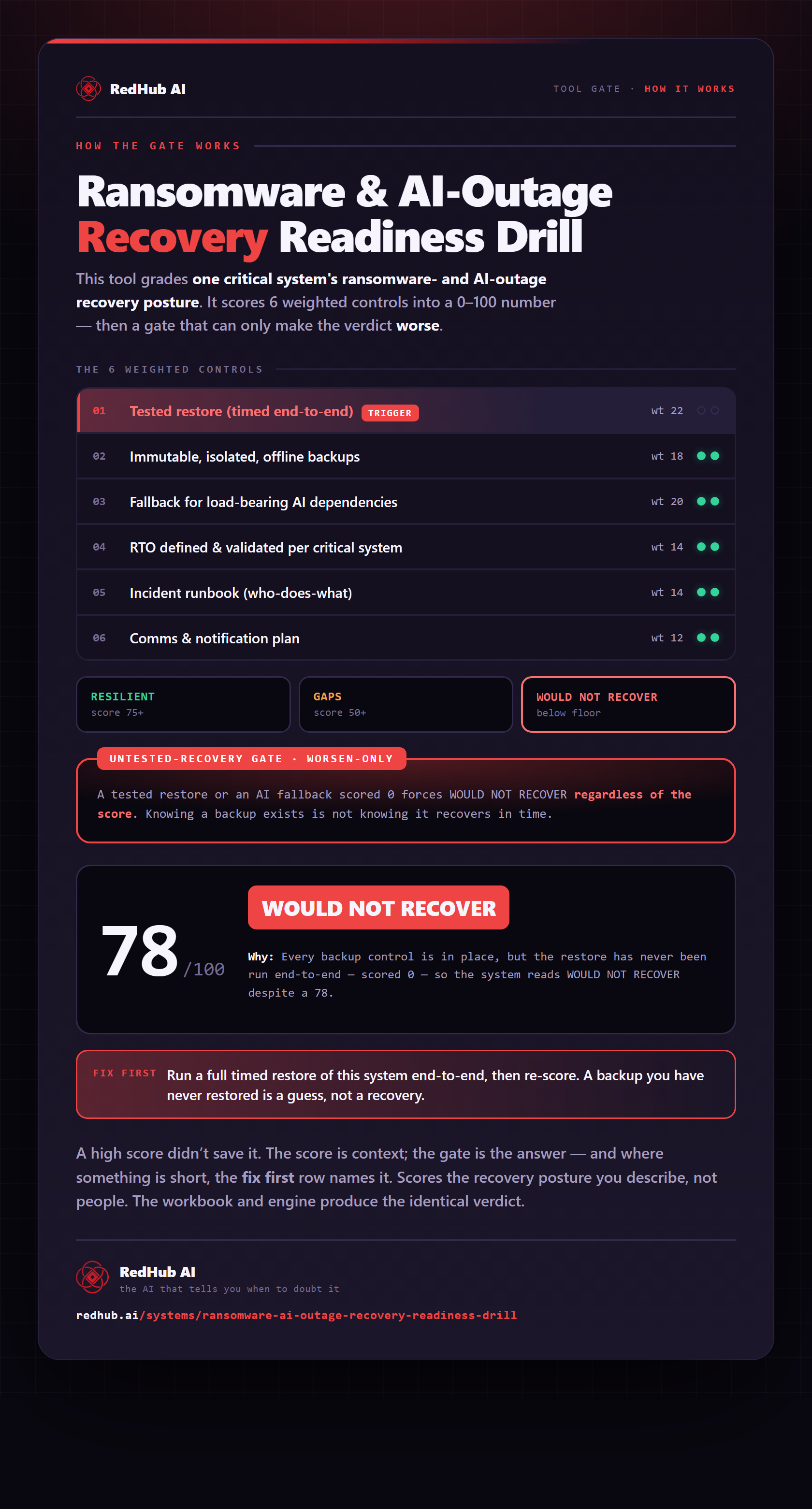
The gate this post refers to, drawn from the tool’s own logic. See the tool.