What to Do When Your AI Tools Go Down: An Outage Playbook
RedHub AI Editorialupdated October 5, 20266 min read

Jump to a section6
When an AI tool your business depends on goes down, switch to a fallback you chose in advance, tell the people affected, and keep working in a slower mode instead of waiting for it to come back. An AI outage used to be a small annoyance. Now that drafting, support replies and data processing run through a model, it can stop a whole part of the operation. The businesses that handle one calmly decided ahead of time what they would do instead. An outage playbook is that decision, written down before you need it.
TL;DR: For each AI or SaaS tool your business relies on, decide the fallback in advance: a manual process, an alternate tool, or a planned pause. Decide who gets notified and how you keep serving customers. Tell "their outage" (wait or switch) apart from "our access is the problem" (possibly something worse). A second model is a real fallback, but it won't behave exactly like the first. The Ransomware & AI-Outage Recovery Readiness Drill ($79) reads WOULD NOT RECOVER on any load-bearing AI dependency with no fallback. Part of the guide on recovery readiness.
First, know what you actually depend on
Before you can plan for an outage, list the AI and SaaS tools your operation can't run without for a day: the ones where "it's down" means real work stops. Separate the load-bearing from the merely convenient. You only need fallback plans for the first group. Most teams find it shorter than they feared, plus one or two tools they hadn't realized were critical until they wrote them down.
Count the AI features inside other products too. The Readiness Drill's playbook tells buyers to list load-bearing AI dependencies as systems in their own right: a support copilot, a product feature, or an ops workflow that routes through a single model or API. In the drill's shipped sample, a support copilot on a single LLM API scores 66, inside the GAPS band, and still reads WOULD NOT RECOVER because it has no fallback.
The outage playbook, tool by tool
- Name the fallback. For each critical tool: if it's down for an hour, a day, a week, what do we do instead? The drill's runbook lists the usual options: a second provider, a cached last-known-good response, a queue-and-retry, or a hand-off to a person.
- Decide the trigger. How long do you wait before switching? Ten minutes of a flaky tool isn't an outage; two hours down is. Pick a threshold so nobody agonizes in the moment.
- Assign the calls. Who confirms the tool is down (and not your own internet), who switches to the fallback, and who tells the team and customers.
- Keep serving customers. Have a plain message ready: what's delayed, what still works, and when you'll update next. Customers tend to forgive an outage handled openly far more readily than silence.
A second model is not a drop-in copy
Switching to another AI provider sounds like the clean fallback, and it is the one most likely to surprise you. A different model formats output differently, follows instructions more or less strictly, and refuses different things. Anything downstream that was tuned to the first model can break without an error. Our post on why AI model upgrades break production workflows walks through how that happens, and model-agnostic AI architecture covers how to keep a workflow portable enough to switch.
A manual fallback has the opposite problem. It works, but a support team that leans on an AI assistant for most replies may not keep up by hand for long. Sometimes the honest fallback is a pause, a queue and a message to customers. For some tools none of the options is good, and the plan is knowing how long you can wait. The drill's runbook adds one more check: compare the vendor's SLA with your recovery-time objective, because a system can't hit a two-hour recovery target if a critical provider doesn't commit to one.
Write it down and keep it reachable
A playbook stored on the system that's down is useless. CISA's #StopRansomware Guide makes the same point about incident response plans, telling organizations to ensure "a hard copy of the plan and an offline version is available." Keep yours as a printed copy, a separate note, or a file on your phone. Revisit it as your tool stack changes, since AI dependencies tend to pile up faster than anyone documents them. If one vendor already sits under most of your workflow, the signs of AI vendor lock-in are worth a read before the next outage.
Find the AI dependency that would take you down
One of the two triggers in the Ransomware & AI-Outage Recovery Readiness Drill is the AI fallback. A load-bearing model or API with no fallback or degraded mode reads WOULD NOT RECOVER, no matter how well the system scores on backups. You mark six recovery controls 0, 1 or 2 for each critical system; systems without a tripped trigger read RESILIENT, GAPS or WOULD NOT RECOVER by score, with the one control to drill first where a control is short.
Get the Recovery Readiness Drill — $79Pairs well with
The AI Vendor Reliability & Spend-Justification Scorecard ($79) grades each AI or SaaS vendor on uptime, incident load and support alongside value, and a business-critical vendor that fails any reliability dimension reads DO NOT RENEW. The Shadow AI Discovery & Risk-Triage Kit ($69) surfaces the AI tools your team uses, including the ones nobody listed as dependencies. The AI Reliability Bundle ($329) includes the Prompt Regression Lab, which snapshots a baseline and flags regressions, a way to check a fallback model before you need it.
More in this guide
What should I do when an AI tool I rely on goes down?
Switch to a fallback you chose in advance (a manual process, an alternate tool or a planned pause), tell the people affected with an honest update, and keep working in a slower mode. The key is deciding the fallback before the outage, not during it.
How do I know which tools need an outage plan?
List the AI and SaaS tools your operation can't run without for a day, the load-bearing ones where "it's down" means work stops. Include AI features inside other products, such as a support copilot. You only need fallback plans for that list.
How is an AI outage different from a security incident?
A vendor-side outage means wait or switch to your fallback. If only you can't access your account, your data looks wrong, or your keys stopped working, treat it as a possible security event and investigate. The responses differ, so don't assume every access problem is a routine outage.
Can I just switch to a different AI model during an outage?
Often, yes, but test it first. A different model can format output differently, follow instructions differently and refuse different things, which can quietly break whatever sits downstream. Run your real tasks through the fallback model before you need it.
Is depending on AI tools risky?
The risk is a critical dependency with no plan B: a workflow that can't run without one specific tool. Give each critical AI dependency a fallback, even a slow manual one or a planned pause, and check the vendor's commitments against how long you can afford to be down.
Where should I keep my outage playbook?
Somewhere reachable when your main tools are down: a printed copy, a separate note or your phone. CISA's #StopRansomware Guide gives the same advice for incident response plans. Revisit it as your tool stack changes.
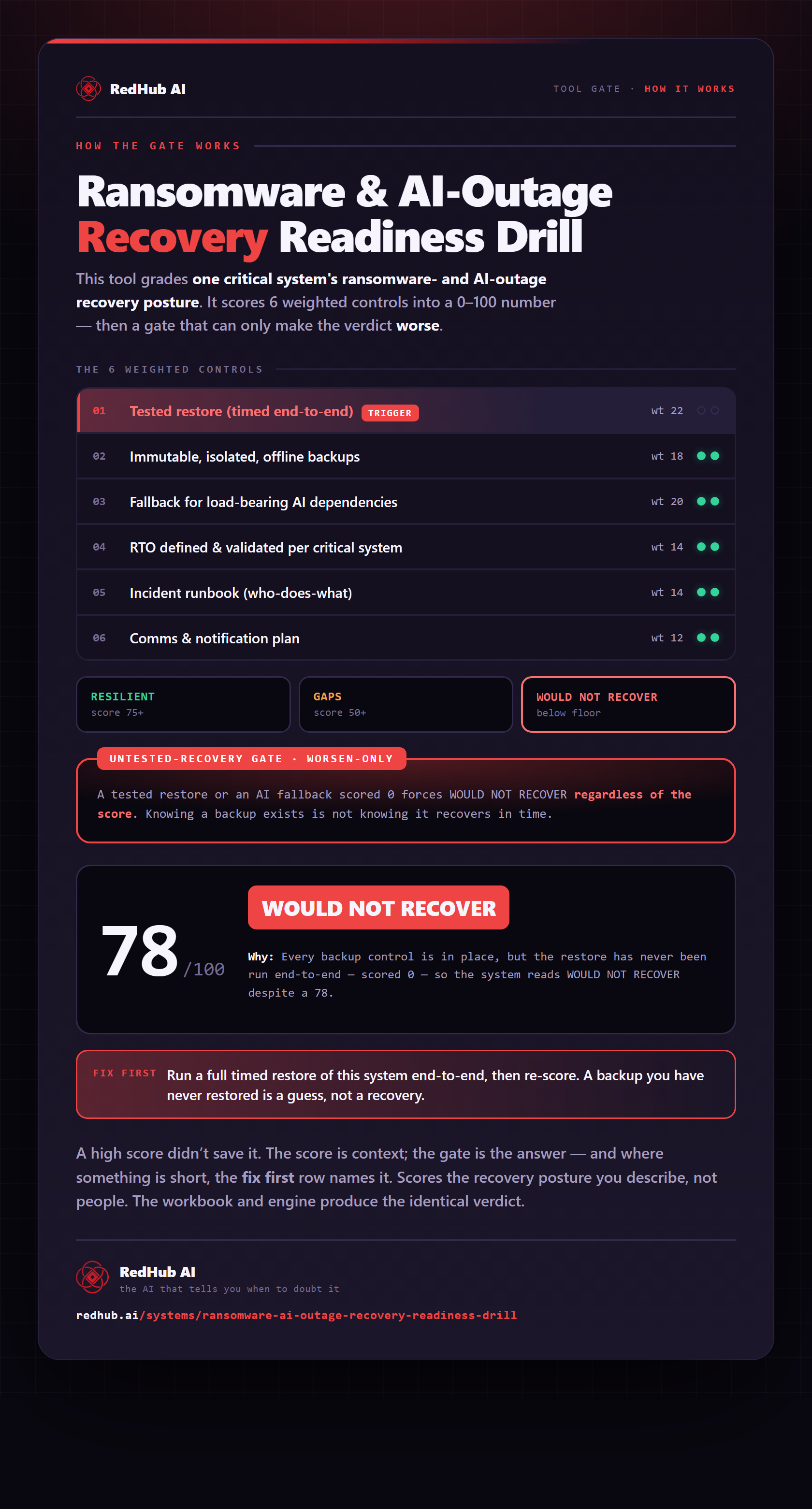
The gate this post refers to, drawn from the tool’s own logic. See the tool.