How to Document a Process Without Spending Days on It
RedHub AI Editorialupdated October 4, 20265 min read
Jump to a section8
If you can do a task, you can learn how to document a process in roughly the time the task takes: do it once with a recorder running, say each step out loud, and let AI turn the transcript into numbered steps. The writing stops being the slow part. What's left is a review pass and the exceptions that didn't happen while you were recording.
TL;DR: Documenting from memory stretches an afternoon into a project, because you rebuild every step and forget the ones you do on autopilot. A narrated recording of one real run gets you there faster, with AI structuring the transcript into an SOP. Review the draft against the recording, then add the exceptions that one run didn't show. The AI-First SOP Engine ($79) handles the structuring inside Claude and also returns a Claude skill and an automation map.
Why writing it down eats the afternoon
You know the process cold. Sit down to write it out, though, and the hours go. Writing from memory means rebuilding every step, second-guessing the order, and realizing halfway through that you left out the time-zone check before the invoice goes out. That rebuilding cost is what turns "just write it down" into "block out a day," which is why it keeps sliding to next week.
Record it once
Skip the blank page. Start a recording, then do the job as you would on a normal day, saying each action as you take it. Loom, Zoom and most meeting tools produce a transcript; for work away from a screen, a voice memo run through a transcription app does the same job. You aren't writing anything yet. You are doing the task out loud, and the transcript becomes the raw material.
What a recording catches, and what it misses
| Writing from memory | Recording the task | |
|---|---|---|
| Time to a first draft | However long the rebuilding takes | The length of the task, plus the AI run and your review |
| Step order | Rebuilt, sometimes wrong | The order you did it in |
| Exceptions | The ones you remember | Only the ones that came up during that run |
| Where it stalls | The blank page | The review, if nobody owns it |
The third row is the catch. A recording is honest about one run of the task, and one run is usually the easy version: the card went through, the client answered, the file arrived in the right format. Exceptions you didn't hit aren't in the transcript, so the AI has nothing to structure. There are two fixes, and neither is complete. Record again the next time an exception happens, which is accurate but slow. Or end the recording by talking through the exceptions you remember, which is fast and brings back the memory problem you were trying to escape.
How long the AI part takes
The product page for the AI-First SOP Engine shows one sample run: a 90-second Loom of a dental practice owner explaining how the front desk handles a no-show, a 187-word transcript, and 4 minutes 12 seconds from paste to all three outputs. That is RedHub's own run on one short task, not a promise about yours. A longer task means a longer transcript and a longer review.
From transcript to usable SOP
- Record the walkthrough, narrating each action as you take it
- Paste the transcript into the AI and have it restructure the narration into numbered, plain-language steps
- Read the draft against what you did, and fix anything it got wrong or left out
- Add the missing exceptions, each as an if-then branch
- Save the checked SOP where the team already looks for documents
The fast draft still needs a slow read
AI can produce a clean-looking SOP from your transcript in minutes. It can also merge two actions into one, mishear a tool name, or add a step that sounds right and never happened. Read the draft with the recording open. If you notice a step that shouldn't exist while you watch yourself do it, cut it from the process before it goes into the document, because a recorded workaround becomes official the moment it is written down.
Document a process from one recording
Record the task once and the Engine does the structuring in Claude: a written SOP with a trigger, an owner, a time to complete and numbered steps with decision branches; a Claude skill as a SKILL.md folder; and an automation map for the tools you use. The review and the missing exceptions stay with you.
Document a process from a single recording — $79Pairs well with
Processes that start in your inbox pair with the Inbox-to-Done Engine ($129), which triages every thread as REPLY NOW, DELEGATE, SCHEDULE or ARCHIVE and drafts the replies that need you; it never sends. Once a documented process is headed for an agent, the Agent-Executable SOP Readiness Gate ($79) grades each step READY, GAP or BLOCKER and, where a step falls short, names the one to fix first. Agency teams can pair the new SOPs with the Agency Operators Skills Pack ($89), six Claude skills covering onboarding, status reports, scope creep, kickoff decks, invoice reconciliation and renewals.
More in this guide
How long does it take to document a process this way?
Roughly the length of the task, plus the AI run and a review pass. The slow part of traditional SOP writing is rebuilding the process from memory, and recording it skips that.
What kind of recording do I need?
Anything you can get a transcript from. A screen recording such as Loom works for digital tasks. For work away from a screen, a narrated voice memo run through a transcription app does the job.
Do I need to script what I say before recording?
No. Narrate as you work, the way you would explain it to someone sitting next to you. A scripted version tends to drop the judgment calls you make without thinking.
What does a single recording miss?
Any exception that didn't happen during that run. Record again when an exception comes up, or talk through the ones you know at the end of the recording, then add each as an if-then branch.
What if I notice the process is inefficient while recording it?
Fix it first, then record again. Documenting an inefficient process makes it look official without making it any faster.
Can this work for a process that involves several people?
Yes. Record each person's part separately, or have the main owner narrate the whole chain, and write the result as one SOP with a clear handoff point between roles.
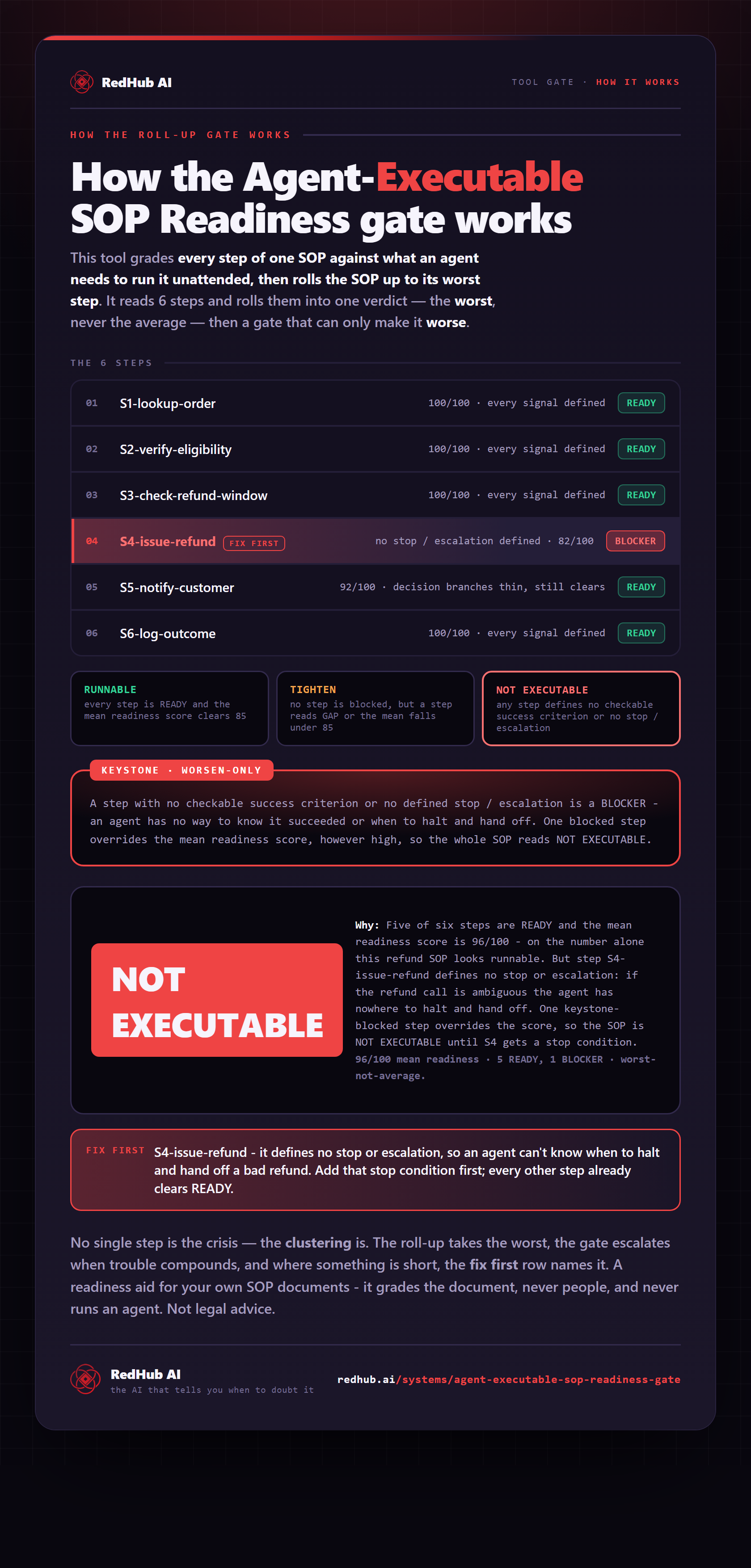
The gate this post refers to, drawn from the tool’s own logic. See the tool.