Email Deliverability: Why Your Email Lands in Spam
RedHub AI Editorialupdated August 18, 20266 min read

Jump to a section11
- TL;DR
- What is email deliverability?
- The four things that actually decide inbox placement
- Authentication in one paragraph: SPF, DKIM, and DMARC
- DMARC enforcement: from monitor to reject
- The Google, Yahoo, and Microsoft bulk-sender rules
- Why emails still land in spam even when everything "looks" fine
- Deliverability is the prerequisite for everything downstream
- Read next: the deliverability cluster
- Decision Guide
- Common Questions
TL;DR
- What it is: email deliverability is whether your email reaches the inbox — decided mostly by authentication and sender reputation, not your subject line.
- Who it's for: anyone sending marketing, transactional, or outreach email who isn't sure the technical plumbing is holding them back. Check it with the Email Deliverability & DMARC Enforcement Readiness Gate.
- How it works: SPF, DKIM, and DMARC prove you're really you. Alignment, a one-click unsubscribe, and a low complaint rate keep mailbox providers trusting you after that.
- Bottom line: fix the authentication and reputation signals first. No amount of clever copy outruns a domain mailbox providers don't trust.
What is email deliverability?
Email deliverability is the rate at which your email actually reaches a recipient's inbox instead of landing in spam or getting blocked outright. It's decided mostly by three technical records — SPF, DKIM, and DMARC — plus your sending reputation: how many people complain, how many mark you as spam, and whether you make it easy to unsubscribe. Good subject lines and clean lists still help, but they can't fix a domain mailbox providers already distrust.
Best for: anyone running marketing, transactional, or outreach email who wants a straight answer on their domain's readiness — grade it with the Email Deliverability & DMARC Enforcement Readiness Gate.
Most people troubleshoot deliverability backward. Open rates drop, so they rewrite the subject line. Replies dry up, so they soften the call to action. None of that touches the actual problem, because most of what decides whether your email reaches the inbox is settled before you ever write a word — by whether your sending domain is authenticated and trusted.
Email deliverability is that trust score, in practice. It's built from a handful of technical signals mailbox providers check automatically, every time you send. Get those right and more of your mail reaches real inboxes. Get them wrong and no subject line saves you.
The four things that actually decide inbox placement
Every mailbox provider is running the same rough checklist on your mail before a human ever sees it. Here's the checklist, in the order it usually gets checked.
| Signal | What it proves | Where you fix it |
|---|---|---|
| SPF | This server is allowed to send mail for your domain | A DNS TXT record |
| DKIM | This message wasn't altered in transit | A DNS TXT record plus a signing key |
| DMARC | What to do when SPF or DKIM fails, and reporting back to you | A DNS TXT record, moved from monitor to enforce |
| Unsubscribe + complaints | People can leave easily, so they don't have to hit "report spam" | A one-click List-Unsubscribe header and clean sending habits |
Authentication in one paragraph: SPF, DKIM, and DMARC
SPF is a published list of servers allowed to send for your domain. DKIM adds a digital signature so a receiving server can confirm your message wasn't tampered with. Neither one, by itself, stops someone from spoofing your visible "From" address — that's DMARC's job. DMARC checks that SPF or DKIM lines up with your domain, then tells mailbox providers what to do if it doesn't. Set up SPF and DKIM first; see the plain-English breakdown in SPF and DKIM explained.
DMARC enforcement: from monitor to reject
Publishing a DMARC record isn't the same as enforcing one. DMARC moves through three stages, and skipping ahead is the single most common way people break their own legitimate mail:
- p=none — monitor only. Nothing gets blocked; you just start collecting reports on who's sending mail as your domain.
- p=quarantine — failing mail gets routed to spam instead of the inbox. This is where real enforcement starts.
- p=reject — failing mail is blocked outright. Full enforcement, and the only stage that actually stops a spoofed email from a fake version of your domain.
The full walkthrough, including the mistakes that get people stuck at "none" forever, is in DMARC explained.
The Google, Yahoo, and Microsoft bulk-sender rules
Since February 2024, Google and Yahoo require anyone sending 5,000 or more messages a day to personal Gmail or Yahoo addresses to authenticate with SPF and DKIM, publish a DMARC record (at least in monitor mode), add a one-click unsubscribe link, and keep their spam-complaint rate under 0.3%. Microsoft has published similar guidance. Cross that 5,000 threshold without meeting the rules and mail gets throttled or dumped to spam with no warning email — see the full breakdown in the Google & Yahoo bulk-sender requirements guide.
Why emails still land in spam even when everything "looks" fine
A well-written email from an unauthenticated or complained-about domain still goes to spam. The usual real causes, roughly in order of how much they matter: broken or missing authentication, a high spam-complaint rate, no easy unsubscribe, and a sudden spike in send volume. Spammy-sounding phrasing is real, but it's last on the list, not first. The full cause-by-cause breakdown is in why emails go to spam.
Quick self-check: are you enforcing, at risk, or failing?
Tick what's true for your sending domain today. This is a simplified, illustrative self-check — it doesn't replace a full grading of alignment and reputation, and it doesn't guarantee inbox placement either way.
Your readiness, right now
Authentication is necessary, not sufficient. Even a fully authenticated domain can still land in spam because of reputation, content, or engagement signals the checks above don't cover. Fixing SPF, DKIM, and DMARC improves your odds. It does not guarantee inbox placement, and no honest tool will promise you one — including the readiness gate below, which grades readiness, not outcomes.
Deliverability is the prerequisite for everything downstream
This isn't just a newsletter problem. A CRM Win-Back System re-engagement email, a Lead-to-Meeting Engine first-touch reply, or a fast reply from a Speed-to-Lead Routing Kit — none of it matters if the message never reaches the inbox. Deliverability sits underneath all of it. And to be clear: these deliverability rules are separate from legal email compliance like CAN-SPAM or GDPR. Meeting Google's and Yahoo's sender rules doesn't automatically make your program legally compliant, and this isn't legal advice.
Know your domain's real readiness
The Email Deliverability & DMARC Enforcement Readiness Gate grades SPF, DKIM, DMARC, alignment, one-click unsubscribe, and spam-complaint headroom against the Google, Yahoo, and Microsoft rules — ENFORCING, AT RISK, or FAILING, per domain. Deterministic, offline, and honest about what it checks.
Get the Readiness Gate — $79 →Read next: the deliverability cluster
- DMARC explained — what it is, and the safe path from monitoring to full enforcement.
- SPF and DKIM explained in plain English — what each record proves, and why you need both.
- Why emails go to spam — the real causes, in the order they actually matter.
- Google & Yahoo bulk-sender requirements — the 2024 rules, and how to check you meet them.
Decision Guide
Fix this now if: you send real volume of email — marketing, transactional, or outreach — and don't actually know your SPF, DKIM, and DMARC status today.
You're probably fine if: you already run continuous DMARC monitoring, enforce at p=reject, and track your complaint rate below 0.3%.
Best first step: look up your sending domain's DMARC record right now and see what policy is actually published. Most people are surprised.
Common Questions
What is email deliverability?
Email deliverability is whether your email actually reaches a recipient's inbox, as opposed to spam or being blocked. It's decided mostly by authentication (SPF, DKIM, DMARC) and your sending reputation.
Why do my emails go to spam if the content looks fine?
Content usually isn't the main cause. Broken authentication, a high spam-complaint rate, and no easy unsubscribe matter more, and mailbox providers check those first.
What's the difference between SPF, DKIM, and DMARC?
SPF lists which servers can send for your domain. DKIM proves a message wasn't altered. DMARC checks that SPF or DKIM aligns with your domain and tells mailbox providers what to do if it doesn't.
Do I need to follow Google and Yahoo's bulk-sender rules?
They're mandatory if you send 5,000 or more messages a day to personal Gmail or Yahoo addresses. Below that, they're still good practice — the requirements describe a healthy sending setup either way.
Does fixing SPF, DKIM, and DMARC guarantee my email reaches the inbox?
No. It removes the most common and most fixable blockers. Reputation, content, and recipient engagement still matter, and no one can honestly guarantee inbox placement.
Is this the same as CAN-SPAM or GDPR compliance?
No. Deliverability rules from mailbox providers and legal compliance rules like CAN-SPAM or GDPR are different things. Meeting one doesn't automatically satisfy the other. This isn't legal advice.
Where should I start?
Check your domain's SPF, DKIM, and DMARC status today. The Email Deliverability & DMARC Enforcement Readiness Gate grades all of it, plus alignment and complaint headroom, per domain.
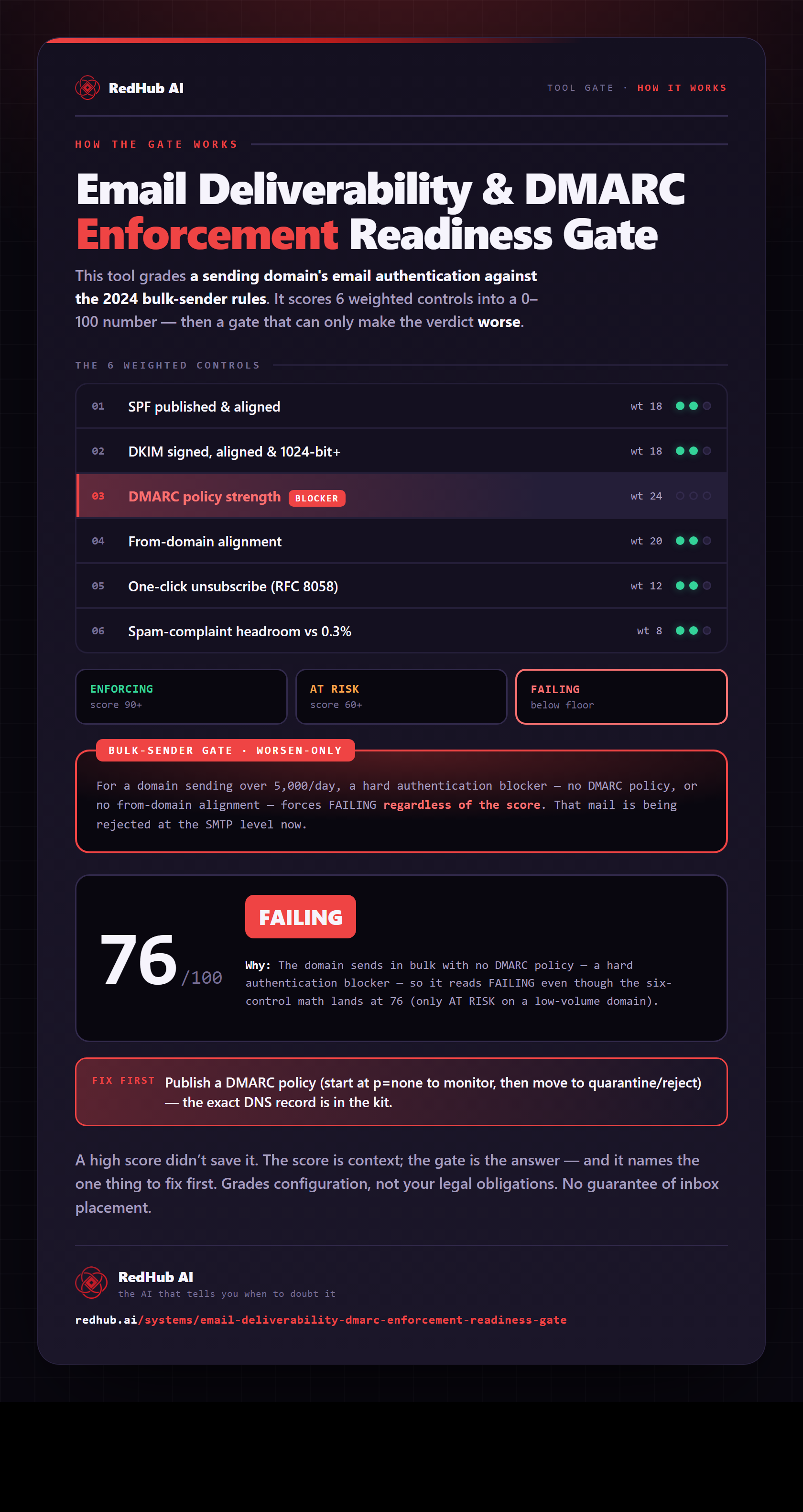
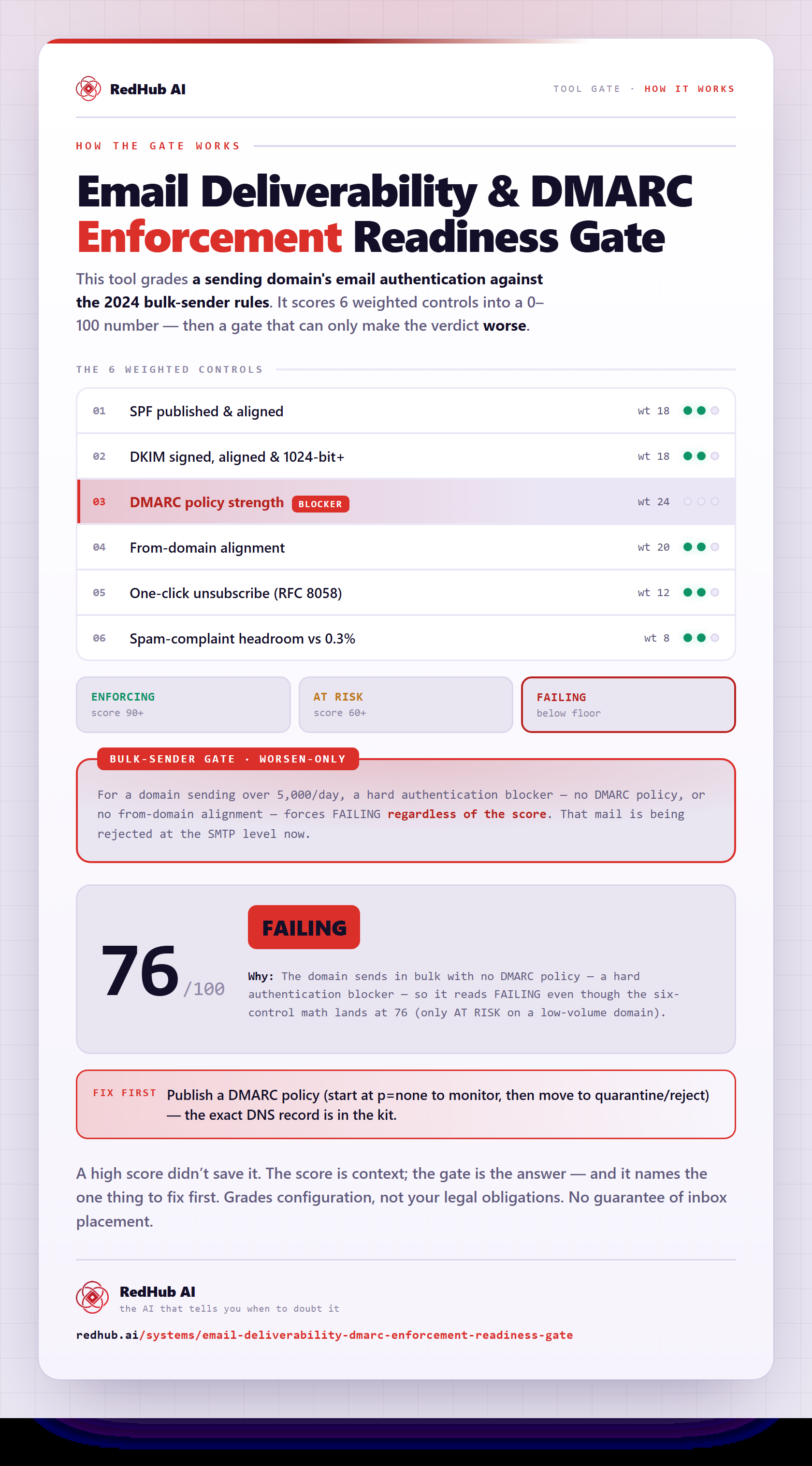
The gate this post refers to, drawn from the tool’s own logic. See the tool.