Model Deprecation: When the Model Changes Under You
RedHub AI Editorialupdated September 20, 20268 min read

Jump to a section7
Model deprecation is when the provider retires or replaces the model version your feature calls, and your feature starts behaving differently without anyone on your team touching it. It is the strangest failure surface in this whole guide, because every other bug has a cause you can point at in your own history. This one doesn’t. The code is the same, the prompt is the same, the deploy is the same, and the output moved anyway.
TL;DR: Model deprecation and silent model updates change your AI feature’s behavior without changing your code. There are three ways it reaches you — a pinned version gets retired, a floating alias quietly points somewhere new, or the same name starts behaving differently — and the tell is always the same: nothing in your git history explains the change. The defense is knowing exactly what you call, watching your own provider’s deprecation notices, and keeping a baseline suite you can re-run against a candidate model before you’re forced to move.
This is not a prompt regression, and treating it like one wastes your day
A prompt regression has an author. Someone edited a line, shipped it, and a case that used to pass stopped passing — the change is in the history, and finding it is a matter of reading the diff. That’s a solved problem with a known shape, and it has its own guide: prompt regression testing covers building the golden set and the gate that catches your own edits.
This is the opposite case. Nobody edited anything. The most common way teams find it is a support ticket about output that used to be fine, followed by an hour of reading commits that all look innocent — because they are. If you go looking for the change in your own repository you will not find it, and the time you spend looking is the real cost of not knowing this failure surface exists.
Three ways a model change reaches you
They are not equally visible, and the least visible one is the most common.
| How it happens | What you see | How much warning |
|---|---|---|
| A pinned version is retired — you named a specific model version and the provider is sunsetting it | Eventually a hard error, or a forced migration to a successor | Usually the most, because a retirement is normally announced |
| A floating alias is repointed — you called a general name rather than a dated version, and the name now resolves to something newer | No error at all. Output shifts. Formatting, verbosity, refusal behavior, and edge-case handling move first | Usually the least, and this is the one that surprises people |
| The same name behaves differently — the provider updates a model in place | No error, and no version string changed either | Varies by provider and is the hardest to reason about |
Notice that two of the three produce no error. That is why this surface belongs in a guide about quiet failures rather than in a guide about outages. An exception gets caught by monitoring you probably already have. A response that is still well-formed, still confident, and subtly different is exactly the kind of thing that reaches a user before it reaches you.
Find out what you are actually calling
Most teams are less certain about this than they expect, because the model string is usually set once, early, by whoever built the first version of the feature, and never revisited.
- Grep your codebase for every model string. Not just the main call — background jobs, evaluation scripts, the summarization helper somebody added later, and anything in a config file or environment variable. Look at: whether the same string appears in every place, or whether one path is quietly on something older.
- Decide, for each one, whether it is pinned or floating. A dated or explicitly-versioned string is pinned; a general product name is usually an alias that can move. Look at: your provider’s own documentation for which of their names are aliases — the naming conventions differ between providers and they change over time, so read theirs rather than assuming.
- Find where your provider publishes deprecation notices, and make sure a human receives them. Look at: whether those notices currently go to a shared inbox nobody reads, or to the person who originally set up the account and has since changed roles.
- Write down what each call is for. A model change matters far more on the path that drafts customer-facing text than on the one that tags internal notes. Look at: which calls a user sees the output of, and which ones only you do.
That inventory is worth an afternoon once, and it is the thing that turns a model retirement from a scramble into a scheduled task.
The defense is a baseline you can re-run on demand
Knowing a change is coming only helps if you can answer the next question: what does it actually do to my output? Reading a provider’s release notes tells you what changed in general. It cannot tell you what changed for your prompts, on your cases, in your product.
The mechanism is the same one that catches your own prompt edits — a saved set of representative cases with a recorded baseline of how the current setup handles them. The difference is what you hold constant. For a prompt regression you hold the model fixed and change the prompt. Here you hold the prompt fixed and change the model, then read the same four buckets of diff:
| Bucket | What it means when a model changes |
|---|---|
| Regressions | Cases that passed before and fail now. The reason to delay the switch, or to adjust the prompt before switching |
| Fixes | Cases that failed before and pass now. Genuinely good news, and easy to miss if you only look for damage |
| Drift | Cases that still pass but the output moved. Often where formatting and tone changes hide |
| Suite changes | Cases you added or edited. Kept separate so a new case can’t be mistaken for a behavior change |
Run that before the date you’re forced to move, not after. A migration you chose the timing of is an ordinary piece of work. The same migration on a deadline, with the old version already erroring, is where teams ship a prompt rewrite they haven’t checked.
The Prompt Regression Lab ($89) is the baseline suite for exactly this: a committed baseline, the four diff buckets, and a gate you can run in CI — whether the thing that changed was your prompt or the model underneath it. If the surface you’re worried about is a multi-step agent rather than a single call, the Agent Reliability Harness ($149) covers tool calls and step behavior, and both ship inside the AI Reliability Bundle ($329).
The honest boundary
A green suite after a model swap means one thing precisely: nothing you tested for got worse. It is not a statement about the cases you didn’t think to include, and a model change is exactly the situation where your blind spots move too. A new model can be better on average and worse on the one input shape your product happens to send constantly.
So treat the suite as a floor rather than a verdict, and add cases when a user finds something it missed. Reliability here is a trend you maintain, not a guarantee you buy — and nobody, including your provider, can promise you that a model change is behaviorally neutral for your product.
More in this guide
Frequently asked questions
What is model deprecation?
Model deprecation is when an AI provider retires a model version so that calls to it eventually stop working, or replaces what a model name points at so that calls to it start behaving differently. From your side it looks like an AI feature changing on its own, because your code, your prompt, and your deploy are all unchanged. Providers announce retirements on their own schedules and through their own channels, so check yours rather than relying on a general rule.
How is this different from a prompt regression?
A prompt regression has an author and a diff — someone changed the prompt and something that used to pass stopped passing, and you can find it in your history. A model change has neither. Nothing in your repository explains it, which is why teams lose time bisecting their own commits before thinking to check the model. The detection mechanism is the same baseline suite; what differs is which side you hold constant.
Should I pin a model version or use a general name?
Pinning gives you a stable behavior you control the timing of changing, at the cost of eventually having to migrate when that version retires. A floating name keeps you current automatically, at the cost of behavior that can move without warning. Neither is universally right — but the choice should be deliberate and written down, and the worst outcome is not knowing which one a given call is using. Check your provider’s documentation for which of their names are pinned versions and which are aliases.
How do I know a model change is what broke my feature?
Start with the shape of the evidence rather than the symptom. If the behavior moved and there is no commit, config change, or deploy that lines up with when it moved, a model change is a strong candidate. Confirm it by running your baseline cases against the version you believe you were on and the one you appear to be on now, and comparing the two outputs directly.
Can I test a new model before I’m forced to switch?
Yes, and that is the whole point of keeping a baseline suite. Run the same saved cases with the same prompts against the candidate model, then read the difference as regressions, fixes, drift, and suite changes. Doing that on your own schedule turns a forced migration into an ordinary piece of planned work, which is the difference between adjusting a prompt carefully and rewriting one under deadline.
If my suite passes on the new model, am I safe to switch?
You know that nothing you tested for got worse, which is real but bounded. A model change can shift behavior on input shapes you never added a case for, and a model that is better on average can be worse on the specific thing your product does most. Treat a green suite as a floor, switch with that understanding, and add a case whenever something reaches a user that the suite missed.
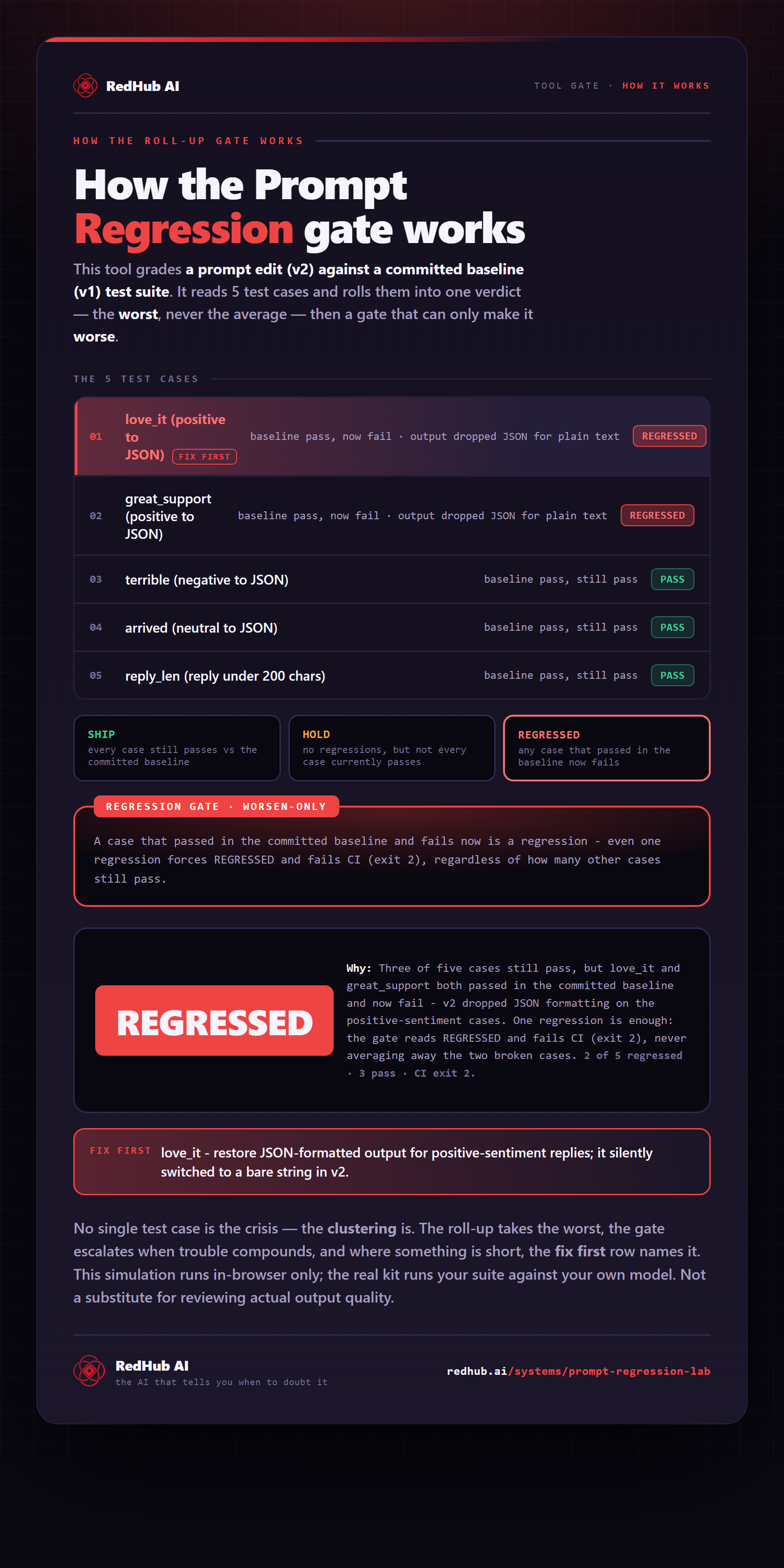
The gate this post refers to, drawn from the tool’s own logic. See the tool.