Paid, But Nothing Happened: Where Fulfillment Breaks
RedHub AI Editorialupdated November 5, 20266 min read

Jump to a section8
When a customer has paid but the order was not created, it usually comes down to one of two things. Either the step that grants access or writes the order was waiting for the customer's browser to reach a page it never reached, or nothing was wired to react to the payment at all. The money moved and the rest of the flow did not notice. Work out which of the two it is first, because they are different repairs.
TL;DR: This ticket appears when a step after the charge, such as granting access, creating the order record or sending a confirmation, was set off by the customer's browser landing on a page instead of a notification from the processor. Or when no step was listening at all. Trace it backward from the payment record, not forward from the ticket. You can reproduce it yourself in test mode by closing the tab the moment you pay.
The email you now dread
It reads about the same every time. "I paid, the charge is on my card, and I don't have access." Or "my order isn't showing." Checking the payment is the fast part, and it went through. The useful question is slower: what was supposed to happen next, and was that step ever told the payment happened?
This is not a sign the app was built badly. Usually one step, most often the one that grants access or writes the order, was wired to fire when the customer reached a certain page. Nobody chose that on purpose. It is the easiest version to build, and it passes every test you run yourself, because you never close the tab early.
Work backward from the payment
The instinct is to start from the ticket and guess. Maybe the grant logic has a bug. Maybe the database dropped a row. Maybe support should just fix this one customer and move on. Working backward is more reliable. Find the charge. Confirm it succeeded on the processor's side. Then ask what was supposed to happen because of this charge, and what actually triggers that thing.
The two shapes this takes
Shape one: the step waited for the browser. It works for every customer whose browser finishes the trip and fails for the ones whose does not. A dropped connection, a closed laptop, a dead battery. You will not see it in your own testing. Stripe's Checkout fulfillment guide names this case: a customer can pay successfully and then lose their internet connection before the landing page loads, which is why it says you can't rely on the landing page alone.
Shape two: nothing was listening. There is no broken step, just a missing one. On a brand-new purchase this tends to get caught fast, because it fails for everyone. It lasts much longer on steps nobody thought to test, like the order record for a subscription renewal or a refund that never reaches your own database.
The fix differs. Shape one needs the step moved onto the processor's notification to your server, usually called a webhook. Shape two needs a step built from scratch. Why the Redirect Isn't the Receipt goes deeper on shape one.
Reproduce it on purpose
You can find this without reading code. Use your processor's test mode and a test card.
- Pay and leave. Start a test payment and close the tab the moment you submit, before your success page loads. Check: was the order recorded? Was access granted? If not, that step waits for the browser.
- Arrive without paying. Copy your success page's URL from a completed test purchase. Open it in a private window, signed out. Then try it again with the session or order ID in the URL changed. Check: did anything get granted? If so, the page is trusting the browser.
- Try the quiet branches. Renew, cancel and refund a test subscription. Check: did your own records change each time?
Run these only against your own test setup. They take an afternoon, and each one either clears a step or gives you the exact ticket before a real customer sends it.
What to ask your AI builder for
The request is short and specific: "The step that grants access (or creates the order) should be triggered by the payment processor's notification to the server, not by the customer reaching the success page. It should check that the payment is marked paid with the processor, and it should do nothing if this payment was already handled." That last clause matters. Notifications can arrive more than once, and if you keep the success page as a second, faster path, two things will now try to fulfill the same order.
After the fix, the redirect still has a job. It shows the customer something reassuring while the notification lands. The two may arrive in either order, so the page should be able to say "processing" for a moment rather than "failed."
Check every step, not just the one that complained
A ticket only surfaces the step that broke loudly. A renewal that never got logged, or a plan change that never took effect, can sit broken without anyone writing in. The honest complication is that you cannot rule these out by waiting for tickets. Silence from customers is not evidence that a quiet branch works.
The Money Path Teardown is a spreadsheet that asks the same questions of every step: what is at stake, what triggers it, who decides the amount or outcome, and is it safe to run twice. A step nothing triggers reads NOT HANDLED. A step triggered by the redirect reads TAKEN ON TRUST. The sheet ranks NOT HANDLED first, on the reasoning that it fails ordinary customers with nobody attacking it. You could argue the closed-tab customer belongs in that group too, and the redirect row's own reason line does name the closed tab. Either way, both rows need fixing. The sheet is offline, and grades what you tell it.
More in this guide
Frequently asked questions
Why would a customer's payment go through but their access not appear?
Usually because the step that grants access was set to run when the customer's browser reached a specific page, not when the processor confirmed the payment to your server. If their connection dropped or the tab closed before that page loaded, the charge happened and the grant never ran. The other common cause is that no step was wired to react to that kind of payment at all.
How do I know if this is happening in my own app?
In your processor's test mode, start a test payment and close the tab right after you submit, before the success page loads. Then check whether the order was recorded and access granted. If nothing happened, that step depends on the browser finishing a trip it does not always finish.
Is this a coding mistake?
It is a gap more than a mistake. The version that runs off the redirect is simpler to build and passes every manual test, because the person testing always finishes the trip. It is an easy question not to think of asking.
What should I ask my AI builder to fix, specifically?
Ask it to trigger the step from the payment processor's notification to your server rather than from the customer reaching the success page, to confirm the payment is marked paid with the processor before acting, and to do nothing if that payment was already handled. Each part is specific enough to test afterward.
Does fixing this one ticket mean the whole flow is safe?
Not necessarily. A ticket only reveals the step that failed loudly. Other steps, such as a renewal or a plan change, can be wired the same fragile way without anyone complaining, because fewer customers hit them. Check every step that moves money or access, not just the one that broke first.
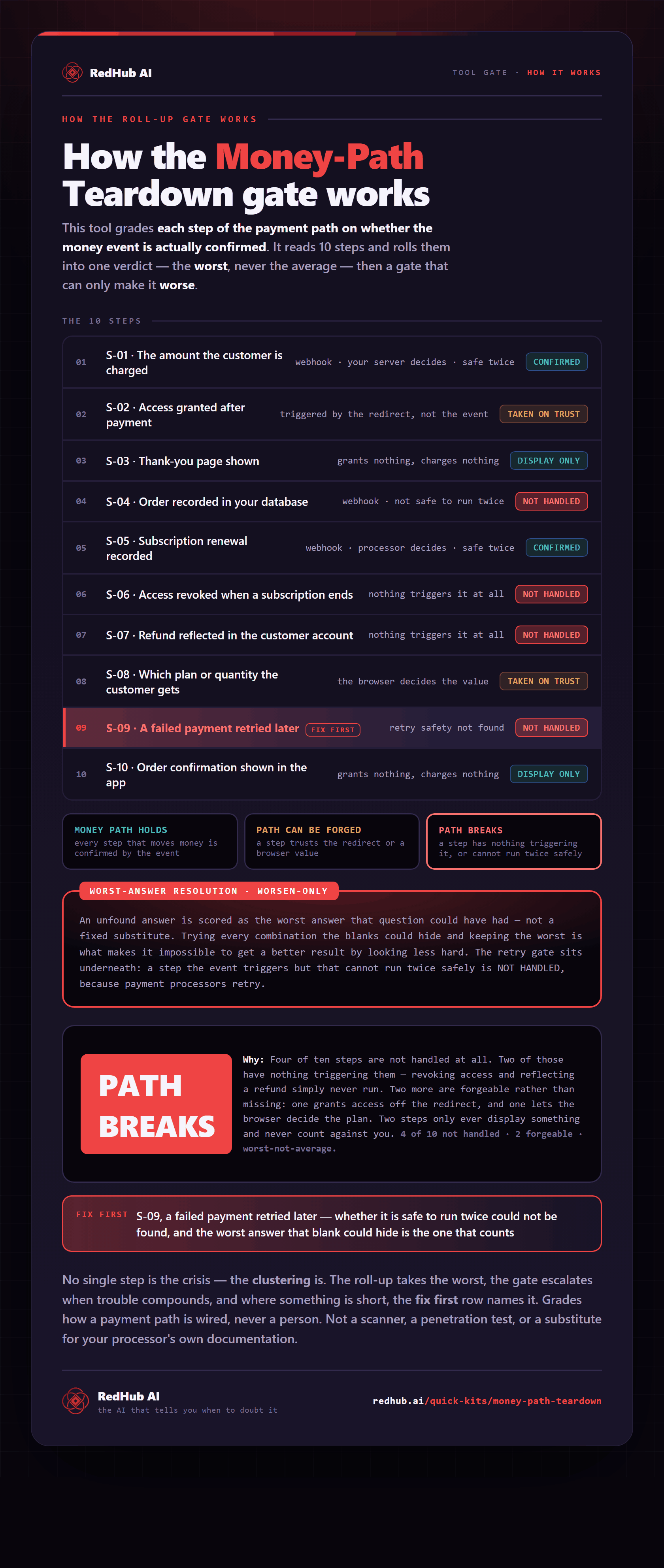
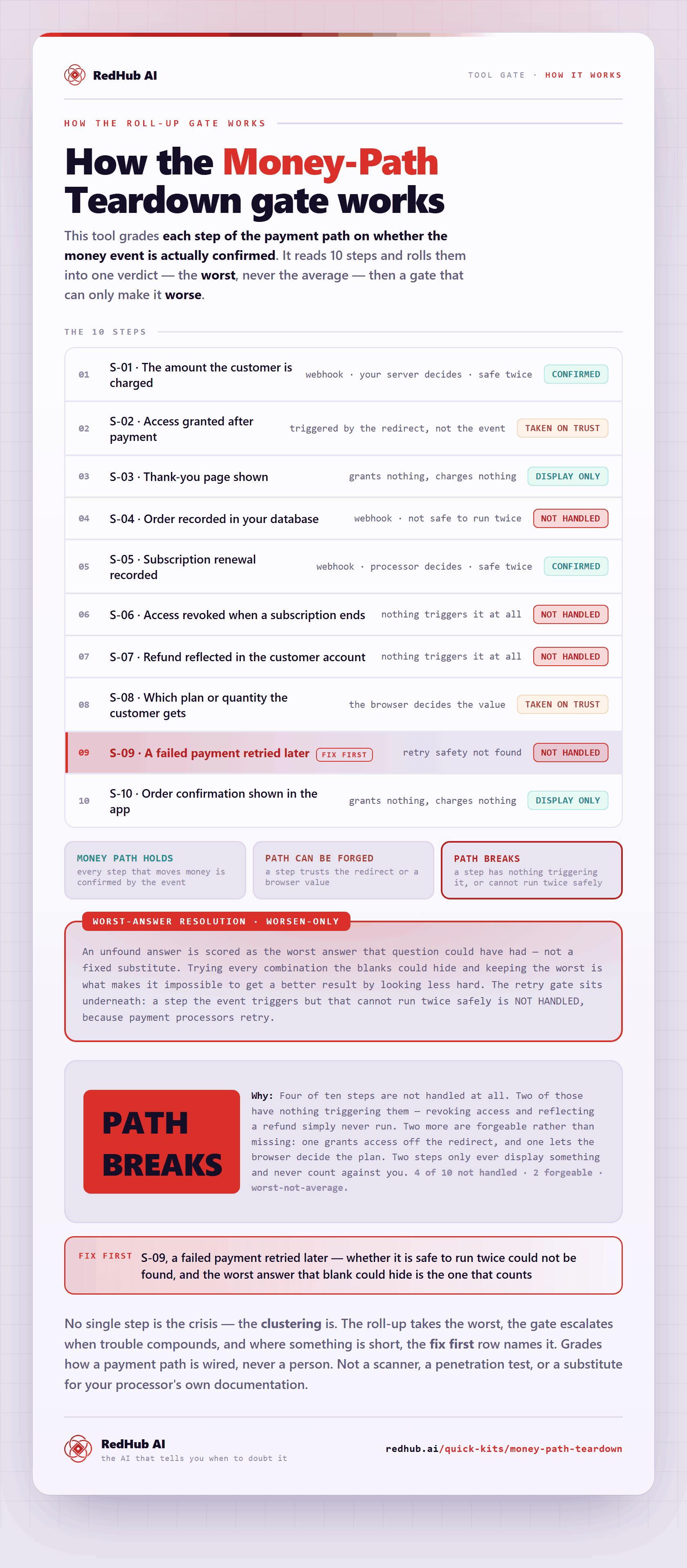
The gate this post refers to, drawn from the tool’s own logic. See the tool.