Seedance 2.0 AI Video: A Practical Guide
Todd Brooks, Founderupdated July 22, 202613 min read
Jump to a section12
- TL;DR
- What Is Seedance 2.0 AI Video?
- Table of Contents
- The Moment Everything Changed
- What Seedance 2.0 Really Is
- How It Works (Without the Jargon)
- The Power of References: Your New Control Panel
- What Seedance 2.0 Does Best
- Where You Can Use It (and What It Costs)
- How It Stacks Up Against Other AI Video Tools
- A Simple 7-Day Plan to Get Fluent
- Decision Guide
TL;DR
- What it is: Seedance 2.0 AI video is ByteDance's multimodal video generator that processes text, images, video clips, and audio simultaneously to create polished 4–15 second clips with cinematic motion and sound sync.
- Who it's for: Creators, marketers, and small teams who need fast, studio-quality video for product demos, social ads, concept pitches, and branded content without full production crews.
- How it works: Upload up to 9 images, 3 video references, and 3 audio clips, write a prompt, and Seedance renders HD video in 30–60 seconds with consistent characters, smooth camera moves, and audio-synced timing.
- Bottom line: It's the best AI video tool for controlled, repeatable, reference-heavy workflows — especially when paired with GPT Image 2 for storyboarding first.
What Is Seedance 2.0 AI Video?
Seedance 2.0 AI video is ByteDance's flagship multimodal video model that synthesizes text prompts, reference images, video clips, and audio into cohesive short-form video content. Released in February 2026, it handles multi-shot consistency, realistic physics, and audio-driven animation in a single unified workflow.
Best for: Product marketers, social media teams, and creators who need studio-quality output without the studio budget, timeline, or crew.
You can think of Seedance 2.0 as the moment AI video stopped feeling like a toy and started acting like a real director on your team. In a few minutes, it can turn a rough idea into a tight, cinematic clip with realistic motion, synced sound, and characters that stay on-model from shot to shot.
The Moment Everything Changed
Picture this.
You have a product launch in three days. No budget for a film crew, no time to storyboard, no editor on call.
You open Seedance 2.0. You type a short description, drop in a few product photos, add a 10-second reference clip with the camera move you like, and a music loop you grabbed from your library. Thirty to sixty seconds later, you're looking at a polished 12-second ad: smooth camera motion, stable product shots, cuts that match the beat, and no stock-footage feel.
That's the shift that landed in 2026. We finally crossed a line. Not just "AI made a video," but "AI made something I can actually ship to a client without apologizing."
This guide walks through what Seedance 2.0 is, how it works, what it costs, where it beats other tools, and how to get fluent with it in a week.
What Seedance 2.0 Really Is
Seedance 2.0 is ByteDance's (opens in a new tab) flagship multimodal video model, officially released in February 2026. "Multimodal" just means it understands four kinds of input at the same time:
- Images
- Video clips
- Audio
- Text prompts
Most older tools were either text-to-video or image-to-video. Seedance 2.0 is different. It lets you direct the look, the motion, the sound, and the story in a single pass.
On hosts like WaveSpeed (opens in a new tab), Higgsfield (opens in a new tab), and others, a typical generation looks like this:
- Up to 9 images (characters, products, environments)
- Up to 3 videos, total up to 15 seconds, for motion and camera moves
- Up to 3 audio clips, total up to 15 seconds, for music, SFX, or dialogue
- A natural language prompt that sets the narrative and style
- Output clips between roughly 4 and 15 seconds, with native audio generation
The result is a short HD clip that feels like it came out of a small studio, not a meme generator.
How It Works (Without the Jargon)
Under the hood, Seedance 2.0 uses a Dual-Branch Diffusion Transformer architecture. You don't need the math. You just need to know what it buys you.
- It starts from noise and "pulls" a video out of it step by step, like a photo appearing in a darkroom.
- It processes your text, images, video, and audio together instead of bolting separate models together.
- It tracks time, so motion is smooth and events line up with beats, cuts, and sound cues.
Because everything flows through one unified model, you see fewer weird seams: fewer sudden style shifts, fewer "teleporting" objects, and better match between what you describe and what you get.
In practice, that means you can:
- Copy a specific camera move from a reference clip.
- Lock a character's appearance across multiple shots.
- Hit a music drop right when the product reveals.
And you can do all of that in roughly 30–60 seconds per generation on mainstream platforms.
The Power of References: Your New Control Panel
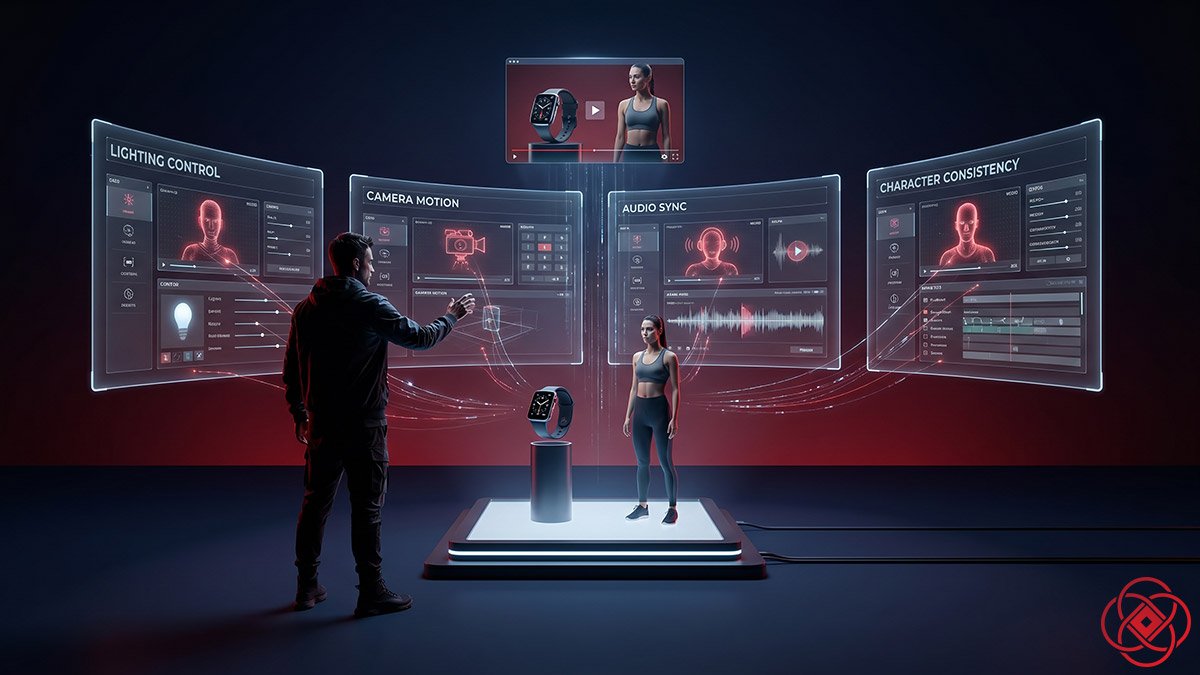
The real magic of Seedance 2.0 is its reference system. Instead of throwing assets in and hoping the model "kind of" uses them, you treat each one like a member of your crew.
Think in roles, not files:
- One image defines the hero character's face and outfit.
- Another image defines the product and lighting.
- A short video defines the camera motion.
- An audio clip defines rhythm and mood.
Platforms that expose Seedance's full reference syntax let you label these assets and call them in your prompt with handles like @HeroFace or @ProductBottle. That's a key difference from many older tools, which might "sort of" consider your reference but often drift away.
Some common roles you can set:
- Motion patterns (from video)
- Camera techniques (from cinematic references)
- Character and product appearance (from images)
- Audio rhythm and mood (from music or VO)
This is what makes Seedance feel like directing. You're not just describing. You're pointing to concrete examples and saying: "Do exactly this, but for my brand."
The Images-First Workflow: GPT Image 2 and Nano Banana Pro
There's a simple trick that separates people who "play" with Seedance 2.0 from people who rely on it for client work: they don't start in video. They start in images.
If you jump straight into text-to-video, every failure costs you full video compute and time. You're rolling the dice on:
- The character's look
- The environment
- The lighting and composition
- The overall style
If any of those are wrong, you regenerate the entire clip.
The images-first workflow flips that:
- You design your key frames with a dedicated image model.
- You pick 1–9 frames that feel "correct" for your story.
- You hand those frames to Seedance 2.0 and let it handle the motion and storytelling.
Because Seedance is very strong at image-to-video, you get smoother results, fewer retries, and tighter control over what shows up in the frame. You're not asking it to invent the look; you're asking it to animate and direct something you already like.
GPT Image 2: Your Best First Option
If you only pick one image model to pair with Seedance 2.0 right now, make it GPT Image 2 (opens in a new tab).
Across tutorials, guides, and creator tests you see the same pattern:
- GPT Image 2 is one of the most prompt-obedient image models available.
- It handles consistent faces across multiple images far better than most rivals.
- It renders text, logos, and small product details in a way that's usable in real content.
- It is especially strong for realistic, grounded scenes: people, products, interiors, and city streets.
Creators who combine GPT Image 2 with Seedance 2.0 report:
- Storyboard grids from GPT Image 2 translate cleanly into Seedance shots.
- Character-driven UGC content feels more stable, especially for face-centric campaigns.
- The cost per usable video drops, because you waste fewer video runs chasing the "right" look.
If Seedance is your director, GPT Image 2 is your casting director and production designer.
Nano Banana Pro: Still a Very Good Option
Nano Banana Pro (and Nano Banana 2 in tools like Dzine and others) is still a very capable image partner for Seedance.
Side-by-side tutorials show that:
- GPT Image 2 (opens in a new tab) often wins on realism and fine-grained detail for low-noise, "real people" content.
- Nano Banana Pro (opens in a new tab) produces bold, stylized, and cinematic images that work extremely well as Seedance reference frames.
- For sci-fi, fantasy, and highly stylized worlds, Nano Banana outputs can look as good as or better than GPT Image 2—just with a different flavor.
So the play is simple:
- For grounded realism, products, or UGC-style content, default to GPT Image 2.
- For stylized worlds and dramatic brand moods, Nano Banana Pro is still a very good choice and often gives more striking frames on the first pass.
You don't have to pick sides. Many creators keep both: GPT Image 2 for clean storyboards, Nano Banana Pro for mood frames.
Two Battle-Tested Images-First Workflows
Recent guides and community posts point to two images-first flows that work especially well.
Workflow 1: Storyboard-to-video (fast)
- Use GPT Image 2 to generate a 3×3 storyboard grid or 3–9 key frames for your scene.
- Pick the frames that feel right and fix any details with another image pass.
- In Seedance 2.0, feed that grid or those frames as image references for an image-to-video run.
- Write a motion-focused prompt: how the camera moves, what changes, what beats to hit.
- Let Seedance treat the storyboard as "visual DNA" and output a 10–15 second cinematic shot.
Workflow 2: Frame-by-frame control (precise)
- Use GPT Image 2 or Nano Banana Pro (opens in a new tab) to create a hero frame for each key shot: intro, conflict, reveal, payoff.
- For each frame, run a 4–8 second Seedance generation where that frame is the base image.
- Give very clear motion instructions for each shot: "slow push-in," "handheld step-back," "orbit around the product," and so on.
- Stitch the micro-clips in your editor, then layer final audio, captions, and graphics.
Fold this into the 7-day plan like this: on Day 2 and Day 3, don't just "add images." Use GPT Image 2 or Nano Banana Pro on purpose, and run at least one storyboard-to-video and one frame-by-frame test.
You'll feel the difference. Seedance stops being a slot machine and starts feeling like a camera you know how to aim.
What Seedance 2.0 Does Best
Now that you know how references (and pre-built images) work, it's easier to see where Seedance shines.
Visual Quality and Consistency
Seedance 2.0 delivers smoother motion, more stable faces, and better style consistency than earlier versions and many peers. It's especially strong at:
- Keeping faces and clothing consistent across short sequences.
- Handling basic physics—falling objects, splashes, simple interactions.
- Keeping a coherent look across multiple shots in a clip.
Motion and Camera Work
With video references, Seedance can follow complex camera moves: slow push-ins, handheld moves, even simple action beats. You don't have to describe every move in text; you show a 5-second clip, and it learns the motion pattern.
Audio-Video Sync
Seedance 2.0 generates native sound—music, effects, and basic voice timbres in certain deployments—and lines it up with visual events. You can also drive timing with your own audio track:
- Cuts on beat
- Key visual moments on drops
- Rough lip sync to dialogue
Character and Object Control
By feeding multiple reference images, you can keep a character's identity or a product's look consistent across shots, at least for short arcs. It's not perfect for long-form stories yet, but it's a big jump from the "new face every shot" era.
Where You Can Use It (and What It Costs)
Seedance 2.0 isn't a single website. It's a model that shows up in multiple products, each with its own pricing.
Consumer and Creator Platforms
Jimeng (China) – Official consumer app.
- Free tier with around 800 seconds of welcome credits.
- Daily login credits for a few short clips per day.
- Monthly subscription at roughly 69 RMB (about 9.60 USD) for "unlimited" standard generation with reasonable daily limits.
Dreamina (global) – Web-based UI with Seedance video.
- Free plan with 225 shared tokens and watermarks.
- Paid plans from about 18–84 USD/month, trading more tokens and priority for price.
WaveSpeed, Nano Banana, ZenCreator, others – Creator-focused platforms that expose Seedance endpoints with templates and promos.
- Pricing varies, but most bundle minutes/credits per month and offer launch discounts.
API and Developer Access
If you're building internal tools or running agency workflows, the API picture around Seedance 2.0 is still fragmented.
ByteDance has a public Seedance 2.0 model page, but broad, fully open first‑party API access is limited and staged, so most teams currently reach Seedance through third‑party platforms rather than a single official API endpoint with one stable price.
In practice, nearly all public pricing you’ll see comes from resellers and infra providers, not from one universal Seedance 2.0 rate card. Some platforms list per‑second prices that change by resolution and tier (for example, lower rates for 480p and higher rates for 720p or 1080p, often with separate “standard” and “pro” routes), while others bundle Seedance into broader multimodel plans where you pay by credits or minutes instead of a simple flat fee.
There is no single universal API price for Seedance 2.0 right now. If you want programmatic access, you compare provider‑specific pricing, limits, and stability, then pick the one that fits your workload and budget.
From a cost‑management point of view, short 6–15 second test clips at mid resolutions are usually cheap enough to experiment with, but longer 1080p runs with many retries and variants can burn through credits quickly. That’s why it makes sense to lock your concept and visuals with still images first, then generate only the video you actually plan to use.
How It Stacks Up Against Other AI Video Tools
Recent reviews and head-to-heads paint a clear picture.
- Seedance 2.0 wins when you want control: multi-shot stories, on-brand social, UGC and product ads, audio-synced content, and reference-heavy workflows.
- Grok Imagine leans into wild, surprising visuals, better for experiments and novelty, less predictable for brand work.
- Runway offers stronger editing and compositing, plus team workflows, but depends more on manual polish around the AI clips.
- Veo-style high-end models push visual fidelity for hero shots, but are harder to access and more expensive for day-to-day use.
If you need a dependable workhorse for repeatable, controlled content, Seedance 2.0 is often the first tool in the stack for teams working in AI for business and AI video tools workflows.
Limitations You Should Know
Even with all the hype, Seedance 2.0 is not magic.
- Long-form character consistency across many scenes is still hard.
- Complex hand interactions and dense crowd scenes can produce artifacts.
- You still need a human eye for pacing, story, and taste; the model offers options, not judgment.
Access is also fragmented. Features often hit Chinese-market apps like Jimeng before rolling out elsewhere.
A Simple 7-Day Plan to Get Fluent
If you want to get comfortable with Seedance in a week, here's a straight path drawn from current guides and tutorials.
- Day 1 – Basic text-to-video
Run pure text prompts. Aim for simple 6–8 second clips. Learn how your words map to visuals. - Day 2 – Add images (with intent)
Use GPT Image 2 or Nano Banana Pro to generate 2–3 reference images for character or product, then feed them into Seedance. - Day 3 – Add motion references
Drop in a short reference video. Ask Seedance to follow its camera move. - Day 4 – Add audio
Use a music loop or VO. Watch how cuts and actions follow the sound. - Day 5 – Multi-shot narratives
Use video extension or chained generations to create a 20–30 second sequence in 3–4 chunks. - Day 6 – Editing and polish
Bring clips into your editor (CapCut, Premiere, etc.) to cut, caption, and finish. - Day 7 – Run a small "release"
Publish two or three Seedance-driven pieces, track engagement, and note which structures work.
Treat Seedance 2.0 as a new kind of camera. The faster you learn its language, the more dangerous you become with it.
Decision Guide
Use it if: You need fast, controlled video for social media, product demos, concept pitches, or branded content, and you're comfortable working with reference images, video clips, and audio to guide the output.
Skip it if: You need long-form video (60+ seconds), frame-perfect control, production-grade lip-sync for dialogue-heavy content, or you prefer pure text-only workflows.
Best first step: Spend Day 1 testing pure text prompts, then immediately move to Day 2 with GPT Image 2 storyboard frames. The images-first workflow is where Seedance 2.0 shows its real power.
FAQ
What is Seedance 2.0 AI video in simple terms?
Seedance 2.0 AI video is ByteDance's multimodal video generator that takes text, images, video clips, and audio as input and produces polished 4–15 second video clips with consistent characters, smooth camera motion, and audio sync. It's designed for creators who need studio-quality output without hiring production crews.
How does Seedance 2.0 compare to Runway, Pika, and other AI video tools?
Seedance 2.0 excels at reference-heavy, controlled workflows—ideal for brand content, product demos, and repeatable social media campaigns. Runway offers stronger editing and team features but requires more manual polish. Pika favors experimental, surprising visuals but is less predictable for brand work. Seedance is the workhorse for teams that need consistency and speed.
How much does Seedance 2.0 cost?
Pricing varies by platform. Jimeng (China) offers a free tier with ~800 seconds of credits and a monthly subscription around $9.60 USD. Dreamina (global) has free and paid plans from $18–84/month. API access through providers like Atlas Cloud costs roughly $0.022–0.247 per second depending on quality tier. Short clips are affordable; high-res, high-volume projects burn credits quickly.
What's the maximum video length Seedance 2.0 can generate?
Seedance 2.0 generates clips between 4 and 15 seconds per render. For longer content, you'll need to create multiple clips and stitch them together in a video editor. It's optimized for short-form social content, ads, and product demos—not long-form narratives.
Why should I use GPT Image 2 with Seedance 2.0?
GPT Image 2 is highly prompt-obedient, handles consistent faces across multiple images better than most rivals, and renders realistic scenes with usable text and product details. Starting with GPT Image 2 storyboards gives you tighter control over what appears in the final video and reduces wasted compute on failed text-to-video runs. It's the images-first workflow that separates hobbyists from professionals.
Is Seedance 2.0 better for small businesses or enterprise teams?
Small businesses and mid-sized teams get the most value. It's priced for high-volume use without requiring enterprise contracts. If you're a solo creator, small marketing team, or agency that needs fast turnarounds on branded video without hiring freelancers, Seedance 2.0 is a strong fit. Large enterprises may want more control, custom integrations, and longer output limits.