AI Automation Threshold: When a Workflow Is Worth It
RedHub AI Editorialupdated October 2, 20267 min read

Jump to a section9
An AI automation threshold is the point where automating one specific workflow is worth more than it costs to build, run and control. Below it, the work stays with people or with plain software. Above it, AI earns a place, and the same scores tell you how much freedom to give it: draft for a person, recommend with evidence, or act within tight limits. The test has two parts, applied to one workflow at a time: six factors scored 1 to 5, then one piece of arithmetic that a short pilot replaces with real numbers.
TL;DR: Score one workflow from 1 to 5 on volume, repeatability, data readiness, error tolerance, economic value and control readiness. Under RedHub's starting rule, a heuristic rather than a standard, the total says whether it is worth a pilot and the weakest safety score says how much autonomy it can take: assist, recommend or act. Then subtract build, run, review, maintenance and control costs from the monthly benefit, and let a pilot check the guesses. For a proposed agent, the Agent Use-Case Fit & Proof-of-Value Gate ($99) scores its fit and weighs its return against the cost of its controls. Start with the pillar: AI Intelligence Costs: Your Automation Math Is Out of Date.
Repetitive is not the same as ready
A workflow can repeat every day and still be a poor candidate if the data is messy, mistakes are expensive, exceptions outnumber the normal cases, or nobody owns the result. And do not start with the most visible process in the company. Start where you can count the accepted results and where a failure can be caught and undone.
The six-part threshold model
Each factor gets a score from 1 (weak) to 5 (strong). A 5 looks like this:
| Factor | High-score signal |
|---|---|
| Volume | The task occurs frequently enough for savings to compound |
| Repeatability | The workflow follows stable patterns and rules |
| Data readiness | Inputs are accessible, permitted, and sufficiently structured |
| Error tolerance | Mistakes can be reviewed, contained, or reversed |
| Economic value | Time saved, revenue gained, quality improved, or risk reduced is measurable |
| Control readiness | An owner, approvals, logs, permissions, and escalation path exist |
Low error tolerance does not rule a workflow out. It changes the design. A high-risk workflow can still use AI to prepare work, with a person approving before anything happens.
Three levels of adoption
- Assist. The AI researches, summarizes, extracts, classifies or drafts. A person decides and acts.
- Recommend. The AI proposes an action, route or decision with its evidence. A person approves the steps that matter.
- Act. The AI carries out defined actions inside tight limits on policy, permissions, budget and rollback.
Turning scores into a decision
Six numbers need a rule for what they mean. The one below is RedHub's own starting rule, a heuristic we use, not an industry standard or a published framework. Tune its cutoffs to your own risk:
- Any factor at 1: fix that factor before building anything.
- 18 or more out of 30: worth a pilot. Below 18, park it and revisit when something changes.
- The lower safety score, error tolerance or control readiness, sets the highest level: 1 or 2 means Assist, 3 means Recommend, 4 or 5 means Act.
The total measures promise. The safety cap measures the damage a bad run can do. Averaging them would let a high-volume workflow buy autonomy it has not earned.
Scoring one workflow
Take a property manager with 600 rental units. About 900 tenant maintenance requests a month arrive by email, text and a web portal. A coordinator reads each one, judges urgency, picks a vendor and creates a work order. Illustrative scores:
| Factor | Score | Why |
|---|---|---|
| Volume | 4 | About 900 requests a month, every month |
| Repeatability | 4 | Most fall into a dozen types: leaks, appliances, locks, pests. About one in six does not. |
| Data readiness | 2 | Three channels, unit numbers often missing, vendor list kept in one person's spreadsheet |
| Error tolerance | 3 | A wrong vendor costs a day and can be fixed. A missed emergency cannot, so emergencies skip the AI and go straight to a person. |
| Economic value | 4 | Coordinator minutes per request are easy to time |
| Control readiness | 2 | The operations manager owns it, but there is no log of who changed a work order and no after-hours escalation |
The total is 19, so it is worth a pilot. The lower safety score is 2, so the pilot runs at the Assist level: the AI reads each request and drafts a work order with a category, an urgency and a suggested vendor, and the coordinator approves or fixes it. The two 2s also name what to fix first: capture the unit number on every channel, and add a change log.
Calculate the economic threshold
Estimate the monthly benefit from time saved, added throughput, fewer errors or more revenue. Subtract build amortization (the build cost spread over the months you expect to use it), operating cost, review, maintenance and risk controls. The result should be positive before broad rollout.
Our post on AI automation ROI covers break-even volume and a common mistake: counting the whole old task time as saved when a person still checks the work. Subtracting review as a cost, as above, avoids it.
The review minutes decide it
The softest number in that arithmetic is the 2-minute review, and it is a guess. Suppose the pilot shows drafts often miss the unit number, and checking takes 4 minutes. Review now costs $2,160, total cost rises to $2,891, and the net falls to $349 a month. At 5 minutes it is $191 a month below zero. Same workflow, same scores, and the decision flips on a number nobody had measured.
That is why the low data-readiness score mattered: fixing unit-number capture is what keeps the review short. And a team scoring its own idea has every reason to be generous, so the scores earn trust only after a pilot measures real acceptance and correction rates. How long the pilot runs is a judgment call: long enough to see the unusual requests, not just a quiet week.
If you are not sure the workflow needs an AI model at all, the free Decision Fit Check tells you whether a task needs plain code, a decision model, a fast general model, a frontier reasoning model or a person.
Decide whether a proposed agent is worth building
The Agent Use-Case Fit & Proof-of-Value Gate scores a proposed agent on six fit dimensions, including genuine autonomy need and failure fallback, then weighs its projected return against the cost of its controls. It returns BUILD, PILOT FIRST or DON'T BUILD, and two gates force DON'T BUILD when the controls erase the return or the work never needed an agent.
Get the Agent Use-Case Fit & Proof-of-Value Gate — $99Pairs well with
The AI Cost-Per-Task Calculator ($29) compares human hours against AI per task and gives each one an Automate, Review or Skip verdict. Before a pilot moves up to Act, the AI Agent Go-Live Readiness Gate ($79) rates five operational controls, from an approval gate on destructive actions to a tested rollback path, and returns READY, FIX or DO NOT DEPLOY. The Agent Action Admissibility Engine ($99) checks each action an agent proposes against your own rules before it runs, and returns ADMISSIBLE, REVIEW or INADMISSIBLE.
More in this guide
What is an AI automation threshold?
A workflow crosses it when automating that specific workflow with AI is worth more than it costs to build, run and control.
How do I score a workflow for AI automation?
Score it from 1 to 5 on volume, repeatability, data readiness, error tolerance, economic value and control readiness. Under RedHub's starting rule, a heuristic and not a standard, a total of 18 or more out of 30 is worth a pilot, and any factor at 1 gets fixed first.
How much autonomy should an AI workflow get?
In RedHub's starting rule, the lower of error tolerance and control readiness decides. A 1 or 2 means the AI assists and a person acts, a 3 means it recommends and a person approves, and a 4 or 5 allows it to act within tight limits.
Does low error tolerance rule out AI?
No. It changes the design. A high-risk workflow can still use AI to research or draft, with a person approving before anything happens.
How do I calculate whether a workflow is worth automating?
Estimate the monthly benefit, then subtract build amortization, operating cost, review time, maintenance and risk controls. If the result is positive, run a limited pilot to replace the guesses with measured numbers.
Which workflow should I automate first?
Not the most visible one. Start where accepted results can be counted and failures can be caught and reversed.
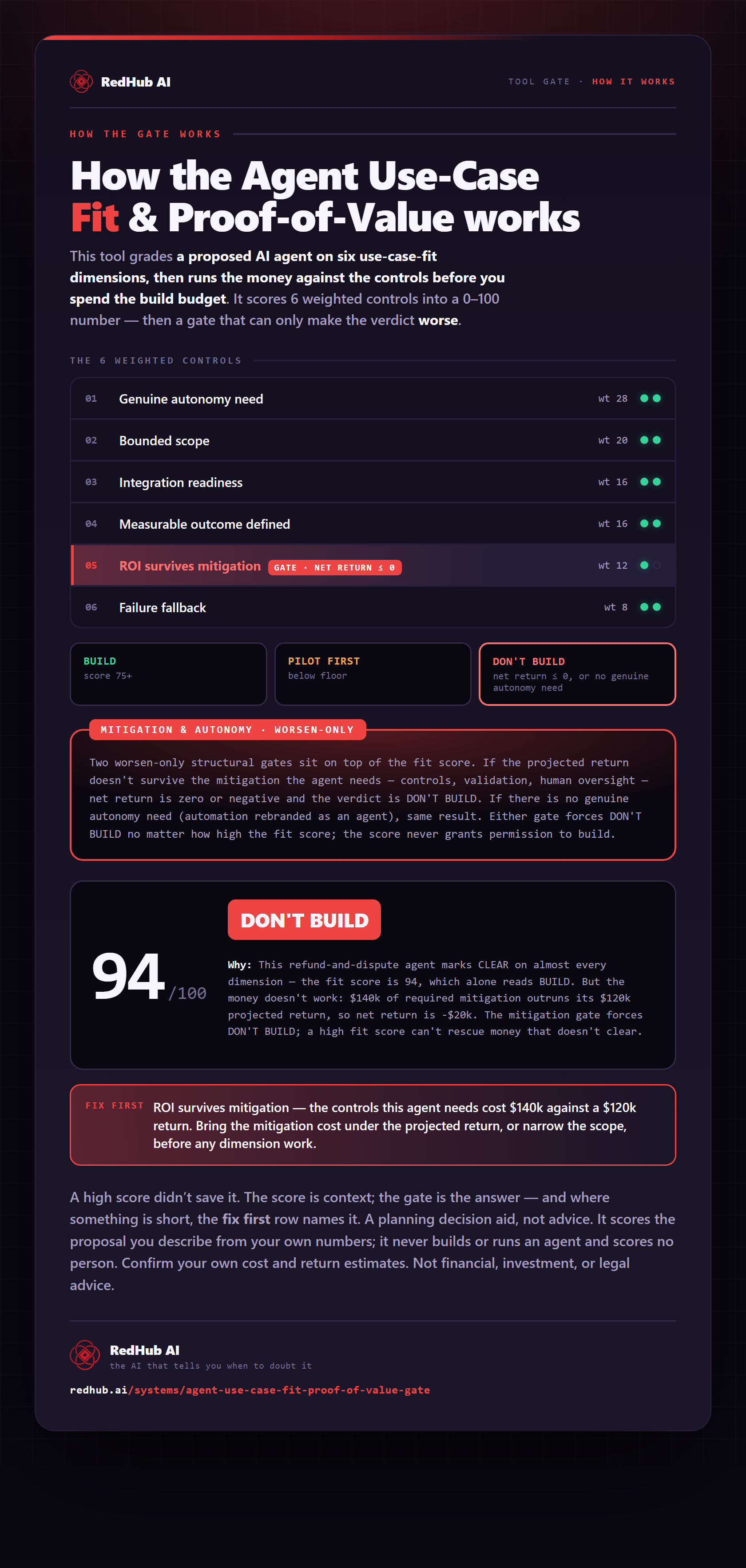
The gate this post refers to, drawn from the tool’s own logic. See the tool.