AI Overviews Traffic Loss: How To Measure It
RedHub AI Editorialupdated August 17, 20267 min read
Jump to a section11
- TL;DR
- What is AI overviews traffic loss?
- Why a "healthy" rankings report can hide a real problem
- Check your own Search Console for the gap
- Zero-click search is the bigger trend behind this
- What to actually do about it
- How this changes SEO going forward
- Where this fits with AI visibility overall
- Where to go deeper
- Decision Guide
- FAQ
TL;DR
- What it is: AI overviews traffic loss is what happens when a page's Google Search Console impressions hold steady or rise while its clicks fall — because Google's AI Overview already answered the question on the results page.
- Who it's for: founders, marketers, and local-service operators watching stable rankings and shrinking traffic — see the AI Overview Traffic-Loss Diagnostic.
- How it works: pull your own Search Console export, compare two matched date ranges page by page, and watch for impressions flat-or-up paired with clicks down — that gap is the signal, not your overall traffic total.
- Bottom line: a normal rankings report can't show you this. You have to look at impressions versus clicks, per page, to catch it.
What is AI overviews traffic loss?
AI overviews traffic loss is the pattern where a page keeps showing up in Google Search — its impressions stay flat or even climb — but fewer people click through, because Google's AI Overview answered the question directly on the results page. Marketers call this the "Great Decoupling," because clicks stop moving in step with impressions the way they normally do. It shows up page by page in Google Search Console, and it's invisible to most dashboards, which only track total sessions.
Best for: anyone who can export their own Google Search Console data — the AI Overview Traffic-Loss Diagnostic ($79) reads that export and grades every page HOLDING, DECOUPLING, or EVAPORATING.
Your rankings haven't moved. Your impressions look fine, maybe even a little better than last quarter. And your traffic is still falling. If that sounds familiar, you are not imagining it, and you are not losing the search game the way you think you are. You're likely losing clicks to Google's own AI Overview — the AI-written answer box that now sits above your listing on a growing share of searches.
This is AI overviews traffic loss, and it behaves differently from every traffic problem you've dealt with before. A ranking drop is easy to see — your position falls, your impressions fall with it. This is quieter. Your position holds. Your impressions hold, or even rise. Only the click disappears, because the searcher got their answer without ever leaving the results page.
Why a "healthy" rankings report can hide a real problem
Most traffic dashboards report one number: sessions, or clicks, over time. When that number falls, the usual next step is to check rankings. If rankings look fine, the mystery deepens — and a lot of teams stop looking, because the obvious suspect is cleared.
But rankings and clicks used to move together for a simple reason: the only way to answer a searcher's question was to click through to a page. AI Overviews break that link. Google can now generate the answer itself, cite a few sources, and the searcher's question is answered before they scroll past the answer box. Your page can still rank near the top and never get the click.
Key insight: the tell isn't a falling number. It's a gap between two numbers that used to move together. Impressions flat or up, clicks down — that gap, checked page by page in Search Console, is the signature AI Overviews leave behind. We go deep on this pattern in the Great Decoupling.
Check your own Search Console for the gap
You don't need a live connection to Google or a paid tool to get a first read. You need two matched date ranges and a few minutes in Search Console.
- Open Search Console → Performance → Search Results, and set the date range to your last 90 days compared with the prior 90 days.
- Sort by pages, then look at each page's impressions change and clicks change side by side, not just the total.
- Flag any page where impressions are flat or rising while clicks are meaningfully down — that's a candidate for AI-Overview interception, not a ranking problem.
- Note whether the query the page targets is the kind of plain, factual question an AI answer box handles easily — informational queries are the most exposed.
The full step-by-step version of this check, across every page in one sitting, is in the Great Decoupling.
Quick decoupling self-check
Try it on one page right now. Enter the impressions change and the clicks change you found in Search Console, and see which verdict it lands in.
Decoupling self-check (illustrative)
Illustrative, not the full engine: this two-input check mirrors the pattern the real diagnostic scores — impressions holding while clicks fall past a threshold. The actual AI Overview Traffic-Loss Diagnostic grades each page on six signals and takes the weakest one as the verdict, plus a separate interception gate. Treat this mini version as a gut check, not a score.
Zero-click search is the bigger trend behind this
AI Overviews are the newest and fastest-growing driver of what the industry calls zero-click search — a search that fully satisfies the person without a click to anyone's website. It's been building for years through featured snippets and knowledge panels; AI Overviews just made it dramatically more common, because the answer box can now handle far more question types. Not every query is equally exposed, though — we break down which of your pages are safe and which are at risk in zero-click search.
What to actually do about it
Once you've flagged the pages losing clicks, the fix depends on which weak point caused it. There isn't one universal fix — there are three honest paths:
- Defend the click. If the page has real signal strength but is losing citation presence or extractability, sharpen how AI engines read and cite it.
- Repurpose the page. If the underlying content has drifted stale or lost intent fit, a rebuild can win back relevance instead of a shrinking share of a dying query.
- Let it go. Some pages are permanently ceding their click to an answer box, and chasing them is wasted effort better spent elsewhere.
We walk through how to choose between those three, page by page, in how to recover traffic from AI Overviews.
How this changes SEO going forward
When Google can answer the query itself, ranking #1 stops being the whole goal. The real goal becomes earning the click that survives the answer box — which changes what "good SEO" looks like for a page. We cover exactly what shifts, and what doesn't, in AI overviews SEO.
Stop guessing which pages are bleeding
The AI Overview Traffic-Loss Diagnostic ($79, one-time) reads your own Search Console export, grades every page HOLDING, DECOUPLING, or EVAPORATING on six signals, names your worst page, and routes each fix to the right tool.
Get the Diagnostic — $79 →Where this fits with AI visibility overall
This diagnostic is about a specific, measurable problem: Google's own AI Overview intercepting clicks inside the Google results page. It's a different problem from earning a citation across ChatGPT, Perplexity, or Claude — that broader discipline is called generative engine optimization, and we cover the full strategy in our GEO pillar. If your audit shows weak citation presence, the AEO audit is the hands-on fix layer for that specific signal.
Where to go deeper
This pillar is the map. Each piece of the picture has its own guide:
- The Great Decoupling — what it is, why AI Overviews cause it, and how to spot it in your own Search Console.
- Zero-click search — the bigger trend, and which of your pages are exposed versus safe.
- How to recover traffic from AI Overviews — the page-by-page playbook: defend, repurpose, or retire.
- AI overviews SEO — how the goal of SEO shifts when Google answers the question itself.
Decision Guide
Dig into this if: your rankings and impressions look stable or better, but your clicks or overall traffic have fallen and you have Search Console access.
Skip it if: your traffic and rankings are falling together — that's a normal ranking problem, not a decoupling problem — or you don't have access to your own Search Console data.
Best first step: pull one high-traffic page's impressions and clicks for the last 90 days versus the prior 90, and see if the gap shows up.
FAQ
What is AI overviews traffic loss?
It's when a page's Google Search Console impressions hold steady or rise while its clicks fall, because Google's AI Overview answered the search query directly on the results page. It's often called the Great Decoupling.
How do I know if my traffic loss is caused by AI Overviews, not a ranking drop?
Check impressions and clicks separately, per page, in Search Console. A ranking drop shows both falling together. AI Overview interception shows impressions flat or rising while clicks fall — that gap is the tell.
Will this show up in my rankings report?
No. Rankings and impressions can look completely normal, or even improve, while clicks quietly fall. That's exactly why this pattern goes unnoticed — the report most teams check first doesn't surface it.
Is AI overviews traffic loss the same as zero-click search?
They're closely related. Zero-click search is the broader trend of searches that end without any click. AI Overviews are currently the fastest-growing driver of it, because they can fully answer far more question types than older zero-click formats like featured snippets.
Can I get this traffic back?
Sometimes. It depends on the page. Some pages can defend their click by strengthening how AI engines cite them; some need a content rebuild; and some queries are permanently answered on the results page and aren't worth chasing. The fix is page-specific, not one-size-fits-all.
Do I need special tools to check this myself?
No — a free Google Search Console account and a few minutes comparing two date ranges gets you a first read. A dedicated diagnostic speeds up the page-by-page grading and routes the fix, but the underlying check is something you can do by hand.
What does the AI Overview Traffic-Loss Diagnostic actually do?
It reads your own Search Console export — no live Google connection — and grades every page HOLDING, DECOUPLING, or EVAPORATING based on six signals, taking the weakest one as the verdict. It names your worst-hit page and routes each fix to the right tool. It's $79, one-time, and diagnoses; it doesn't recover traffic on its own.
Put a number on the bleed
Run your own Search Console export through the diagnostic, see which pages are HOLDING, DECOUPLING, or EVAPORATING, and get routed straight to the fix. $79, once, yours to keep.
Get the AI Overview Traffic-Loss Diagnostic →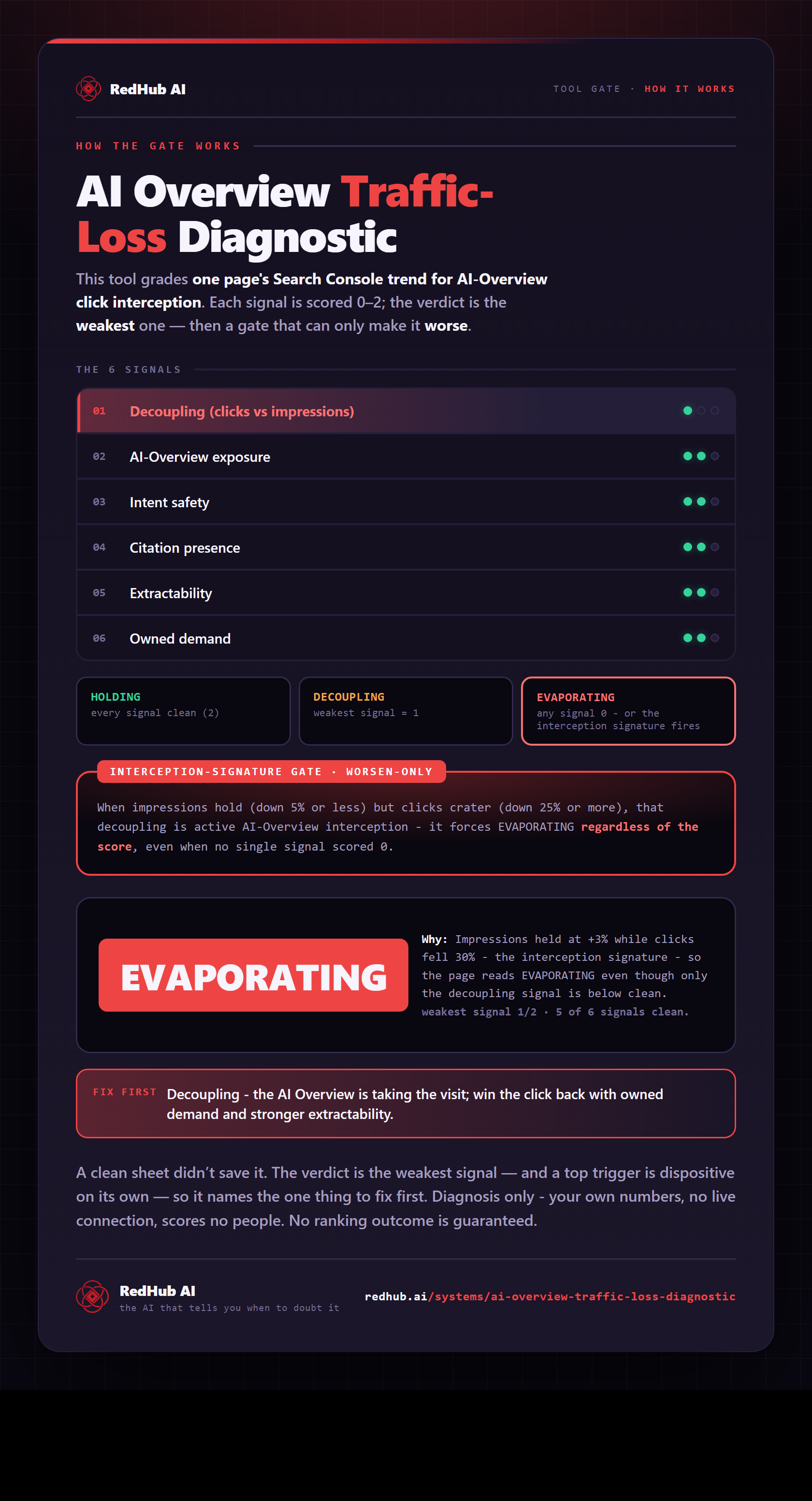
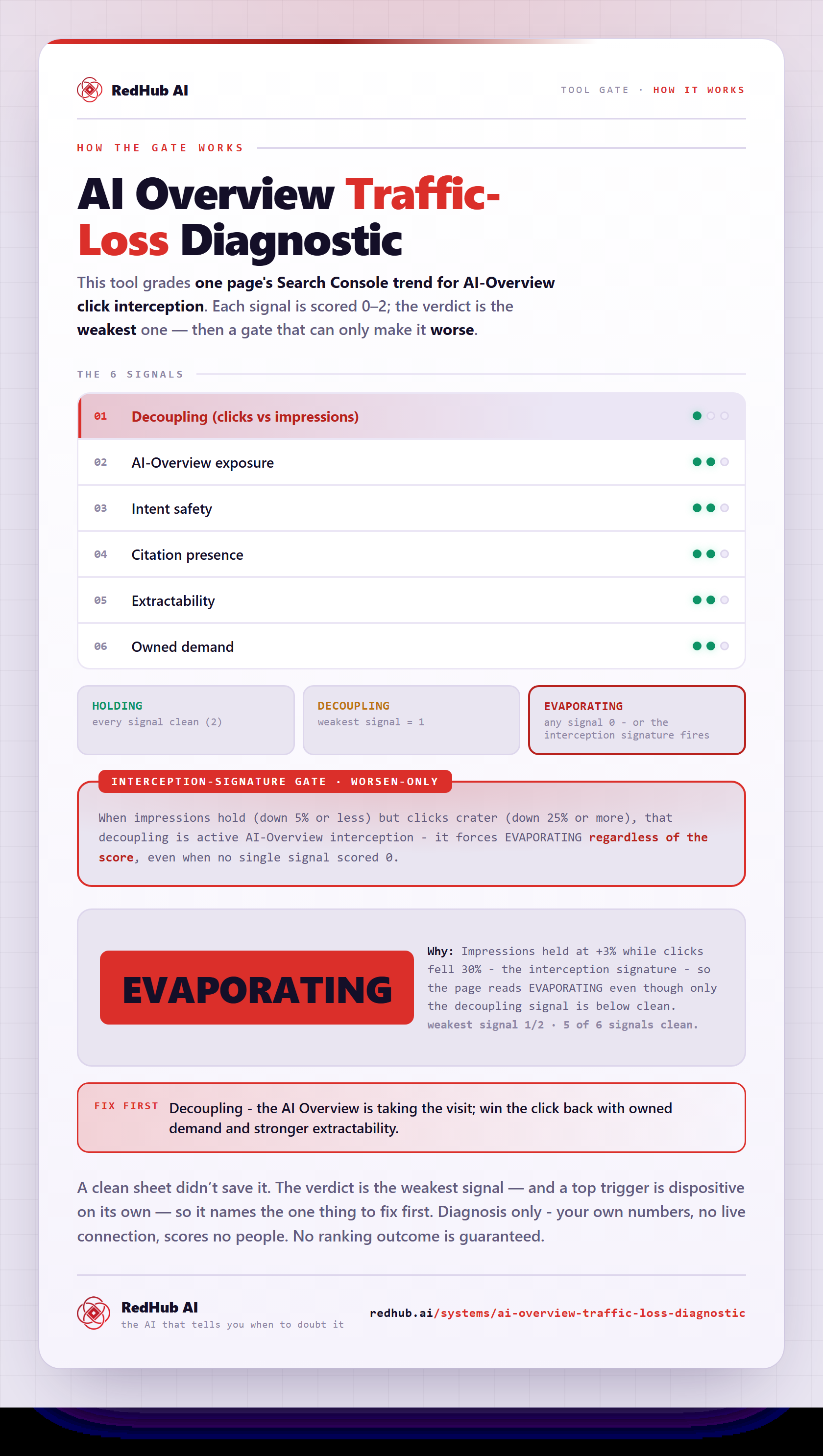
The gate this post refers to, drawn from the tool’s own logic. See the tool.