How to Recover Traffic From AI Overviews
RedHub AI Editorialupdated August 17, 20266 min read

Jump to a section8
TL;DR
- What it is: a page-by-page playbook for pages losing clicks to AI Overviews — every page gets one of three honest calls: defend, repurpose, or retire.
- Who it's for: anyone who's already flagged pages showing the impressions-up/clicks-down pattern — start with the AI Overview Traffic-Loss Diagnostic.
- How it works: the page's weakest signal decides the call — citation and extractability gaps get defended, stale intent fit gets repurposed, permanently-answered queries get retired.
- Bottom line: not every page is worth fighting for. Spend the effort where it actually moves the number.
How do you recover traffic from AI Overviews?
You recover traffic from AI Overviews one page at a time, not with a single site-wide fix. Each page losing clicks gets sorted into one of three calls: defend it (strengthen the signals that earn a citation and the remaining click), repurpose it (rebuild the content around an angle an AI answer can't fully cover), or retire it (accept the query is permanently answered elsewhere and redirect the effort). The right call depends on which specific signal is weakest for that page — not a guess, and not the same answer for every page on your site.
Best for: teams who already have a list of pages showing the decoupling pattern — the AI Overview Traffic-Loss Diagnostic ($79), where a signal is short, names the weakest one per page and routes the fix for you.
Once you've identified which pages show the Great Decoupling pattern — impressions flat or up, clicks falling — the natural next question is what to do about it. The honest answer is that there isn't one fix. There are three, and picking the wrong one wastes effort. Rebuilding a page that was never going to earn the click back is just as costly as leaving alone a page you could have easily saved.
The right call comes from asking what's actually broken on that specific page. A page can lose clicks for different reasons — weak citation signals, stale content that no longer matches what the searcher wants, or a query that's simply been permanently absorbed into the answer box. Each of those points to a different action.
| If the weak point is... | The call is... | Fix with |
|---|---|---|
| Citation presence or extractability | Defend | AEO Citation Audit & Optimizer Kit |
| AI-Overview exposure or owned demand | Defend / build around | GEO / AI Visibility Playbook |
| Intent fit or content freshness | Repurpose | Content Refresh & Publishing Engine |
| Query permanently answered on the SERP | Retire | Redirect the effort elsewhere |
Call 1: Defend the click
Defend is the right call when the underlying content is genuinely good, but the page is weak on the signals that earn a citation or extractability inside an AI answer — clear headers, direct answers near the top, up-to-date schema, and clean entity signals. These pages don't need a rewrite. They need to become easier for an AI engine to read, cite, and prefer.
- Check whether the page answers its main question directly in the first two or three sentences — buried answers get skipped by extraction.
- Audit citation signals: is your business named consistently, and does your schema match what the page actually says?
- Strengthen the specific gap. If it's presence or accuracy, that's an audit-and-fix job. If it's a broader visibility gap, that's a strategy job.
Call 2: Repurpose the page
Repurpose is the right call when the content itself has drifted — it no longer matches what today's searcher actually wants, even though it once did. A page that answers a question in a way that's become generic or outdated is easy for an AI Overview to out-perform. The fix isn't better citation signals on stale content — it's new content built around an angle the AI genuinely can't cover: a specific case, current data, or a next step only your business provides.
Key insight: repurposing works best when you rebuild toward defensible ground — comparison, current pricing, or a transaction — rather than sharpening the same generic answer that got absorbed in the first place. A better version of a fully-answerable question is still a fully-answerable question.
Call 3: Retire the page (or let the query go)
Some queries are simply not coming back. If a plain factual question is now reliably and completely answered inside the AI Overview, and there's no realistic angle your page could add, spending more effort defending or rebuilding it is money spent chasing a query that's gone. The better move is to redirect that effort — and sometimes the page itself, via an internal link or consolidation — toward content built for a query type AI Overviews can't fully absorb.
This isn't giving up. It's the same discipline as any budget decision: stop spending where the return has structurally changed, and reallocate to where it hasn't.
Get the call made for you, page by page
The AI Overview Traffic-Loss Diagnostic ($79) scores each page's weakest signal and, where a page is short, names the exact RedHub drop to fix it — so you're not guessing between defend, repurpose, and retire.
Get the Diagnostic — $79 →Why the page-by-page approach beats a blanket policy
It's tempting to pick one strategy and apply it site-wide — rewrite everything, or give up on informational content entirely. Both overcorrect. Some of your best-performing, highest-intent pages are barely touched by AI Overviews and don't need any of this. Some low-effort factual pages were never going to earn much traffic anyway and aren't worth defending. The value is in sorting your specific pages into the right bucket, not applying one rule to all of them.
That sorting depends on first confirming which pages are actually affected — the same impressions-up/clicks-down check covered in the Great Decoupling — and understanding which query types are structurally more exposed, covered in zero-click search. Once you know both, the defend/repurpose/retire call gets much easier to make with confidence.
Decision Guide
Defend a page if: the content is solid but weak on citation signals, extractability, or overall AI visibility.
Repurpose a page if: the content has drifted stale or no longer matches current search intent, but the topic still has real value.
Retire or redirect effort if: the query is a plain factual question now reliably and fully answered on the results page, with no defensible angle left.
FAQ
How do you recover traffic from AI Overviews?
Page by page. Sort each affected page into defend (strengthen citation and extractability signals), repurpose (rebuild around an angle AI can't fully answer), or retire (redirect effort from a permanently-absorbed query). There's no single site-wide fix.
Can every page lost to AI Overviews be recovered?
No, and expecting that wastes effort. Some queries are now reliably and fully answered on the results page with no realistic angle left for a page to add. The honest move for those is to redirect the effort, not keep fighting for a click that's structurally gone.
How do I know whether to defend or repurpose a page?
Check what's actually weak. If the content is solid but the page reads poorly to an AI engine — buried answers, weak schema, inconsistent naming — defend it. If the content itself no longer matches what today's searcher wants, repurpose it instead of polishing an outdated answer.
What tool fixes the citation and extractability signals?
The AEO Citation Audit & Optimizer Kit ($79) audits and fixes exactly those signals — whether AI engines name your business, how prominently, and how easily they can extract and cite your content.
What tool fixes a broader AI-visibility or owned-demand gap?
The GEO / AI Visibility Playbook ($149) covers the strategy layer — building AI visibility and demand that isn't dependent on a single Google feature.
What tool handles the repurpose call?
The Content Refresh & Publishing Engine ($129) is built for reviving pages that have lost intent fit or gone stale — the exact job a repurpose call requires.
How do I decide which pages need this in the first place?
Start with the AI Overview Traffic-Loss Diagnostic ($79). It reads your own Search Console export, grades every page HOLDING, DECOUPLING, or EVAPORATING, and names each page's weakest signal — so you know exactly which call to make before you spend the effort.
Stop guessing which pages to fix first
Get the defend/repurpose/retire call made for you, page by page, from your own Search Console data. $79, once, yours to keep.
Get the AI Overview Traffic-Loss Diagnostic →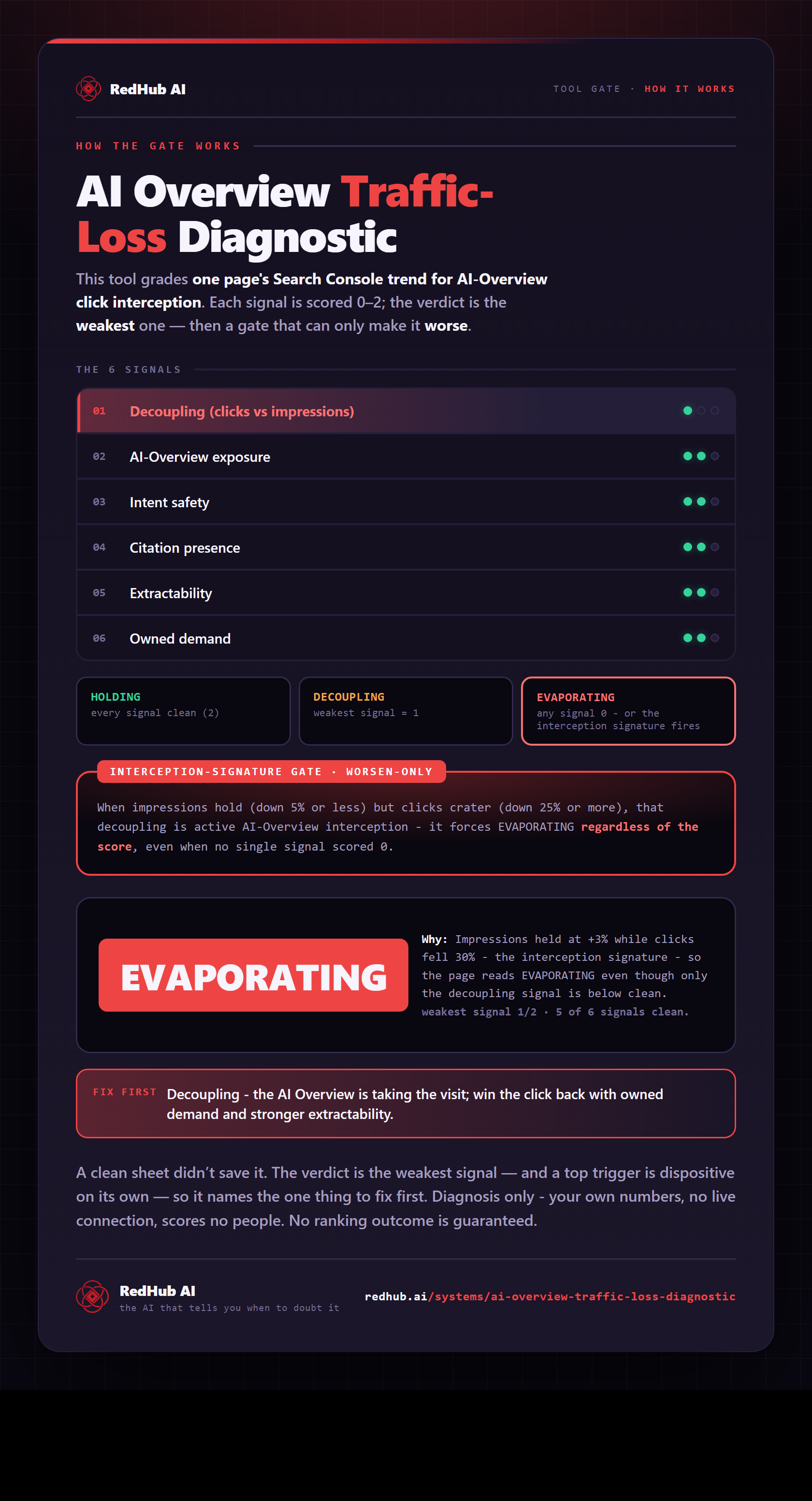
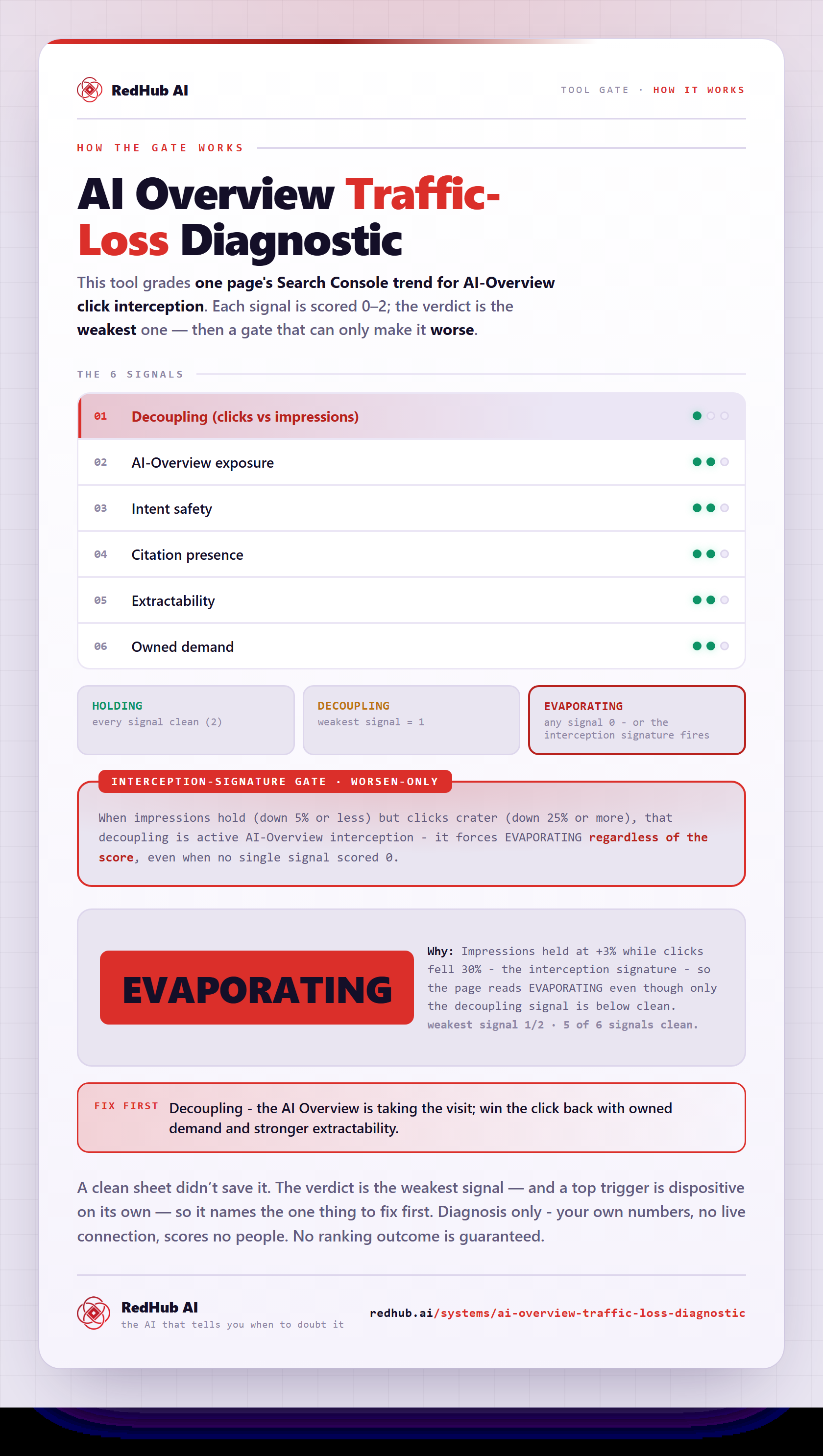
The gate this post refers to, drawn from the tool’s own logic. See the tool.