How Easily Can Someone Get Around a Front-End Check?
RedHub AI Editorialupdated October 7, 20266 min read

Jump to a section7
It takes no hacking skill to bypass client side validation. The tools ship with the browser. Someone can edit a field before it is submitted, turn JavaScript off, or send a request to your server without loading your page. If a check exists only in the browser, all three routes go around it.
TL;DR: A front-end-only check can be skipped by editing a value in the browser's developer tools, by turning off JavaScript, or by calling your server directly. Front-end checks still earn their place for honest users. They can't be the only thing between a stranger and something that matters. The four-step test below shows whether one check in your app is browser-only. The Browser Line Read-Off ($59) sorts all of them on one sheet. Start with the pillar: Client-Side vs Server-Side Validation: Which of Your App's Checks Are Real.
The tool is already on the computer
Chrome, Firefox, Edge and Safari each come with a panel called developer tools. In Chrome you open it with F12, or by right-clicking the page and choosing Inspect, according to Google's DevTools documentation. Safari's are turned off by default, and Apple's documentation says you switch them on with one setting, "Show features for web developers."
The panel shows the HTML and JavaScript your page shipped, and the network requests it sends and receives. It also lets a person edit the page live, in the tab that is open. Nobody has to install anything.
Three ways past a check that lives only in the browser
Edit a value before it is sent. A hidden field, a dropdown, or a JavaScript variable holding a number can all be changed in the developer tools. The form then submits as normal. Your server receives whatever was in the field at that moment. An edited value and a typed one look identical to it.
Turn JavaScript off. If the validation runs only in JavaScript, disabling JavaScript removes it. On a traditional server-rendered page the form still submits and the check never runs. There is a catch for apps that draw their whole interface in JavaScript, as single-page apps do. Switching it off breaks the page, and a broken page can look like protection. It isn't. The check is still gone, and a person who wants past it uses the next route.
Skip the page. Your page is one of several ways to talk to your server. Anyone can send the same kind of request from a command-line tool such as curl, from a request-building app such as Postman, or from the console inside the developer tools. If the form was the only thing enforcing a rule, and using the form is optional, the rule was optional too.
Try it on your own app
Use a test account, on an app you own, with nothing real attached to it.
- Pick a form with a number. A quantity field, a discount amount, or a checkout total will do: anything where the number changes what you charge or grant.
- Open the developer tools. You should see the page's code, and a tab called Network that lists the requests the page sends.
- Find the value and change it. Look for the form field in the Elements tab in Chrome, or the Inspector tab in Firefox. Edit the number there, then submit the form.
- Watch what your server does. See whether the outcome reflects the number you first typed or the one you edited. If the edited number is the one that counts, that check lives only in the browser, or the server believes what the browser sent.
What one test can't tell you
A test that fails tells you a lot: that check is browser-only, or the server takes the browser's word. A test that passes tells you less than it seems to. It covers one field on one form. The discount field beside it can still be wide open, and so can a request the form never sends. Testing by hand finds a hole. It doesn't show there are none.
That is the reason to list your checks before you test any more of them. Every moment your app decides yes or no goes on the list: can this person sign in, can they open this record, what do we charge them. Then you ask the same three questions of each.
What to do with a check that fails
Keep the browser check. It still helps the honest user. Give it a twin on the server: the same rule, enforced where the browser can't reach, using a number your server looked up.
Then run the four steps again. A server-side check can still read its number out of the request, and when it does, the edit goes through exactly as before. That version of the mistake looks fixed in the code. The Server-Side Check That's Still a Browser Decision covers it.
Finding browser-only checks is one job. A penetration test is a different one, and passing this test certifies nothing about the rest of your app.
Run the same test on paper, for every check
The Browser Line Read-Off is a spreadsheet with room for 30 checks. For each one you pick three answers from dropdowns: what it guards, where it runs, and what it decides from. Each row reads ENFORCED, TRUSTS THE BROWSER or FINE IN THE BROWSER. Where a row trusts the browser, the Dashboard names one to fix first. You read your own screen and type what you see. The sheet connects to nothing and is not a scanner.
Get the Browser Line Read-Off — $59Pairs well with
Logged-In Is Not Allowed ($59) asks the question that comes after this one, since a login answers who you are, not whether this record is yours. The Money Path Teardown ($69) takes an order flow one step at a time and routes each step CONFIRMED, DISPLAY ONLY, TAKEN ON TRUST or NOT HANDLED. Can You Explain Your Own App? ($59) covers nine areas of a small app with two questions each: can you name it, and have you seen it yourself.
More in this guide
Do I need to know how to code to bypass a client-side check?
No. Opening developer tools, editing a value and turning off JavaScript are all done through the browser's own menus. Calling a server directly with curl or Postman takes some comfort with those tools, but no programming.
Is it safe to test this on my own app?
Run it only against an app you own, signed in to a test account with no real money or customer data attached. A bypass that works may create an order or change a record, and you will want that to happen somewhere you can throw away.
If a check can be bypassed, why have client-side validation at all?
It helps the cooperative user: instant feedback on a typo, and a form that won't submit an empty required field. Keep it for that. Add a server check for anything that decides money, another person's data or access.
How do I know if a specific check is client-side only?
Open developer tools, find the value the check depends on, change it and submit. If your server accepts the changed value, the check either doesn't exist on the server, or it exists and trusts what the browser sent.
My app breaks when I turn JavaScript off. Does that protect it?
No. An app that draws its interface in JavaScript stops working without it, but the server behind it still accepts requests. A person can send one from a command-line tool without loading the page.
What should I do once I find a bypassable check that matters?
Add the same rule on your server, using a number the server looks up or calculates instead of one it takes from the request. Then repeat the test to confirm the edited value no longer counts.
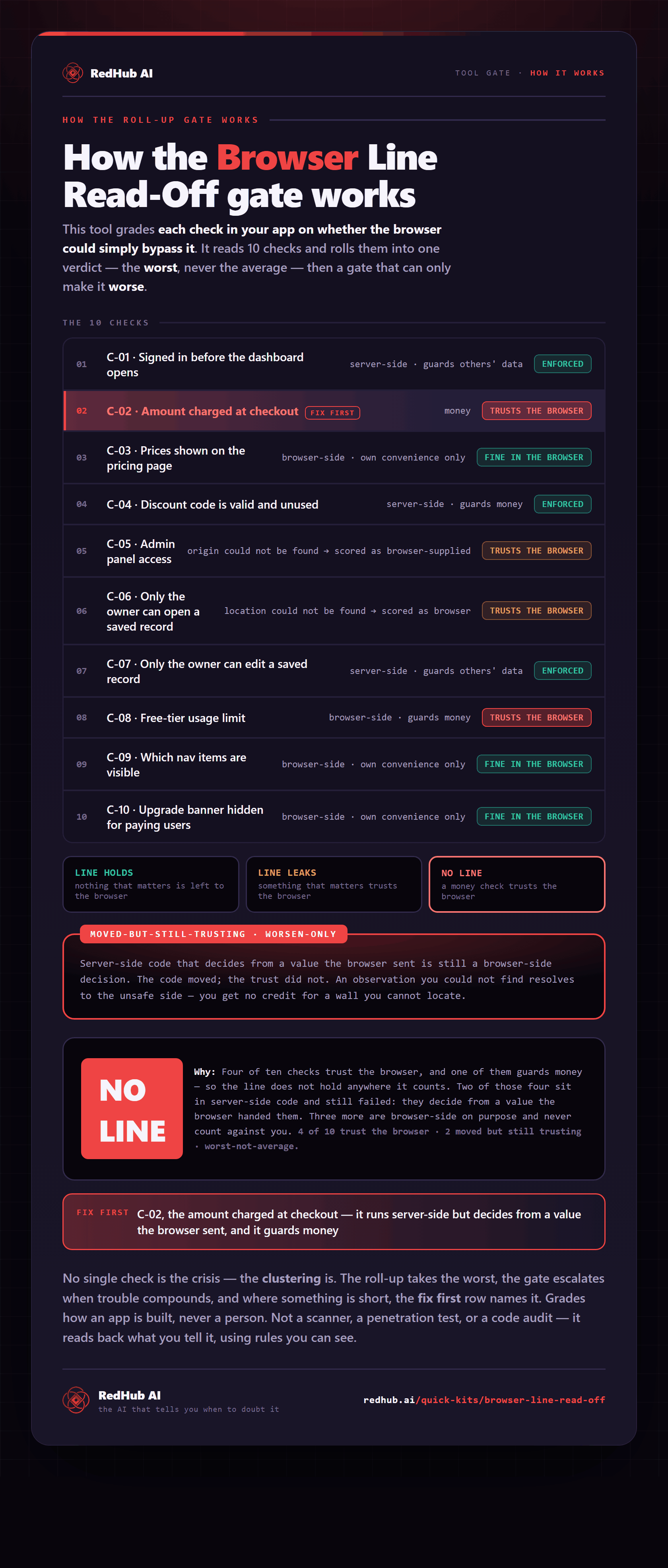
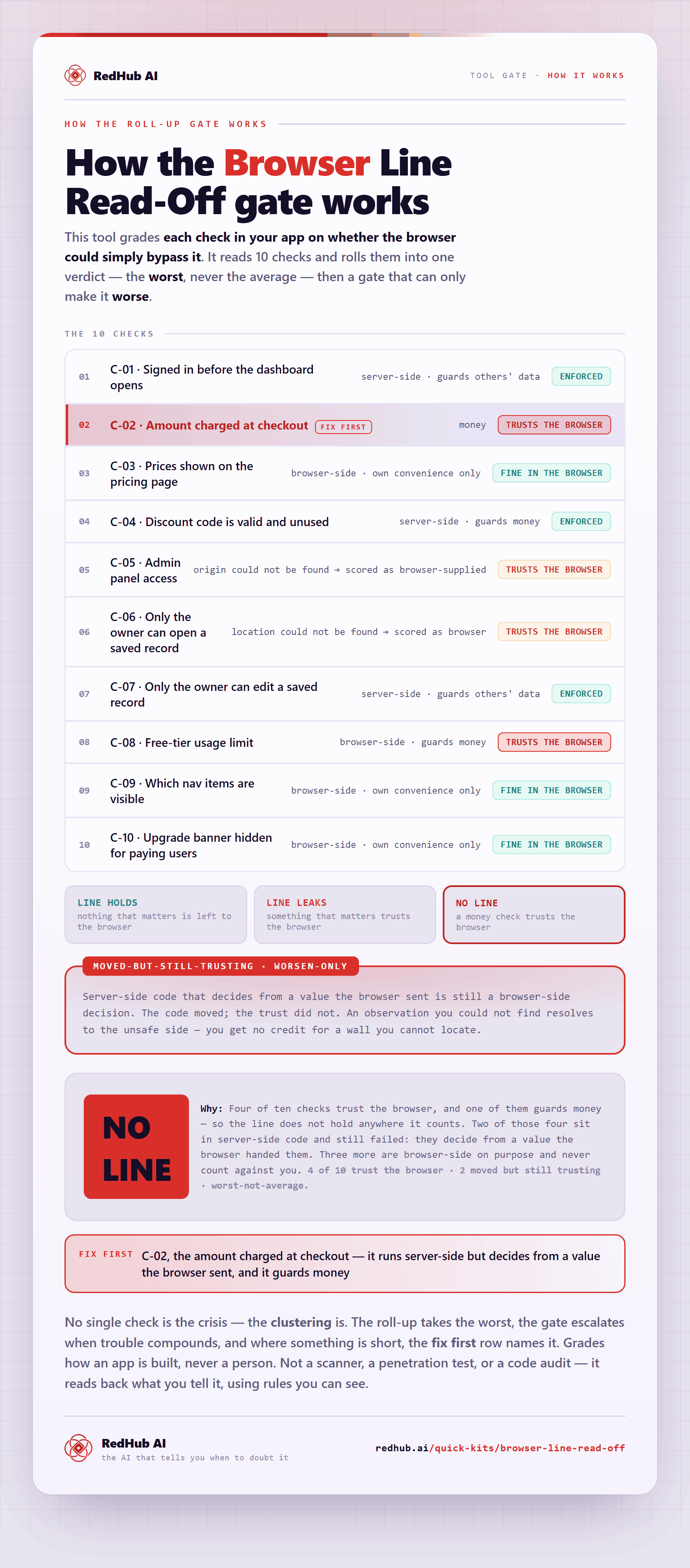
The gate this post refers to, drawn from the tool’s own logic. See the tool.