"Never Trust the Client" — What That Actually Means for Your App
RedHub AI Editorialupdated October 7, 20266 min read

Jump to a section7
"Never trust the client" is a rule about decisions with a stake attached: money, another person's data, or access. Each of those has to be verified or recalculated on your server before it counts. The client is your user's browser, a computer they control and you don't. The browser can still do useful work. It can't have the final word on anything that matters.
TL;DR: Treat the phrase as a sorting rule. For each check your app makes, ask what happens if the browser lies. If the answer is money lost, someone else's data exposed, or access granted, the server must decide it again from a value it controls. If the answer is a slightly worse screen, the check can stay in the browser. The Browser Line Read-Off ($59) runs that sort on a spreadsheet. Start with the pillar: Client-Side vs Server-Side Validation: Which of Your App's Checks Are Real.
A slogan with no instructions
You have likely read the phrase in a comment thread or a course, said as though everyone already knew how to use it. What follows is often the same phrase again in different words. Nobody says how to apply it to the checkout form or the login screen in front of you. Agreeing with the rule is easy. Running it against your own code takes a question you can ask of one check at a time.
The sorting question under the slogan
Ask of each check: does it use a value that came from somewhere you control, or a value the browser sent along? "You control" means a database you own, a calculation your server performs, or a value looked up by an ID. "The browser sent it" means the value arrived in the request: a form field, a hidden input, a URL parameter, or a variable computed in JavaScript. In that second case your server is believing it.
Four ordinary checks show how the question sorts.
| Check | Does it matter if the browser lies? | Where it should be enforced |
|---|---|---|
| Hiding a menu item from a free-tier user | No. It is a display choice. | The browser is enough |
| Showing an upgrade banner to non-paying users | No. Nothing is granted or denied. | The browser is enough |
| Letting a user open one of their own saved records | Yes. A wrong answer exposes someone else's data. | The server, from its own record of who owns what |
| Charging the correct amount at checkout | Yes. A wrong answer costs you money. | The server, which looks up or calculates the price |
The language the check is written in doesn't decide its row. The cost of a lie does. When a lie costs you nothing, the browser can keep deciding. When a lie costs money or exposes a record, the server decides again.
The checks that don't look like security
People apply the rule to the login screen and forget it everywhere else. A discount code doesn't look like a security feature. Neither does a shipping fee worked out from a ZIP code, or a counter that says a free trial ends after three uses. Each one decides something with money attached, so each one falls under the rule.
The free-trial counter is the easiest to misfile. It feels like convenience, a friendly number in the corner of the screen. If the count lives in the browser, a visitor can reset it and use the paid feature forever. In the Browser Line Read-Off's worked example, that check is row C-08, "Free-tier usage limit." It guards money, runs in the browser, and reads TRUSTS THE BROWSER.
The opposite mistake is treating every browser check as a hole. That leads to over-building display logic, or to tuning out the warning because it fires on things that don't matter. The read-off has a destination for those rows, FINE IN THE BROWSER, and it never counts them against the verdict.
The browser sends everything. Now what?
Read strictly, the rule can't be followed. Every request comes from the browser. The product ID, the discount code and the cookie that says who is signed in all arrive from a computer you don't control. A server that trusted nothing from the client could do nothing.
The working line is between a question and an answer. The browser may send a question: which product, which code, which record. The server supplies the answer from its own records: what that product costs, whether that code is valid, who owns that record. A product ID is a question. A price is an answer.
That line holds for most checks and gets thin for some. A user ID in the request body is a question in form and an answer in effect, because it tells the server whose record to change. You have to open the code and see what the server does with the value, and no slogan does that step for you.
Run the sort on your own app
- List every check. Write down each moment your app decides yes or no.
- Ask what a lie costs. Put each check in one of two piles: something bad happens, or the screen looks slightly worse.
- Read the first pile's code. For each check in it, confirm the server enforces the rule from a value it controls, and not one lifted from the request.
The second pile needs no work. Sorting this way covers one gap. It does not review your app's security, and a clean sort does not certify the app as safe.
The sorting pass, as a spreadsheet
The Browser Line Read-Off asks three fixed questions per check: what it guards, where it runs, and what it decides from. Each row lands on ENFORCED, TRUSTS THE BROWSER or FINE IN THE BROWSER, with a one-line reason beside it. The Dashboard rolls the rows up, worst not average, to LINE HOLDS, LINE LEAKS or NO LINE. One .xlsx, 30 rows, offline. It reads back what you tell it and is not a scanner.
Get the Browser Line Read-Off — $59Pairs well with
The Supabase RLS Read-Off ($69) asks what your database lets a stranger reach, one row per table and per operation, and rolls up to TABLES LOCKED, GAPS IN THE POLICIES or PROJECT OPEN. The Front Door ($139) bundles this read-off with Logged-In Is Not Allowed and Can You Explain Your Own App?, and adds a rollup that returns DOOR HOLDS, ONE HALF OF A DOOR or NO DOOR. The Vibe-Coded App Hardening Kit ($79) is a production-readiness audit with a 10-antipattern catalog, a 6-layer checklist and a monitoring template.
More in this guide
What does "never trust the client" mean in plain terms?
Any check that decides something with a stake, such as money, another user's data or access to a feature, must be verified on your server using a value your server controls. The browser's answer to that kind of question can't be the last word.
Does this mean I should never write validation in JavaScript?
No. JavaScript validation gives instant feedback and a smoother form. Keep it, and make sure it is never the only enforcement for something that matters.
How do I tell if a specific check matters in this sense?
Ask what happens if the browser's answer is a lie. If someone only sees a less tailored screen, the check doesn't need server enforcement. If the lie involves money, someone else's data or access they shouldn't have, it does.
Is this the same as client-side vs server-side validation?
They are close. Client versus server is about where code runs. This rule is about where the check gets its deciding value. A server-side check can still break the rule if it takes that value from the request.
The browser has to send something. What is it allowed to send?
A question, such as a product ID, a discount code or a record ID. The server supplies the answer from its own records: the price, whether the code is valid, who owns the record. Trouble starts when the request carries the answer too.
What is the fastest way to apply this to my own app?
List every check your app makes, sort each by what a lie would cost, and for every one that matters, confirm the server verifies it from a value it controls.
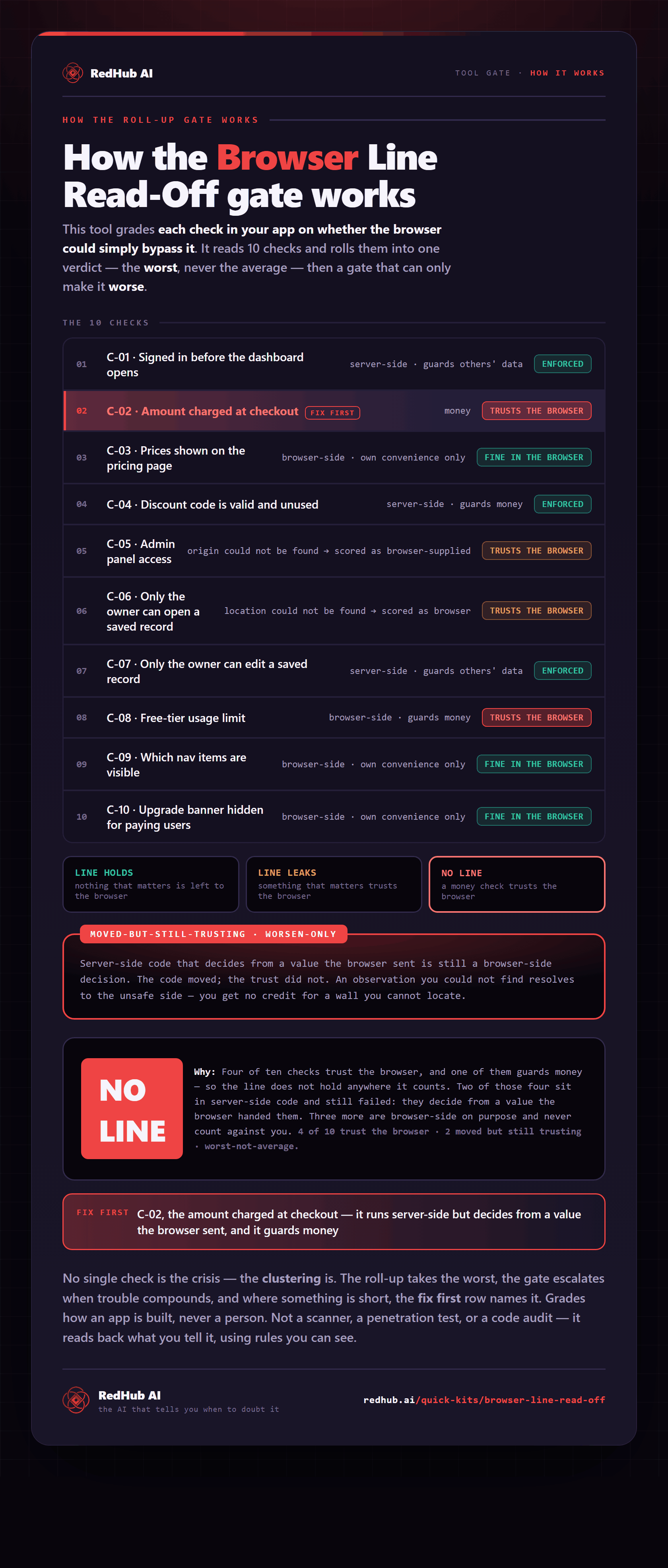
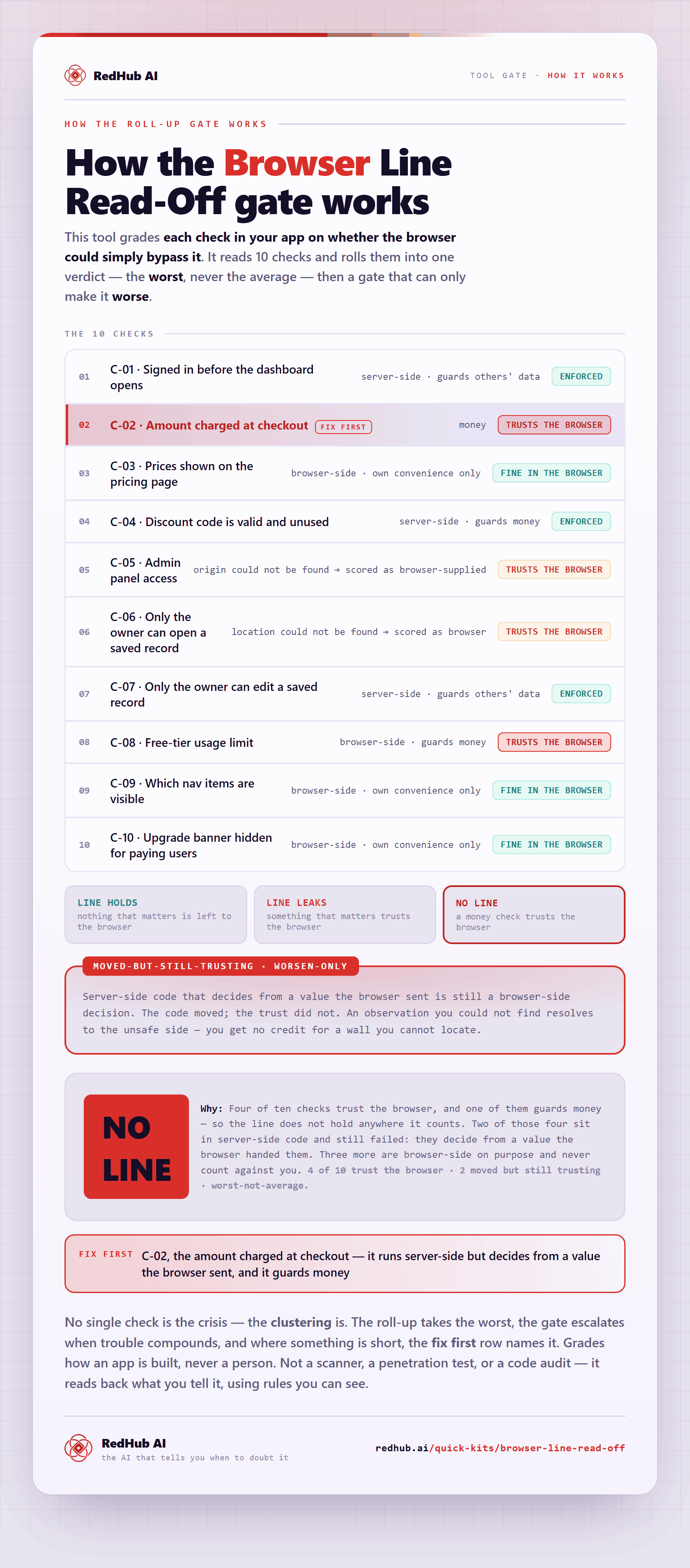
The gate this post refers to, drawn from the tool’s own logic. See the tool.