The Server-Side Check That's Still a Browser Decision
RedHub AI Editorialupdated October 7, 20266 min read

Jump to a section8
Some server side validation mistakes are visible in the code: a rule that is missing, or a field nobody checks. This one is harder to see. The check exists, it runs on your server, and it still lets the browser choose the answer, because the number it compares against came in with the request. The browser could have edited that number before sending it.
TL;DR: "Where does this run?" is one question short. Two checks can sit in the same server file and both guard money, and one can still be steered from the browser, because it reads its number from the request. The follow-up question is where the number came from. The Browser Line Read-Off ($59) asks both questions of every check you list. Start with the pillar: Client-Side vs Server-Side Validation: Which of Your App's Checks Are Real.
Two checks that look like twins
Both run at checkout, in the same server file. The first is the amount charged: the server takes a dollar total off the incoming request and charges the card that amount. The second is a discount code: the server takes a code the browser sent, finds it in its own list of active discounts, confirms it hasn't been used, and calculates the reduced price.
Asked where they run, both get the same answer. These are rows C-02 and C-04 in the Browser Line Read-Off's worked example, and the sheet sends them to opposite destinations.
| Check | Guards | Runs on | Decides from | Destination |
|---|---|---|---|---|
| Amount charged at checkout | Money | Server | The request the browser sent | TRUSTS THE BROWSER |
| Discount code is valid and unused | Money | Server | The server's own list of codes | ENFORCED |
Only the "Decides from" column differs. A review that records where each check runs writes the same word in both rows.
How a check ends up this way
Moving validation to the server feels like the finish line, and for many checks it is. The slip comes when the server-side version gets written. A total is already sitting in the request. Reading it is less work than opening the product catalog and adding the line items again.
An AI builder takes the same shortcut for the same reason. It was told to validate on the server. It was never told to recalculate.
The question that separates them
Ask it of every server-side check you have: trace the number back one step. What touched it last before the comparison?
For the discount code, the last thing to touch it was the server's own lookup. For the checkout amount, it was the request, and one step behind the request is the browser. A check passes when your server is the last hand on the number.
Why a where-does-it-run review passes it
A check that lives only in the browser announces itself. Open developer tools and there it is, in the page's own JavaScript. A server-side check that trusts the browser sits where you expect safety to be. A review that asks only where each check runs marks it handled and moves on.
The worked example puts a number on that. Four of its ten checks read TRUSTS THE BROWSER. Two of those four are server-side: the checkout amount, and admin panel access, where the builder couldn't find what the check decides from. The Dashboard has a line for them, "would look fine on a location-only read," and in the example it shows 2.
The answer is only as good as your trace
The discount code row reads ENFORCED because someone answered server_lookup for it. The sheet can't open your code and confirm that. If the code is looked up on the server but the discount amount still arrives in the request, the right answer for that row was browser_supplied, and a wrong answer reads clean.
This matters most in code you didn't write. Generated code can pass a value through three functions before anything compares it, and one step back may not be far enough. Trace until you reach a database read or the request. When you can't reach either, the answer is cant_find.
Find your own pair
Look at your checkout, your usage limits or your access checks for two that sit in the same file and guard similar things. Ask each one where its number came from. You are looking for the row where the server was handed a number.
When you find one, give your AI builder a specific instruction: "Recalculate this amount from the product ID and quantity. Do not accept it as a parameter." Then trace the number again, since a fix can move the code and leave the source of the number where it was.
Spotting these checks closes one gap. An app can pass every row here and still have open permissions, exposed keys or no rate limits.
Record where each check runs, and where its number comes from
The Browser Line Read-Off takes three answers per check: what it guards, where it runs, and what it decides from. A check that guards money or other people's data, runs server-side and decides from a browser-sent value reads TRUSTS THE BROWSER. The Dashboard counts how many of your exposed checks are server-side. One .xlsx with a ten-check worked example, offline. It grades what you tell it and is not a code audit.
Get the Browser Line Read-Off — $59Pairs well with
The Vibe-Coded App Hardening Kit ($79) is the wider production-readiness pass: an audit, a 10-antipattern catalog, a 6-layer checklist and a monitoring template. The Money Path Teardown ($69) reads an order flow one step at a time, and TAKEN ON TRUST is one of the four places a step can land. The Supabase RLS Read-Off ($69) does the same kind of read on database policies, one row per table and per operation.
More in this guide
What does it mean for a server-side check to trust the browser?
The check runs in code on your server, but the number it compares against, such as a price, a quantity or a permission flag, was taken from the incoming request. The browser could have changed that number before sending it.
How do I tell one from a safe server-side check?
Trace the number back. If the last thing to touch it was your server's own database or calculation, the check is safe on this point. If the last thing was the request, it isn't.
Why is this harder to catch than a browser-only check?
It sits where you expect safety to be. A review that asks only whether a check is server-side marks it as fine. A browser-only check shows up as soon as you open developer tools.
Is a discount code check an example of this problem?
No. It is the contrast. The browser can send a code, as long as the server looks up whether it is valid and calculates the amount. It becomes the same problem if the server accepts the discount amount as input.
What if I can't trace where a number comes from?
Treat the check as trusting the browser until you can. In generated code a value may pass through several functions, so keep tracing until you reach a database read or the request.
What do I do once I find one of these in my app?
Rewrite the check to look up or recalculate its number from a product catalog, a database record or a stored value. Then trace the number again to confirm its source changed.
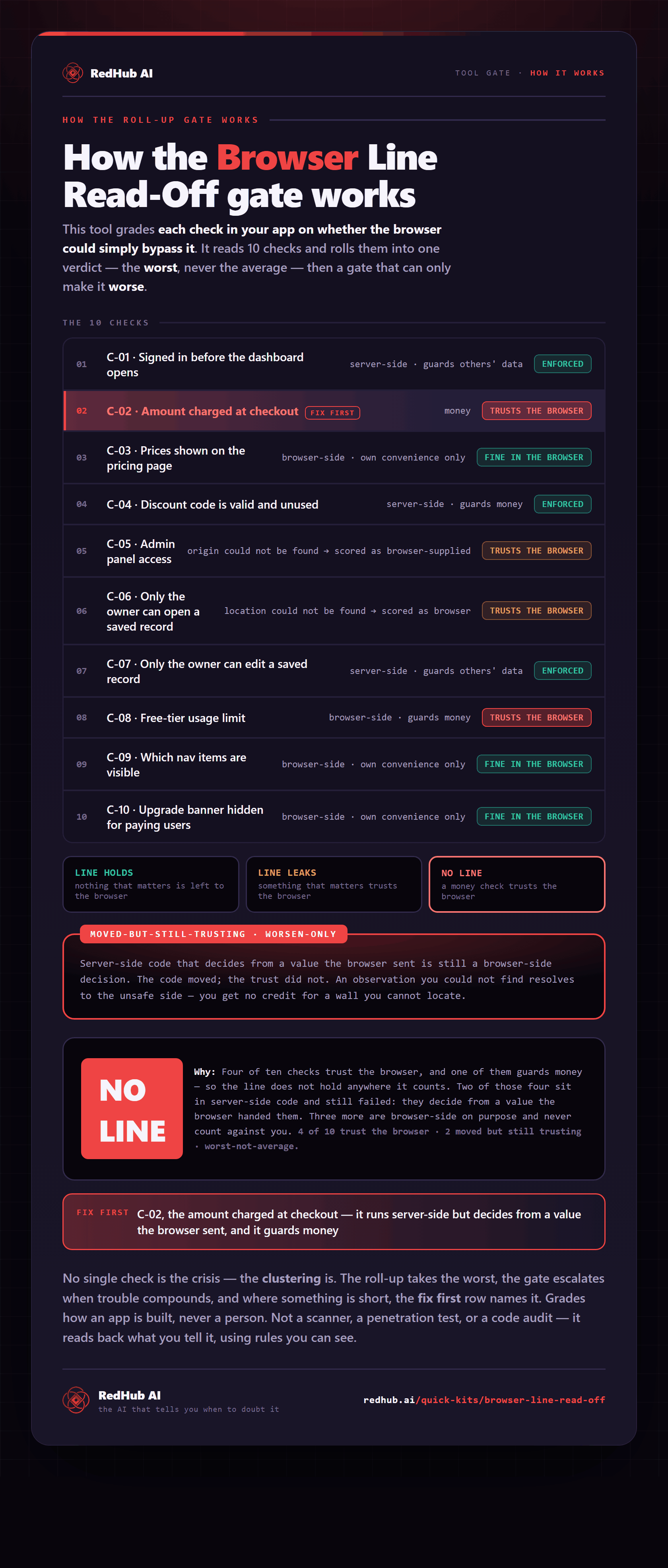
The gate this post refers to, drawn from the tool’s own logic. See the tool.