How to Compare Two Lists and Find What's Missing
RedHub AI Editorialupdated October 7, 20266 min read

Jump to a section8
When you compare two lists to find what is missing, the answer comes from one shared key column, checked in both directions. A key in List A with no partner in List B is one kind of gap. A key in List B with no partner in List A is the other kind. Sorting, color-coding and formatting come after that check, and none of them replace it.
TL;DR: "What's missing" means comparing one list's key column against the other's, twice: A against B, then B against A. A key with no partner is missing. A key that matches but disagrees on a value is a mismatch, which is a separate problem. Before you report a missing record, look for a near-match on the key. The Two-List Reconciliation Kit ($49) labels a key ORPHAN A or ORPHAN B by the side it sits on.
Missing runs in two directions
The first instinct is to ask what is in List A that is not in List B. The reverse question carries the same weight. A vendor invoice with no entry in your payment log may be a bill nobody paid. A payment in your log with no matching invoice is money that went out with nothing on file to explain it. Both are real, and they point in opposite directions. A method that checks one direction finds half the gaps and reports the job as finished.
The manual way: sort and scan
- Sort both lists by the same key column.
- Put them side by side on one sheet.
- Walk down both columns together and flag any key that appears on one side only.
This works while both lists fit on one screen. It stops working at the first gap. If List B is missing invoice 1005, every row below it sits one line off, and you are no longer comparing a row with its partner. You have to re-align by hand after each gap, and each re-alignment is one more place to slip.
The formula way: one check per direction
A count does the job without the scrolling. With List A's keys in column A and List B's keys in column E, =COUNTIF(E:E,A2) returns 0 when the key in A2 never appears in List B. Copy it down the column and filter for zero. Those are the keys only in List A.
Then build the mirror image: =COUNTIF(A:A,E2) beside List B. Skip that second formula and List B's orphans stay invisible.
Two cautions. Microsoft's COUNTIF page says the function ignores upper and lower case, which helps, and that leading or trailing spaces can return an unexpected count, which does not. Run TRIM on both key columns first. And if you use a lookup instead of a count, leave the #N/A results on the sheet. In this job, #N/A is the finding. Wrapping the lookup in IFERROR to tidy the column erases it. Our post on Excel formula errors covers how those wrappers hide a real break.
What a missing row tends to mean
A key on one side only is a question, not yet a finding. These are common starting points, and your own data may behave differently.
| Signal | Common cause | What to check first |
|---|---|---|
| Only in A, dated in the last few days | Timing lag: B has not caught up | Run the compare again after B's next update |
| Only in A, dated weeks ago | A real gap: never processed on the B side | Pull the source document and escalate |
| Only in B, no clear origin | A duplicate entry, or a key typed wrong on the A side | Look for a near-match key in List A |
| One only-in-A and one only-in-B with the same amount | One record keyed two ways | Compare the two keys character by character |
Missing is not the same as mismatched
A key that appears on both sides and disagrees on amount, status or date is not missing. It matched on the key and failed on the value. The fix is different too. A missing row sends you looking for a record. A mismatched row sends you looking for which of two records is right. Keep them in separate piles. Our post on how to find differences between two spreadsheets covers the value side.
Check for a near-match before you report it
Telling a vendor their invoice is missing, when it is sitting in your log as INV-1O05 with a letter O, is an awkward email to walk back. An exact-key compare cannot see that those are the same record. It reports two orphans, one per side: INV-1005 only in A, INV-1O05 only in B.
The Two-List Reconciliation Kit reads that pattern at the batch level. When orphans appear on both sides at once, its verdict for the pair moves from EXCEPTIONS to ORPHANED. Its Start Here tab says this usually means a key-format mismatch or the wrong file. Usually is the honest word. The same verdict appears when two unrelated records are each missing from the other side, and the workbook cannot tell the two cases apart. You have to open the rows.
So before you escalate, sort the orphans from both sides into one column and read them together. Matching amounts, keys that differ by one character, and a dropped leading zero are the three things to look for.
Both directions, on one sheet
The Two-List Reconciliation Kit joins List A and List B on an exact key, ignoring upper and lower case, and labels every key RECONCILED, EXCEPTION, ORPHAN A or ORPHAN B. It does not do fuzzy matching, so clean the key columns before you paste. The Reconciliation tab reads up to 500 rows per list, and the Keys panel builds the list of distinct keys from both lists itself. A key repeated on one list is flagged, and its amounts are summed.
Get the Two-List Reconciliation Kit — $49Pairs well with
When the missing rows trace back to invoices that only ever arrived as PDFs, the AI Document Extraction Kit ($99) turns invoices, receipts and forms into structured data, flagging low-confidence fields for review. The CSV / Data-Export Schema & Quality Gate ($69) grades whether an exported file is structurally fit to process and returns READY, FIX or BLOCK for the file. And for three or more lists that should agree, the Multi-Source Data Reconciliation Engine ($89) marks a key INCOMPLETE when it is missing from a source.
More in this guide
How do I find what's missing between two lists?
Match both lists on a shared key column, then flag every key that appears on one side only. Check both directions, A against B and B against A, or you will find only half the gaps.
Why does one lookup formula miss rows?
A single formula checks one list against the other, not the reverse. Keys that exist only in the second list need their own formula pointing the other way.
Is a missing row the same as a mismatched row?
No. Missing means the key never appears on the other side. Mismatched means the key appears on both sides and a value, such as an amount or a status, disagrees. They need different fixes.
What should I do before reporting a row as missing?
Look for a near-match on the key: a typed letter O in place of a zero, a trailing space, a dropped leading zero. Any of those makes one record look like two missing ones.
Should I hide #N/A errors when comparing lists?
Not here. When a lookup returns #N/A, the key was not found, and that is the result you are looking for. Hiding it with IFERROR removes the evidence.
What if I need to compare more than two lists?
This method is built for exactly two. For three or more sources that should agree, the Multi-Source Data Reconciliation Engine ($89) reconciles them on one match key.
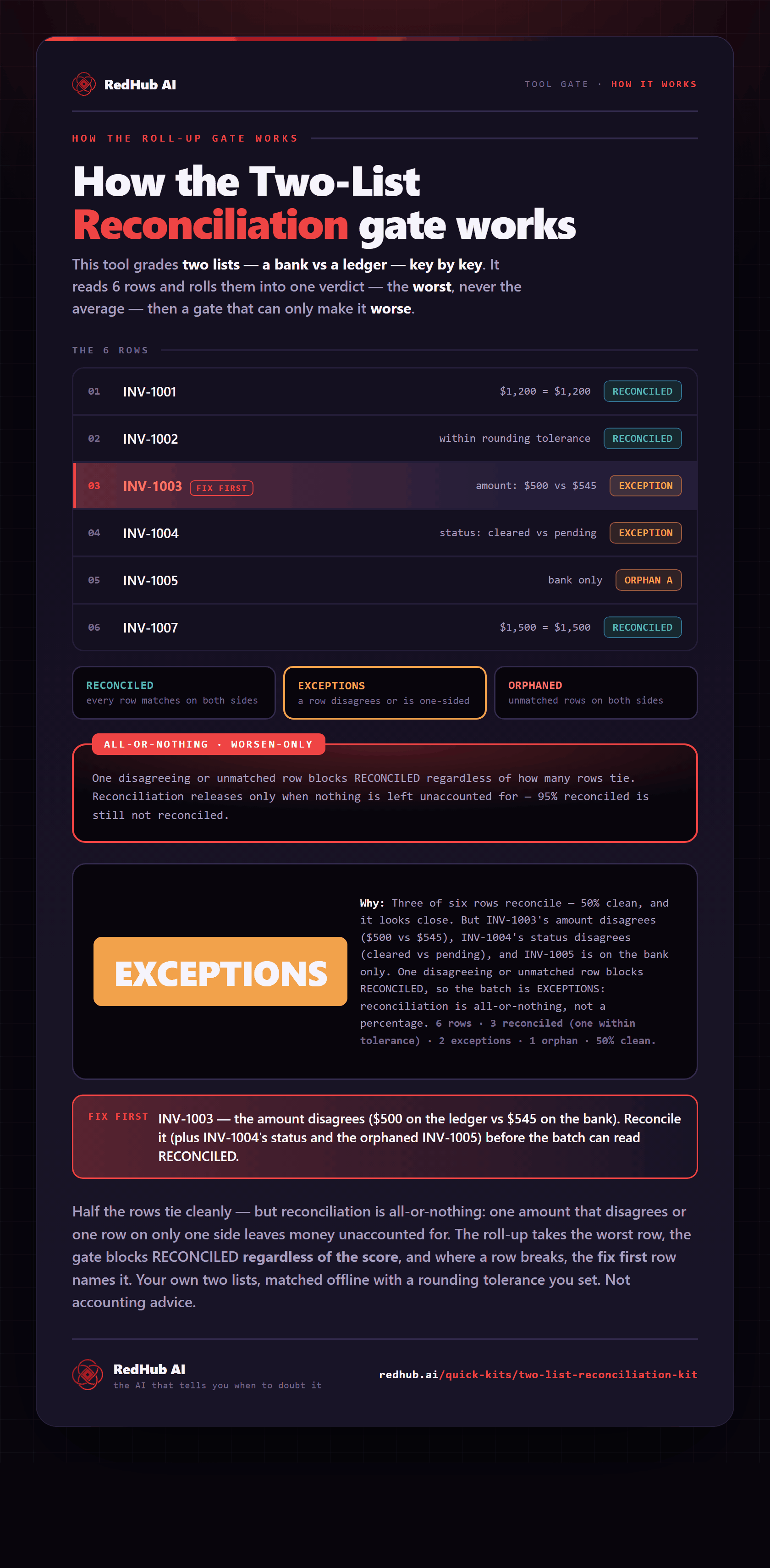
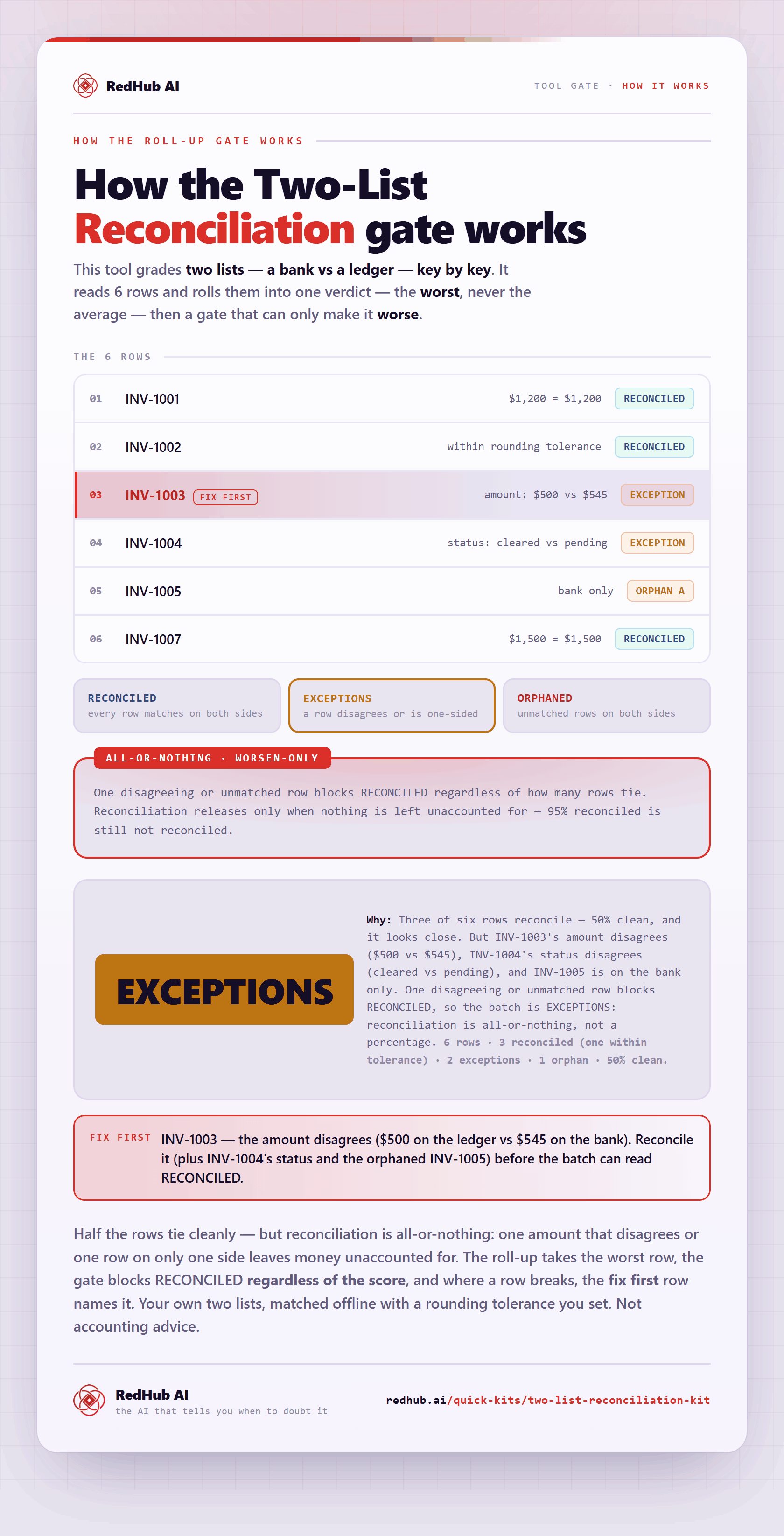
The gate this post refers to, drawn from the tool’s own logic. See the tool.