How to Reconcile Two Lists (Without Losing a Day to VLOOKUP)
RedHub AI Editorialupdated October 7, 20267 min read

Jump to a section10
- What reconciling two lists means
- Step 1: Pick the match key
- Step 2: Set the tolerance before you run anything
- Step 3: Sort every key into one of four buckets
- Step 4: Check a sample of the matches by hand
- A total that ties proves nothing
- Where VLOOKUP runs out
- When two lists are not enough
- Pairs well with
- More in this guide
To reconcile two lists, sort every key into four buckets: matched, only in List A, only in List B, and mismatched. One key column and one tolerance rule do the sorting. The missing row is the smaller risk, because it lands in a bucket where someone will look at it. A false match hides inside "matched", and nobody opens that bucket twice.
TL;DR: Pick one match key (an ID, not a name). Set the tolerance before you see any results. Run the compare, then check a sample of the matched rows by hand. A lookup formula can do this for two short, clean lists. It gets harder once a key repeats or two amounts differ by a cent. The Two-List Reconciliation Kit ($49) is one .xlsx that joins two lists on an exact key and marks each key RECONCILED, EXCEPTION or ORPHANED.
What reconciling two lists means
You have two exports. A bank statement and a ledger. Last month's customer list and this month's. A vendor's invoice list and your PO log. Three questions cover the whole job: what is in both, what is in only one, and what is in both but does not agree, such as a different amount or a different status. VLOOKUP, a pivot table and a purpose-built workbook are three routes to the same three answers.
This guide covers the general case. For the ledger-specific version, with tie-outs that check themselves, see our post on account reconciliation.
Step 1: Pick the match key
The match key is the column that says "this row in List A is the same real-world thing as this row in List B." A good key is unique and stable: an order ID, an invoice number, an account number, an email address. A name is a weak key, because two customers can both be John Smith. A free-text description is weaker, because people type it differently each time.
Look at the key column before you run anything. Microsoft's support page on leading zeros says Excel automatically removes them from data like 00123, so a product code can arrive as 123 in one export and 00123 in the other. Spaces do the same damage. Microsoft's COUNTIF page warns that leading and trailing spaces can return an unexpected count, and points to the TRIM function.
Step 2: Set the tolerance before you run anything
Tolerance is the rule for "close enough to count as agreeing." It comes in three shapes:
- Exact match. The two values must be the same. Use it for IDs, account numbers and statuses.
- Numeric tolerance. Two amounts agree if they sit within a set gap. Use it where rounding is expected. At a tolerance of 0.01, 845.124 and 845.12 agree, and 500 and 545 do not.
- Fuzzy match. Text may vary a little: a misspelling, an abbreviation. Use it for names only when no ID exists, and review every pair it produces.
Write the rule down first. A tolerance chosen after you have seen the output has been tuned to the answer you wanted.
Step 3: Sort every key into one of four buckets
| Bucket | What it means | The kit's label | What to do with it |
|---|---|---|---|
| Matched | Key in both lists, values agree within tolerance | RECONCILED | Check a sample by hand, then file it |
| Only in A | Key in List A, not in List B | ORPHAN A | Investigate: a timing lag, a missing entry, or a real gap |
| Only in B | Key in List B, not in List A | ORPHAN B | Same. The second list is not the safe side |
| Mismatched | Key in both, but an amount or status disagrees | EXCEPTION | Work these first |
The kit's worked example makes the buckets concrete. It is a bank-versus-ledger example with six keys. Three keys reconcile, including the 845.124 and 845.12 pair. Two are exceptions: one where 500 sits against 545, and one where the amounts agree but the status reads cleared on one side and pending on the other. One key, a 90.00 entry, exists only in List A.
Three of six is 50%, and the verdict for the pair still reads EXCEPTIONS. The kit's batch verdict is a gate. One open key blocks RECONCILED, and the percentage is shown for context only.
Step 4: Check a sample of the matches by hand
Whatever did the sorting, pull ten or fifteen rows from the matched bucket and read them against the source documents. A false match happens when two different things share a key, or when a tolerance is set too wide. It costs more than a miss. A miss shows up as "only in A" or "only in B." A false match disappears into "matched".
A clean sample lowers the odds of a false match. It does not bring them to zero. How many rows to read depends on what one wrong match would cost you, and no workbook can make that call.
A total that ties proves nothing
The quick check most people reach for is the grand total: if both lists sum to the same figure, call it done. Take an illustrative case with made-up numbers. The bank shows invoice 2001 at 545 where the ledger has 500, a difference of plus 45. The bank shows invoice 2002 at 300 where the ledger has 345, a difference of minus 45. The two errors cancel. The totals agree to the cent, and two rows are wrong.
That is why the buckets are counted by key and never by sum. A net difference of zero is not a reconciliation.
Where VLOOKUP runs out
VLOOKUP works for two short, clean lists with unique keys. Real exports give it three problems.
- The default is approximate. Microsoft's VLOOKUP page says that if you leave out the last argument, the function uses an approximate match and assumes the first column is sorted. If the column is not sorted, the same page lists "Wrong value returned" among its common problems.
- A repeated key returns one row. Microsoft's XLOOKUP page says the function returns the item for the first match it finds. A second row with the same key never surfaces.
- It has no tolerance. A lookup fetches the other amount. Deciding whether 845.124 agrees with 845.12 takes a second formula, and checking both directions takes a second lookup.
Each piece is solvable. Stacking them in a second sheet, then explaining the stack to whoever inherits the file, is where the day goes.
When two lists are not enough
Everything above assumes two exports and one key. With three or more sources, such as a bank export, a payment-processor export and your ledger, a new question appears: is a key missing from one source, or do the sources disagree about its value? A two-way join cannot separate those. The Multi-Source Data Reconciliation Engine ($89) is the product built for that case.
Two lists, one key, one verdict
The Two-List Reconciliation Kit is one .xlsx with three tabs: Start Here, Dashboard and Reconciliation. It joins two lists on an exact key, ignoring upper and lower case, and compares an amount (default tolerance 0.01) and a status. Every key reads RECONCILED, EXCEPTION, ORPHAN A or ORPHAN B. The Reconciliation tab reads up to 500 rows per list and builds the list of distinct keys itself. It flags a repeated key, a row with no key and an amount stored as text, so read the Input checks line before you rely on the verdict. It does no fuzzy matching.
Get the Two-List Reconciliation Kit — $49Pairs well with
The Multi-Source Data Reconciliation Engine ($89) reconciles three or more sources on one match key and classifies every key AGREED, DISPUTED or INCOMPLETE. If your lists start life as invoices, receipts or forms, the AI Document Extraction Kit ($99) turns them into structured data and flags low-confidence fields for review instead of guessing; it carries no accuracy guarantee. Once the two lists agree, the AI Data Analysis Starter Kit ($79) supplies a master prompt, 8 focused prompts and a 24-question bank for any AI tool that runs code on your uploads.
More in this guide
What is the first step to reconcile two lists?
Pick one match key that is unique and stable, such as an invoice number or an email address. Then set the tolerance rule before you run the compare, so the rule is not shaped by the results.
Can I reconcile two lists with VLOOKUP?
Yes, for short, clean lists with unique keys. It gets harder with repeated keys, with amounts that differ by a rounding cent, and with gaps that run in both directions, because each of those needs its own extra formula.
What is a match key?
It is the column both lists share that identifies one real-world thing: an order ID, an invoice number or an email address. A name or a free-text field makes a weak key because two different records can carry the same value.
Why is a false match worse than a missed row?
A missed row lands in "only in A" or "only in B," where it is visible. A false match lands in "matched," and matched rows are the ones nobody reads again.
If both lists add up to the same total, are they reconciled?
No. Two errors of the same size in opposite directions cancel in the total and leave two wrong rows behind. Count the buckets by key, not by sum.
How is this kit different from the Multi-Source Data Reconciliation Engine?
The Two-List Reconciliation Kit ($49) joins exactly two lists on one key. The Multi-Source Data Reconciliation Engine ($89) reconciles three or more sources on one key and separates a value conflict from a key that is missing from a source.
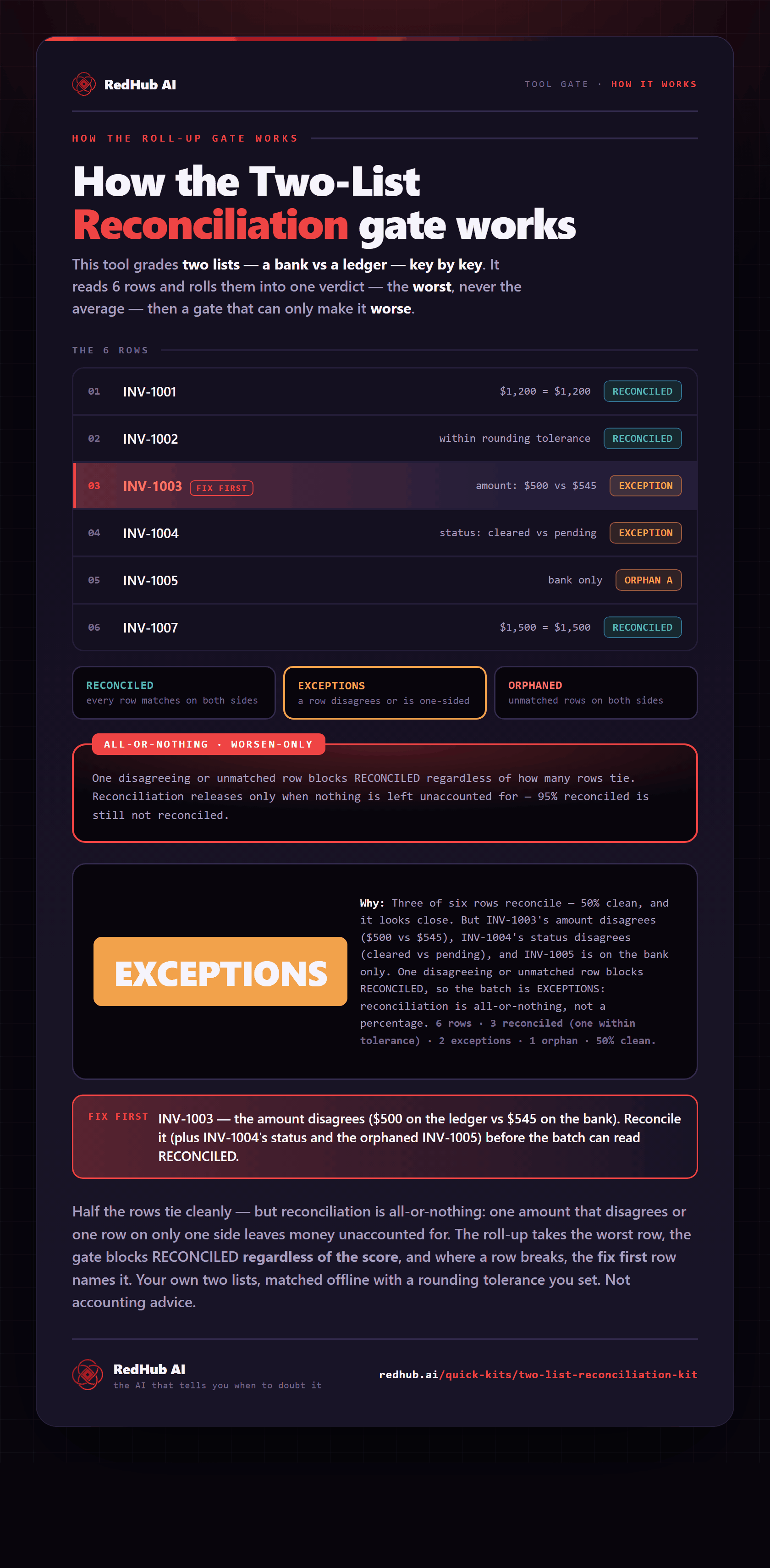
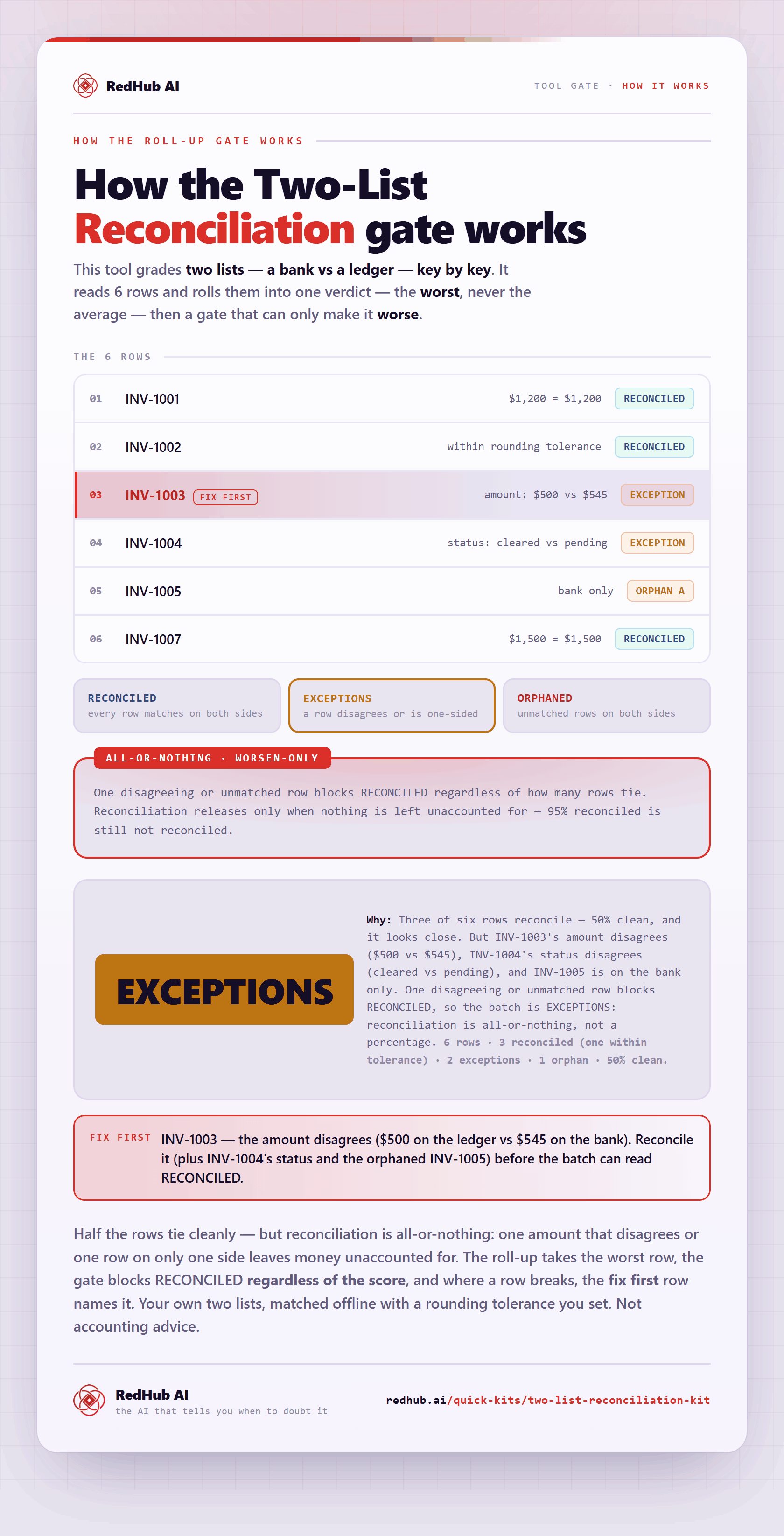
The gate this post refers to, drawn from the tool’s own logic. See the tool.