How to Find the Differences Between Two Spreadsheets
RedHub AI Editorialupdated October 7, 20266 min read

Jump to a section8
A row can sit in both spreadsheets and still be wrong. That is why the way to find differences between two spreadsheets has two passes. First match the rows on a shared key. Then compare every value column on the matched pairs: amount, status, date, whatever the sheet tracks. Checking only whether a row exists on both sides skips the second pass.
TL;DR: "Different" is a separate question from "missing." Match the two spreadsheets on a key column, then compare each value field on the pairs that matched. Clean up formats before you compare, so "$1,200.00" against 1200 is not reported as a difference. Treat the result as a worklist: it shows where the sheets disagree, not which one is right. The Two-List Reconciliation Kit ($49) marks a key EXCEPTION when it is on both lists and an amount or status disagrees.
Two spreadsheets, three kinds of difference
"Find the differences" can mean three things.
- Structural differences. A row is in one sheet and not in the other.
- Value differences. The same row is in both, and a field disagrees: a different price, a different status.
- Formatting differences. The same data, written two ways: a date stored as text against a true date, an amount with a currency symbol against one without.
The third kind is noise, and it should never reach the report. The first kind is the easiest to see. The second kind is the quiet one, because at a glance the row looks matched.
Excel's built-in tools, and where they stop
Two tools come up first. A conditional-formatting rule can color any cell that differs from the same cell address on the other sheet. Microsoft also ships a separate program called Spreadsheet Compare, which its support pages describe as showing differences "line by line, and cell by cell." Microsoft says it is only available with Office Professional Plus 2013, 2016 and 2019 or Microsoft 365 Apps for enterprise.
Both suit one situation: two versions of the same workbook, with the same layout. Microsoft's own how-to is titled "Compare two versions of a workbook by using Spreadsheet Compare."
Two exports from two systems are a different situation. The billing system sorts by invoice date. The bank sorts by posting date. A rule that compares cell B7 with cell B7 is comparing by position, and position means nothing when row 7 holds a different invoice in each file. Every row comes back flagged, including the ones that agree. The same thing happens inside one system when a single row is added or removed: everything below it shifts by a line.
The two-pass method
- Match rows by key. This tells you which rows have a partner to compare with at all.
- Compare each value column on every matched pair, and flag any that fall outside your tolerance.
- Report two lists. Structural gaps go in one, value differences in the other.
Our post on how to compare two lists covers the first pass in detail, including why it has to run in both directions.
Reading the difference report
| Difference type | Example | What it asks of you |
|---|---|---|
| Structural | An order ID in this month's export and not in last month's | Decide whether it is expected, such as a new record |
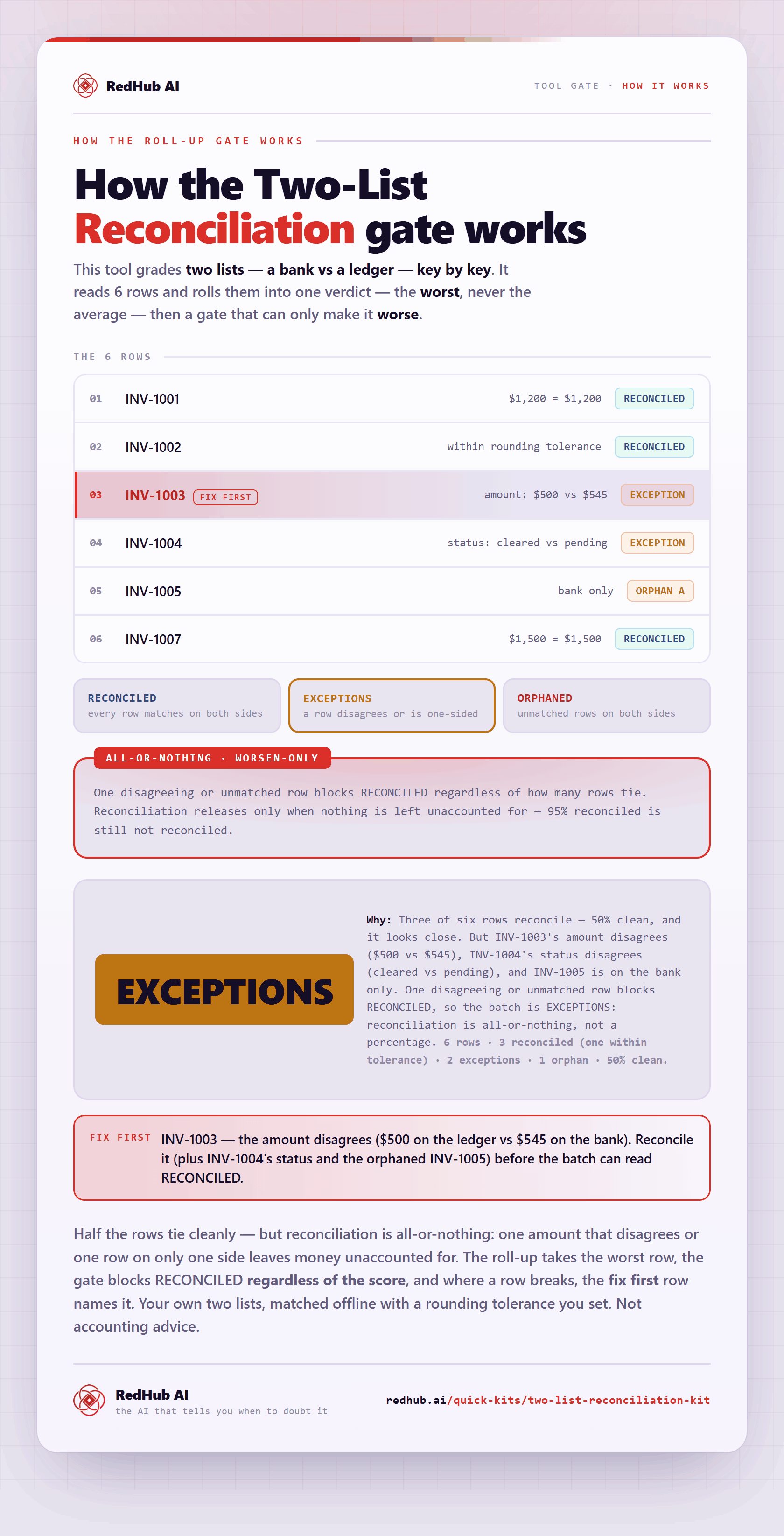
| Value | The same order ID with a total of 500 in one sheet and 545 in the other | Find out which sheet is right |
| Formatting | "$1,200.00" in one sheet and 1200 in the other | Nothing. Normalize it away before the compare |
Normalize before you compare
Strip currency symbols and thousands separators. Trim spaces. Put dates in one format, as true dates and not as text. Do this to both spreadsheets before the compare runs. Cleaning up afterward means reading a report where real differences and formatting noise look the same.
The cost of skipping this step is not the wasted hour. A report with 200 flags, 190 of them formatting, teaches the reader to skim. The ten real ones get skimmed with the rest. Those figures are made up to show the proportion, and the proportion is the point: 190 of 200 is 95% noise.
If the files are CSV exports, most of this is checkable before either one is opened. Our guide on how to validate a CSV file walks through it.
A found difference is a worklist item
The comparison tells you where two spreadsheets disagree. It cannot tell you which one is right. An invoice that reads 545 at the vendor and 500 in your ledger might be an overcharge. It might be a ledger entry made from a superseded quote. The report surfaces the disagreement, and a person resolves it.
Tolerance cuts both ways here, and there is no setting that removes the trade. The Two-List Reconciliation Kit defaults to an amount tolerance of 0.01, so 845.124 against 845.12 reconciles and does not clutter the exception list. The same setting lets a real one-cent error through. Set the tolerance to 0 and every rounding artifact becomes an exception to read. Which cost you prefer depends on whether a cent matters in the list you are holding.
Key first, values second
The Two-List Reconciliation Kit joins two lists on an exact key, then compares an amount and a status for every key found on both sides. Agreement on both reads RECONCILED. A gap beyond the tolerance, or a status that differs, reads EXCEPTION. Status text is compared ignoring case and surrounding spaces. The Reconciliation tab reads up to 500 rows per list and builds the list of distinct keys itself. Rows pasted below that area are not read, and the Check column says so.
Get the Two-List Reconciliation Kit — $49Pairs well with
The CSV / Data-Export Schema & Quality Gate ($69) grades whether an exported CSV is structurally fit to be processed before any row-level tool touches it, with a per-column CLEAN, DIRTY or MISSING. The AI Data Analysis Starter Kit ($79) is a master prompt, 8 focused prompts and a 24-question bank with a five-rule honesty layer, for any AI tool that runs code on your uploads. With a third spreadsheet in play, the Multi-Source Data Reconciliation Engine ($89) marks a key DISPUTED when one source's number disagrees beyond a one-cent tolerance.
More in this guide
How do I find differences between two spreadsheets?
Match rows by a shared key column first, then compare every value field on the matched pairs. Checking only which rows exist misses the differences inside rows that appear in both.
Why does a cell-by-cell compare flag everything?
It compares by position. If the two spreadsheets are not in the same row order with the same row count, each cell is being compared with a different record, so nearly every row reads as different.
Are formatting differences real differences?
No. "$1,200.00" and 1200 are the same value written two ways. Normalize formats on both sheets before comparing, or the noise will bury the differences that count.
Can I use Spreadsheet Compare for this?
Microsoft says Spreadsheet Compare is only available with Office Professional Plus 2013, 2016 and 2019 or Microsoft 365 Apps for enterprise, and it describes the tool as comparing two versions of a workbook. Two exports in different row orders need a key-based match first.
Does a difference report tell me which spreadsheet is correct?
No. It shows where the two disagree. A person still has to go to the source document and decide which value is right.
Should I allow a tolerance on amounts?
It depends on the list. A small tolerance, such as 0.01, stops rounding from filling the report. It also lets a real error of that size pass. A tolerance of 0 flags both.

The gate this post refers to, drawn from the tool’s own logic. See the tool.