Matching Records Across Two Lists: Exact, Fuzzy, and Tolerance Matches
RedHub AI Editorialupdated October 7, 20266 min read

Jump to a section7
Three rules cover matching records between two lists: exact, fuzzy and numeric tolerance. Each one fails in its own direction. Exact is strict, so it misses real matches over a stray space. Fuzzy and tolerance are forgiving, so they accept matches that are not real when set too loose. Choosing the rule per column, before you see any results, is most of the work.
TL;DR: Use exact matching for IDs and account numbers, fuzzy matching for names and free text when no ID exists, and numeric tolerance for amounts that can differ by a known small margin. Set the rule first. Then read a sample of the fuzzy and tolerance matches by hand, because a loose rule files its mistakes under "matched." The Two-List Reconciliation Kit ($49) uses an exact key and an amount tolerance you set in one cell. It does not do fuzzy matching.
Exact matching
Exact matching requires the two keys to be the same value. Use it whenever you hold a real identifier: an order number, an account ID, a SKU. On a key that is unique, it is the safest rule there is, because two identical IDs are the same record.
That safety belongs to the key, not to the rule. An exact match on "John Smith" will join two different customers without complaint. The rule did its job and the key was not unique.
The common failure runs the other way. Exact is too strict for dirty data. Microsoft's support page on leading zeros says Excel automatically removes them, so account 00412 in one export can sit as 412 in the other. Its COUNTIF page warns that leading and trailing spaces can return an unexpected result.
Fuzzy matching
Fuzzy matching accepts text that is close: a misspelling, an extra space, "Corp" for "Corporation." Reach for it when names or descriptions are all you have. In Microsoft's Power Query it is an option on a merge.
The setting that matters is the similarity threshold. Microsoft's Power Query documentation describes it as a value between 0.00 and 1.00, where 1.00 is the same as an exact match, and says the default is 0.80. Its own example: "Grapes" matches "Graes" only if the threshold is set below 0.90.
Read that example from the other side. By that example, at the default a six-letter word with one letter dropped counts as a match. That is the right call for "Grapes." It is a harder call for Jon Smith and John Smith, who may be one customer or two.
- Treat fuzzy as the last resort. If an ID exists, match on the ID.
- Review every fuzzy pair before it goes anywhere. Do not let a fuzzy match write to a financial record unread.
- Once a pair is confirmed, give both rows the same key. After that, the exact rule can carry it.
Numeric tolerance matching
A tolerance lets two amounts differ by a set gap and still agree. It exists because rounding is real. One system stores 845.124 and another stores 845.12, and nobody wants to investigate four-tenths of a cent.
The Two-List Reconciliation Kit handles it with one cell. The default is 0.01. At that setting 845.124 and 845.12 reconcile, 500 and 545 do not, and a difference exactly at the tolerance still reconciles. Set the cell to 0 and the amounts must be equal.
| Match type | Best for | How it goes wrong |
|---|---|---|
| Exact | IDs, account numbers, SKUs | Too strict: a space or a dropped zero turns one record into two missing ones |
| Fuzzy | Names and descriptions with no ID | Too loose: two different records are joined as one |
| Numeric tolerance | Amounts, quantities, totals | Too wide: a real shortfall passes as rounding |
How to choose a tolerance
- Start tight. Use the smallest gap your data can explain, such as 0.01 for currency rounding.
- Run the match and read what lands in the mismatched pile.
- Widen only on evidence. If pairs you know are good keep failing by the same small amount, widen by that amount and run again.
Write the reason next to the number. "0.01, rounding" tells next quarter's reader why the cell is set that way. A bare 0.50 tells them nothing.
The fee that hides a shortfall
Tolerance has a problem no setting solves. Suppose your processor nets a fee out of each payment, and the fee runs up to 50 cents. These numbers are made up to show the mechanism. You set the tolerance to 0.50 so fee differences stop flooding the exception list. Now a customer short-pays an invoice by 40 cents. The gap is inside the tolerance. It reconciles as if it were a fee.
The match rule cannot tell an expected 40 cents from an unexpected 40 cents. They are the same number. The cleaner fix is upstream: compare gross amounts on both sides and reconcile fees as their own line. That is not always possible with the exports you are given. When it is not, you are choosing between a long exception list and a blind spot of known width, and you should know which one you picked.
A loose rule also makes the output look better. Fewer exceptions, a higher matched share, a shorter worklist. The report is tidiest at the moment the rule is most wrong, which is the argument for reading a sample of matched rows every time.
Accounts payable applies the same idea with more documents in play. Our post on 2-way vs 3-way matching covers how many records an invoice should be checked against.
An exact key and a tolerance you can see
The Two-List Reconciliation Kit matches keys exactly, ignoring upper and lower case, and puts the amount tolerance in one visible cell (default 0.01, or 0 for strict equality). Each key reads RECONCILED, EXCEPTION, ORPHAN A or ORPHAN B. It does not do fuzzy or approximate matching, so settle name variants before you paste. The workbook reads up to 500 rows per list and builds the list of distinct keys itself. A key repeated on one list is flagged as a duplicate, and its amounts are summed.
Get the Two-List Reconciliation Kit — $49Pairs well with
For accounts payable, the Invoice-PO-Receipt 3-Way Match ($79) matches each invoice line against the purchase order and the goods receipt by PO number and line number, with four editable tolerances, and returns APPROVE, HOLD or BLOCK PAYMENT per invoice. The Multi-Source Data Reconciliation Engine ($89) applies a one-cent tolerance across three or more sources on one match key. If the names you are trying to match were typed in from paper, the AI Document Extraction Kit ($99) turns invoices, receipts and forms into structured data and flags low-confidence fields for review.
More in this guide
What is the difference between exact and fuzzy matching?
Exact matching requires the two keys to be the same value. Fuzzy matching accepts text that is close, such as a small spelling difference. Use exact whenever you have a unique ID.
When should I use numeric tolerance matching?
When amounts can differ by a small gap you can explain, such as a rounding cent. Start with the tightest tolerance and widen it only when pairs you know are good keep failing by the same amount.
Is fuzzy matching risky?
It is the rule most likely to join two different records, because two people or companies can have similar names. Review every fuzzy pair by hand before treating the match as final.
Can an exact match be wrong?
Yes, when the key is not unique. Two customers with the same name will match exactly and still be two people. Exact matching is only as safe as the key it runs on.
Should I set the tolerance before or after seeing the results?
Before. A tolerance picked after you have seen the output has been adjusted to produce the answer you hoped for.
Does the Two-List Reconciliation Kit do fuzzy matching?
No. It joins on an exact key, ignoring upper and lower case, and applies a numeric tolerance to the amount. Name variants need to be settled before the lists go in.
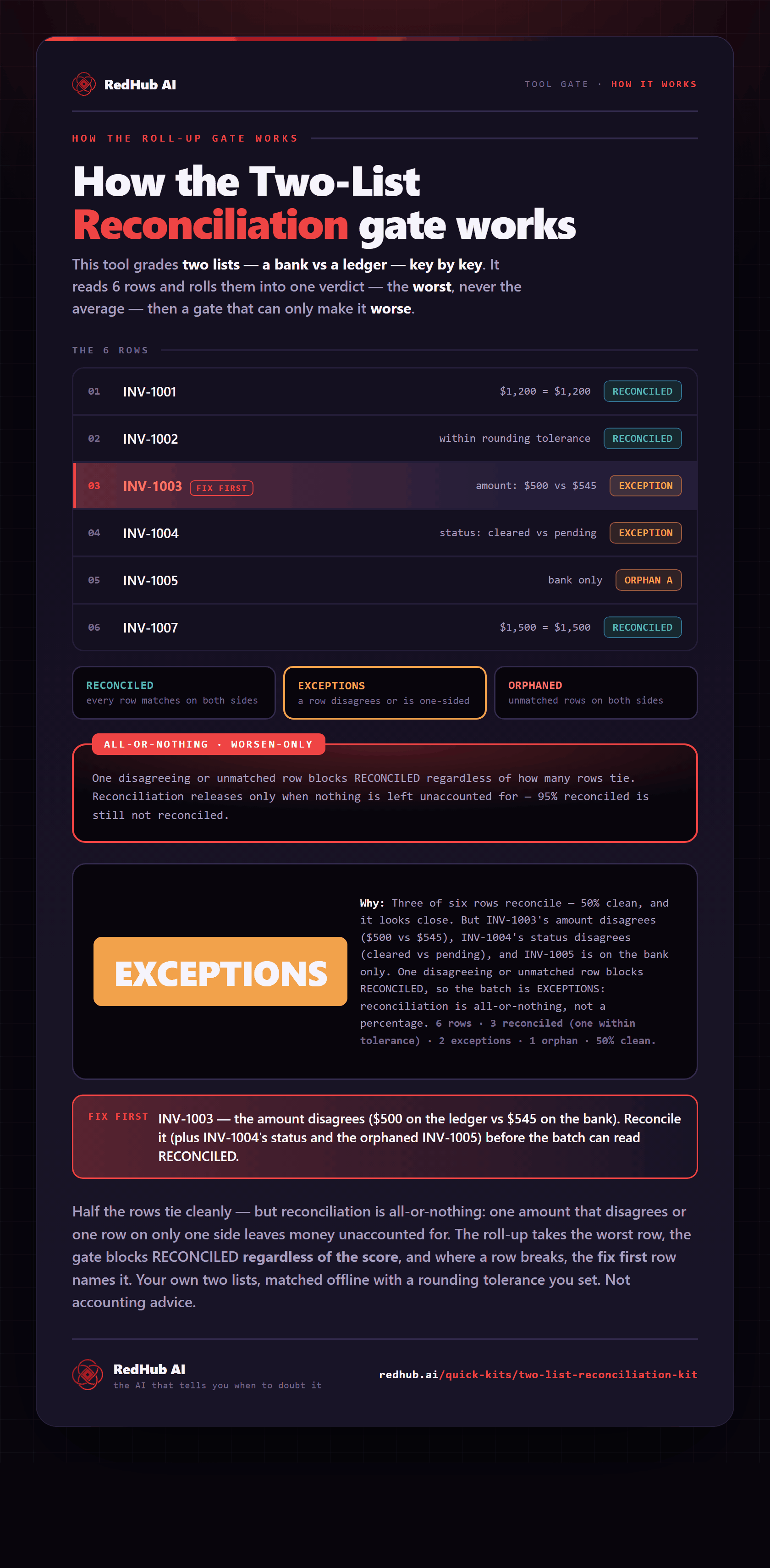
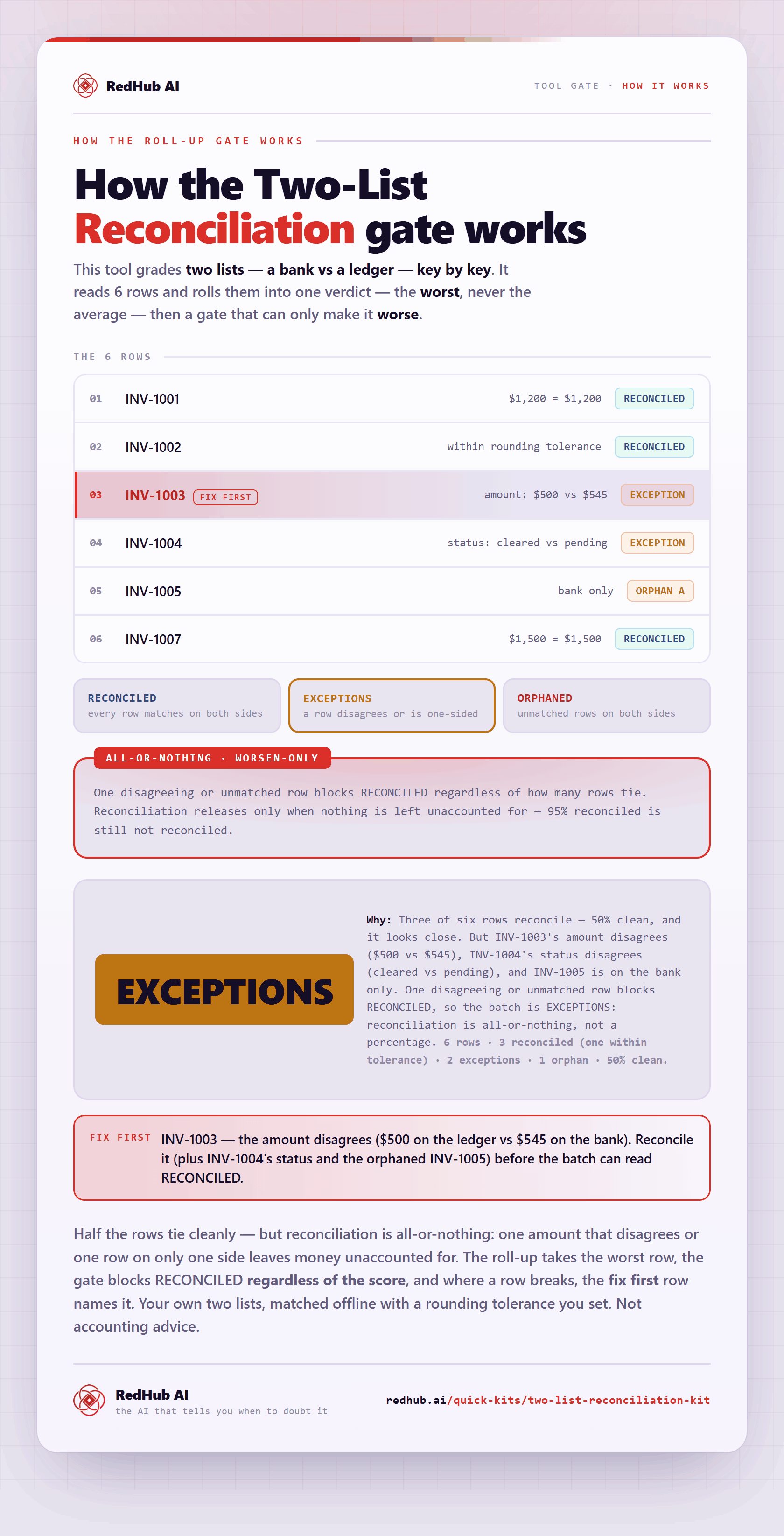
The gate this post refers to, drawn from the tool’s own logic. See the tool.