How to Run a Content Audit (and Decide What to Refresh, Rewrite, or Retire)
RedHub AI Editorialupdated September 7, 20264 min read

Jump to a section8
TL;DR
- What it is: a content audit inventories your existing posts and sorts each into refresh, rewrite, retire, or leave — so you act on the whole library with intent.
- Who it's for: teams with more content than they can eyeball. See the refresh engine.
- How it works: score each page on traffic, position, staleness, business value, and accuracy — then assign an action.
- Bottom line: the audit's output is a prioritized action list, not a spreadsheet you file away. Score below to try it.
What is a content audit?
A content audit is a systematic review of every page in your library that scores each one and assigns it an action: refresh it, rewrite it, retire it, or leave it. You score on a handful of signals — organic traffic and its trend, ranking position, how stale the facts are, business value, and whether the page is still accurate — and let those signals decide the verdict. The point isn't to produce a spreadsheet; it's to turn a vague sense that "our content needs work" into a prioritized list of exactly which posts to touch, in what order, and how.
Best for: libraries too big to review by hand — the Content Refresh & Publishing Engine scores your whole library through your WordPress connection and returns the action list. It reads and drafts; you publish.
Most "content audits" die as a giant spreadsheet nobody acts on. The fix is to make the audit end in decisions, not data. That means scoring every page on the few signals that actually predict whether an update will pay off, and letting each score map to one clear action.
The signals that decide the verdict
Score each page on five things. Together they sort your library far better than gut feel.
| Signal | Why it matters |
|---|---|
| Traffic + trend | How much it earns now, and which way it's heading |
| Ranking position | A page on page two has more upside than one already at #1 |
| Staleness | How out-of-date the facts, examples, and tools are |
| Business value | Whether the topic drives leads or revenue, not just visits |
| Accuracy | Whether the page can be trusted as-is or is fundamentally wrong |
Map each score to one action
The verdict follows from the signals. Try it on a single post:
Refresh-priority check (illustrative)
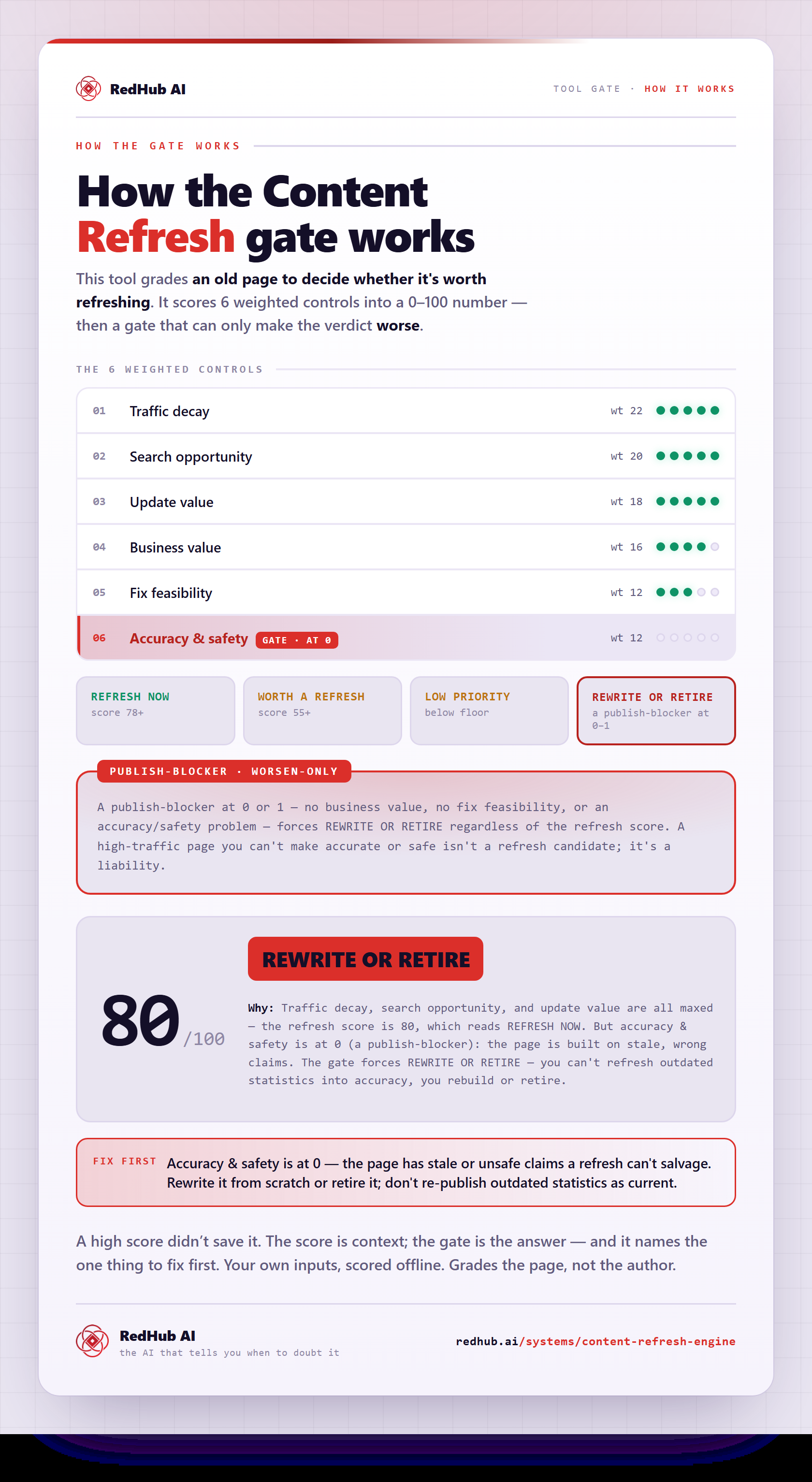
Key insight: accuracy is a gate, not a score. A page that's inaccurate or off-strategy is a rewrite-or-retire no matter how much traffic it gets — you don't fast-track wrong content to republish just because it ranks.
The four verdicts
- Refresh now: high value, decaying, still fundamentally sound — the best return on your time. Do these first.
- Worth a refresh: solid pages with some decay — queue them for the next sprint.
- Low priority: little traffic or upside — leave them and revisit later; not every page earns attention.
- Rewrite or retire: inaccurate, thin, or off-strategy — rebuild properly or unpublish. Never a quick refresh with a new date.
Audit the whole library, not one post
The Content Refresh & Publishing Engine scores every published post on these signals, returns a Refresh-Ready vs Content-Debt roll-up, and, where a piece is ready to refresh, names the post to refresh first — turning the audit into an action list automatically.
Get the Content Refresh Engine — $129 →Run it on a cadence, not once
A content audit isn't a one-time project — it's a recurring rhythm. Content keeps decaying, so a library you audited six months ago has newly-slipped pages today. Re-scoring on a regular cadence (quarterly works for many teams) is what makes the effort compound: you see what recovered after a refresh, what newly decayed, and where claims have drifted out of date, instead of starting from scratch each time.
For the full method, read the pillar on content refresh, and go deeper on the hardest call in refresh, rewrite, or retire.
Decision Guide
Use it if: you have more content than you can review by hand and need a prioritized action list.
Skip it if: you have a handful of posts you can assess in an afternoon without a system.
Best first step: score your pages on the five signals, gate on accuracy, and start with the "refresh now" list.
FAQ
What is a content audit?
A systematic review that scores every page in your library and assigns each an action — refresh, rewrite, retire, or leave. It turns a vague "our content needs work" into a prioritized list of which posts to touch, in what order, and how.
What should I measure in a content audit?
Five signals: organic traffic and its trend, ranking position, how stale the content is, business value, and whether it's still accurate. Together they predict whether an update will pay off far better than eyeballing the library.
How do I decide whether to refresh, rewrite, or retire a post?
Let the signals decide. High-value, decaying, still-sound pages get a refresh; inaccurate or off-strategy pages get a rewrite or retirement; low-traffic, low-upside pages are left alone. Accuracy is a gate — a wrong page can't be a quick refresh no matter how well it ranks.
How often should I run a content audit?
Treat it as a recurring rhythm, not a one-off. Quarterly works for many teams — often enough to catch newly-decayed pages while staying reversible. Re-scoring on a cadence is what makes the effort compound instead of resetting.
Do I need a tool, or can I do it in a spreadsheet?
A small library is fine in a spreadsheet. The problem is scale and follow-through — big libraries are slow to score by hand, and manual audits tend to die as a filed spreadsheet. A tool that scores automatically and re-scores on a cadence is what keeps the audit an action list.
Is the refresh-priority check exact?
No — it's illustrative. It shows how a few signals map to a verdict so you can see the logic; a full audit weighs more signals and your real analytics. Use it as a gut-check, not a final ruling on any page.
Turn "our content needs work" into a list
Score every page, gate on accuracy, and act on the refresh-now list first. It reads and drafts; you publish.
Get the Content Refresh Engine — $129 →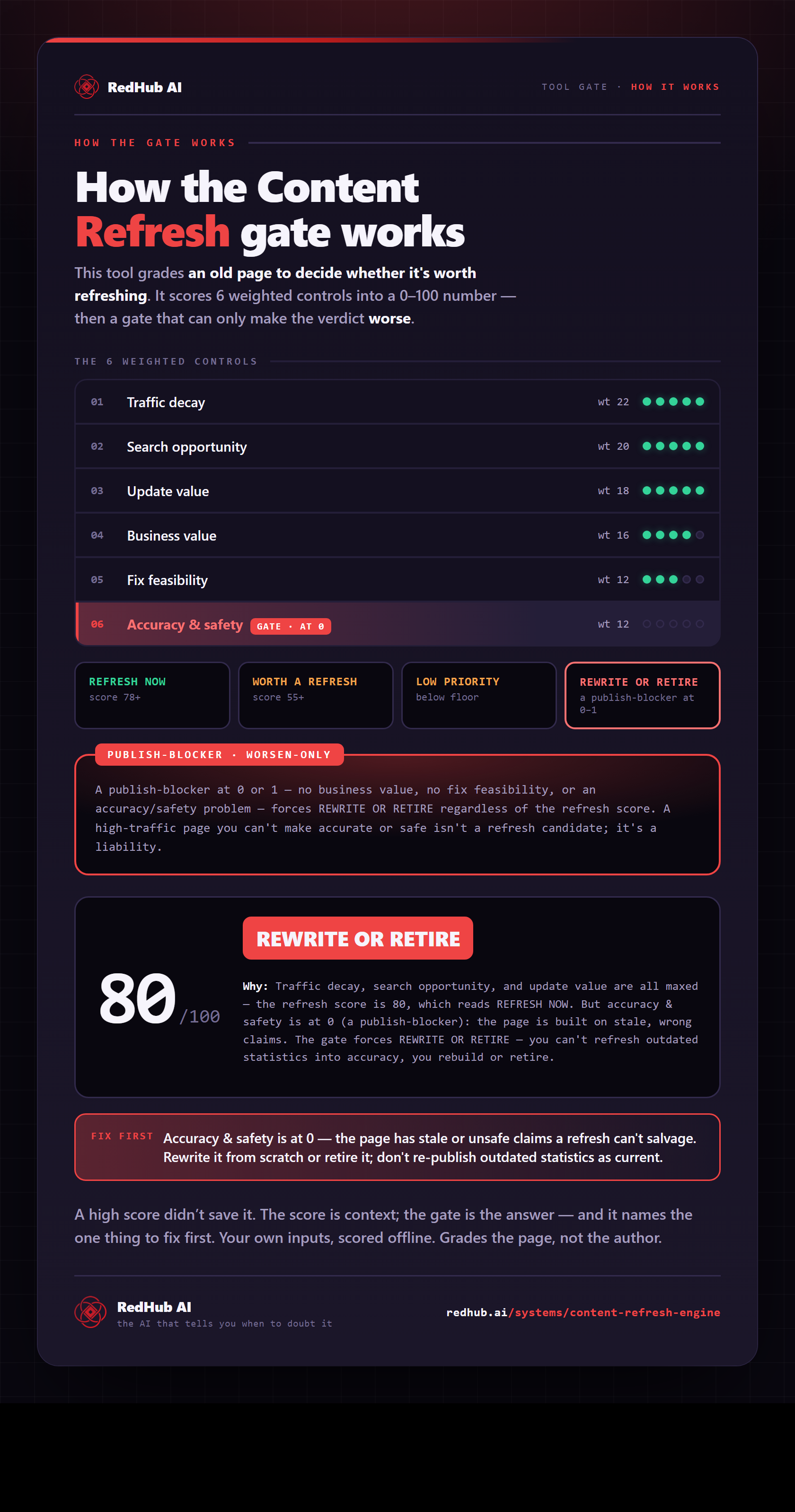
The gate this post refers to, drawn from the tool’s own logic. See the tool.