Content Refresh: How to Update Old Blog Posts (and Which Ones to Skip)
RedHub AI Editorialupdated September 7, 20265 min read

Jump to a section9
TL;DR
- What it is: content refresh is updating existing posts to win back the rankings and traffic they've lost — not rewriting everything, just the pages worth saving.
- Who it's for: content and SEO leads with a library that's quietly decaying. See the refresh engine.
- How it works: score your library, refresh the high-value decayers, and retire the ones that aren't worth saving.
- Bottom line: refreshing everything is a trap. Refresh the right posts, and don't republish content that isn't ready. No tool can guarantee rankings.
What is a content refresh?
A content refresh is updating an existing blog post — new facts, a sharper intro, current examples, better internal links, an updated title and meta — while keeping its URL, so it reclaims the rankings and traffic it has lost over time. It's cheaper and faster than writing new content because the page already has authority and history. But the goal isn't to refresh your whole library; it's to find the decaying posts that are actually worth saving and to leave (or retire) the ones that aren't. Refreshing everything wastes effort on pages that will never earn it back.
Best for: teams with a large, aging content library — the Content Refresh & Publishing Engine scores which posts to refresh and drafts them in your voice. It reads, drafts, and stages a draft; you publish.
Your best posts are decaying right now. A page that ranked well two years ago slips a position a month as the facts age, competitors publish fresher takes, and search engines favor what's current. The fix isn't more new content — it's refreshing the pages you already have. But there's a right way to do it, and the first rule is counterintuitive: don't refresh everything.
Why refreshing everything is a trap
The instinct, once you learn about content refresh, is to update your whole library. That's a mistake. Most of your traffic and ranking potential lives in a small slice of your posts. Refreshing a page that never ranked, never earned links, or covers a topic nobody searches anymore is effort you'll never get back — it's busywork that feels productive. Worse, some old posts shouldn't be republished at all: they're inaccurate, thin, or off-strategy, and giving them a fresh date doesn't fix that. The skill is triage, not volume.
Key insight: a refresh program lives or dies on what you choose not to refresh. Fast-tracking a weak post to republish because it once ranked just puts inaccurate or thin content back in front of readers with a newer date on it.
Score your library before you touch anything
Before refreshing a single post, score every page on a few signals — traffic trend, ranking position, how stale the facts are, business value, and whether it's still accurate. That sorts your library into four buckets:
| Verdict | What it means | Action |
|---|---|---|
| Refresh now | High value, clearly decaying, still salvageable | Update first — best return |
| Worth a refresh | Solid page, some decay | Queue it for the next sprint |
| Low priority | Little traffic or upside | Leave it; revisit later |
| Rewrite or retire | Inaccurate, thin, or off-strategy | Rebuild it properly or unpublish — never fast-track |
Score your library automatically
The Content Refresh & Publishing Engine reads your published posts through your WordPress connection, scores each into Refresh Now / Worth a Refresh / Low Priority / Rewrite or Retire, and, where a piece is ready to refresh, tells you the post to refresh first — so you spend effort where it pays back.
Get the Content Refresh Engine — $129 →How to refresh a post the right way
Once you've picked a "refresh now" post, the update itself follows a pattern:
- Keep the URL. The page's history and links are its power — refresh in place, don't republish at a new address.
- Update the facts, and source them. Replace stale figures and examples with current ones, and cite each. Never invent a statistic to fill a gap.
- Sharpen the intro and structure. Rewrite the opening to answer the query directly, and reorganize sections around how people search now.
- Refresh title, meta, and internal links. A clearer title and fresh internal links signal relevance and spread authority.
- QA before you publish. Check every updated claim against its source, confirm the redirect situation, and only then hit publish.
Keep your voice, not generic AI
AI makes refreshing fast, but unguided it flattens every post into the same generic tone. A refreshed post should still sound like you — so ground the rewrite in the original, keep your phrasing and point of view, and let AI update the facts and tighten the structure rather than rewrite your voice away. Speed is the point; sounding like everyone else is not.
What this is not
Honest about the limits: a refresh recovers rankings the page can recover — it does not guarantee a ranking, a position, or a traffic number, because that depends on competition, intent, and the search engines. Good tooling reads, drafts, and stages a draft for you; it should never publish, overwrite the live post, change the URL, or delete on its own — clicking publish stays yours. And it should refuse to fast-track a post that's inaccurate or worthless, however well it once ranked.
Go deeper: why your best posts lose traffic, how to update old posts without breaking SEO, how to run a content audit, and when to refresh vs rewrite vs retire. To keep refreshed drafts sounding like you, the Brand Voice Engine locks your voice.
Decision Guide
Use it if: you have a library of older posts and traffic is sliding on pages that used to perform.
Skip it if: your site is young with few posts — write new content first; there's little to refresh yet.
Best first step: score your library and refresh the single highest-value decaying post before you touch anything else.
FAQ
What does it mean to refresh content?
It's updating an existing post — new facts, a sharper intro, current examples, updated title and internal links — while keeping its URL, so it reclaims rankings and traffic it has lost. It's faster than new content because the page already has authority and history.
Should I refresh all my old posts?
No — that's the common trap. Most upside lives in a small slice of your library. Refresh the high-value pages that are decaying but salvageable, leave the low-priority ones, and rewrite or retire the inaccurate or thin ones instead of fast-tracking them to republish.
Does refreshing content actually recover traffic?
Often, for pages that still have authority and cover topics people search. But no one can guarantee it — recovery depends on competition, search intent, and the engines. A refresh improves the page's chances; it doesn't promise a position or a number.
Should I change the URL when I refresh a post?
No. The URL carries the page's history and backlinks — its ranking power. Refresh in place at the same address. Publishing the update at a new URL throws away the authority you're trying to reclaim.
How is a refresh different from a rewrite?
A refresh updates a page that's fundamentally sound — facts, intro, structure, links. A rewrite rebuilds a page that's inaccurate, thin, or off-strategy from the ground up. If a post can't be trusted as-is, it needs a rewrite (or retirement), not a quick refresh with a new date.
Can AI refresh my posts for me?
AI can score your library and draft the updates fast, but keep a human in the loop: it should read, draft, and stage a draft — not publish, overwrite, or delete on its own. And it must ground the update in the original and never invent a statistic. You review and click publish.
Refresh the right posts, skip the rest
Score your library, update the high-value decayers in your voice, and never republish content that isn't ready. It reads, drafts, and stages a draft; you publish.
Get the Content Refresh Engine — $129 →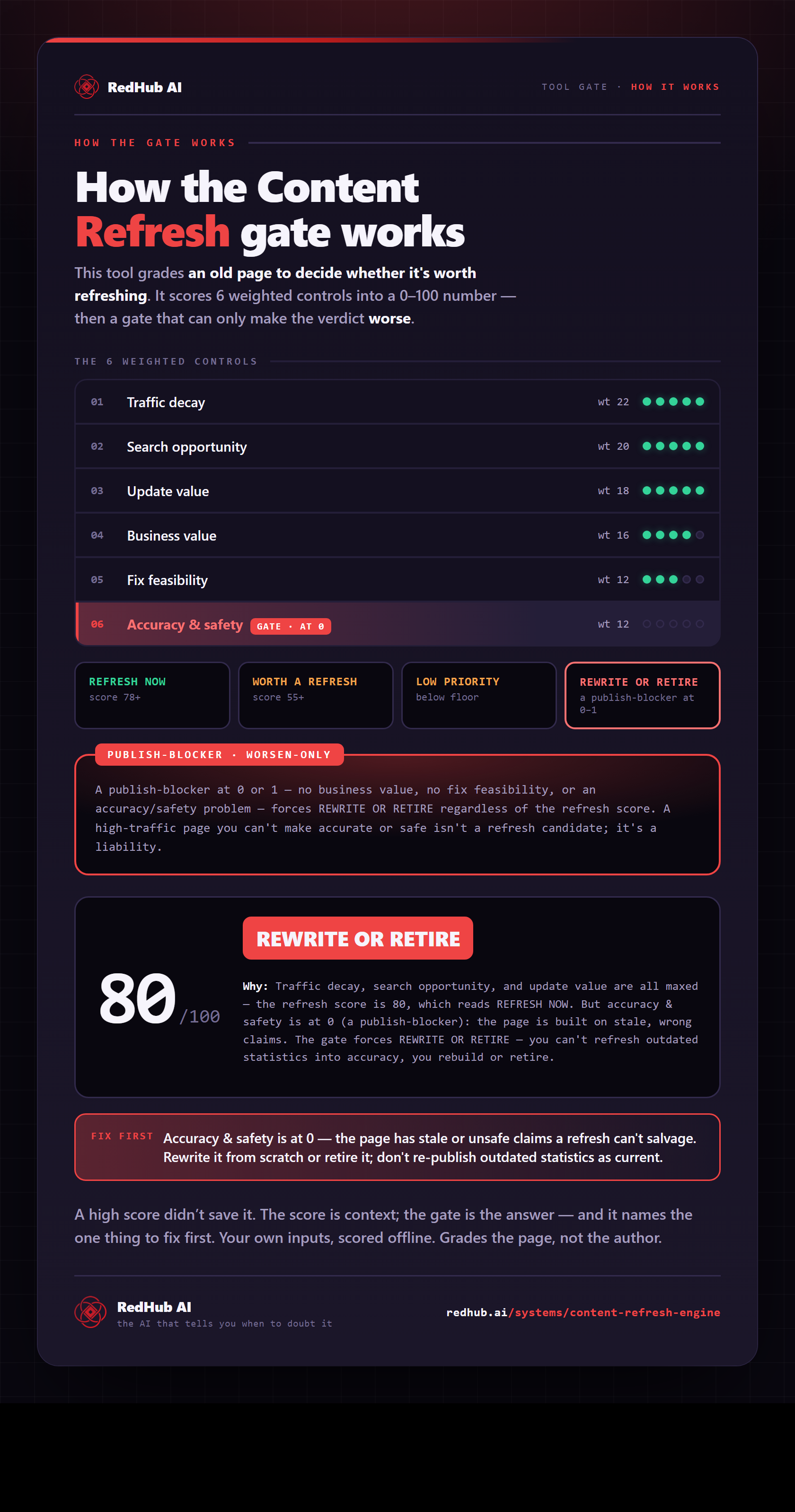
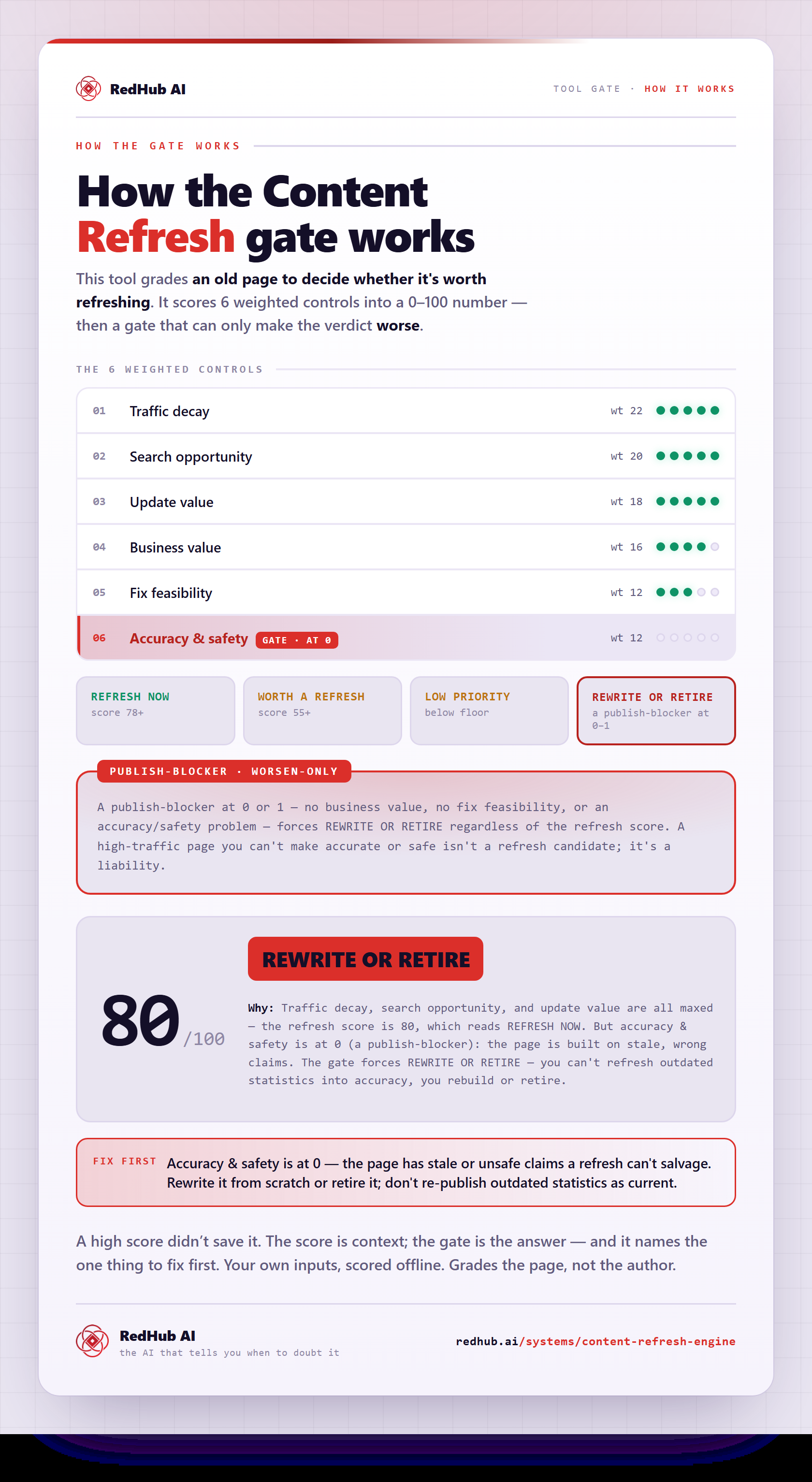
The gate this post refers to, drawn from the tool’s own logic. See the tool.