Core Web Vitals and Revenue: Does Site Speed Actually Cost You Sales?
RedHub AI Editorialupdated October 5, 20266 min read

Jump to a section10
- The short version
- Speed-to-revenue calculator (illustrative)
- What counts as "site speed"
- How much does speed change revenue
- Fixing it without hiring a dev team
- Measuring what a fix is worth
- Where speed fits next to everything else
- What the Core Web Vitals Revenue-Impact Gate actually does
- Pairs well with
- More in this guide
Core Web Vitals revenue loss is real, but the number belongs to your site, not to Google or to anyone's case study. A slow page costs sales when visitors leave before your offer loads, or when the page lags and jumps as they try to buy. How much it costs depends on your traffic, your conversion rate and how slow "slow" is. You can estimate it from your own numbers today, and measure the real figure once you ship a fix.
TL;DR: Core Web Vitals (LCP, INP, CLS) measure how fast and stable a page feels to real visitors. Google uses them in ranking, but says relevance comes first. Speed affects conversions more directly, though the size of the effect varies by site and even by industry. Use the calculator below to size your exposure, and the Core Web Vitals Revenue-Impact Gate ($49) to grade each page and decide what to fix first.
The short version
Google's Core Web Vitals are Largest Contentful Paint (LCP), Interaction to Next Paint (INP) and Cumulative Layout Shift (CLS). They measure loading, responsiveness and visual stability, and Google's web.dev counts a page as passing when all three meet the target at the 75th percentile of page loads. Google's Search Central documentation says they "are used by our ranking systems." For revenue, they matter more as a proxy for the experience itself. A page that limps or jumps while loading loses people before they read the headline, let alone tap Add to Cart.
Speed-to-revenue calculator (illustrative)
Enter your own numbers to see what a conversion lift from a speed fix could be worth on your traffic. This is a planning estimate, not a guarantee. The real lift depends on how slow the site is now, what you fix and everything else on the page.
Speed-to-revenue calculator (illustrative)
Two notes on this calculator. The default numbers are placeholders that show the math. They are not a benchmark, so replace every field with your real traffic and conversion data. And the "conversion lift" field is a hypothesis. Nobody can tell you in advance that fixing LCP will lift conversion by exactly 5%. You set a target, make the fix, then check your analytics to see what happened. That second number is the one that counts.
What counts as "site speed"
"Site speed" is three separate things under Core Web Vitals: how fast the main content appears (LCP, good at 2.5 seconds or less), how quickly the page answers a tap (INP, good at 200 milliseconds or less), and whether things jump while loading (CLS, good at 0.1 or less). Each fails for a different reason and needs a different fix. We explain each one in plain English in What Are Core Web Vitals? LCP, INP, and CLS in Plain English.
How much does speed change revenue
Be wary of anyone who quotes a single industry-wide penalty for slow pages. The best-known study, Deloitte's 2020 Milliseconds Make Millions report for Google, found conversion gains for retail brands and falling conversion rates for lead-generation brands after the same kind of speed improvement. Direction is a good enough reason to fix a slow site. It is not a number to drop into a forecast as if it were guaranteed. We walk through what that study does and does not show in Does Page Speed Affect SEO and Conversions?
Fixing it without hiring a dev team
Most Core Web Vitals failures on small business sites come from a few repeat offenders: oversized images, a pile of tracking scripts and plugins, and no caching. None of those needs a developer. We cover the settings-level fixes, and the few problems that do need code, in How to Improve Core Web Vitals Without a Developer.
Measuring what a fix is worth
The calculator is a planning tool. The real answer comes from your own before-and-after data: baseline your conversion rate, ship one fix, and compare matching windows. That method, including a significance check on a 1.8% to 2.1% example, is in How to Measure the Revenue Impact of a Slow Website.
Where speed fits next to everything else
Speed is not the only place revenue leaks. If traffic is falling because AI Overviews answer the query before anyone clicks, that is a different diagnosis. If you don't come up when people ask an AI assistant for a recommendation in your category, that is a citation problem. And if visitors land on a fast page that still doesn't persuade, the fix is copy and offer structure, not milliseconds. Speed is the floor, not the ceiling. It is worth fixing first because a slow page undercuts everything built on top of it.
What the Core Web Vitals Revenue-Impact Gate actually does
The Gate is one spreadsheet with three tabs: Start Here, Dashboard and CWV Calculator. For each page you paste field LCP, INP and CLS, plus monthly sessions, conversion rate and value per conversion. It grades the page on its worst metric, the way Search Console grades a URL group, and returns PASSING, NEEDS WORK or BLEEDING. Where a metric is short, it names the one to fix first. The Dashboard rolls the pages up to a site verdict and a total annual figure at risk.
The dollar figure has a boundary worth knowing before you buy. It multiplies your monthly revenue by a per-100ms sensitivity you set (default 1%, yours to change) and by how far LCP sits over 2.5 seconds. INP and CLS set the verdict but not the dollars. In the kit's own worked example, a category page with good LCP and CLS but an INP of 520 milliseconds reads BLEEDING, and its revenue at risk reads $0. That page still needs fixing. The spreadsheet just won't invent a price for a metric it has no sensitivity for. It costs $49, one time.
Grade every page before you pay for speed work
PASSING, NEEDS WORK or BLEEDING per page, the metric to fix first where a metric is short, and revenue at risk from your own numbers. RedHub asserts no industry lift and guarantees no ranking change or recovery.
Get the Core Web Vitals Revenue-Impact Gate — $49Pairs well with
If your Core Web Vitals come back clean but sales still lag, the AI Offer & Landing-Page Conversion Kit ($79) scores your offer and landing copy and runs a claim-honesty check. If organic clicks are sliding while impressions hold, the AI Overview Traffic-Loss Diagnostic ($79) grades each page from your own Search Console numbers. And if you want to be cited when people ask an AI assistant instead of Google, the AEO Citation Audit & Optimizer Kit ($79) audits how citable your pages are.
More in this guide
Does site speed affect sales, or is that overstated?
It is real but easy to overstate. Slow pages tend to lose visitors before they buy, but no universal "one second equals X% of sales" figure holds across sites. Deloitte's 2020 study for Google found gains for retail and falling conversion rates for lead-generation sites.
What are Core Web Vitals in one sentence?
Three Google metrics, LCP for loading, INP for responsiveness and CLS for visual stability, that measure how fast and stable a page feels to real visitors.
Is Core Web Vitals a big deal for SEO?
It counts, but less than relevance. A fast page with thin content still won't outrank a slower page that answers the query better, and Google says good Core Web Vitals reports don't guarantee top rankings.
How do I know if my site is slow enough to matter?
Check your field Core Web Vitals in Search Console or PageSpeed Insights against Google's thresholds. If any of LCP, INP or CLS reads needs improvement or poor, it is worth fixing.
What does the Core Web Vitals Revenue-Impact Gate deliver?
A $49 spreadsheet that grades each page PASSING, NEEDS WORK or BLEEDING by its worst metric, names the metric to fix first where a metric is short, and estimates revenue at risk from your own conversion numbers and your own per-100ms LCP sensitivity assumption.
Why can a BLEEDING page show $0 at risk in the Gate?
The Gate's dollar estimate uses only how far LCP sits over 2.5 seconds, times your own per-100ms sensitivity. A page that fails on INP or CLS still reads BLEEDING, but the spreadsheet puts no price on those two metrics.
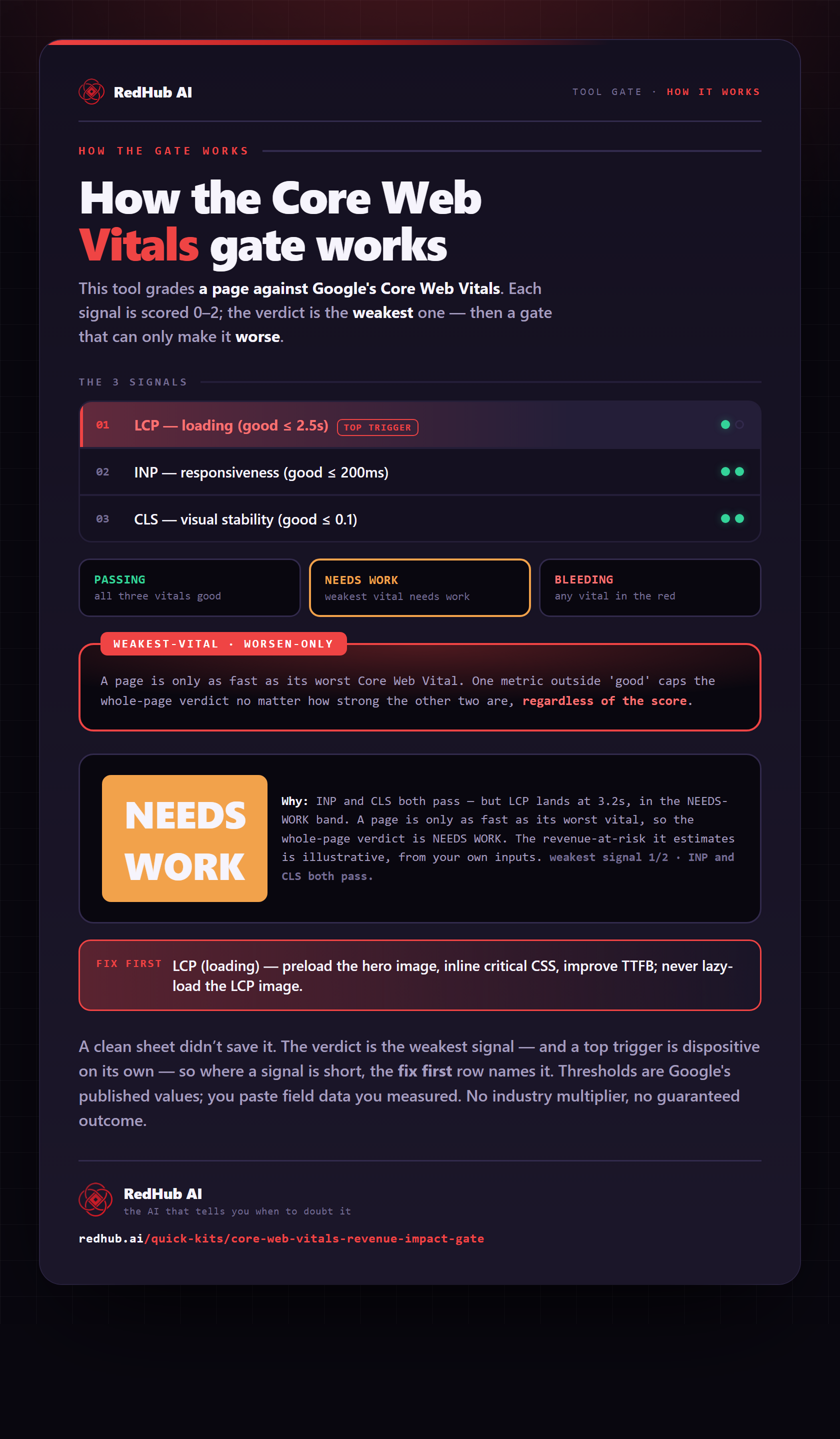
The gate this post refers to, drawn from the tool’s own logic. See the tool.