File Naming Conventions That Don't Fall Apart
RedHub AI Editorialupdated October 7, 20266 min read

Jump to a section7
File naming conventions hold up when three things are fixed before the first file is saved: the order of the fields, the separator between them, and what happens when two files want the same name. The first two are easy to write down. The third is the one a pinned message rarely covers, and it is the only one that can cost you a file.
TL;DR: Fix the field order, give each separator one job, use ISO dates and padded numbers, and decide the collision rule up front. Then check names mechanically, because a rule nobody checks drifts. The File Naming & Organization Engine ($49) is a spreadsheet that checks each file's fields against a four-part convention, builds the corrected name, and marks any two files that would end up with the same name as COLLISION. It plans the rename. It does not touch your disk.
A rule nobody checks
The usual convention is one line in an onboarding doc: name files like YYYY-MM-DD_Client_DocType_v1. It works for a week. Then someone types the date as 5/14, someone else drops the version, and by the next quarter half the folder follows the rule. The rule was fine. Nothing was checking it.
Writing the rule down properly helps, and our guide on how to write an SOP covers how to make a written step one that people follow. A written step still depends on someone reading it at the moment they hit Save. A check does not.
The three parts of a convention that lasts
- A fixed field order. Date, then client or project, then document type, then version. Decide once. The order is what lets a folder sort by date and lets a search for "acme invoice" return every Acme invoice.
- Separators with one job each. No spaces, no punctuation beyond the separators, lowercase throughout.
- A collision rule. Before any rename, compare every new name with every other new name. Where two match, add a token that tells them apart (a sequence number, a time, an initial) before either file moves. Our post on how to batch-rename files without losing one walks through that check.
Dates, numbers and case
Write dates as YYYY-MM-DD. The W3C's date and time note, a profile of ISO 8601, gives the complete date in that form, with 1997-07-16 as its example. A date like 03-04-25 is March 4 to one reader and April 3 to another. Year-first dates also sort correctly as plain text: 2024-12-01 lands before 2025-03-04 with no date logic involved.
Pad sequence numbers. Sorted as plain text, 10 comes before 2, so files numbered 1 through 12 list as 1, 10, 11, 12, 2. Some file browsers, Windows File Explorer among them by default, sort numbers by value and hide this. A script, a spreadsheet column or a plain-text listing will not. Numbered 01 through 12, the files list in order everywhere.
Lowercase everything. Microsoft's file naming documentation tells developers not to assume case sensitivity, and to treat OSCAR, Oscar and oscar as the same name, while noting that a POSIX-style file system may treat them as three. Two names that differ only in capitals are one file on one machine and two on another. The same page lists nine punctuation characters that are reserved in Windows file names:< > : " / \ | ? *. A date typed as 05/14/2026 cannot be part of a Windows file name at all.
One separator or two
The common advice is to pick hyphens or underscores and never mix them. The worked example in our own workbook mixes them on purpose: 2026-04-20_acme_invoice_v2.pdf. Hyphens sit inside a field, as in the date or a client called globex-corp. Underscores sit between fields. Split that name on underscores and you get four fields back. Write it with hyphens only, as 2026-05-14-globex-corp-contract-v3, and nothing in the name says where the client ends.
The price is that two marks are harder to remember than one, and people will swap them. A team that never parses file names with a script may be better off with the simpler rule.
Version tags carry the same kind of tradeoff. v2 reads more naturally. v02 still sorts correctly once a v10 exists. How wide to pad is a guess about how many versions a document will ever have, and nobody knows that on the day the convention is written.
A sheet that checks, in place of a page that asks
The File Naming & Organization Engine is one .xlsx with three tabs: Start Here, Dashboard and Naming Checker. For each file you enter the current name, the extension and four field values. The sheet tests each field: the date has the YYYY-MM-DD shape, the client is a lowercase slug, the document type is one of invoice, contract, proposal, report or receipt, and the version is a v followed by a number. It then builds the corrected name and counts how many other rows would end up with it.
Each row gets one of three verdicts. CONFORMS means the name already matches. RENAME means it does not match yet and the sheet shows the corrected name. COLLISION means two rows would become the same file name, and both are marked no matter how tidy each one is. In the six-file example that ships in the sheet, one file is CONFORMS, three are RENAME and two are COLLISION, so the batch verdict is COLLISIONS FOUND. The Dashboard shows a conformance share of 17, which is 1 in 6 rounded, for context only. The share never decides the verdict.
A field that fails its test is written into the corrected name as a marker. The sample row with the date 05/14/2026 comes out as FIXME-date_globex-corp_contract_v3.pdf. That row still reads RENAME, so treat any corrected name containing FIXME as not ready to apply until the field is fixed.
Check the names before you change them
One spreadsheet with a worked six-file example. It checks each file's date, client, document type and version, builds the corrected name, and marks every pair of files that would collide. It tells you the names; you apply them.
Get the File Naming & Organization Engine — $49Pairs well with
A name says what a file is called. It does not say where the document should go. The Document Classify & Route Kit ($69) matches each incoming document against routing rules you control and returns ROUTE, QUARANTINE or UNMATCHED. It decides the destination and does not move the document. If the files are data exports, the CSV / Data-Export Schema & Quality Gate ($69) grades whether the file itself is fit to process, as READY, FIX or BLOCK. And if naming is only one of several document problems, the Document Processing Pipeline Diagnostic ($79) scores six stages of the workflow from your own marks and, where a stage is short, points to the tool for that stage.
More in this guide
What is a file naming convention?
It is a fixed rule for how files are named: which fields appear, in what order, with which separators and which characters. A working convention also says what to do when two files would end up with the same name.
What is the best date format for file names?
YYYY-MM-DD, the ISO 8601 form. It cannot be misread as day-month or month-day, and it sorts in date order when a folder is sorted by name.
Should I use hyphens or underscores in file names?
Either works if each has one job. One common pattern uses hyphens inside a field and underscores between fields, so a name can be split back into its parts. A single separator is easier to remember but harder to parse. Avoid spaces either way.
Why should file names be lowercase?
Because systems disagree about capitals. Windows treats Report.pdf and report.pdf as the same name by default, and a POSIX-style file system may treat them as two files. Lowercase names behave the same everywhere.
How do I handle two files that would get the same name?
Find them before renaming anything. Compare every planned name with every other planned name, and where two match, add a token that tells them apart, such as a sequence number or a time. Then open both files to see whether they are the same document.
Does the File Naming & Organization Engine rename my files?
No. It is a spreadsheet. You enter each file's current name and field values, and it shows the corrected name and a verdict for each row. You or a script apply the renames.
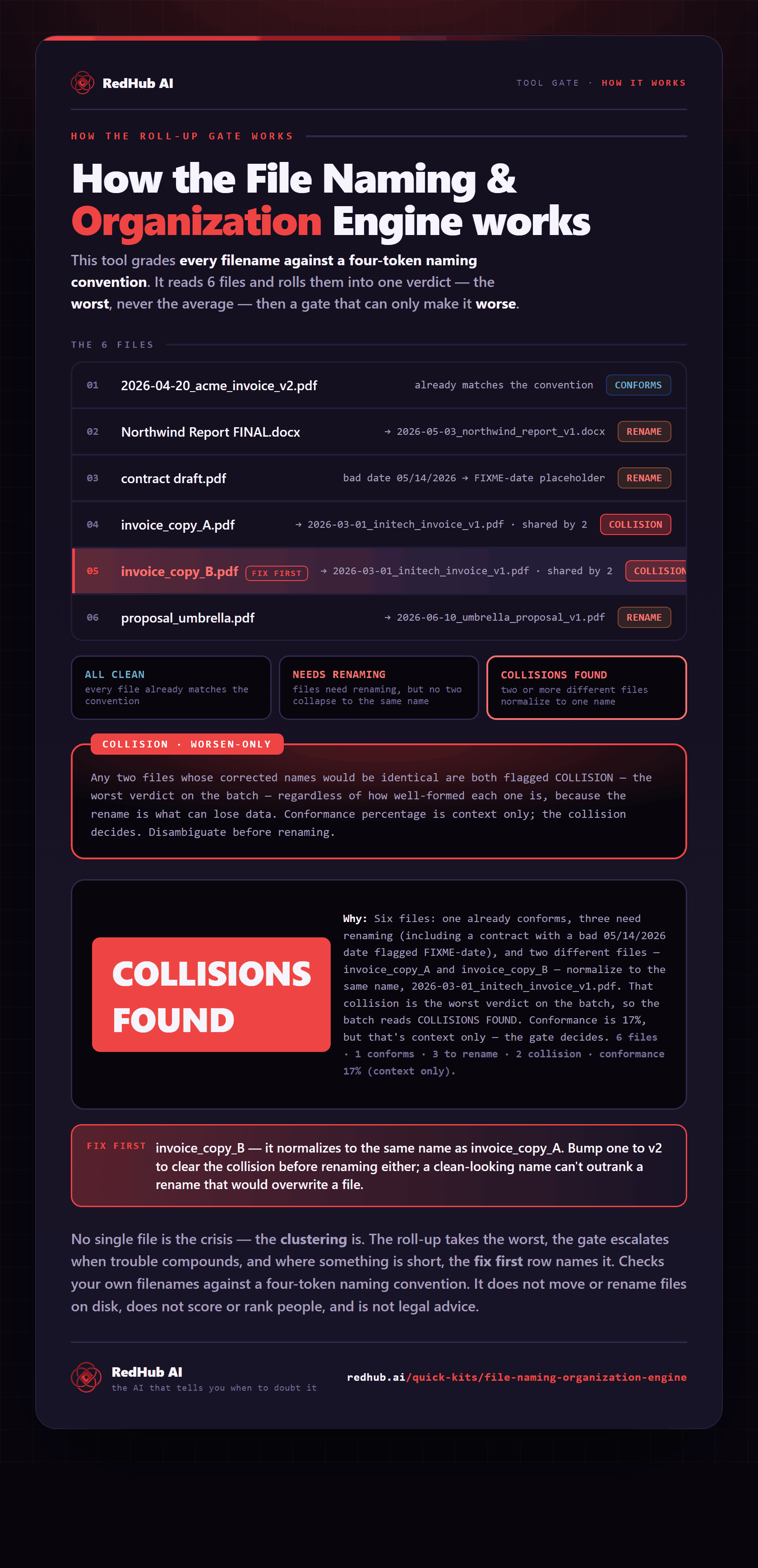
The gate this post refers to, drawn from the tool’s own logic. See the tool.