How to Organize Files So You Can Actually Find Them
RedHub AI Editorialupdated October 7, 20265 min read

Jump to a section7
The short version of how to organize files: put the words you would search for into the file name, in the same order every time, and keep the folders few. A name built from date, client and document type can be found by typing part of it. A good name finds a file even in the wrong folder. A good folder cannot save a bad name.
TL;DR: Organize for search first and browsing second. Put date, client or project, and document type in every name in one fixed order, drop filler words like "final" and "copy," and keep folders shallow. To audit a folder you already have, the File Naming & Organization Engine ($49) checks each file's fields against a four-part convention and shows the corrected name. The naming rules are in File Naming Conventions That Don't Fall Apart.
Search works when the name holds the answer
The common way to organize is to build a folder tree and click through it. That holds up until the tree is four levels deep and a file could sit in any of three places. Search is faster, but search can only match what is there to match. A file called final_v2_USE_THIS.docx gives it nothing: no date, no client, no document type.
Now put the same three facts in the same position in every name. Type "acme 2026" and every Acme file from this year comes back, whichever folder it landed in. That is the whole case for a naming convention. Tidiness is a side effect.
What a searchable name looks like
- General first, specific last. Date, then client or project, then document type, then version. Sorted by name, the folder reads in date order.
- The same order every time. If the date leads in one file and trails in the next, sorting breaks and you stop trusting what search returns.
- Fields, not filler. "Final," "copy," "new" and "updated" tell search nothing. A version tag does the job those words were reaching for.
In practice that looks like 2026-05-03_northwind_report_v1.docx. The file it replaces in our worked example was called Northwind Report FINAL.
Where the name matters most, and least
The payoff is uneven. A scanned receipt saved as an image, a photo of a signed page, a zip archive: these have no text inside for search to read, so the name is the only handle search has. They are also the files most likely to be called IMG_4471.jpg or scan0003.pdf.
A typed document is the opposite case. If your computer or drive indexes file contents, a search for the client's name may find the proposal no matter what it is called, and a careful name adds less than this post has made it sound. Whether content search is on, and which file types it covers, depends on your setup. Test it: search for a phrase you know is inside one document and absent from its name. If the file comes back, start your renaming effort with the scans and exports, not the Word files.
Folders are the coarse filter
Folders still do useful work: one top level for client or project, perhaps a year beneath it. Past that, each extra level is one more thing to remember. Let the folder carry the broad category and the name carry the detail. When a deep folder path is repeating what a good name already says, one of the two is redundant, and the folder is the one that cannot be searched. Our post on folder structure for small teams covers how to pick the top level.
Auditing the folder you already have
- Pull a file list. Export a directory listing, or copy the names into a spreadsheet.
- Settle the convention. Field order, allowed document types, separators.
- Record each file's fields. Date, client, type and version for every file. This is the slow step, because someone has to open
scan0003.pdfto learn what it is. - Check, then rename. Compare each name with the convention, and compare the corrected names with each other before changing anything.
Step 3 is where audits stall, and no tool removes it. The File Naming & Organization Engine starts after it. You enter each file's current name, extension and four field values. The sheet tests each field, builds the corrected name, and returns CONFORMS, RENAME or COLLISION for the row. It does not read names off your drive and it does not work out the fields for you.
You also do not have to do the whole drive. Start with the folder people complain about. A convention applied to new files from today, plus one cleaned-up folder, beats a full audit that never finishes.
See which names already pass
One spreadsheet. Enter each file's fields, and it shows the corrected name for every row and marks any two files that would end up with the same one. The renaming stays with you.
Get the File Naming & Organization Engine — $49Pairs well with
Finding a file is one problem. Knowing whether a client's packet is complete is another, and the Document Intake Completeness Checker ($69) handles that one: you define the required items, and each case comes back COMPLETE, CHASE or HOLD INTAKE. For documents arriving faster than anyone can file them, the Document Classify & Route Kit ($69) applies routing rules you write and names a destination for each one, without moving anything itself. The Document Processing Pipeline Diagnostic ($79) is the wider view: six stages scored from your own marks, with the weakest stage as the headline.
More in this guide
What is the best way to organize files so I can find them later?
Make the name searchable. Put the date, the client or project, and the document type in every file name in one fixed order. Then you can find a file by typing part of its name, wherever it was saved.
Does folder structure still matter if the names are good?
Yes, as a coarse filter. A top level for client or project, and perhaps a year below it, is usually enough. The name carries the detail.
Should I take words like "final" or "copy" out of file names?
Yes. They carry nothing a search can use, and "final" stops being true the next time the file is edited. Use a version tag such as v2 in its place.
Which files benefit most from a naming convention?
Files with no searchable text inside: scans saved as images, photos, archives, and exports with generated names. For those, the file name is all a search has to go on.
How do I audit a messy folder?
Export the file list, settle the convention, record each file's date, client, type and version, then compare every name with the convention. Check the corrected names against each other before renaming, so two files do not end up with the same one.
Do I have to rename everything at once?
No. Apply the convention to new files from today and clean up one high-traffic folder first. Older folders can wait until someone needs them.
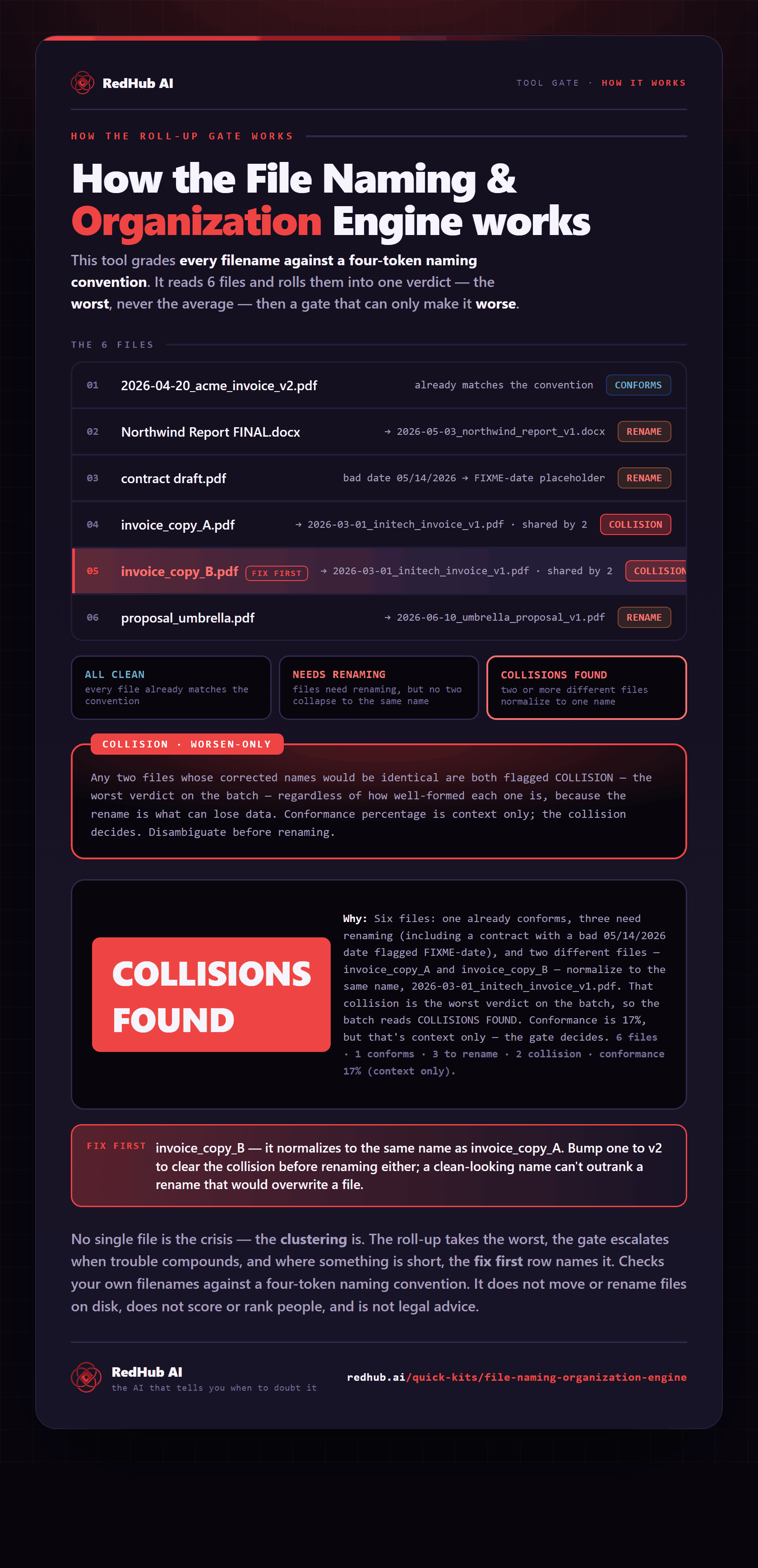
The gate this post refers to, drawn from the tool’s own logic. See the tool.