File Naming Mistakes That Quietly Lose Files
RedHub AI Editorialupdated October 7, 20266 min read

Jump to a section8
Most file naming mistakes cost minutes. One can cost the file: a collision, where two different files are given the same name and one replaces the other. Filler words, ambiguous dates and stray punctuation make a file harder to find or harder for a tool to open. Only the collision removes a file, and it tends to happen during the cleanup meant to fix the other mistakes.
TL;DR: Rank naming mistakes by what they cost. Filler words slow search. Regional dates and unpadded numbers break sorting. Reserved characters and capital-letter twins break tools. A collision can replace a file, depending on the tool doing the rename. Before any cleanup, compare the corrected names with each other. The File Naming & Organization Engine ($49) is a spreadsheet that does that comparison and marks every clash as COLLISION. The full convention is in File Naming Conventions That Don't Fall Apart.
Mistakes that slow you down
- Filler in place of fields.
final,final_v2,USE_THIS,copy of copy of. None of these is a date, a client or a document type, so none of them helps a search. - No version marker. Without one, "which is the latest?" gets answered by the modified date, and the modified date changes whenever someone opens a file and saves it without changing anything.
These waste time. Nothing breaks.
Mistakes that break sorting
- Regional dates.
03-04-25is March 4 or April 3 depending on who typed it. Read as month first, it is also the later date of the pair and still lists ahead of12-01-24when sorted by name.YYYY-MM-DDfixes both. - Unpadded numbers. In a plain-text sort,
10comes before2. Some file browsers sort numbers by value and hide this, which is why it tends to surface later, in a script or a spreadsheet.01,02…10sorts the same way everywhere. - Mixed separators. Spaces in one name, underscores in the next, a hyphen in a third. Anything that splits a name into fields now needs three rules.
Mistakes that break tools
This tier is less well known, and Microsoft's file naming documentation spells it out for Windows.
- Reserved characters. Nine punctuation marks cannot appear in a Windows file name:
< > : " / \ | ? *. A name that is legal on a Mac, such as one containing a question mark, can fail when it reaches a Windows machine. - Trailing spaces and periods. The same page says not to end a file or folder name with either, because the Windows interface does not support it even where the file system does.
- Reserved names.
CON,PRN,AUX,NULand a set ofCOMandLPTnames are off limits, and the documentation notes thatNUL.txtis equivalent toNUL. - Capital-letter twins. Microsoft advises treating OSCAR, Oscar and oscar as the same name, while a POSIX-style file system may treat them as three files. Two files that coexist on a Linux server become one name on Windows.
That last item is a collision already. It was created by moving files between systems, with no rename involved.
The mistake that removes a file
A collision is two different files headed for one name in one folder. What happens next depends on the tool. Some refuse and report an error. Others replace the file that was there, and nothing on screen says so. Our post on how to batch-rename files without losing one has the documented behavior of three common tools.
Every mistake above can be seen by looking at the name. A collision that has already happened cannot. The surviving file looks normal. The missing one is noticed weeks later, when someone asks for the earlier draft.
Cleanup is where collisions come from
The mistakes in the first tier are often doing a job. Take two files from the worked example in our workbook: invoice_copy_A.pdf and invoice_copy_B.pdf. The names are bad. They are also different, and copy_A and copy_B are the only things keeping them apart. Apply a clean convention of date, client, type and version, and both become 2026-03-01_initech_invoice_v1.pdf.
So the order of work matters. Fixing the cosmetic mistakes first is what creates the destructive one. Work out every corrected name, compare them with each other, and resolve the clashes before a single file is renamed.
What the comparison cannot tell you is whether A and B are two invoices or one invoice saved twice. If they are two, one of the fields is wrong and each needs its real date or version. If they are one, a copy should be removed. Someone has to open both, and no naming rule does that for you.
Checking a batch before you fix it
The File Naming & Organization Engine is a spreadsheet for this step. You enter each file's current name, extension, date, client, document type and version. It tests the shape of each field, builds the corrected name, and returns one verdict per file: CONFORMS, RENAME or COLLISION. In the shipped six-file example the two invoice copies both read COLLISION and the batch verdict is COLLISIONS FOUND.
It also keeps a bad field visible. The sample row with the date 05/14/2026 produces a corrected name beginning FIXME-date, so the slash never reaches a file name. The date test checks the pattern (four digits, a hyphen, two digits, a hyphen, two digits) and the calendar, so a typo like month 13 or February 30 also comes back as FIXME-date. The sheet plans names. It does not rename, move or delete anything.
Check the cleanup before you run it
One spreadsheet with a worked six-file example. It builds the corrected name for each file you list and marks every pair that would land on the same name, so you can resolve them first. You apply the renames.
Get the File Naming & Organization Engine — $49Pairs well with
Names are one layer. For exported data, the next layer down is the file's structure, and the CSV / Data-Export Schema & Quality Gate ($69) blocks a file on a single ragged row even when every column looks clean. Our post on how to validate a CSV file covers the checks. The Document Classify & Route Kit ($69) reads signals such as file name and text content and assigns each document ROUTE, QUARANTINE or UNMATCHED. And the Document Processing Pipeline Diagnostic ($79) places naming inside the whole document workflow, taking the weakest of six stages as its headline.
More in this guide
What is the worst file naming mistake?
A collision: giving two different files the same name in the same folder. Depending on the tool, one file can replace the other. Other naming mistakes make a file harder to find or open, but leave it in place.
Why are my files sorting in the wrong order?
Usually an unpadded number or a regional date. In a plain-text sort, 10 comes before 2, and a month-first date like 03-04-25 lists ahead of 12-01-24 from the year before. Pad numbers with a leading zero and write dates as YYYY-MM-DD.
Which characters are not allowed in Windows file names?
Microsoft's documentation lists nine reserved punctuation characters: less than, greater than, colon, double quote, forward slash, backslash, vertical bar, question mark and asterisk. It also says not to end a name with a space or a period.
Are spaces okay in file names?
Most systems allow them. They need quoting on a command line and turn into %20 in a web address, so a hyphen or an underscore travels better.
Can two files have the same name with different capital letters?
On a POSIX-style file system they may. Windows treats names that differ only in capitals as the same name by default, so the two files clash when they are copied there. Keeping names lowercase avoids the problem.
How do I avoid a collision when cleaning up file names?
Work out every corrected name before renaming anything, and look for any name that appears twice. Add a token such as a sequence number to tell those files apart, then open them to see whether they are different documents.
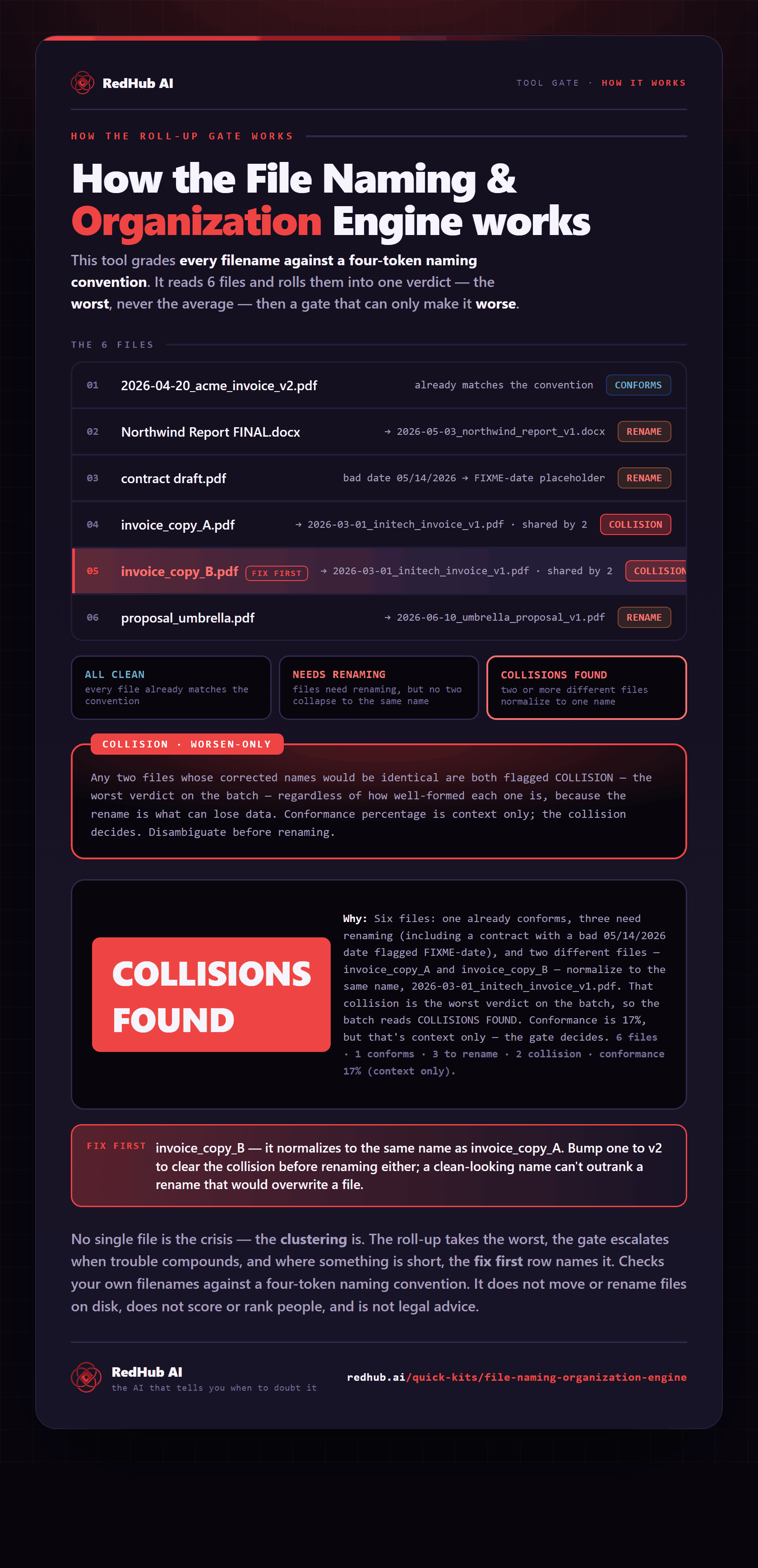
The gate this post refers to, drawn from the tool’s own logic. See the tool.