How to Batch-Rename Files Without Losing One
RedHub AI Editorialupdated October 7, 20266 min read

Jump to a section6
To batch rename files without losing one, write out the full list of old names and new names first, and look for two rows with the same new name before any file moves. That pair is a collision. What happens to it depends on the tool: some stop with an error, and some replace one file with the other without a word. You do not want to learn which kind you have halfway through 300 files.
TL;DR: Plan the rename as a list, check the new names against each other and against what is already in the folder, fix every clash with an extra token, and only then run it. Take a copy first. The File Naming & Organization Engine ($49) is a spreadsheet that builds the corrected name for each file you list and marks any two that would end up identical as COLLISION. You or your script apply the renames. The convention behind it is in File Naming Conventions That Don't Fall Apart.
How two different files end up with one name
Rename one file by hand and you see both names. A batch rename applies a pattern (strip a prefix, add a date, drop the word "copy") to every file at once, and you see none of the results before they happen. Patterns remove detail, and sometimes the detail they remove was the only difference between two names.
The worked example in our workbook has this case. Two files, invoice_copy_A.pdf and invoice_copy_B.pdf, share a date, a client and a version. Cleaned up to the convention, both become 2026-03-01_initech_invoice_v1.pdf.
What your tool does next
The answer is different for each tool, and the documentation for three common ones says so.
| Tool | When the new name already exists | Source |
|---|---|---|
Windows rename command | Refuses, with the message "Duplicate file name or file not found" | Microsoft Learn |
mv on Linux | Replaces the existing file by default; the -i option makes it ask first | GNU Coreutils manual |
Python os.rename | On Windows, always raises an error. On Unix, the existing file "will be replaced silently" if you have permission | Python documentation |
The third row is the one to read twice. The same script is safe on a Windows laptop and destructive on a Mac or a Linux server. A rename script that a colleague tested on one machine tells you little about what it will do on yours.
A tool that refuses is not a clean outcome either. A batch that stops at file 140 of 300 leaves a folder that is half old names and half new, and you have to work out which half each file is in before you can run it again.
The safe sequence
- Copy the folder first. A rename tool keeps no copy of what it replaced. If you need a refresher on what a real backup is, see our post on the 3-2-1 backup rule.
- List every old-to-new pair. The whole batch, not a sample of ten.
- Compare the new names with each other. Any name that appears twice is a collision.
- Compare them with the destination. A new name can also match a file that is already there and was never part of the batch.
- Fix each clash with a token. A sequence number, a time, an initial. Then open both files, because the list cannot tell you whether they are two documents or one document saved twice.
- Run the rename, then count. The folder should hold the same number of files it held before.
Step 6 is the cheap check people skip. If you started with 300 files and end with 299, one was replaced, and the copy from step 1 is how you get it back.
Doing the comparison in a spreadsheet
Steps 2 through 5 are a spreadsheet job. The File Naming & Organization Engine does them for a convention of date, client, document type and version. For each file you enter the current name, the extension and the four field values. The sheet builds the corrected name and counts how many rows share it. One row with that name is CONFORMS or RENAME. Two or more, and every one of them reads COLLISION.
Three limits are worth knowing before you rely on it.
- It compares the rows you list. A file already sitting in the destination is only checked if you add it as a row, and it is compared by its corrected name.
- A field that fails its format is written as a marker. The sample date 05/14/2026 produces
FIXME-date_globex-corp_contract_v3.pdf, and that row reads RENAME. Fix the field before applying a name with FIXME in it. - It ships with a six-file example. It has 200 rows ready, and past that you fill the last formula row down, up to 1,000 files. The count on every row already covers the whole list, and the Dashboard says so if a listed row is not being counted.
The sheet never touches a file. It gives you the list from step 2 with the clashes marked, which is the part a rename tool does not do for you.
Find the clash before the rename does
One spreadsheet. List the files and their fields, and it shows the corrected name for each and marks every set of files that would end up with the same one. Nothing on your disk changes until you change it.
Get the File Naming & Organization Engine — $49Pairs well with
A file can have a perfect name and broken contents. If the batch is CSV exports headed for an import, the CSV / Data-Export Schema & Quality Gate ($69) checks the header, row widths, encoding and required columns and returns READY, FIX or BLOCK for the file. Renaming is often the first step of sorting, and the Document Classify & Route Kit ($69) covers the next one, assigning each document a type and destination from rules you write. When the renamed files are packets that must be complete before work starts, the Document Intake Completeness Checker ($69) holds any case with a missing blocker item.
More in this guide
What is the biggest risk when you batch rename files?
Two files being given the same new name. Depending on the tool, the rename either stops with an error or replaces one file with the other. Checking the full list of new names for repeats before you run anything removes the risk.
Will my rename tool warn me before it overwrites a file?
It depends on the tool. The Windows rename command refuses a name that already exists. The Linux mv command replaces the existing file by default, and its -i option makes it ask first. Read the documentation for the exact tool and system you are using.
How do I check for collisions before a batch rename?
Put every old name and its planned new name in a list. Look for any new name that appears more than once, and compare the new names with the files already in the destination folder.
What should I do when two files would get the same name?
Add a token to one of them, such as a sequence number or a time, so the names differ. Then open both files to see whether they are different documents or the same one saved twice.
Can I undo a batch rename that overwrote a file?
Usually not from the rename tool. A replaced file is recovered from a backup or a copy, which is why the first step is to copy the folder before renaming anything.
How do I know a batch rename worked?
Count the files before and after. The numbers should match. If the folder holds fewer files than it started with, at least one was replaced.
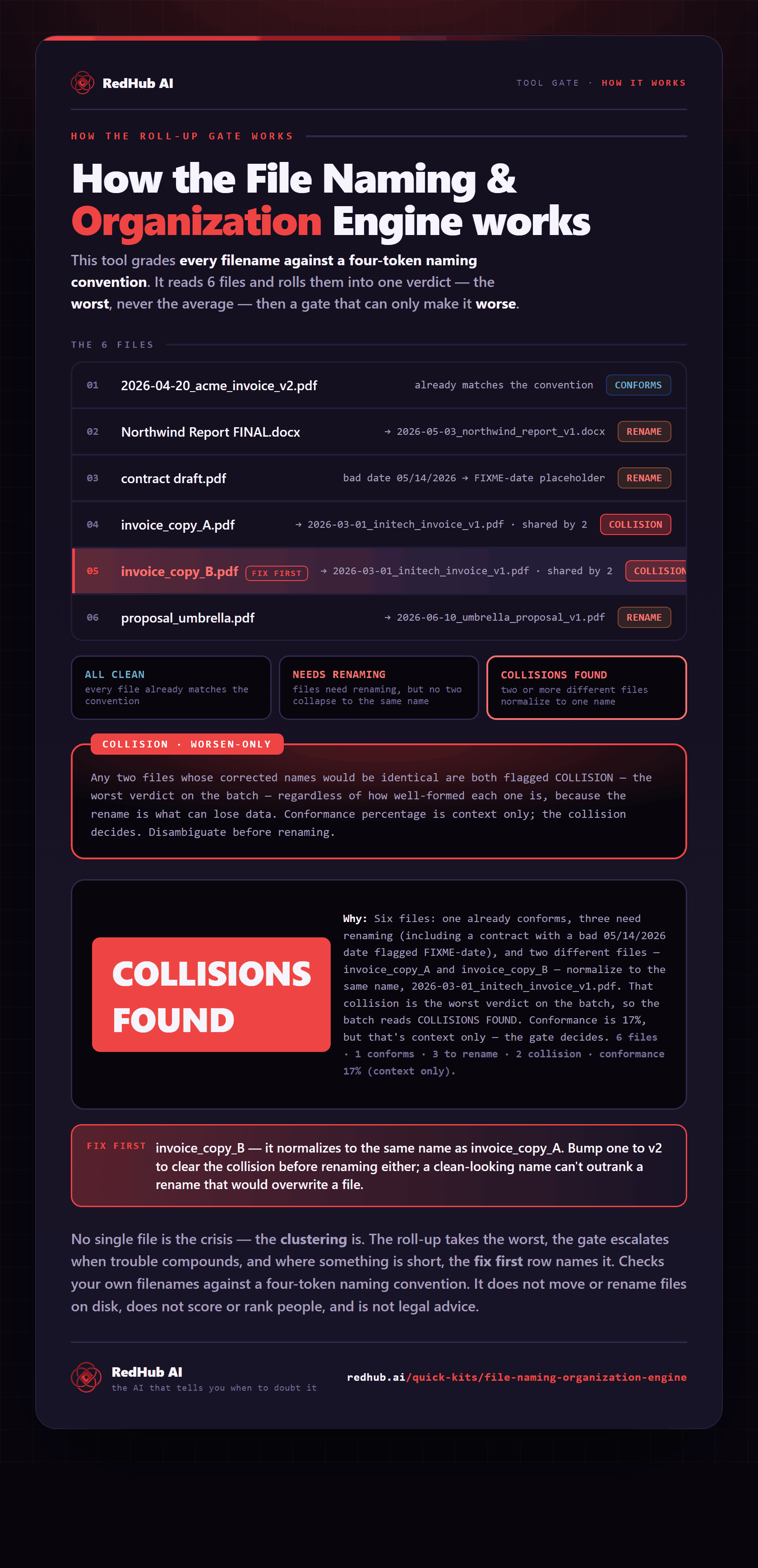
The gate this post refers to, drawn from the tool’s own logic. See the tool.