The First Email That Books the Meeting
Todd Brooks, Founder6 min read

Jump to a section8
TL;DR
- What it is: The first email that books the meeting answers the lead's actual request, proves a human read it, and proposes two or three real open times.
- Who it's for: Anyone whose replies end in "let me know what works" — part of the lead to meeting conversion series.
- How it works: Concrete times turn "schedule a call" from the lead's homework into a one-line yes.
- Bottom line: Every open-ended closing line costs you meetings. Propose times, every time.
What does the first email that books the meeting look like?
It's short, it's specific, and it does three jobs in under 120 words: it engages what the lead actually asked (proof a human read the request), it states one clear reason a call is the right next step, and it proposes two or three concrete open times pulled from your real calendar. It closes with a binary ask — "does either work?" — not an open-ended "let me know your availability."
Best for: replies to meeting-ready inbound leads — the Lead-to-Meeting Engine drafts this exact email in your voice, with the times read from your own Google Calendar.
You answered fast. You picked the right lead. And the thread still died — because the email ended with "happy to find a time that works for you." That sentence feels polite. What it actually does is hand the lead a task: check their calendar, guess at yours, compose a reply, and wait for round two. Busy people don't refuse tasks. They defer them. Deferred is where meetings go to die.
Why proposed times beat "let me know"
Every scheduling email is a small negotiation, and someone has to move first. When you propose specific times, three things change at once:
- The reply shrinks to one line. "Tuesday at 2 works" is a ten-second job. Describing one's availability from scratch is not.
- The meeting becomes concrete. A named slot on a named day is a real event the lead can picture. "Sometime next week" is fog.
- You signal competence. A reply with live, accurate slots — sent within the hour — tells the lead how working with you will feel. (That speed matters as much as the wording: see speed to lead.)
Key insight: the times have to be real. Proposing slots you've already soft-promised elsewhere — or sending a bare scheduling link with no context — trades the lead's ten-second yes for either a double-booking apology or a "do my scheduling for me" chore. Real open slots, read from a live calendar, in a sentence a human wrote.
Stall vs. book: the same lead, two replies
Both replies below answer the same form-fill within the hour. Only one of them books. (Illustrative examples, written for this post.)
Hi Dana — thanks so much for reaching out! We'd love to learn more about what you're looking for. We help companies like yours with exactly this kind of challenge. Would you be open to a quick call sometime? Let me know what times generally work for you and we'll get something on the books. Looking forward to connecting!
What's wrong: it never mentions what Dana asked. It pitches ("companies like yours") before earning it. And it closes with homework — Dana now has to describe her availability and wait for round two. Warm tone, zero traction.
Hi Dana — you mentioned the handoff between your intake form and your CRM is where leads go quiet. That's usually fixable in a week, and it's easier to show than to write out. Would a 20-minute call work? I'm open Tuesday at 2:00 or Wednesday at 10:30 (ET) — does either work? If not, Thursday afternoon is flexible.
Why it books: line one proves a human read the form. Line two gives one concrete reason the call is worth 20 minutes. Then two real slots, a named length, a binary ask, and one fallback. Dana's whole job is to type "Tuesday."
The anatomy, step by step
- Mirror their request in the first line. Use their words, not your category's. This is the sentence that separates you from every autoresponder they got today.
- Give one reason the call beats email. One. "Easier to show than write out" is plenty. Three paragraphs of value proposition is a pitch, and pitches get filed for later.
- Propose two or three real open times, with the timezone. Pulled from your live calendar, not from memory. Name the meeting length so the commitment is bounded.
- Close binary, with one fallback. "Does either work? If not, Thursday afternoon is flexible." The fallback keeps a no from ending the thread.
- Stop at roughly 120 words. No attachments, at most one link. The first email's only job is the meeting — everything else is for the meeting.
One caveat before you polish the wording: this email only earns its speed when it goes to the right lead. Sending a slick meeting ask to a lead with no budget or timeline books a meeting that can't close. Score first — the model and the gate are in meeting-ready leads: who actually gets a slot. And when a great first email gets silence anyway, that's normal, not failure — the next move is in the follow-up sequence that books meetings.
The tedious part, removed
Nothing above is hard to write once. The grind is writing it fresh, per lead, with live calendar slots, while four more leads arrive. That per-lead grind is exactly what the Lead-to-Meeting Engine removes: four Claude Skills read each new inbound lead through your own HubSpot or GoHighLevel CRM and Gmail, score it, and — for the leads that clear the gate — draft this first-touch reply in your voice with two or three real open times read from your Google Calendar. The draft lands in your queue. You read it, adjust a word if you want, and press send. It never sends for you, and it never books or holds a slot — the calendar stays entirely yours.
Every ready lead gets this email — drafted, not typed
The Lead-to-Meeting Engine ($149, one-time) drafts calendar-aware first-touch replies for the leads that can actually buy, plus a cadence playbook and speed-to-lead tracker. You review, you send, you book.
Get the Lead-to-Meeting Engine — $149 →The first email is one leak of three on the path from lead to booked call. The full map is in the pillar guide: how to turn leads into booked meetings.
Decision Guide
Use this format if: your first replies end open-ended, or your "scheduling" is a bare calendar link with no human sentence around it.
Skip it if: your leads already book straight from a scheduler happily — don't add friction to a flow that works; fix your follow-up instead.
Best first step: take your last ten first-replies and count how many proposed a specific time. That number over ten is the habit you're changing.
FAQ
How many meeting times should I propose in the first email?
Two or three, with the timezone and the meeting length. One slot feels like a demand, and five reads like you're not busy. Two or three says "I'm in demand, and I made this easy for you."
Is it better to propose times or send a scheduling link?
Proposed times in a human sentence convert the fastest reply. A scheduling link works best as the fallback — "or grab any slot here if those don't fit" — after the concrete times. Leading with a bare link hands the lead your scheduling work with no context.
How long should a first-touch email be?
Around 120 words or less. Mirror their request, one reason for the call, two or three times, a binary ask. Everything you're tempted to add belongs in the meeting, not the email.
What if the lead ignores the proposed times?
Follow up in two to three days with fresh slots — your calendar has moved, and re-sending stale times reads as a template. The full touch-by-touch structure is in the follow-up sequence guide.
Can AI write this email without sounding like AI?
Yes, if it's grounded in the lead's real request and your real calendar — that's what makes it specific, and specificity is what generic AI email lacks. The Lead-to-Meeting Engine drafts from both, in your voice, and you review every word before it sends.
Does the engine send the email or book the slot for me?
No. It reads and drafts only — it never sends a message, never books or holds a calendar slot, and never edits a live CRM record. You stay the one who sends and books, which is where the judgment belongs.
Make "Tuesday at 2 works" your most common reply
Calendar-aware first-touch drafts for every meeting-ready lead, queued in priority order — $149 one-time, yours to keep.
Get the Lead-to-Meeting Engine — $149 →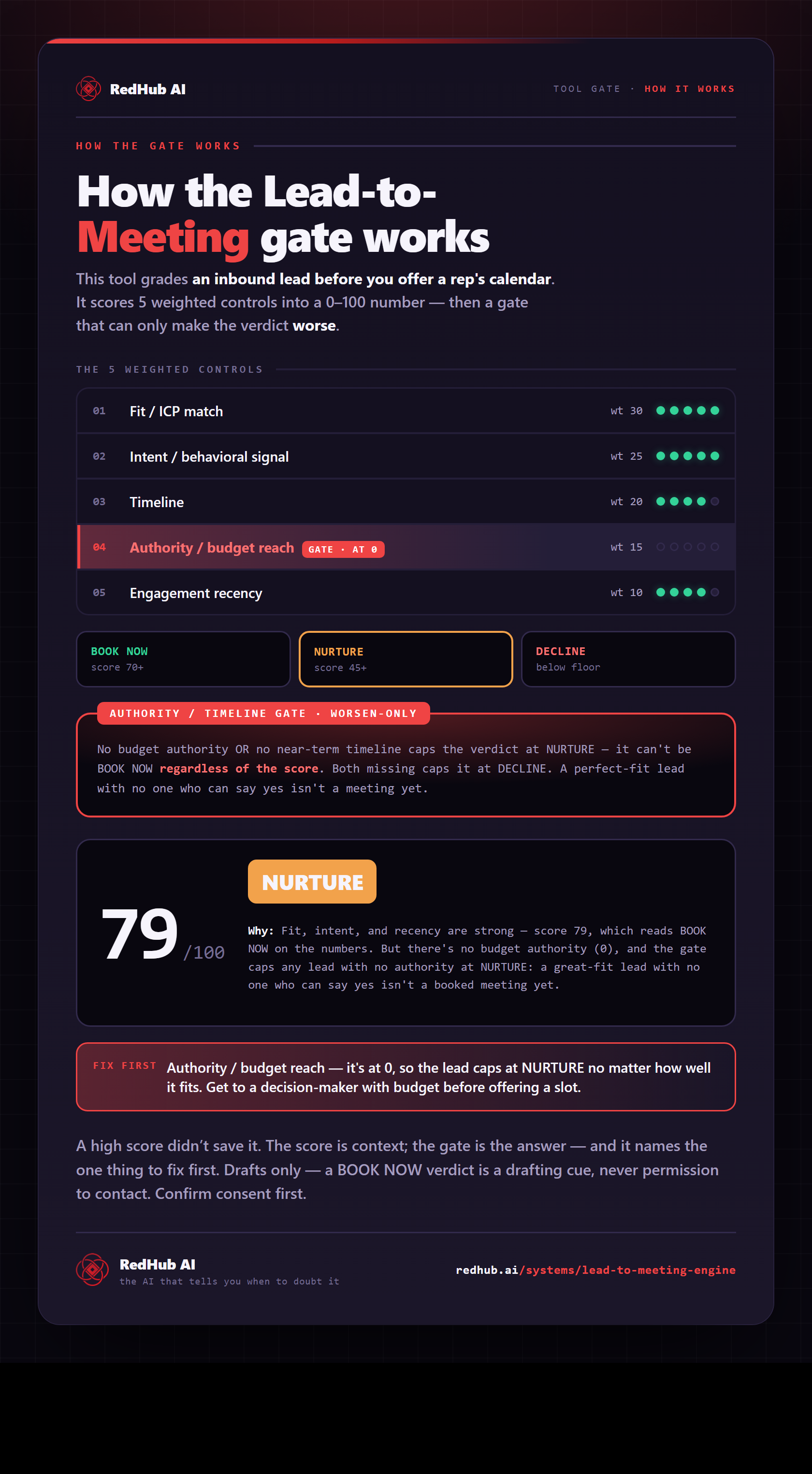
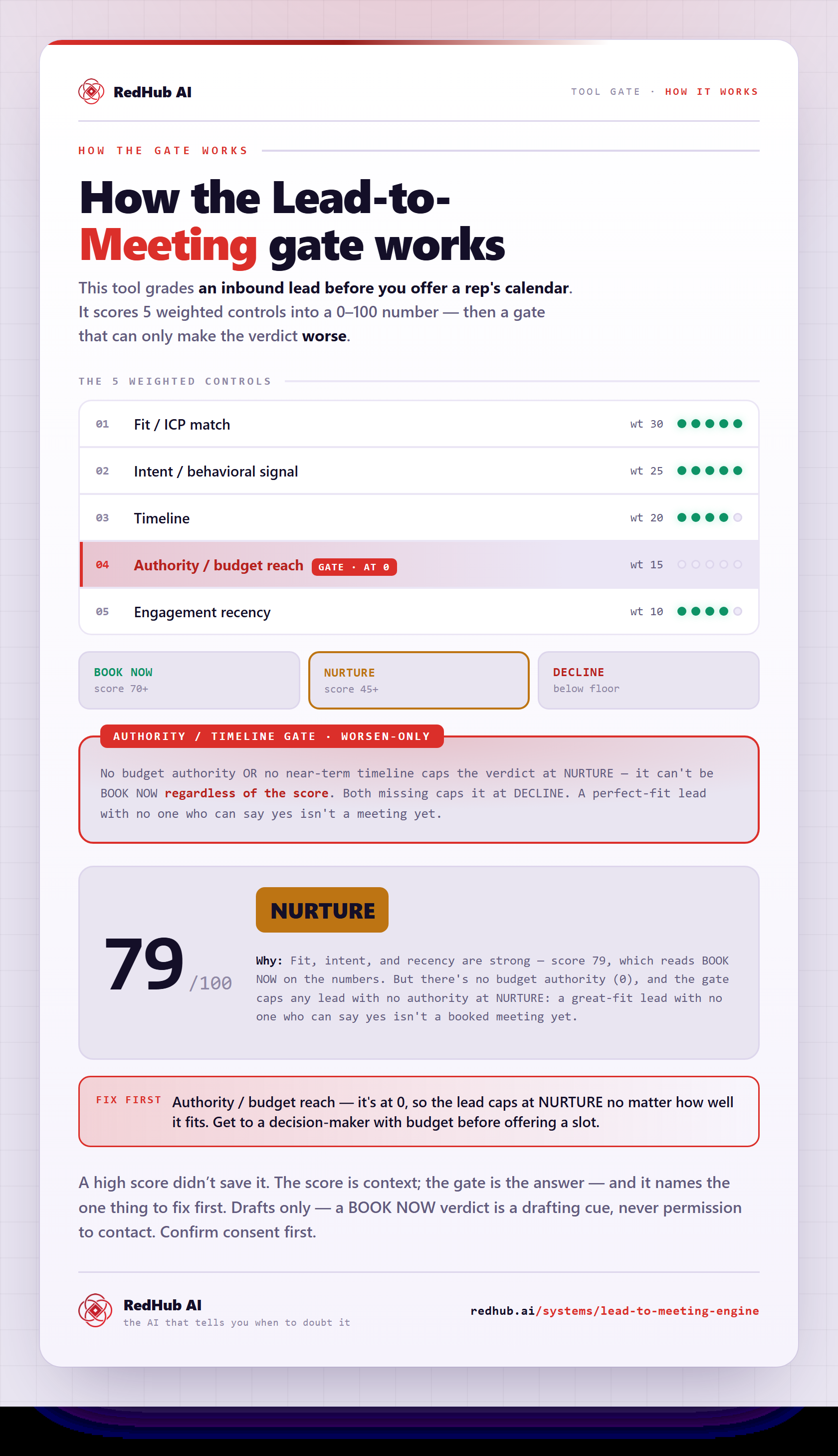
The gate this post refers to, drawn from the tool’s own logic. See the tool.