Speed to Lead: Why the First Hour Books the Meeting
Todd Brooks, Founder6 min read

Jump to a section8
TL;DR
- What it is: Speed to lead is the time between an inbound lead arriving and your first real reply — not an autoresponder, an actual answer.
- Who it's for: Anyone whose inbound leads sit in a CRM overnight — this is part of the lead to meeting conversion series.
- How it works: Lead attention decays by the hour. A fast, concrete reply catches the lead while they're still thinking about the problem.
- Bottom line: The bottleneck isn't effort. It's the manual per-lead path. Collapse it to review-and-send and the first hour becomes routine.
What is speed to lead?
Speed to lead is the elapsed time between a new inbound lead arriving — a form-fill, a demo request, an email reply — and your first meaningful response. It is one of the strongest predictors of whether that lead ever becomes a booked meeting. Industry studies consistently suggest that reaching a qualified lead within the first hour produces several times more meaningful conversations than reaching them the next day.
Best for: teams on HubSpot or GoHighLevel whose replies go out "when someone gets to it" — the Lead-to-Meeting Engine drafts the reply and queues the leads so the first hour stops being luck.
A lead who filled out your form ten minutes ago is a different person than the same lead tomorrow morning. Right now, they have the problem open in a browser tab. They may be filling out a competitor's form in the next one. Speed to lead is the discipline of meeting them in that window — and it's worth more than almost any improvement you can make to the pitch itself.
Why the first hour is worth so much
Three things are true in the first hour that stop being true later.
- Attention. The lead is actively thinking about the problem. Your reply lands as help, not interruption.
- Memory. They remember exactly what they asked for. Tomorrow, your reply needs to re-explain its own context.
- Competition. Most leads contact more than one vendor. The first concrete reply — especially one that proposes actual meeting times — frames everyone who answers later.
The often-cited figure is that first-hour contact yields around seven times more meaningful conversations than next-day contact. Treat that as a widely reported industry range, not a law. But the direction is not in dispute anywhere: response time and booked meetings move together.
Illustrative shape, not a measurement — the exact curve varies by market. The point is the slope: it only goes one way.
Where the hours actually go
No one decides to reply slowly. The delay is built out of small, reasonable steps. Open the lead. Read the form. Check the company website. Decide if it's worth a real reply. Write one from scratch. Open the calendar. Find open slots that aren't already soft-held. Type them out. Now multiply by every lead that arrived while you were in a client meeting.
That per-lead path is the real enemy of speed to lead. It also creates a second, sneakier problem: when you finally sit down to clear the backlog, you work it top-of-inbox first — which means newest first, not best first. The strongest lead of the day can be the one that waits longest.
Key insight: an instant autoresponder does not count as speed to lead. Leads discount "we received your message" to zero. The clock stops at the first reply that engages their actual request — ideally with real times attached.
How many leads pass the hour unanswered?
Put your own numbers in. This is plain arithmetic — no hidden multiplier, no invented conversion rate.
Your first-hour gap
Whatever your number is, those are the leads where the meeting was most bookable — and where the reply arrived after the window closed. That's the gap a faster path recovers.
Fixing the first hour without living in your inbox
The answer is not "check email more." The answer is to shrink the work each lead needs before a reply can go out.
- Pull every new lead into one queue. CRM form-fills and inbox replies in one list, so nothing waits in a tab nobody has open.
- Score before you write. Not every lead deserves a first-hour sprint. A scored verdict — book now, nurture, decline — tells you which replies are urgent. The model is covered in meeting-ready leads.
- Draft with the calendar already read. The slowest step in the manual path is finding open slots. A draft that already proposes two or three real times removes it. See the first email that books the meeting.
- Work the queue in priority order. Highest score first, and a tracker that shows how long each lead has been waiting — so the backlog can't silently reorder itself newest-first.
- Review and send. You read every draft before it goes out. Speed comes from removing the drafting work, not from removing the judgment.
This is exactly the loop the Lead-to-Meeting Engine runs: four Claude Skills read new leads through your own HubSpot or GoHighLevel CRM and Gmail, score each one, draft first-touch replies with real open times from your Google Calendar, and assemble a prioritized queue with a speed-to-lead tracker. It never sends and never books — it hands you a queue where the only remaining work is the part that needed you anyway.
If your leads arrive through website chat or SMS, the capture side matters too — the AI Chat & SMS Concierge (GHL) qualifies leads live in the conversation, and this workflow picks up the leads it logs.
Make the first hour your default, not your best day
The Lead-to-Meeting Engine ($149, one-time) collapses read-judge-write-check-propose into review-and-send, and ships the speed-to-lead tracker that shows who's still waiting.
Get the Lead-to-Meeting Engine — $149 →Speed is one of three leaks between "lead in" and "meeting booked." The full map — including prioritization and the follow-up cadence — is in the pillar guide: how to turn leads into booked meetings.
Decision Guide
Use this approach if: real inbound leads arrive weekly and your median first reply is measured in hours or days.
Skip it if: you already answer nearly every lead inside an hour with concrete times — your leak is elsewhere; check the follow-up cadence instead.
Best first step: pull last month's leads and timestamp the first real reply on each. The median is your speed to lead. Most teams are surprised.
FAQ
What is a good speed to lead time?
Under an hour is the widely used bar for inbound leads, and faster is better. The goal isn't a heroic five-minute reply to everything — it's making the first hour your routine for the leads that score as meeting-ready.
Does an autoresponder count?
No. Leads treat "we got your message" as silence. Speed to lead is measured to the first reply that engages what they actually asked — ideally one proposing real meeting times.
Is the 7× first-hour figure real?
It's a widely reported industry range from lead-response research, not a guarantee about your pipeline. Your exact multiplier will differ. The consistent finding across studies is simply that response time and conversation rates move together, steeply.
Should I answer every lead in the first hour?
No — that's how teams burn out and stay slow anyway. Score first. Meeting-ready leads get the first-hour sprint with times attached. Nurture leads get a value-first note on a saner clock. Declines get a polite acknowledgment.
Can AI just send the replies for me instantly?
Instant auto-sending is how bad replies go out fast. The honest middle is draft-first: the Lead-to-Meeting Engine reads, scores, and drafts, but never sends or books — you review and press send, which still takes minutes, not hours.
How do I measure speed to lead in my CRM?
Compare each lead's created-at timestamp with the timestamp of the first outbound email or call logged against it. Track the median weekly. The engine's included speed-to-lead tracker does this per lead so the longest-waiting leads are visible.
The meeting goes to whoever answers first — with times
Read, score, draft, queue: four Skills turn a new lead into a ready-to-send reply proposing real open slots from your own calendar.
Get the Lead-to-Meeting Engine — $149 →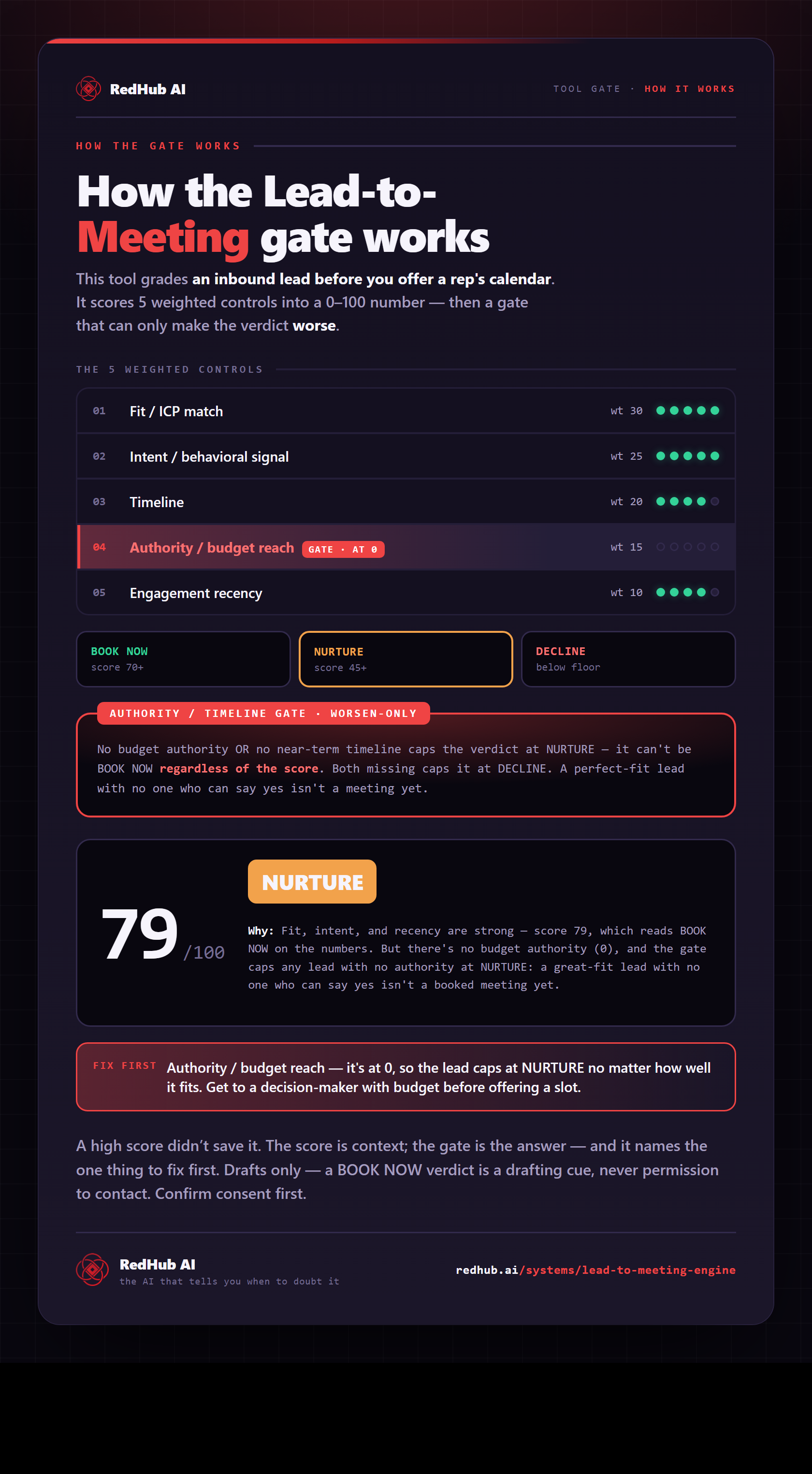
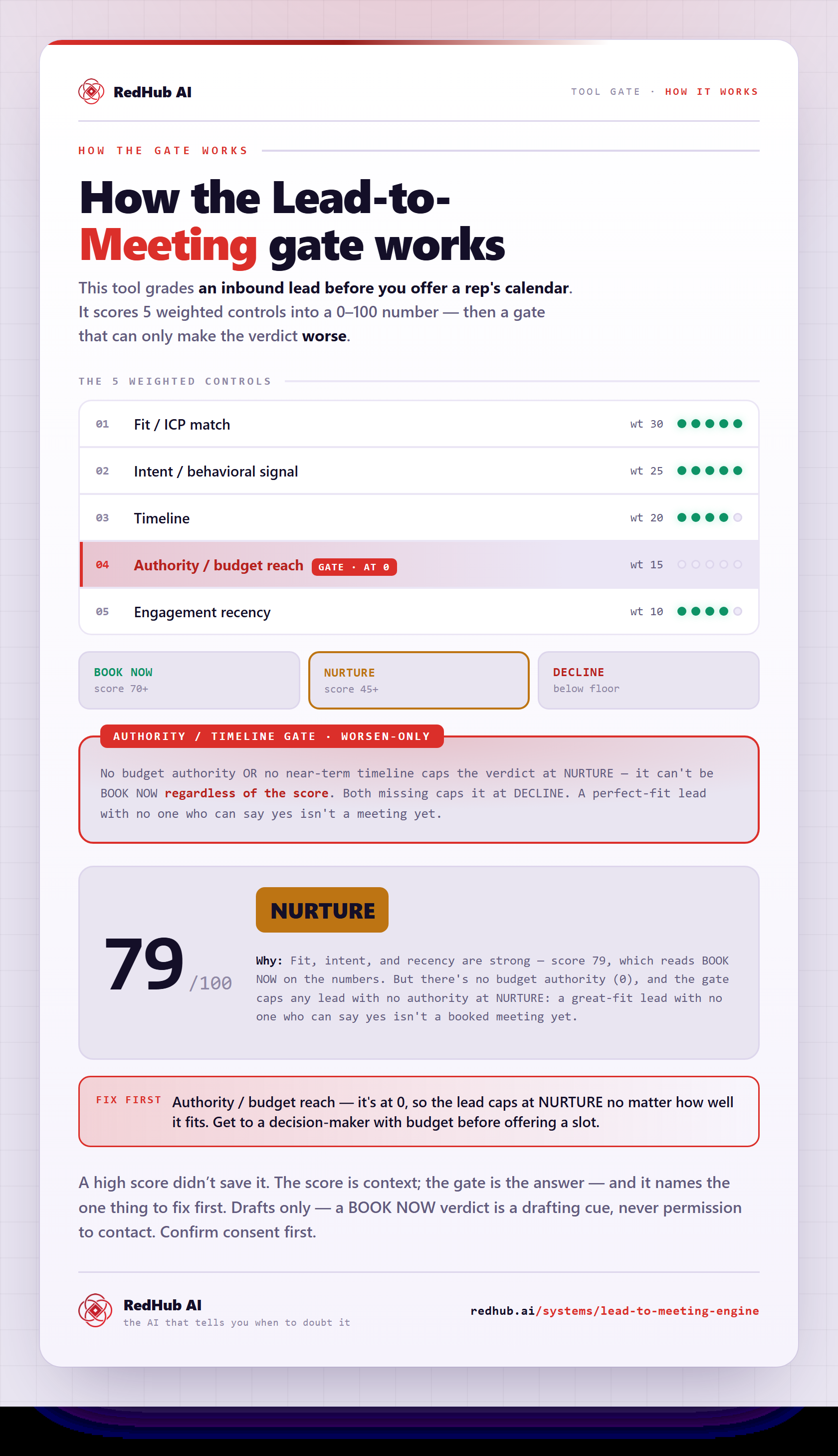
The gate this post refers to, drawn from the tool’s own logic. See the tool.