The Follow-Up Sequence That Books Meetings
Todd Brooks, Founder6 min read

Jump to a section8
TL;DR
- What it is: A follow-up sequence that books meetings is a short, spaced set of touches — each one useful on its own, each one carrying a concrete next step.
- Who it's for: Teams whose leads reply once and go quiet — part of the lead to meeting conversion series.
- How it works: Most meetings are booked after the first email. The cadence keeps the thread alive without turning into a nag.
- Bottom line: Silence after email one isn't a no. It's a Tuesday. Follow up like you believe that.
What makes a follow-up sequence book meetings?
A follow-up sequence that books meetings has three properties: it's short (four to five touches, then stop), it's spaced (days apart, widening), and every touch either adds something useful or makes the yes easier — a re-proposed set of open times, a relevant answer, a one-line "should I close this out?" Sequences fail when every touch is the same "just bumping this" message with no new reason to reply.
Best for: inbound leads that scored as meeting-ready or nurture — the Lead-to-Meeting Engine ships a first-touch and cadence playbook built on exactly this structure.
Here's the uncomfortable pattern in most pipelines: the first email gets the attention, and the follow-up gets the meeting. Busy people don't answer email one — not because they're uninterested, but because it arrived during someone else's crisis. A good follow-up sequence is how you stay in the room without becoming the person everyone dreads. Most teams don't have one. They have one email and then a guilty silence.
Why one touch almost never books the call
Think about the last useful email you didn't answer. You meant to. Something landed on top of it. That's your lead, every week. Sales research has long suggested that a large share of conversions happen after multiple touches, while most sellers stop after one or two. The exact numbers vary by study — treat them as direction, not gospel — but the direction is blunt: the meeting usually lives in touch two through five.
Speed gets you into the conversation; the cadence keeps you in it. If your first reply is going out a day late, fix that first — see speed to lead: why the first hour books the meeting.
The shape of a cadence that works
You don't need a 14-step sequence from an outbound playbook. Inbound leads already raised their hand. The job is lighter: stay useful, keep proposing the meeting, and know when to stop.
- Touch 1 — the first-touch reply (day 0, inside the hour if you can). Answer what they asked and propose two or three real open times. The anatomy is in the first email that books the meeting.
- Touch 2 — the short nudge (day 2–3). Two lines. Re-propose fresh times — your calendar has moved since day 0, and stale slots read as a form letter.
- Touch 3 — the value add (day 5–7). No ask-only bump. Send something that helps them whether or not they book: a relevant answer, a short resource, a pointed question about their situation.
- Touch 4 — the direct ask (day 10–12). One honest line: is this still worth fifteen minutes, or should you close the file? Directness here reads as respect, not pressure.
- Touch 5 — the close-out (day 14–21). Tell them you're stepping back and leave the door open. Then actually stop. A clean stop protects the relationship — and your sender reputation.
Key insight: the touches aren't five attempts at the same email. Each one has a different job — propose, nudge, help, ask, close. If two touches in your sequence could swap places without anyone noticing, one of them isn't earning its send.
Match the cadence to the lead's verdict
The biggest cadence mistake isn't timing — it's sending the meeting-ask cadence to a lead who can't book a meeting yet. A lead with no budget authority or no near-term timeline shouldn't be getting "here are three slots" three times in a row. They should be getting the nurture track: useful, patient, no calendar link yet. How to tell them apart is the subject of meeting-ready leads: who actually gets a slot.
| Lead verdict | Cadence goal | What each touch carries |
|---|---|---|
| Book now | A slot on the calendar | Real open times, re-proposed fresh each touch |
| Nurture | Stay useful until they can buy | Value first — answers, resources, no slot yet |
| Decline | A polite, single close | One courteous acknowledgment. No sequence. |
Automate the drafting, not the sending
Cadence tools love the word "autopilot." Be careful with it. Fully automated sequences are how a lead who replied yesterday gets "just bumping this" today — the single fastest way to burn a warm thread.
Automate this
- Reading new leads and replies from the CRM and inbox
- Scoring who's meeting-ready vs. nurture
- Drafting each touch, with fresh calendar slots
- Tracking who's due for which touch, and who's gone quiet
Keep this human
- Pressing send — every time
- Reading a reply's tone before the next touch
- Deciding to stop early when the thread says stop
- Consent judgment on anyone you're not sure raised their hand
That split is exactly where the Lead-to-Meeting Engine draws its line. It reads your leads through your own HubSpot or GoHighLevel CRM and Gmail, scores them, drafts the outreach with real open times from your Google Calendar, and queues who's next — and it never sends, never books, never edits a live record. The included first-touch and cadence playbook covers the touch-by-touch structure above, in your voice.
One boundary: a drafted follow-up is not permission to send it. Fresh inbound leads consented by raising their hand. A dormant list from last year didn't. Before running any cadence on a cold or dormant list, get a per-contact verdict from the Database Reactivation Readiness Engine first.
Ship the cadence without writing five emails per lead
The Lead-to-Meeting Engine ($149, one-time) includes the first-touch and cadence playbook plus four Claude Skills that draft every touch — calendar-aware, in your voice, always yours to send.
Get the Lead-to-Meeting Engine — $149 →The cadence is one piece of the path from lead to booked call. The full picture — speed, prioritization, the first email, and the follow-through — is in the pillar guide: how to turn leads into booked meetings.
Decision Guide
Use this cadence if: your leads get one reply and then silence, and "follow up with Tuesday's leads" lives in your head instead of a system.
Skip it if: your first reply isn't going out fast yet — fix speed to lead first; a great cadence on a cold thread starts from behind.
Best first step: find five leads from the last month who never answered email one. Send each a touch-3-style value note today and watch what comes back.
FAQ
How many follow-ups should I send before giving up?
Four to five touches over two to three weeks is a sane ceiling for inbound leads. Past that, replies get rare and annoyance gets likely. Close the thread cleanly and move the lead to a long-term nurture list if they still fit.
How long should I wait between follow-ups?
Widen as you go: two to three days after the first email, then roughly a week, then ten days or more. Tight early spacing matches the lead's attention window; wider spacing later keeps you present without crowding them.
What should a follow-up email say besides "just checking in"?
Give them a new reason to reply: fresh proposed times, a useful answer to something they mentioned, or a direct question about whether the timing still works. "Just checking in" carries no reason, which is why it gets no reply.
Should I re-propose meeting times in every follow-up?
In the meeting-track touches, yes — and make them current. Proposing slots that already passed, or the same three slots from a week ago, signals a template. Fresh times pulled from a live calendar signal a person.
Is it OK to fully automate a follow-up sequence?
Automating the drafting and the schedule is fine. Automating the send is where threads get burned — an auto-touch that ignores yesterday's reply does more damage than no touch at all. Keep a human on the send button.
Does the Lead-to-Meeting Engine send the follow-ups for me?
No, by design. It reads, scores, drafts, and queues — including cadence touches with real open times from your calendar — but it never sends or books. You review each draft and press send yourself. It's $149 one-time at redhub.ai.
The meeting is usually in touch two through five
Four Skills, a runnable scoring engine, a cadence playbook, and a speed-to-lead tracker — so every lead gets the right next touch, drafted and waiting for your send.
Get the Lead-to-Meeting Engine — $149 →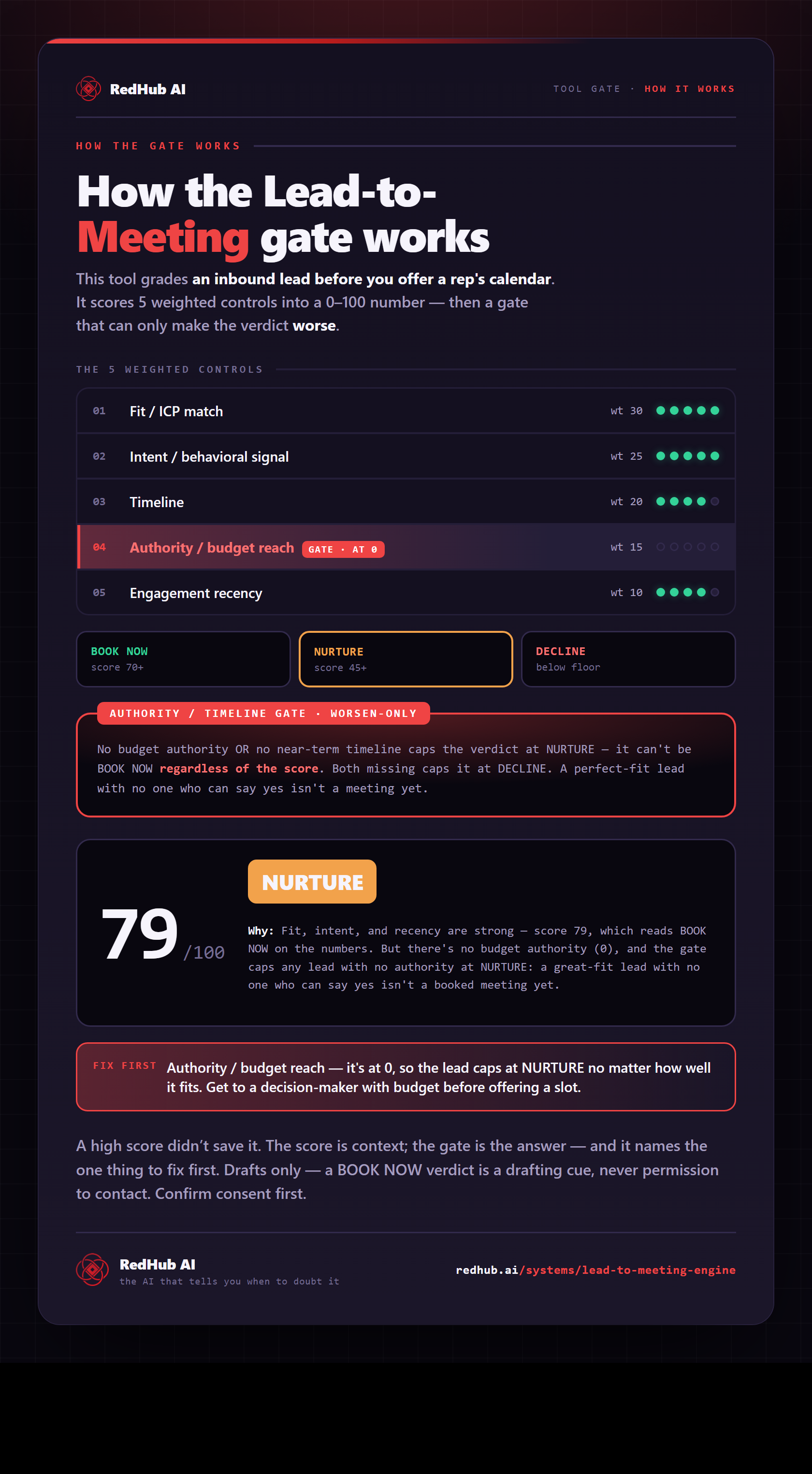
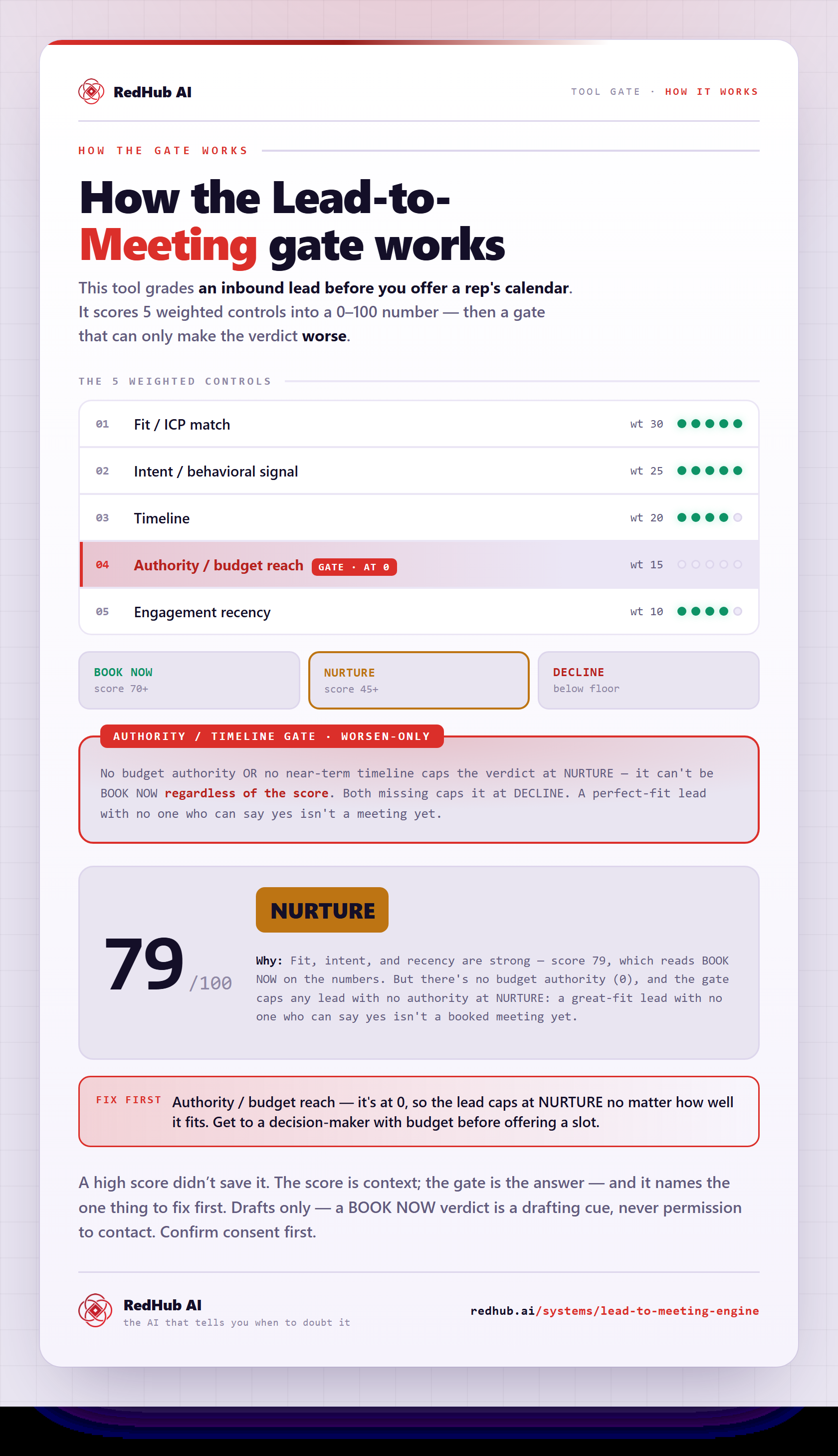
The gate this post refers to, drawn from the tool’s own logic. See the tool.